
Corporate action information is one of the most important data sources for investors, analysts, and financial technology developers. Having access to a centralized corporate action dashboard makes it easier to monitor market events without manually checking multiple sources.
In many market monitoring workflows, users need access to different types of corporate action information. The Warrant Calendar API provides information related to warrant events, while the Today Corporate Actions API provides the latest corporate actions occurring on the current trading day.
This notebook builds a practical case: creating an interactive IDX Corporate Action Dashboard using Python.
The project combines two APIs from the Indonesia Stock Exchange ecosystem: Warrant Calendar API and Today Corporate Actions API.
Instead of accessing each endpoint separately, the notebook creates a simple interactive dashboard where users can select the desired dataset, retrieve API responses, convert JSON data into structured dataframes, and display the results directly inside Jupyter Notebook.
Cell 1 — Import Libraries and API Configuration
import requests
import pandas as pd
import ipywidgets as widgets
from IPython.display import display, clear_output

RAPIDAPI_KEY = "YOUR_API_KEY"

BASE_URL = "https://indonesia-stock-exchange-idx.p.rapidapi.com"

HEADERS = {
    "Content-Type": "application/json",
    "x-rapidapi-key": RAPIDAPI_KEY,
    "x-rapidapi-host": "indonesia-stock-exchange-idx.p.rapidapi.com"
}
Explanation
Cell 1 prepares the notebook environment and configures the API connection.
The notebook imports several required Python libraries. The requests library is responsible for communicating with API endpoints. pandas is used to convert API responses into structured dataframes for easier analysis.
The notebook also imports ipywidgets, which provides interactive components such as dropdown menus and buttons. The display and clear_output functions from IPython.display are used to control how the dashboard output appears inside Jupyter Notebook.
After importing the libraries, the notebook configures the RapidAPI connection using RAPIDAPI_KEY, BASE_URL, and HEADERS.
The HEADERS dictionary contains the authentication information required by the Indonesia Stock Exchange API, including the content type, API key, and API host.
This cell creates the foundation for connecting the Warrant Calendar API and Today Corporate Actions API to the interactive dashboard.
Cell 2 — Create Flexible API Data Retrieval Function
def get_data(endpoint):
    url = BASE_URL + endpoint

    response = requests.get(
        url,
        headers=HEADERS
    )

    response.raise_for_status()

    data = response.json()

    if isinstance(data, list):
        return pd.DataFrame(data)

    if isinstance(data, dict):
        for k, v in data.items():
            if isinstance(v, list):
                return pd.DataFrame(v)

        return pd.json_normalize(data)

    return pd.DataFrame([data])
Explanation
Cell 2 creates a reusable function called get_data() that retrieves information from different IDX API endpoints.
The function receives an endpoint parameter and combines it with BASE_URL to generate a complete API URL.
Using requests.get(), the notebook sends a request to the selected API endpoint with the predefined authentication headers.
The response.raise_for_status() method ensures that HTTP errors are detected automatically before the data processing continues.
After receiving the response, the notebook converts the JSON payload into Python objects using response.json().
The function then checks the structure of the returned data. If the response is a list, it is directly converted into a pandas dataframe.
If the response is a dictionary, the function searches for any value that contains a list and converts that list into a dataframe. If no list is found, the notebook uses pd.json_normalize() to flatten nested JSON structures.
This flexible function allows the same workflow to process both Warrant Calendar API and Today Corporate Actions API responses.
Cell 4 — Load Selected Data and Display Dashboard
def load_dashboard(b):

    with output:
        clear_output()

        try:
            df = get_data(menu.value)

            print(f"Total Rows : {len(df)}")
            print(f"Total Columns : {len(df.columns)}")

            display(df)

        except Exception as e:
            print("Error :", e)

btn.on_click(load_dashboard)

display(
    widgets.VBox([
        widgets.HTML("<h2>📈 IDX Calendar Dashboard</h2>"),
        menu,
        btn,
        output
    ])
)
Explanation
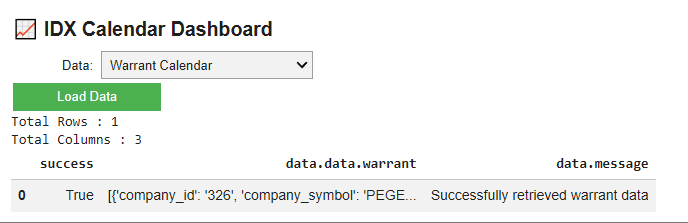
Cell 4 completes the functionality of the interactive IDX Corporate Action Dashboard.
The notebook defines a function named load_dashboard() that runs whenever the user clicks the Load Data button.
Inside the function, clear_output() removes previous results to ensure the dashboard always displays fresh information.
The notebook then calls the get_data() function using the selected value from the dropdown menu. Depending on the user selection, the function retrieves data from either the Warrant Calendar API or the Today Corporate Actions API.
After the data is successfully retrieved, the notebook displays several useful pieces of information:
Total number of rows in the dataset.
Total number of columns in the dataset.
The complete dataframe containing corporate action information.
The notebook also implements error handling using try and except. If the API request fails or unexpected data is returned, the dashboard displays an error message instead of stopping the notebook execution.
The command btn.on_click(load_dashboard) connects the button with the dashboard loading function.
Finally, widgets.VBox() combines all dashboard components, including the title, dropdown menu, load button, and output display area into a single interactive layout.
This cell creates the final user interface for the IDX Corporate Action Dashboard.
Result:
OVERALL WORKFLOW
This notebook follows a structured and interactive corporate action monitoring workflow.
First, the notebook imports all required Python libraries and configures the RapidAPI connection.
Second, it creates a flexible API retrieval function that can process different JSON response structures from the Indonesia Stock Exchange API.
Third, the notebook builds an interactive dashboard using ipywidgets, allowing users to switch between the Warrant Calendar API and Today Corporate Actions API.
Fourth, the dashboard retrieves the selected API data, converts the response into a pandas dataframe, and displays important information such as dataset size and corporate action details.
The final result is a simple interactive dashboard that helps investors, analysts, and developers monitor IDX corporate action information more efficiently.
WHY THIS CASE MATTERS
Monitoring corporate actions is an essential part of investment research because events such as warrants and daily corporate announcements can influence market attention and investor decisions.
By integrating the Warrant Calendar API with the Today Corporate Actions API, this notebook provides a centralized way to access multiple corporate action datasets through a single interface.
Instead of manually checking separate data sources, users can switch between different corporate action categories, retrieve real-time information, and analyze the results directly inside Jupyter Notebook.
This workflow does not generate investment recommendations. Instead, it creates a practical foundation for building automated market monitoring systems, financial dashboards, and corporate action research tools.
CONCLUSION
This tutorial demonstrates how to build an interactive IDX Corporate Action Dashboard using Python, the Warrant Calendar API, and the Today Corporate Actions API.
The notebook configures API access, retrieves data from multiple endpoints, handles various JSON response formats, converts API responses into structured dataframes, and displays the results using an interactive dashboard.
The final workflow provides:
Warrant Calendar API monitoring.
Today Corporate Actions API tracking.
Flexible API data processing.
Automatic JSON normalization.
Interactive dashboard visualization.
Real-time corporate action data exploration.
For investors, market analysts, and fintech developers, this project provides a practical foundation for creating corporate action dashboards and improving IDX market monitoring workflows.
In the end, this project is not only about retrieving API data. It is about transforming corporate action information into an interactive and efficient dashboard that makes market research easier and more accessible.