Understanding the composition of an investor's portfolio can provide useful context for examining investment strategies, asset allocation, and portfolio concentration. Publicly reported portfolio information allows analysts to identify securities held at a particular reporting date and examine how the reported value of those positions is distributed across different companies.
Portfolio analysis involves more than identifying the largest holdings. The number of shares, reported market value, portfolio weight, and company identity can help explain the relative importance of each position. Examining these variables together makes it possible to identify holdings that account for a substantial share of the reported portfolio and determine which assets may deserve further research.
Python offers a practical environment for automating this process. By combining financial API integration with data-processing libraries, analysts can retrieve portfolio records, standardize the returned information, calculate position weights, rank holdings, generate charts, and export the results for further examination.
This article presents MarketFlow Trader Intelligence, a Python-based framework that uses the MarketFlow All-in-One Market Finance API through RapidAPI. The implementation retrieves a list of supported investors, requests portfolio data for the investor identifier warren-buffett, and analyzes a historical portfolio snapshot dated June 30, 2024.
The framework includes flexible JSON extraction, automatic column detection, numerical conversion, portfolio weight calculations, a ranking of the largest positions, a dashboard of key findings, and an Excel export function. The objective is to demonstrate a reproducible workflow for financial data exploration rather than to generate automatic buy or sell recommendations.
The results depend on the records returned by the API, the definitions of its fields, and the completeness of the reported portfolio. A historical portfolio snapshot should be interpreted as information about the specified reporting date, not as evidence of the investor's current holdings or recent transactions.
2. Methodology
The analysis is organized into five computational cells. Each cell performs a distinct task, allowing the workflow to be executed and inspected step by step.
Cell 1 — API configuration: imports the necessary libraries, authenticates to RapidAPI, defines the investor and reporting date, and establishes reusable API and JSON extraction functions.
Cell 2 — Investor discovery: retrieves the available investor list and converts the response into a structured DataFrame.
Cell 3 — Portfolio retrieval: requests the selected investor's portfolio snapshot and normalizes the returned records.
Cell 4 — Portfolio analytics: detects relevant columns, converts numerical fields, calculates portfolio weights where possible, and ranks the positions.
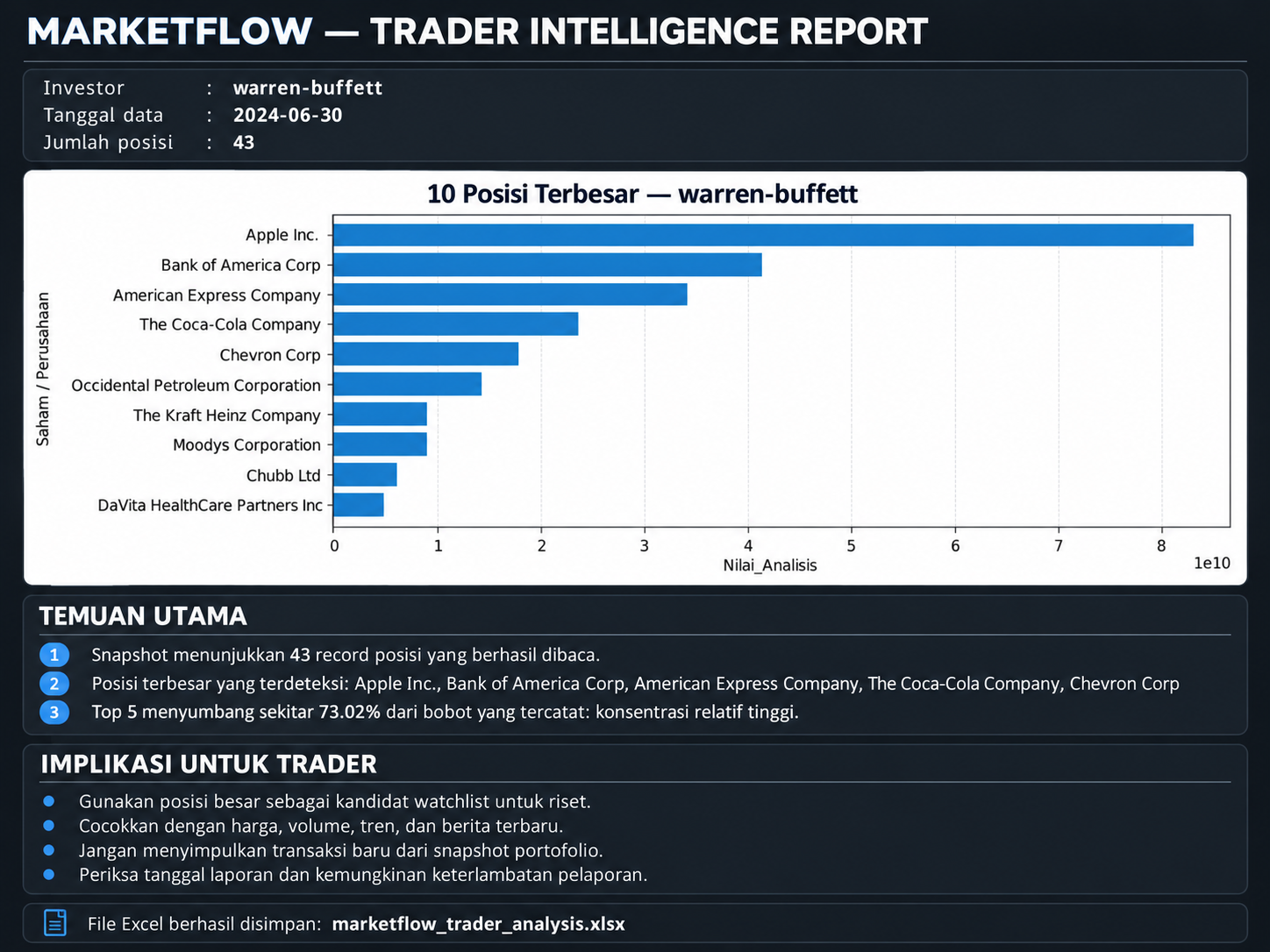
Cell 5 — Dashboard and reporting: displays the largest holdings, generates a horizontal bar chart, summarizes key findings, and exports the data to an Excel workbook.
The implementation uses Requests for HTTP communication, Pandas for data processing, NumPy for numerical support, Matplotlib for visualization, and OpenPyXL through Pandas for Excel export.
The reporting date is set to June 30, 2024. This is a historical reference date selected by the supplied script. To examine another reporting period, the REPORT_DATE parameter must be changed to a date supported by the API.
3. Implementation and Python Code
Cell 1 — Installation, Configuration, and API Functions
The first cell establishes the analytical environment and configures authentication. The API key is read from the RAPIDAPI_KEY environment variable or requested interactively if the variable is unavailable.
The api_get() function provides a reusable method for sending authenticated GET requests. It uses a timeout, prints the HTTP response status, checks whether the request succeeded, and returns the decoded JSON response.
The extract_records() function handles common nested JSON structures by searching for record lists under keys such as data, results, investors, portfolio, and holdings. This makes the data retrieval process more flexible when the API returns nested objects.
Code — Cell 1
%pip -q install requests pandas numpy matplotlib openpyxl

import os, json, requests
import numpy as np
import pandas as pd
import matplotlib.pyplot as plt
from getpass import getpass
from IPython.display import display
from urllib.parse import quote

API_HOST = "marketflow-all-in-one-market-finance-api.p.rapidapi.com"
BASE_URL = f"https://{API_HOST}"

API_KEY = os.getenv("RAPIDAPI_KEY", "").strip()
if not API_KEY:
    API_KEY = getpass("Masukkan RapidAPI Key: ").strip()

if not API_KEY:
    raise ValueError("RapidAPI Key belum diisi.")

HEADERS = {
    "x-rapidapi-key": API_KEY,
    "x-rapidapi-host": API_HOST
}

REPORT_DATE = "2024-06-30"
INVESTOR_SLUG = "warren-buffett"
LANG = "en"

def api_get(endpoint, params=None):
    response = requests.get(
        f"{BASE_URL}/{endpoint.lstrip('/')}",
        headers=HEADERS,
        params=params or {},
        timeout=30
    )
    print(f"{endpoint}: HTTP {response.status_code}")
    response.raise_for_status()
    return response.json()

def extract_records(obj):
    """Cari daftar record di berbagai bentuk respons JSON."""
    if isinstance(obj, list):
        if not obj:
            return []
        if all(isinstance(x, dict) for x in obj):
            return obj
        for item in obj:
            result = extract_records(item)
            if result:
                return result
        return []

    if isinstance(obj, dict):
        preferred = [
            "data", "results", "investors", "portfolio",
            "holdings", "items", "records", "stocks"
        ]
        for key in preferred:
            if key in obj:
                result = extract_records(obj[key])
                if result:
                    return result

        for value in obj.values():
            if isinstance(value, list):
                result = extract_records(value)
                if value and all(isinstance(x, dict) for x in value):
                    return value
                result = extract_records(value)
                if result:
                    return result

    return []

print("Konfigurasi siap.")
print("Tanggal laporan:", REPORT_DATE)
print("Investor:", INVESTOR_SLUG)
Cell 2 — Retrieving the Investor List
The second cell calls the list-investors endpoint to retrieve the investors supported by the API. The response is processed using the extract_records() function defined in Cell 1.
The resulting records are converted into a Pandas DataFrame using pd.json_normalize(). If the API returns a usable investor list, the notebook displays up to 30 records and prints the available column names. If the response cannot be normalized into records, the original JSON payload is printed for inspection.
This step helps users understand the available investor identifiers and the structure of the API response before requesting a specific portfolio.
Code — Cell 2
investors_raw = api_get("list-investors")
investors = extract_records(investors_raw)

print("Struktur respons:", type(investors_raw).__name__)
print("Jumlah investor yang terdeteksi:", len(investors))

investors_df = pd.json_normalize(investors) if investors else pd.DataFrame()

if not investors_df.empty:
    display(investors_df.head(30))
    print("\nKolom yang tersedia:")
    print(investors_df.columns.tolist())
else:
    print("Belum ditemukan daftar investor berbentuk record.")
    print(json.dumps(investors_raw, indent=2, ensure_ascii=False)[:6000])
Cell 3 — Retrieving the Investor's Portfolio
The third cell retrieves the portfolio snapshot using the portofolio-checks endpoint. The request includes three parameters: the language, reporting date, and investor slug.
After receiving the response, the script extracts the portfolio records and converts them into a DataFrame. It then reports the selected investor, reporting date, number of extracted records, and available column names.
If the response does not contain recognizable records, the notebook displays a portion of the original JSON response. This provides a way to inspect the payload and determine whether the issue comes from the API response structure, unavailable data, or an unsupported reporting date.
The extracted portfolio is the primary dataset used by the subsequent analytical cells.
Code — Cell 3
portfolio_raw = api_get(
    "portofolio-checks",
    params={
        "lang": LANG,
        "report_date": REPORT_DATE,
        "slug": INVESTOR_SLUG
    }
)

portfolio_records = extract_records(portfolio_raw)
portfolio_df = (
    pd.json_normalize(portfolio_records)
    if portfolio_records else pd.DataFrame()
)

print("Investor:", INVESTOR_SLUG)
print("Tanggal laporan:", REPORT_DATE)
print("Jumlah record portofolio:", len(portfolio_records))

if not portfolio_df.empty:
    display(portfolio_df.head(20))
    print("\nKolom portofolio:")
    print(portfolio_df.columns.tolist())
else:
    print("Data belum dapat dinormalisasi. Respons asli:")
    print(json.dumps(portfolio_raw, indent=2, ensure_ascii=False)[:10000])
Cell 4 — Ownership Analysis and Portfolio Concentration
The fourth cell performs the principal portfolio calculations. It begins by defining find_col(), a helper function that searches for a matching column using exact names and partial keyword matches.
The function is used to identify fields associated with ticker symbols, company names, market values, portfolio weights, and share counts. Once these columns are identified, the script creates standardized analytical columns, including Ticker_Analisis, Nama_Analisis, Nilai_Analisis, and Jumlah_Saham_Analisis.
The to_number() function converts numerical values that may be stored as strings. It removes commas, dollar signs, and percentage symbols before converting the values into numeric data types.
When market values are available, the script calculates portfolio weights by dividing each nonnegative position value by the total of the available nonnegative values. When API-provided weights are available, those values are prioritized, with calculated weights used as a fallback for missing entries.
The resulting dataset is sorted by market value or final portfolio weight. The script then displays the leading positions and calculates the combined weight of the five and ten largest records when the necessary information is available.
These calculations provide a preliminary picture of portfolio allocation. Their accuracy depends on whether each record represents a unique position and whether the returned weights and market values use consistent units.
Code — Cell 4
def find_col(df, aliases):
    # Cari kecocokan nama kolom yang fleksibel.
    cols = list(df.columns)
    normalized = {
        c: str(c).lower().replace("_", " ").replace(".", " ")
        for c in cols
    }

    for alias in aliases:
        for c, name in normalized.items():
            if name.strip() == alias:
                return c

    for alias in aliases:
        for c, name in normalized.items():
            if alias in name:
                return c

    return None

analysis_df = portfolio_df.copy()

if not analysis_df.empty:
    ticker_col = find_col(
        analysis_df, ["ticker", "symbol", "stock symbol"]
    )
    name_col = find_col(
        analysis_df, ["company name", "company", "name", "stock"]
    )
    value_col = find_col(
        analysis_df, [
            "market value", "value usd", "value",
            "position value", "market value usd"
        ]
    )
    weight_col = find_col(
        analysis_df, [
            "portfolio weight", "weight percent",
            "weight pct", "weight", "percentage"
        ]
    )
    shares_col = find_col(
        analysis_df, [
            "shares", "share count", "quantity",
            "shares held", "number of shares"
        ]
    )

    if ticker_col:
        analysis_df["Ticker_Analisis"] = analysis_df[ticker_col]
    if name_col:
        analysis_df["Nama_Analisis"] = analysis_df[name_col]
    elif ticker_col:
        analysis_df["Nama_Analisis"] = analysis_df[ticker_col]

    def to_number(series):
        return pd.to_numeric(
            series.astype(str)
                  .str.replace(",", "", regex=False)
                  .str.replace("$", "", regex=False)
                  .str.replace("%", "", regex=False)
                  .str.strip(),
            errors="coerce"
        )

    if value_col:
        analysis_df["Nilai_Analisis"] = to_number(
            analysis_df[value_col]
        )

    if shares_col:
        analysis_df["Jumlah_Saham_Analisis"] = to_number(
            analysis_df[shares_col]
        )

    if weight_col:
        analysis_df["Bobot_API"] = to_number(
            analysis_df[weight_col]
        )
        # Konversi hanya jika nilainya tampak berupa proporsi 0–1.
        valid_weights = analysis_df["Bobot_API"].dropna()
        if len(valid_weights) and valid_weights.max() <= 1:
            analysis_df["Bobot_API"] *= 100

    if "Nilai_Analisis" in analysis_df:
        values = analysis_df["Nilai_Analisis"]
        total_value = values.where(values >= 0).sum(min_count=1)

        if pd.notna(total_value) and total_value > 0:
            analysis_df["Bobot_Hitung_%"] = (
                values.clip(lower=0) / total_value * 100
            )

    if "Bobot_API" in analysis_df and "Bobot_Hitung_%" in analysis_df:
        # Utamakan bobot dari API jika ada; jika tidak, gunakan hasil hitung.
        analysis_df["Bobot_Final_%"] = (
            analysis_df["Bobot_API"].fillna(
                analysis_df["Bobot_Hitung_%"]
            )
        )
    elif "Bobot_API" in analysis_df:
        analysis_df["Bobot_Final_%"] = analysis_df["Bobot_API"]
    elif "Bobot_Hitung_%" in analysis_df:
        analysis_df["Bobot_Final_%"] = analysis_df["Bobot_Hitung_%"]

    sort_col = (
        "Nilai_Analisis"
        if "Nilai_Analisis" in analysis_df
        else "Bobot_Final_%"
        if "Bobot_Final_%" in analysis_df
        else None
    )

    if sort_col:
        analysis_df = analysis_df.sort_values(
            sort_col, ascending=False, na_position="last"
        )

    display(analysis_df.head(20))

    if "Bobot_Final_%" in analysis_df:
        valid = analysis_df["Bobot_Final_%"].dropna()
        if len(valid):
            print(f"Top 5 bobot: {valid.head(5).sum():.2f}%")
            print(f"Top 10 bobot: {valid.head(10).sum():.2f}%")
            print(
                "Catatan: angka ini hanya valid jika setiap record "
                "mewakili satu posisi yang unik."
            )
    else:
        print("Bobot portofolio tidak tersedia atau tidak dikenali.")

else:
    print("Analisis ditunda karena data portofolio belum tersedia.")

print("\nKolom yang terdeteksi:")
print({
    "ticker": ticker_col if not portfolio_df.empty else None,
    "nama": name_col if not portfolio_df.empty else None,
    "nilai": value_col if not portfolio_df.empty else None,
    "bobot": weight_col if not portfolio_df.empty else None,
    "jumlah_saham": shares_col if not portfolio_df.empty else None
})
Cell 5 — Trader Dashboard, Findings, and Excel Export
The fifth cell converts the analytical results into a trader intelligence report. It displays the investor identifier, reporting date, and number of portfolio records, then selects the appropriate numerical field for the visualization.
The chart presents up to ten of the largest detected positions using a horizontal bar chart. The script also generates text-based findings describing the number of records, the largest detected positions, and the combined weight of the top five holdings when those values are available.
The interpretation section emphasizes that large holdings are candidates for further research rather than automatic trading signals. It also recommends checking current prices, trading volume, market trends, and relevant news before drawing conclusions.
Finally, the script exports the investor list, raw portfolio records, analyzed positions, and summary information to an Excel workbook named marketflow_trader_analysis.xlsx. The separate worksheets make it easier to inspect the original data and compare it with the processed results.
Code — Cell 5
print("=" * 65)
print("MARKETFLOW — TRADER INTELLIGENCE REPORT")
print("=" * 65)
print("Investor      :", INVESTOR_SLUG)
print("Tanggal data  :", REPORT_DATE)
print("Jumlah posisi :", len(analysis_df))

# Grafik 10 posisi terbesar berdasarkan nilai atau bobot.
chart_col = (
    "Nilai_Analisis"
    if "Nilai_Analisis" in analysis_df
    else "Bobot_Final_%"
    if "Bobot_Final_%" in analysis_df
    else None
)

label_col = (
    "Ticker_Analisis"
    if "Ticker_Analisis" in analysis_df
    else "Nama_Analisis"
    if "Nama_Analisis" in analysis_df
    else None
)

if chart_col and label_col and not analysis_df.empty:
    chart_df = analysis_df.dropna(
        subset=[chart_col, label_col]
    ).head(10).copy()

    if not chart_df.empty:
        chart_df = chart_df.sort_values(chart_col)
        plt.figure(figsize=(10, 6))
        plt.barh(
            chart_df[label_col].astype(str),
            chart_df[chart_col]
        )
        plt.title(f"10 Posisi Terbesar — {INVESTOR_SLUG}")
        plt.xlabel(chart_col)
        plt.ylabel("Saham / Perusahaan")
        plt.tight_layout()
        plt.show()
else:
    print("Grafik tidak dibuat: kolom nilai/bobot atau label tidak tersedia.")

# Interpretasi berbasis data, bukan sinyal beli otomatis.
insights = []

if analysis_df.empty:
    insights.append(
        "Data portofolio belum berhasil dinormalisasi. "
        "Periksa respons API sebelum membuat keputusan."
    )
else:
    insights.append(
        f"Snapshot menunjukkan {len(analysis_df)} record posisi "
        f"yang berhasil dibaca."
    )

    if label_col and chart_col:
        top = analysis_df.dropna(subset=[chart_col]).head(5)
        if not top.empty:
            names = (
                top[label_col].astype(str).tolist()
                if label_col in top else top.index.astype(str).tolist()
            )
            insights.append(
                "Posisi terbesar yang terdeteksi: " + ", ".join(names)
            )

    if "Bobot_Final_%" in analysis_df:
        weights = analysis_df["Bobot_Final_%"].dropna()
        if len(weights):
            top5 = weights.head(5).sum()
            if top5 >= 50:
                insights.append(
                    f"Top 5 menyumbang sekitar {top5:.2f}% dari "
                    "bobot yang tercatat: konsentrasi relatif tinggi."
                )
            else:
                insights.append(
                    f"Total bobot Top 5 yang tercatat: {top5:.2f}%. "
                    "Pastikan cakupan data dan denominator bobot lengkap."
                )

print("\nTEMUAN UTAMA")
for i, insight in enumerate(insights, 1):
    print(f"{i}. {insight}")

print("\nIMPLIKASI UNTUK TRADER")
print("- Gunakan posisi besar sebagai kandidat watchlist untuk riset.")
print("- Cocokkan dengan harga, volume, tren, dan berita terbaru.")
print("- Jangan menyimpulkan transaksi baru dari snapshot portofolio.")
print("- Periksa tanggal laporan dan kemungkinan keterlambatan pelaporan.")

# Ekspor hasil dan data mentah untuk audit.
output_file = "marketflow_trader_analysis.xlsx"

with pd.ExcelWriter(output_file, engine="openpyxl") as writer:
    if not investors_df.empty:
        investors_df.to_excel(
            writer, sheet_name="Daftar_Investor", index=False
        )

    if not portfolio_df.empty:
        portfolio_df.to_excel(
            writer, sheet_name="Portofolio_Mentah", index=False
        )

    if not analysis_df.empty:
        analysis_df.to_excel(
            writer, sheet_name="Analisis_Posisi", index=False
        )

    pd.DataFrame({
        "Investor": [INVESTOR_SLUG],
        "Tanggal_Laporan": [REPORT_DATE],
        "Jumlah_Record": [len(analysis_df)],
        "Catatan": [
            "Snapshot historis; bukan sinyal trading otomatis."
        ]
    }).to_excel(writer, sheet_name="Ringkasan", index=False)

print(f"\nFile Excel berhasil disimpan: {output_file}")
Result:
4. Results and Discussion
4.1. Investor Discovery and Portfolio Data Retrieval
The investor discovery module retrieves the list of investors supported by the API and displays the available records. This stage helps establish whether the selected investor identifier is represented in the API's data.
The portfolio retrieval module then requests the selected investor's holdings for June 30, 2024. The number of records successfully extracted provides an initial indication of the size of the dataset available for analysis.
However, the number of records should not automatically be interpreted as the total number of securities in the investor's entire portfolio. The result depends on the API's data coverage, the structure of the returned response, and whether the endpoint provides complete holdings for the selected reporting date.
4.2. Portfolio Position Ranking
The framework attempts to identify company names, ticker symbols, market values, share counts, and portfolio weights. When the relevant fields are available, the positions are sorted in descending order by market value or portfolio weight.
This ranking makes it easier to identify holdings that account for relatively large portions of the reported portfolio. Analysts can then use these holdings as candidates for further research into company fundamentals, valuation, financial performance, and market conditions.
Nevertheless, a large position does not automatically indicate that a security is attractive at its current market price. Portfolio data describe reported holdings at a particular point in time and should not be interpreted as a direct instruction to replicate an investment.
4.3. Portfolio Weight and Concentration
The portfolio weight calculation estimates each position's share of the total reported value. When the API supplies portfolio weights, the framework uses those values as the primary source. If the weights are unavailable for certain positions, the program can use calculated weights based on reported market values.
The combined weight of the five largest positions provides a simple indicator of concentration. A relatively high combined weight suggests that a substantial portion of the reported portfolio is allocated to a small number of holdings.
This interpretation must be treated cautiously when records are incomplete or duplicated. The calculation is also sensitive to the consistency of the underlying values and the definition of the portfolio denominator. Consequently, the resulting percentages should be checked against the raw API response before being used in a financial assessment.
4.4. Dashboard Visualization and Reporting
The dashboard combines the portfolio summary, ranked positions, and key findings into a single reporting workflow. The horizontal bar chart makes it easier to compare the largest detected holdings, while the textual findings provide a concise overview of the retrieved records.
The Excel export function creates separate worksheets for the investor list, raw portfolio data, analyzed positions, and summary information. This separation supports data inspection and makes it easier to trace calculated results back to the original API records.
The workbook can also serve as a starting point for additional analyses, such as sector allocation, historical portfolio comparisons, and changes in reported holdings across reporting periods. Those extensions would require appropriate data fields and, for historical comparisons, multiple compatible reporting snapshots.
4.5. Limitations and Future Improvements
Several limitations should be considered when interpreting the results.
First, the analysis uses a historical reporting date of June 30, 2024. The resulting portfolio information should not be presented as a current snapshot without retrieving a more recent, supported reporting date.
Second, the flexible column-detection function searches for likely field names. Although this approach makes the program adaptable to some variations in API responses, it cannot guarantee that every detected column has the intended meaning.
Third, the calculated portfolio weights depend on the completeness of the available positions. If the dataset contains only a subset of holdings, the resulting weights describe the retrieved dataset rather than necessarily representing the investor's entire portfolio.
Fourth, the current workflow focuses on portfolio composition and concentration. It does not independently evaluate valuation, company profitability, investment risk, or expected returns.
Future improvements could include automatic pagination, stricter schema validation, sector-level allocation analysis, comparisons across multiple reporting dates, and integration with current market prices. These enhancements would provide a more comprehensive foundation for financial research while preserving the distinction between historical portfolio information and investment recommendations.
5. Conclusion
MarketFlow Trader Intelligence demonstrates how Python can be used to retrieve, organize, analyze, and visualize investor portfolio information through the MarketFlow All-in-One Market Finance API.
The framework integrates investor discovery, portfolio retrieval, JSON normalization, automatic column detection, numerical conversion, portfolio weight calculations, position ranking, dashboard visualization, and Excel reporting. These components create a repeatable workflow for examining reported holdings and identifying positions that may warrant further investigation.
The portfolio concentration analysis provides a preliminary view of how reported holdings are distributed across available positions. The visualization and export functions also make the results easier to inspect, document, and reuse in subsequent analysis.
Nevertheless, the reliability of the findings depends on the completeness of the API response, the accuracy of the field definitions, and the reporting date used. Historical portfolio snapshots should not be treated as evidence of current holdings or recent transactions, and large positions should not automatically be interpreted as investment recommendations.
Future development should prioritize data validation, complete record retrieval, historical comparisons, and the integration of additional financial indicators. With these improvements, MarketFlow Trader Intelligence can serve as a useful foundation for structured portfolio research and financial-data exploration.