Liquidity is an important component of cryptocurrency market analysis because it describes the availability and distribution of trading volume at different price levels. For traders, understanding where liquidity is concentrated can provide additional context for evaluating market structure, potential price reactions, and the relationship between buying and selling interest.
In cryptocurrency markets, two useful analytical components are the order book and the liquidity map. An order book organizes available buy orders (bids) and sell orders (asks), while a liquidity map summarizes the reported liquidity associated with particular price levels. Examining these data together can help traders identify areas where the reported volume is concentrated and investigate how market depth may relate to price movements.
Python provides a practical environment for collecting and analyzing this information automatically. Through an application programming interface (API), market data can be retrieved and transformed into structured datasets. Libraries such as Requests, Pandas, NumPy, and Matplotlib support API communication, data normalization, numerical calculations, and graphical visualization.
This article presents BTCUSDT Liquidity Intelligence, a Python-based framework that retrieves order book imbalance and liquidity map data from the MarketFlow All-in-One Market Finance API through RapidAPI. The system analyzes the BTCUSDT trading pair, identifies available price and volume fields, aggregates liquidity by price level, calculates the share of total reported liquidity, ranks the largest liquidity levels, and generates visual reports.
The implementation is organized into five cells covering API configuration, data retrieval, normalization, visualization, and final reporting. It is designed to help traders inspect market data systematically while distinguishing reported liquidity concentrations from confirmed support and resistance levels.
The objective is to provide a reproducible workflow for market-data exploration. The resulting metrics describe the data returned by the API and should not be interpreted as guaranteed price forecasts or automatic buy and sell signals.
2. Methodology
The BTCUSDT Liquidity Intelligence workflow consists of five stages.
API configuration: imports the required libraries, authenticates through RapidAPI, and defines the BTCUSDT trading pair and request timeout.
Data retrieval: requests data from the order book imbalance and liquidity map endpoints and preserves the raw JSON responses for inspection.
Data normalization: extracts structured records from nested JSON, standardizes column names, identifies potential price and volume fields, and aggregates liquidity at identical price levels.
Visualization: generates a liquidity distribution chart and, when suitable bid and ask fields are available, compares their reported volumes.
Liquidity reporting: summarizes the number of price levels, price range, total reported volume, largest liquidity level, percentage share, and top five levels.
The analysis uses Pandas for tabular data processing, NumPy for numerical operations, Requests for API communication, and Matplotlib for visualizations. The IPython.display module is used to present tables directly in Google Colab.
The liquidity share of an individual price level is calculated as:
\[ \text{Liquidity Share}_i = \frac{V_i}{\sum_{j=1}^{n} V_j}\times 100\% \]
where \(V_i\) is the reported volume at price level \(i\), and the denominator represents the total reported volume across all included price levels.
The largest liquidity level is the price level with the highest aggregated volume in the retrieved dataset. Its share indicates the proportion of total reported liquidity represented by that level.
These calculations depend on the meaning and units of the API's volume field. The values may represent order quantity, liquidity estimates, or another measure defined by the provider. Therefore, the results should be interpreted according to the API documentation rather than assumed to represent a complete exchange order book.
3. Implementation and Python Code
The following implementation is organized into five cells for Google Colab. The original file contains two overlapping data-normalization sections; the version below consolidates those steps and standardizes the liquidity columns so that the visualization and final report use a consistent structure.
Cell 1 — Library Imports and API Configuration
This cell imports the required libraries and establishes the connection to the MarketFlow API. The API key is retrieved from the RAPIDAPI_KEY environment variable or requested interactively.
The trading pair is set to BTCUSDT, and a reusable HTTP session is configured with the RapidAPI authentication headers. The LIMIT variable is retained from the original configuration, although the initial endpoint requests intentionally omit the limit parameter to inspect the default API response.
Code — Cell 1
import os
import json
import requests
import numpy as np
import pandas as pd
import matplotlib.pyplot as plt

from getpass import getpass
from IPython.display import display

# Konfigurasi MarketFlow API
BASE_URL = (
    "https://marketflow-all-in-one-market-finance-api.p.rapidapi.com"
)
HOST = "marketflow-all-in-one-market-finance-api.p.rapidapi.com"

API_KEY = os.getenv("RAPIDAPI_KEY") or getpass("Masukkan RapidAPI Key: ")

SYMBOL = "BTCUSDT"
LIMIT = 20
TIMEOUT = 30

HEADERS = {
    "x-rapidapi-key": API_KEY,
    "x-rapidapi-host": HOST
}

session = requests.Session()
session.headers.update(HEADERS)

print(f"Konfigurasi selesai | Symbol: {SYMBOL} | Limit: {LIMIT}")
Cell 2 — Retrieving Order Book and Liquidity Map Data
The second cell sends requests to two API endpoints: /tools/crypto/orderbook-imbalance and /tools/crypto/liquidity-map.
The test_without_limit() function requests each endpoint using the trading symbol without specifying a limit parameter. It prints the HTTP status and a portion of the JSON response so that the analyst can inspect the returned fields.
The raw responses are stored in orderbook_raw and liquidity_raw. Preserving these responses allows subsequent processing to be compared with the original API output.
Code — Cell 2
# Tes apakah parameter limit bisa dihilangkan
def test_without_limit(endpoint):
    response = session.get(
        f"{BASE_URL}{endpoint}",
        params={"symbol": SYMBOL},
        timeout=TIMEOUT
    )

    print("\nEndpoint:", endpoint)
    print("HTTP Status:", response.status_code)

    try:
        data = response.json()
        print(json.dumps(data, indent=2, ensure_ascii=False)[:6000])
        return data
    except ValueError:
        print(response.text[:2000])
        return None


orderbook_raw = test_without_limit(
    "/tools/crypto/orderbook-imbalance"
)

liquidity_raw = test_without_limit(
    "/tools/crypto/liquidity-map"
)
Cell 3 — Data Normalization and Liquidity Metrics
The third cell converts the nested JSON responses into DataFrames. The extract_records() function searches for structured records within common response keys, including data, result, levels, orderbook, liquidity, items, bids, and asks.
The find_col() function identifies potential price and volume columns from a list of candidate field names. When the relevant fields are available, they are converted to numeric values, invalid records are removed, and records with identical prices are aggregated.
For consistency with the final report, the resulting liquidity dataset is standardized to two columns: price and volume. This prevents the reporting stage from depending on the original API's exact column names.
The cell also checks whether the API returned an error response and displays the detected fields for further inspection.
Code — Cell 3
def find_records(obj, depth=0):
    """Cari daftar objek dalam JSON bersarang."""
    if depth > 12:
        return []

    if isinstance(obj, list):
        if obj and all(isinstance(x, dict) for x in obj):
            return obj
        for item in obj:
            found = find_records(item, depth + 1)
            if found:
                return found

    elif isinstance(obj, dict):
        # Prioritaskan daftar yang kemungkinan berisi level pasar
        priority = [
            "levels", "data", "bids", "asks", "orderbook",
            "liquidity", "result", "items", "orders"
        ]

        for key in priority:
            if key in obj:
                found = find_records(obj[key], depth + 1)
                if found:
                    return found

        for value in obj.values():
            found = find_records(value, depth + 1)
            if found:
                return found

    return []


def normalize_records(raw):
    records = find_records(raw)
    df = pd.json_normalize(records)

    # Nama kolom sederhana agar mudah dikenali
    df.columns = [
        str(c).split(".")[-1].lower().replace("-", "_")
        for c in df.columns
    ]

    return df


def find_col(df, candidates):
    for candidate in candidates:
        matches = [c for c in df.columns if c == candidate]
        if matches:
            return matches[0]

    # Fallback untuk nama kolom seperti total_volume atau price_usd
    for candidate in candidates:
        matches = [
            c for c in df.columns
            if candidate in c and not c.endswith("_id")
        ]
        if matches:
            return matches[0]

    return None


ob_df = normalize_records(orderbook_raw)
liq_df = normalize_records(liquidity_raw)

print("Orderbook rows/columns:", ob_df.shape)
print("Liquidity rows/columns:", liq_df.shape)

print("\nKolom orderbook:", ob_df.columns.tolist())
print("Kolom liquidity:", liq_df.columns.tolist())

display(ob_df.head())
display(liq_df.head())

# Kandidat kolom yang umum digunakan API pasar
price_col = find_col(liq_df, ["price", "price_level", "level_price"])
volume_col = find_col(
    liq_df, ["volume", "quantity", "qty", "size", "liquidity", "amount"]
)

if price_col and volume_col:
    liq_df[price_col] = pd.to_numeric(liq_df[price_col], errors="coerce")
    liq_df[volume_col] = pd.to_numeric(liq_df[volume_col], errors="coerce")

    liq_df = liq_df.dropna(subset=[price_col, volume_col])
    liq_df = liq_df.groupby(price_col, as_index=False)[volume_col].sum()
    liq_df = liq_df.sort_values(price_col)

    print("\nLevel likuiditas berhasil dinormalisasi.")
else:
    print(
        "\nKolom harga/volume belum dikenali otomatis. "
        "Periksa nama kolom dan JSON Cell 2 sebelum menyimpulkan."
    )
Cell 4 — Order Book and Liquidity Visualization
The fourth cell generates two visualizations. The first chart displays reported liquidity volume at each price level. The second chart compares aggregate bid and ask quantities if suitable fields are identified in the order book dataset.
The find_matching_col() function searches for likely bid and ask fields, including bid_volume, bid_qty, ask_volume, and ask_qty. When those fields are not available, the chart displays a message indicating that the data could not be identified.
This conditional approach prevents the program from inventing bid and ask values when the API response does not contain recognizable fields.
Code — Cell 4
import matplotlib.pyplot as plt
import pandas as pd
import numpy as np

# Deteksi kolom berdasarkan beberapa kemungkinan nama
def find_matching_col(df, candidates):
    cols = [str(c).lower().replace("-", "_") for c in df.columns]

    # Prioritaskan nama kolom yang cocok persis
    for candidate in candidates:
        if candidate in cols:
            return df.columns[cols.index(candidate)]

    # Selanjutnya cocokkan berdasarkan sebagian nama
    for candidate in candidates:
        for i, col in enumerate(cols):
            if candidate in col:
                return df.columns[i]

    return None


# Kandidat nama kolom order book
bid_candidates = [
    "bid_volume", "bid_qty", "bid_size", "bid_quantity",
    "total_bid", "buy_volume", "buy_qty", "bids"
]

ask_candidates = [
    "ask_volume", "ask_qty", "ask_size", "ask_quantity",
    "total_ask", "sell_volume", "sell_qty", "asks"
]

bid_col = find_matching_col(ob_df, bid_candidates)
ask_col = find_matching_col(ob_df, ask_candidates)

# Visualisasi
fig, axes = plt.subplots(1, 2, figsize=(15, 5))

# --------------------------------------------------
# 1. LIQUIDITY MAP
# --------------------------------------------------
if (
    price_col and volume_col
    and not liq_df.empty
    and price_col in liq_df.columns
    and volume_col in liq_df.columns
):
    temp = liq_df[[price_col, volume_col]].copy()
    temp[price_col] = pd.to_numeric(temp[price_col], errors="coerce")
    temp[volume_col] = pd.to_numeric(temp[volume_col], errors="coerce")
    temp = temp.dropna().sort_values(price_col)

    axes[0].bar(temp[price_col], temp[volume_col])
    axes[0].set_title("BTCUSDT Liquidity by Price")
    axes[0].set_xlabel("Price (USDT)")
    axes[0].set_ylabel("Liquidity")
    axes[0].ticklabel_format(axis="x", style="plain", useOffset=False)
    axes[0].grid(axis="y", alpha=0.25)
else:
    axes[0].text(
        0.5, 0.5, "Data liquidity belum tersedia",
        ha="center", va="center"
    )
    axes[0].set_title("Liquidity Map")

# --------------------------------------------------
# 2. ORDER BOOK
# --------------------------------------------------
if bid_col and ask_col and not ob_df.empty:
    bid_values = pd.to_numeric(ob_df[bid_col], errors="coerce")
    ask_values = pd.to_numeric(ob_df[ask_col], errors="coerce")

    bid_total = bid_values.sum()
    ask_total = ask_values.sum()

    axes[1].bar(
        ["Bid (Buy)", "Ask (Sell)"],
        [bid_total, ask_total]
    )
    axes[1].set_title("Aggregate Bid vs Ask")
    axes[1].set_ylabel("Quantity")
    axes[1].grid(axis="y", alpha=0.25)

else:
    axes[1].text(
        0.5, 0.5,
        "Kolom bid/ask belum teridentifikasi",
        ha="center", va="center"
    )
    axes[1].set_title("Order Book")

    print("Kolom orderbook yang tersedia:")
    print(ob_df.columns.tolist())

    print("\nContoh respons asli API:")
    print(str(orderbook_raw)[:4000])

plt.suptitle(f"{SYMBOL} Market Analysis")
plt.tight_layout()
plt.show()
Cell 5 — Liquidity Intelligence Report
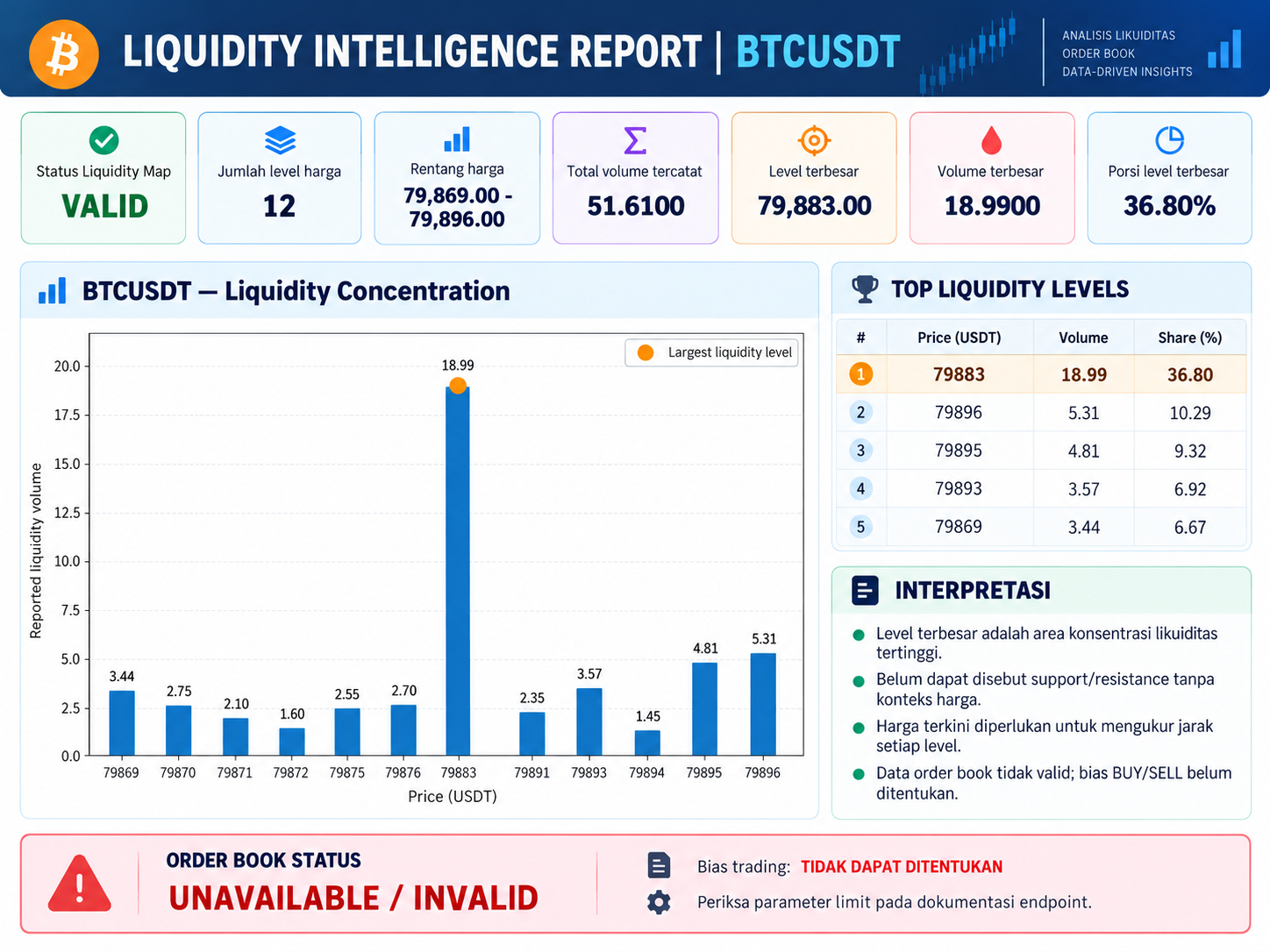
The final cell generates the liquidity intelligence report. It validates the standardized liquidity dataset, calculates the total reported volume, identifies the price level with the largest volume, and determines the percentage share of that level.
The five largest liquidity levels are then ranked by volume. Their individual shares are calculated relative to the total reported volume, allowing the analyst to compare the concentration of liquidity across price levels.
Finally, the cell generates a liquidity concentration chart and prints a short interpretation of the results. The report explicitly distinguishes a concentration of reported liquidity from a confirmed support or resistance level and avoids assigning a buy or sell bias when the required order book data are unavailable.
Code — Cell 5
# =========================================================
# CELL 5 — LIQUIDITY INTELLIGENCE REPORT
# =========================================================

print("=" * 65)
print(f"LIQUIDITY INTELLIGENCE REPORT | {SYMBOL}")
print("=" * 65)

# Validasi data
if liq_df.empty or not {"price", "volume"}.issubset(liq_df.columns):
    print("STATUS: Liquidity Map tidak memiliki data valid.")

else:
    df = liq_df[["price", "volume"]].copy()
    df["price"] = pd.to_numeric(df["price"], errors="coerce")
    df["volume"] = pd.to_numeric(df["volume"], errors="coerce")
    df = df.dropna()
    df = df[(df["price"] > 0) & (df["volume"] >= 0)]

    if df.empty or df["volume"].sum() <= 0:
        print("STATUS: Data likuiditas kosong atau volumenya tidak valid.")

    else:
        # Gabungkan level harga yang sama
        df = df.groupby("price", as_index=False)["volume"].sum()
        df = df.sort_values("price")

        total_liquidity = df["volume"].sum()
        max_idx = df["volume"].idxmax()
        max_level = df.loc[max_idx]

        print("Status Liquidity Map : VALID")
        print(f"Jumlah level harga   : {len(df)}")
        print(f"Rentang harga        : {df['price'].min():,.2f}"
              f" - {df['price'].max():,.2f}")
        print(f"Total volume tercatat: {total_liquidity:,.4f}")
        print(f"Level terbesar       : {max_level['price']:,.2f}")
        print(f"Volume terbesar      : {max_level['volume']:,.4f}")
        print(f"Porsi level terbesar : "
              f"{max_level['volume'] / total_liquidity:.2%}")

        # Lima level dengan volume terbesar
        top5 = df.nlargest(min(5, len(df)), "volume").copy()
        top5["share_pct"] = (
            top5["volume"] / total_liquidity * 100
        ).round(2)

        print("\nTOP LIQUIDITY LEVELS")
        display(
            top5.rename(columns={
                "price": "Price (USDT)",
                "volume": "Volume",
                "share_pct": "Share (%)"
            }).reset_index(drop=True)
        )

        # Visualisasi konsentrasi likuiditas
        plt.figure(figsize=(10, 5))
        plt.bar(
            df["price"],
            df["volume"],
            width=max((df["price"].max() - df["price"].min()) / 100, 0.01)
        )
        plt.scatter(
            [max_level["price"]],
            [max_level["volume"]],
            s=100,
            label="Largest liquidity level"
        )
        plt.xlabel("Price (USDT)")
        plt.ylabel("Reported liquidity volume")
        plt.title(f"{SYMBOL} — Liquidity Concentration")
        plt.ticklabel_format(axis="x", style="plain", useOffset=False)
        plt.grid(axis="y", alpha=0.25)
        plt.legend()
        plt.tight_layout()
        plt.show()

        print("\nINTERPRETASI")
        print("- Level terbesar adalah area konsentrasi likuiditas tertinggi.")
        print("- Belum dapat disebut support/resistance tanpa konteks harga.")
        print("- Harga terkini diperlukan untuk mengukur jarak setiap level.")
        print("- Data order book tidak valid; bias BUY/SELL belum ditentukan.")

# Status order book
if is_api_error(orderbook_raw) or ob_df.empty:
    print("\nORDER BOOK STATUS: UNAVAILABLE / INVALID")
    print("Bias trading: TIDAK DAPAT DITENTUKAN")
    print("Periksa parameter limit pada dokumentasi endpoint.")
Result:
4. Results and Discussion
4.1. Order Book Data Retrieval
The order book module retrieves the response returned by the orderbook-imbalance endpoint. The program normalizes the response and attempts to identify fields representing bid and ask quantities.
When suitable fields are available, the system calculates the aggregate bid and ask values and displays them in a comparison chart. This provides an initial view of the reported buying and selling quantities represented in the response.
However, the aggregate comparison depends on the meaning and structure of the returned fields. A dataset containing individual order records cannot necessarily be interpreted in the same way as one containing pre-aggregated bid and ask totals. Consequently, the API response must be examined before drawing conclusions about buying or selling pressure.
4.2. Liquidity Map Analysis
The liquidity map module identifies price and volume fields, converts them into numerical values, and aggregates records sharing the same price. The resulting dataset provides a structured representation of the reported liquidity distribution across BTCUSDT price levels.
The analysis summarizes the number of distinct price levels, the lowest and highest observed prices, the total reported volume, and the level with the largest volume. These statistics provide a concise overview of the available liquidity data.
The liquidity concentration chart complements the numerical report by displaying the volume associated with each price level. The highlighted point identifies the level with the largest aggregated volume in the retrieved dataset.
These results describe the reported data rather than necessarily representing the complete liquidity available across the entire cryptocurrency market. The interpretation depends on the API's source, coverage, and volume definitions.
4.3. Top Liquidity Levels and Concentration
The top-five table ranks price levels by reported volume and calculates each level's share of total reported liquidity. This makes it possible to compare the relative contribution of the largest levels.
A level with a large share represents a substantial concentration within the dataset. However, it does not necessarily indicate that the price will reverse, stop, or move toward that level.
Liquidity can change as orders are added, modified, or canceled. Furthermore, reported liquidity may represent a particular exchange or data provider rather than all available liquidity across the market. Traders should therefore combine the report with current prices, market depth, trading volume, and relevant market context.
4.4. Visualization and Reporting
The visualization component presents liquidity distribution and, where possible, aggregate bid and ask quantities. The final report complements these charts with numerical summaries and a ranked table.
This combination makes the retrieved data easier to inspect and compare. It also provides a reproducible reporting workflow that can be executed again when new API data become available.
Nevertheless, the usefulness of the dashboard depends on the quality of the API response and successful field identification. If the required fields are missing or the API returns an error, the program should report that limitation instead of interpreting unavailable values as meaningful market signals.
4.5. Limitations and Future Improvements
Several limitations should be considered when using the framework.
First, the code initially requests data without a limit parameter. Although the configuration defines LIMIT = 20, that variable is not used in the initial API requests. The returned record count therefore depends on the endpoint's default behavior.
Second, the field-detection functions rely on candidate names. If the API uses a different schema, the program may fail to identify price, volume, bid, or ask fields. Even when a field is detected, its meaning should be verified against the API documentation.
Third, the current analysis does not retrieve the latest BTCUSDT market price. Consequently, it cannot calculate the distance between the current market price and the largest liquidity level.
Fourth, the order book comparison is descriptive. A larger aggregate bid quantity does not independently establish a bullish market direction, just as a larger ask quantity does not independently establish a bearish trend.
Future improvements could include explicit API schema validation, configurable pagination, integration of current market prices, liquidity distance calculations, and time-series monitoring of changes in liquidity concentration. These additions would provide a more comprehensive basis for market analysis.
5. Conclusion
BTCUSDT Liquidity Intelligence demonstrates how Python can be used to retrieve, normalize, analyze, and visualize cryptocurrency order book and liquidity map data through the MarketFlow All-in-One Market Finance API.
The framework integrates API configuration, order book retrieval, liquidity data normalization, price-level aggregation, bid and ask field detection, liquidity concentration visualization, and a final numerical report. The top-five ranking and liquidity share calculations provide a structured way to identify the largest reported concentrations in the retrieved dataset.
The results can support exploratory analysis of BTCUSDT market structure. However, a concentration of reported liquidity should not automatically be interpreted as confirmed support or resistance, and aggregate bid and ask quantities should not be treated as standalone trading signals.
The reliability of the analysis depends on the API response, field definitions, data coverage, and successful normalization. Future development should prioritize schema validation, current-price integration, and analysis of liquidity changes over time.
Overall, BTCUSDT Liquidity Intelligence provides a useful foundation for systematic liquidity data exploration, provided that its outputs are interpreted as descriptive market information rather than guaranteed predictions or personalized investment advice.