
Market activity is not only about price movement. Behind every transaction, there are brokers executing buy and sell orders, creating trading flows that can reveal market participation and investor behavior.
At the same time, investors also need to monitor upcoming IPO events. IPO Calendar data helps investors stay informed about new companies entering the market and potential future opportunities.
This notebook combines Top Brokers data and IPO Calendar data using Python. The goal is to retrieve broker activity, convert it into a structured dataframe, rank brokers based on transaction value, net buy, and net sell activity, then visualize the result through a simple chart and automated insight.
CELL 1 — Import Library & Konfigurasi API
import requests
import pandas as pd
import matplotlib.pyplot as plt
from IPython.display import display, Markdown

RAPIDAPI_KEY = "YOUR_API_KEY"

BASE_URL = "https://indonesia-stock-exchange-idx.p.rapidapi.com"

HEADERS = {
    "Content-Type": "application/json",
    "x-rapidapi-host": "indonesia-stock-exchange-idx.p.rapidapi.com",
    "x-rapidapi-key": RAPIDAPI_KEY
}
Explanation
Cell 1 prepares the notebook environment and API configuration.
The notebook imports requests for API communication, pandas for dataframe processing, matplotlib.pyplot for visualization, and display with Markdown for cleaner notebook output.
This cell also defines the RapidAPI key, base URL, and request headers required to access the Indonesia Stock Exchange API.
CELL 2 — Fungsi Fetch API
def fetch_api(endpoint, params=None):
    url = f"{BASE_URL}{endpoint}"
    response = requests.get(url, headers=HEADERS, params=params)

    if response.status_code == 200:
        return response.json()
    else:
        print("Gagal mengambil data")
        print("Status Code:", response.status_code)
        print("Response:", response.text)
        return None


def to_dataframe(data):
    if data is None:
        return pd.DataFrame()

    if isinstance(data, list):
        return pd.DataFrame(data)

    if isinstance(data, dict):
        for key in ["data", "result", "items"]:
            if key in data and isinstance(data[key], list):
                return pd.DataFrame(data[key])
        return pd.json_normalize(data)

    return pd.DataFrame()
Explanation
Cell 2 creates helper functions for API retrieval and dataframe conversion.
The fetch_api() function sends a GET request to a selected endpoint and returns the response as JSON when the request is successful. If the request fails, the function displays the status code and API response text.
The to_dataframe() function is prepared to convert different API response structures into a pandas dataframe. It supports list responses, dictionary responses with common data keys, and normalized dictionary responses.
CELL 3 — Ambil Data Top Brokers & IPO Calendar
top_broker_data = fetch_api(
    "/api/market-detector/top-broker",
    params={
        "marketType":"MARKET_TYPE_ALL",
        "period":"TB_PERIOD_LAST_1_DAY",
        "order":"ORDER_BY_ASC",
        "sort":"TB_SORT_BY_TOTAL_VALUE"
    }
)

ipo_data = fetch_api("/api/calendar/ipo")

broker_list = top_broker_data["data"]["data"]["list"]

df_broker = pd.DataFrame(broker_list)

for col in [
    "total_value",
    "net_value",
    "buy_value",
    "sell_value",
    "total_volume",
    "total_frequency"
]:
    df_broker[col] = pd.to_numeric(df_broker[col])

display(df_broker.head())
Explanation
Cell 3 retrieves Top Brokers data and IPO Calendar data.
The Top Broker API is called with parameters for all market types, the latest one-day period, ascending order, and sorting by total transaction value.
The IPO Calendar API is also called and stored in ipo_data.
After the Top Broker response is received, the notebook extracts the broker list from the nested response structure and converts it into a dataframe called df_broker.
Several numeric columns are converted using pd.to_numeric() so they can be sorted, ranked, and analyzed properly.
The notebook then displays the first rows of the broker dataframe and prints the raw Top Broker response for inspection.
CELL 4 — Pembersihan & Analisis Ringkas
top_value = (
    df_broker
    .sort_values("total_value", ascending=False)
    .head(10)
)

top_buy = (
    df_broker
    .sort_values("net_value", ascending=False)
    .head(10)
)

top_sell = (
    df_broker
    .sort_values("net_value")
    .head(10)
)

display(Markdown("## Top Broker by Transaction Value"))
display(top_value[["code","name","total_value"]])

display(Markdown("## Top Broker by Net Buy"))
display(top_buy[["code","name","net_value"]])

display(Markdown("## Top Broker by Net Sell"))
display(top_sell[["code","name","net_value"]])
Explanation
Cell 4 performs a simple broker activity analysis.
The notebook creates three rankings:
First, top_value ranks brokers based on the highest total_value.
Second, top_buy ranks brokers based on the highest positive net_value, showing the strongest net buy activity.
Third, top_sell ranks brokers based on the lowest net_value, showing the strongest net sell activity.
Each result is displayed as a clean table using Markdown headings and selected columns.
CELL 5 — Visualisasi Sederhana
plt.figure(figsize=(12,6))

plt.bar(
    top_value["code"],
    top_value["total_value"] / 1e9
)

plt.title("Top 10 Broker by Transaction Value")
plt.ylabel("Billion Rupiah")
plt.xlabel("Broker Code")

plt.show()


best_buy = top_buy.iloc[0]
best_sell = top_sell.iloc[0]

display(Markdown(f"""
# Insight Otomatis

### Broker Paling Aktif
**{top_value.iloc[0]['name']} ({top_value.iloc[0]['code']})**

Nilai transaksi:
**Rp {top_value.iloc[0]['total_value']:,.0f}**

### Broker Net Buy Terbesar
**{best_buy['name']} ({best_buy['code']})**

Net Buy:
**Rp {best_buy['net_value']:,.0f}**

### Broker Net Sell Terbesar
**{best_sell['name']} ({best_sell['code']})**

Net Sell:
**Rp {abs(best_sell['net_value']):,.0f}**
"""))
Explanation
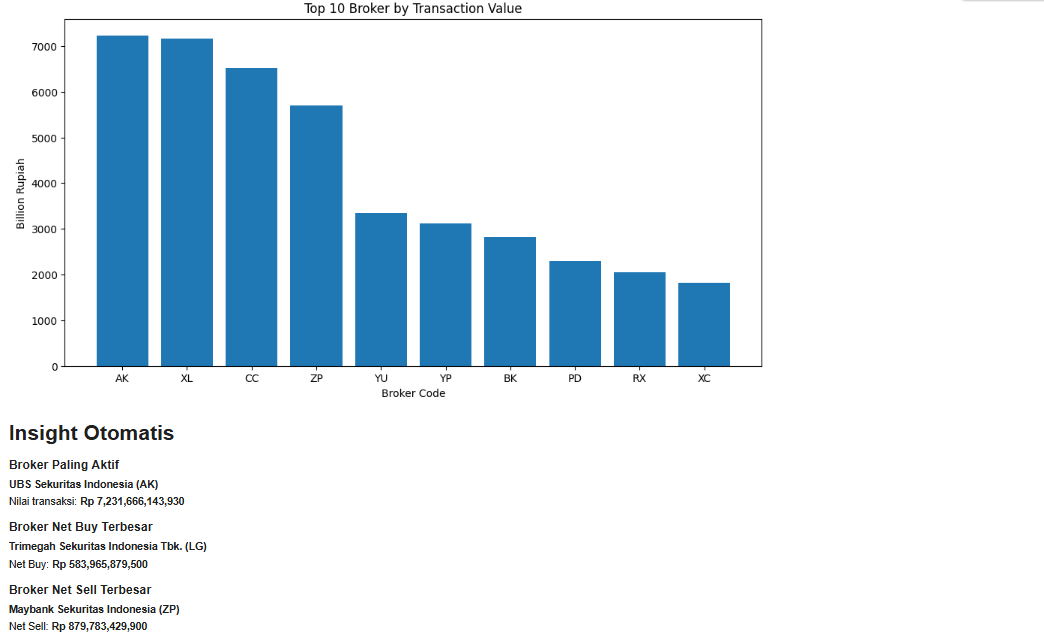
Cell 5 creates a simple visualization and automatic insight summary.
The notebook builds a bar chart showing the Top 10 Brokers by transaction value. Transaction value is divided by 1e9 so the chart is displayed in billion Rupiah.
After the chart is shown, the notebook identifies:
The most active broker by transaction value
The largest net buy broker
The largest net sell broker
The final output is displayed as an automatic Markdown insight report.
Result:
OVERALL WORKFLOW
This notebook starts by importing the required libraries and configuring API access.
It then defines helper functions for retrieving API data and converting responses into dataframes.
Next, it retrieves Top Brokers data and IPO Calendar data from the IDX API.
The broker data is extracted, converted into a dataframe, and cleaned by changing key transaction columns into numeric values.
After that, the notebook ranks brokers by transaction value, net buy activity, and net sell activity.
Finally, it creates a simple bar chart and generates automatic broker activity insights.
WHY THIS CASE MATTERS
Top Broker data can help investors understand which brokers are most active in the market.
High transaction value may indicate strong market participation. Net buy activity can show accumulation pressure, while net sell activity can show distribution pressure.
IPO Calendar data adds another layer of market awareness by helping investors monitor upcoming public offering events.
By combining Top Brokers and IPO Calendar data, investors can observe both current trading activity and future market opportunities in one workflow.
CONCLUSION
This tutorial demonstrates how to build a Top Brokers and IPO Calendar Analysis workflow using Python and the IDX API.
The notebook retrieves Top Broker data, retrieves IPO Calendar data, processes broker transaction metrics, ranks brokers by activity, creates a visualization, and generates automatic insights.
The final workflow provides:
Top broker monitoring
Transaction value ranking
Net buy analysis
Net sell analysis
IPO calendar retrieval
Automatic market insight reporting
For investors, traders, analysts, and fintech developers, this project provides a practical foundation for building a simple broker activity and IPO monitoring tool.