Institutional investment activity is an important subject in financial market analysis because reported transactions can provide information about how major investors allocate capital across different assets. Examining these transactions may help analysts understand investment patterns, identify frequently traded securities, and investigate changes in reported buying and selling activity over time.
The concept of smart money is often associated with investors and institutions that manage substantial amounts of capital. However, interpreting their reported transactions requires careful consideration of reporting dates, transaction values, and the limitations of the available data. A reported purchase does not necessarily indicate that an asset will increase in price, just as a reported sale does not automatically indicate a bearish outlook.
Python provides a practical environment for processing institutional transaction records. By combining API integration with data-processing libraries, analysts can retrieve financial records, normalize JSON responses, identify transaction types, aggregate reported values, and visualize activity over time. These capabilities support a repeatable analytical workflow that reduces the need for manual data processing.
This article presents Smart Money & Institutional Flow Analysis, a Python-based framework that uses the MarketFlow All-in-One Market Finance API through RapidAPI. The implementation retrieves institutional flow records associated with the investor identifier warren-buffett for the period January 1, 2023, to December 31, 2024.
The framework includes API documentation retrieval, institutional transaction extraction, JSON normalization, automatic column detection, buy-and-sell classification, transaction-value aggregation, monthly activity analysis, and dashboard reporting. It also identifies the assets that appear most frequently in the returned transaction records.
The primary objective is to demonstrate how institutional flow data can be organized into a structured analytical report. The resulting statistics describe the records returned by the API and should not be interpreted as real-time trading signals or guarantees of future investment performance.
2. Methodology
The Smart Money & Institutional Flow Analysis workflow is organized into five computational cells.
Cell 1 — Installation, configuration, and parameters: imports the required Python libraries, configures RapidAPI authentication, and defines the investor identifier and reporting period.
Cell 2 — API retrieval: requests the API usage guide and retrieves institutional flow data for the selected investor and date range.
Cell 3 — JSON normalization: extracts transaction records from nested JSON structures and converts them into a Pandas DataFrame.
Cell 4 — Transaction analysis: identifies date, asset, transaction type, transaction value, share count, and price fields. It then classifies transactions and calculates descriptive statistics.
Cell 5 — Dashboard and interpretation: summarizes the retrieved records, visualizes monthly transaction values, compares buy and sell activity, ranks frequently appearing assets, and presents an interpretation of the available data.
The framework uses Requests for API communication, Pandas for tabular processing, NumPy for conditional classification, and Matplotlib for visualization. The IPython.display module presents tables and analysis outputs directly within Google Colab.
The main analytical variables are the transaction date, asset identifier, transaction type, transaction value, number of shares, and share price. Because API response structures may vary, the implementation uses automatic column detection to identify likely fields based on their names.
When transaction values are available, the program calculates separate reported totals for purchases and sales. An indicative net flow is then calculated as:
\[ \text{Indicative Net Flow} = \text{Reported Buy Value} - \text{Reported Sell Value} \]
A positive result indicates that the sum of reported purchase values exceeds the sum of reported sale values in the classified records. A negative result indicates the opposite. This metric is descriptive and should not automatically be interpreted as an investor's complete net capital flow.
The monthly analysis aggregates reported transaction values according to the detected date field. The program also calculates the number of buy and sell records and identifies assets with the highest transaction frequency.
The analysis period is historical, covering 2023 and 2024. Accordingly, the results are intended for retrospective analysis rather than real-time trading decisions.
3. Implementation and Python Code
Cell 1 — Installation, Configuration, and Analysis Parameters
The first cell imports the required libraries and configures the connection to the MarketFlow API. The API key is retrieved from the RAPIDAPI_KEY environment variable or requested interactively through getpass.
The investor identifier and reporting period are then defined. In this implementation, the selected investor is warren-buffett, and the reporting period extends from January 1, 2023, through December 31, 2024.
Code — Cell 1
%pip -q install requests pandas numpy matplotlib

import os
import json
import getpass
import requests
import numpy as np
import pandas as pd
import matplotlib.pyplot as plt

from IPython.display import display, Markdown

BASE_URL = (
    "https://marketflow-all-in-one-market-finance-api.p.rapidapi.com"
)
API_HOST = "marketflow-all-in-one-market-finance-api.p.rapidapi.com"

API_KEY = os.getenv("RAPIDAPI_KEY", "").strip()
if not API_KEY:
    API_KEY = getpass.getpass("Masukkan RapidAPI Key: ").strip()
if not API_KEY:
    raise ValueError("RapidAPI Key wajib diisi.")

HEADERS = {
    "x-rapidapi-key": API_KEY,
    "x-rapidapi-host": API_HOST
}

# Parameter penelitian
INVESTOR = "warren-buffett"
START_DATE = "2023-01-01"
END_DATE = "2024-12-31"

print("MARKETFLOW | SMART MONEY ANALYZER")
print(f"Investor : {INVESTOR}")
print(f"Periode  : {START_DATE} s.d. {END_DATE}")
Cell 2 — Retrieving Institutional Flow Data
The second cell defines the reusable api_get() function for sending authenticated GET requests. The function applies a 45-second timeout, prints the HTTP status, checks the response, and returns the decoded JSON data.
The program first requests the /smartmoney/how-to-use endpoint to retrieve the API usage guide. It then requests /smartmoney/institutional-flow using the selected investor identifier and reporting period.
Both responses are printed in formatted JSON for inspection. This helps users review the returned field names and determine whether the API provides the information required for the subsequent analysis.
Code — Cell 2
def api_get(endpoint, params=None):
    response = requests.get(
        f"{BASE_URL}{endpoint}",
        headers=HEADERS,
        params=params or {},
        timeout=45
    )
    print(f"{endpoint} | HTTP {response.status_code}")
    response.raise_for_status()
    return response.json()

# Dokumentasi penggunaan endpoint
guide = api_get("/smartmoney/how-to-use")

print("\n=== PANDUAN API ===")
print(json.dumps(guide, indent=2, ensure_ascii=False)[:7000])

# Data institutional flow
flow_json = api_get(
    "/smartmoney/institutional-flow",
    params={
        "slug": INVESTOR,
        "start_date": START_DATE,
        "end_date": END_DATE
    }
)

print("\n=== PREVIEW RESPONS INSTITUTIONAL FLOW ===")
print(json.dumps(flow_json, indent=2, ensure_ascii=False)[:7000])
Cell 3 — Normalizing JSON into Transaction Records
The third cell converts the nested JSON response into a structured Pandas DataFrame. The extract_records() function searches for lists of dictionaries within the response and selects the largest candidate list as the primary transaction dataset.
The selected records are flattened with pd.json_normalize(), allowing nested fields to be represented as table columns. If no suitable records are found, the program displays a message asking the user to inspect the API response.
When records are available, the cell reports the number of transactions, lists the detected column names, and displays the first ten records. This preliminary inspection is important because the subsequent calculations depend on the actual field names returned by the API.
Code — Cell 3
def extract_records(obj):
    """Cari daftar record berbentuk dictionary di JSON bertingkat."""
    candidates = []

    def walk(x, path="root"):
        if isinstance(x, list):
            dicts = [item for item in x if isinstance(item, dict)]
            if dicts:
                candidates.append((len(dicts), path, dicts))
            for i, item in enumerate(x):
                if isinstance(item, (dict, list)):
                    walk(item, f"{path}[{i}]")

        elif isinstance(x, dict):
            for key, value in x.items():
                if isinstance(value, (dict, list)):
                    walk(value, f"{path}.{key}")

    walk(obj)

    if not candidates:
        return pd.DataFrame()

    # Prioritaskan daftar record terbesar
    _, path, records = max(candidates, key=lambda item: item[0])
    print("Sumber tabel:", path)

    return pd.json_normalize(records, sep="_")


df = extract_records(flow_json)

if df.empty:
    print("Belum ditemukan daftar transaksi.")
    print("Periksa respons pada Cell 2, termasuk pesan error API.")
else:
    print("Jumlah record:", len(df))
    print("Kolom yang tersedia:")
    print(df.columns.tolist())
    display(df.head(10))
Cell 4 — Transaction Analysis, Buy/Sell Classification, and Asset Activity
The fourth cell performs the primary analysis of institutional flow records. It uses the find_col() function to identify likely fields associated with transaction dates, asset identifiers, transaction types, transaction values, share quantities, and prices.
The selected fields are then processed in a copy of the original DataFrame. Dates are converted into Pandas datetime values, while numerical fields are cleaned of common currency symbols, thousands separators, and surrounding whitespace before being converted to numeric types.
If a transaction-type column is detected, the program classifies each record as BUY, SELL, or OTHER. The classification relies on text matching for common transaction labels such as buy, purchase, bought, sell, sold, and sale.
When a transaction-value column is available, the cell separates the reported purchase and sale values and calculates summary statistics for each activity category. It also identifies the assets with the highest transaction frequency and displays the actual date range represented in the returned records.
If the API response does not contain a recognizable transaction-type field, the program does not infer net flow from transaction values alone.
Code — Cell 4
def find_col(keywords):
    for col in df.columns:
        name = str(col).lower().replace("_", " ")
        if any(k in name for k in keywords):
            return col
    return None


if df.empty:
    print("Analisis dihentikan: data transaksi belum tersedia.")
else:
    date_col = find_col(["date", "timestamp", "reported", "filing"])
    asset_col = find_col(["ticker", "symbol", "stock", "company", "asset"])
    side_col = find_col(["transaction type", "trade type", "side", "action"])
    value_col = find_col([
        "transaction value", "trade value", "market value",
        "amount usd", "value usd", "value", "amount"
    ])
    shares_col = find_col(["shares", "quantity", "units"])
    price_col = find_col(["price per share", "share price", "price"])

    data = df.copy()

    if date_col:
        data[date_col] = pd.to_datetime(data[date_col], errors="coerce")
        data = data.sort_values(date_col)

    def numeric(series):
        # Hapus simbol mata uang dan pemisah ribuan yang umum.
        s = series.astype(str).str.replace(r"[$€£,\s]", "", regex=True)
        s = s.str.replace(r"^\((.*)\)$", r"-\1", regex=True)
        return pd.to_numeric(s, errors="coerce")

    for col in [value_col, shares_col, price_col]:
        if col:
            data[col] = numeric(data[col])

    print("Kolom terdeteksi:")
    print({
        "tanggal": date_col,
        "aset": asset_col,
        "aksi": side_col,
        "nilai": value_col,
        "jumlah saham": shares_col,
        "harga": price_col
    })

    if side_col:
        side = data[side_col].astype(str).str.lower()
        is_buy = side.str.contains(r"\bbuy\b|\bpurchase\b|\bbought\b", regex=True)
        is_sell = side.str.contains(r"\bsell\b|\bsold\b|\bsale\b", regex=True)

        data["Aktivitas"] = np.select(
            [is_buy, is_sell],
            ["BUY", "SELL"],
            default="OTHER"
        )

        print("\nDistribusi aktivitas:")
        display(data["Aktivitas"].value_counts().rename("Jumlah").to_frame())

        if value_col:
            data["Nilai_Beli"] = data[value_col].where(is_buy, 0)
            data["Nilai_Jual"] = data[value_col].where(is_sell, 0)
            summary = data.groupby("Aktivitas")[
                [value_col]
            ].agg(["count", "sum"])
            display(summary)
        else:
            print("Nilai transaksi tidak ditemukan; analisis nominal dilewati.")

    elif value_col:
        print(
            "Kolom aksi beli/jual tidak ditemukan. "
            "Nilai transaksi saja tidak cukup untuk menentukan net flow."
        )

    if asset_col:
        print("\nAset dengan transaksi terbanyak:")
        display(data[asset_col].value_counts().head(15).to_frame("Jumlah transaksi"))

    if date_col:
        print("\nRentang tanggal aktual pada data:")
        print(data[date_col].min(), "hingga", data[date_col].max())

    display(data.head(20))
Cell 5 — Smart Money Dashboard and Trading Insights
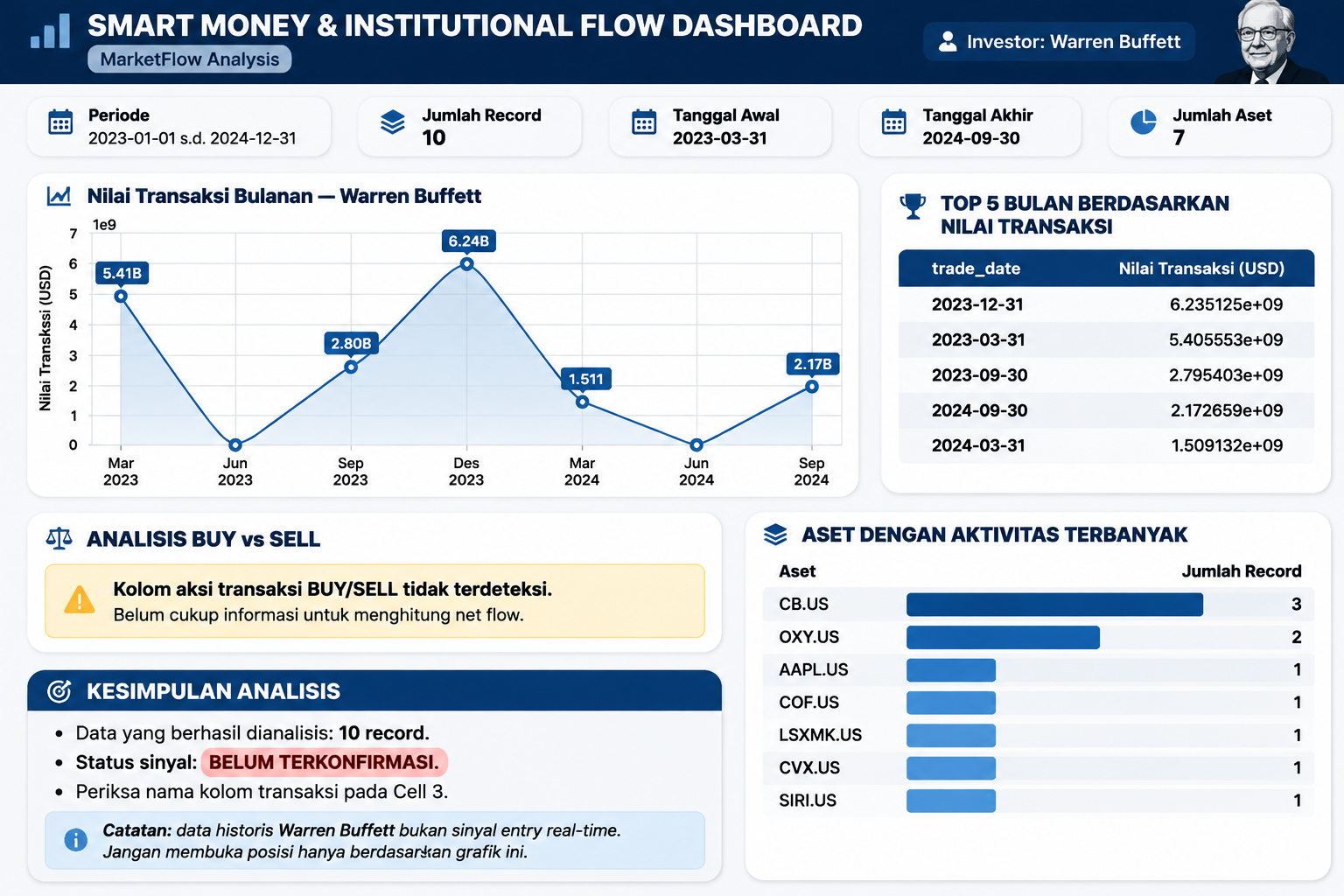
The fifth cell assembles the analytical results into a dashboard. It displays the investor identifier, reporting period, number of returned records, actual date range, and number of unique assets when those fields are available.
The monthly transaction-value chart aggregates reported values by month using Pandas resampling. It then ranks the five months with the highest aggregated values, providing a concise view of the periods with the largest reported transaction totals.
The buy-and-sell section calculates the number of records classified as purchases and sales, together with the purchase share among those two recognized categories. It labels the observed activity as buy-dominant, sell-dominant, or relatively balanced according to the thresholds defined in the script.
When transaction values are available, the dashboard also calculates the difference between reported buy and sell totals. This is presented as an indicative net flow rather than a complete measure of capital movement.
Finally, the cell ranks frequently appearing assets and presents a conclusion based on the available fields. It explicitly cautions against treating historical reported transactions as real-time trading signals.
Code — Cell 5
# CELL 5 — SMART MONEY DASHBOARD & TRADING INSIGHTS

if df.empty:
    print("Data kosong. Periksa kembali respons API pada Cell 2.")
else:
    report = data.copy()

    print("=" * 65)
    print("       SMART MONEY & INSTITUTIONAL FLOW DASHBOARD")
    print("=" * 65)
    print(f"Investor       : {INVESTOR}")
    print(f"Periode        : {START_DATE} s.d. {END_DATE}")
    print(f"Jumlah record  : {len(report)}")

    # 1. Ringkasan kualitas data
    if date_col:
        report[date_col] = pd.to_datetime(report[date_col], errors="coerce")
        print(f"Tanggal awal   : {report[date_col].min()}")
        print(f"Tanggal akhir  : {report[date_col].max()}")

    if asset_col:
        print(f"Jumlah aset    : {report[asset_col].nunique()}")

    # 2. Grafik nilai transaksi: hanya bulan dengan data valid
    if date_col and value_col:
        chart_data = report.dropna(subset=[date_col, value_col]).copy()

        monthly = (
            chart_data
            .set_index(date_col)[value_col]
            .resample("ME")
            .sum(min_count=1)
            .dropna()
        )

        # Hapus bulan yang tidak memiliki nilai transaksi
        monthly = monthly[monthly != 0]

        if not monthly.empty:
            fig, ax = plt.subplots(figsize=(13, 5))
            monthly.plot(
                ax=ax,
                marker="o",
                linewidth=2
            )
            ax.set_title(f"Nilai Transaksi Bulanan — {INVESTOR}")
            ax.set_xlabel("Bulan")
            ax.set_ylabel("Total nilai sesuai satuan API")
            ax.grid(True, alpha=0.3)
            plt.xticks(rotation=45)
            plt.tight_layout()
            plt.show()

            print("\nTOP 5 BULAN BERDASARKAN NILAI TRANSAKSI")
            display(
                monthly.sort_values(ascending=False)
                .head(5)
                .rename("Nilai Transaksi")
                .to_frame()
            )
        else:
            print("\nGrafik nilai transaksi tidak tersedia:")
            print("Tidak ada nilai transaksi numerik yang valid.")

    # 3. Analisis aktivitas beli dan jual
    print("\n" + "-" * 65)
    print("ANALISIS BUY vs SELL")
    print("-" * 65)

    if side_col:
        side = report[side_col].astype(str).str.lower().str.strip()

        buy_mask = side.str.contains(
            r"\bbuy\b|\bpurchase\b|\bbought\b", regex=True
        )
        sell_mask = side.str.contains(
            r"\bsell\b|\bsale\b|\bsold\b", regex=True
        )

        buy_count = int(buy_mask.sum())
        sell_count = int(sell_mask.sum())
        total_known = buy_count + sell_count

        print(f"Transaksi BUY  : {buy_count}")
        print(f"Transaksi SELL : {sell_count}")

        if total_known:
            buy_ratio = buy_count / total_known
            print(f"Rasio BUY      : {buy_ratio:.2%}")

            if buy_ratio >= 0.65:
                print("Bias aktivitas: BUY dominan")
            elif buy_ratio <= 0.35:
                print("Bias aktivitas: SELL dominan")
            else:
                print("Bias aktivitas: relatif seimbang")
        else:
            print("Label BUY/SELL belum dikenali pada data.")

        # Net flow hanya dihitung jika nominal transaksi tersedia
        if value_col:
            buy_value = report.loc[buy_mask, value_col].sum()
            sell_value = report.loc[sell_mask, value_col].sum()

            print(f"Total nilai BUY : {buy_value:,.2f}")
            print(f"Total nilai SELL: {sell_value:,.2f}")
            print(f"Net flow indikatif: {buy_value - sell_value:,.2f}")
    else:
        print("Kolom aksi transaksi BUY/SELL tidak terdeteksi.")
        print("Belum cukup informasi untuk menghitung net flow.")

    # 4. Aset yang paling sering muncul
    if asset_col:
        print("\n" + "-" * 65)
        print("ASET DENGAN AKTIVITAS TERBANYAK")
        print("-" * 65)
        display(
            report[asset_col]
            .value_counts()
            .head(10)
            .rename_axis("Aset")
            .to_frame("Jumlah Record")
        )

    # 5. Kesimpulan berbasis data yang tersedia
    print("\n" + "=" * 65)
    print("KESIMPULAN ANALISIS")
    print("=" * 65)
    print(f"Data yang berhasil dianalisis: {len(report)} record.")

    if not side_col:
        print(
            "Status sinyal: BELUM TERKONFIRMASI. "
            "Periksa nama kolom transaksi pada Cell 3."
        )
    elif not value_col:
        print(
            "Status sinyal: TERBATAS. "
            "Data nilai transaksi belum tersedia untuk menghitung net flow."
        )
    else:
        print(
            "Gunakan dominasi aktivitas sebagai filter awal. "
            "Konfirmasi dengan harga, volume, dan waktu publikasi laporan."
        )

    print(
        "\nCatatan: data historis Warren Buffett bukan sinyal entry real-time. "
        "Jangan membuka posisi hanya berdasarkan grafik ini."
    )
Result:
4. Results and Discussion
4.1. Institutional Flow Data Retrieval
The data retrieval module requests institutional flow records for the selected investor and reporting period. The returned JSON response is then examined to identify the available transaction records and their field structure.
The number of successfully extracted records provides an initial overview of the dataset available for analysis. The actual date range and the number of unique assets are subsequently reported to help characterize the retrieved information.
However, the number of returned records should not automatically be interpreted as the investor's complete transaction history. The results depend on the API's coverage, reporting methodology, available historical data, and the success of the date filters.
4.2. Buy and Sell Activity
The transaction classification module separates records into BUY, SELL, and OTHER categories based on the detected transaction-type field.
The dashboard reports the number of recognized purchase and sale records and calculates the purchase ratio among those two categories. According to the thresholds defined in the implementation, a purchase ratio of at least 65% is labeled buy-dominant, while a ratio of 35% or less is labeled sell-dominant. Values between these thresholds are labeled relatively balanced.
These classifications describe the distribution of recognized transaction records. They do not necessarily reflect the relative capital allocated to purchases and sales because each record contributes equally to the transaction count, regardless of its monetary value.
The classification also depends on the terminology used by the API. Transaction labels that do not match the specified patterns may be assigned to the OTHER category, even if they represent a purchase or sale under the provider's conventions.
4.3. Transaction Value and Indicative Net Flow
When a transaction-value field is detected, the program calculates separate totals for reported purchases and sales. The difference between these totals is presented as indicative net flow.
A positive value indicates that the classified purchase total exceeds the classified sale total, while a negative value indicates that the classified sale total exceeds the purchase total.
Nevertheless, the interpretation depends on the meaning and units of the transaction-value field. The program does not independently establish whether the field represents the full transaction value, a reported market value, or another financial measure. It also does not automatically normalize values expressed in different currencies.
Consequently, the calculated difference should be treated as an analytical estimate based on the returned records rather than a definitive measure of the investor's complete capital movement.
4.4. Monthly Transaction Activity
The monthly activity chart aggregates transaction values by the detected date field. It provides a chronological view of the reported values and helps identify months with relatively high totals.
The dashboard also ranks the five months with the largest aggregated transaction values. This summary makes it easier to identify periods that may warrant further examination.
However, monthly totals can be influenced by the number of records returned, the types of transactions included, and the meaning of the underlying date field. If the field represents a filing or reporting date rather than an execution date, the chart should be interpreted as reported activity by date, not necessarily as a record of when each transaction occurred.
4.5. Assets with the Highest Transaction Frequency
The asset-frequency analysis ranks the securities that appear most often in the retrieved dataset. This allows analysts to identify assets that receive repeated attention in the reported records.
A high transaction frequency may reflect repeated purchases, repeated sales, or a combination of both. The frequency ranking therefore does not establish whether the investor accumulated or reduced a particular position.
Further analysis would be required to distinguish changes in ownership, net share accumulation, transaction timing, and portfolio allocation. The current implementation provides an initial descriptive ranking rather than a complete reconstruction of institutional holdings.
4.6. Limitations and Future Improvements
Several limitations should be considered when interpreting the dashboard.
First, the analysis uses a historical reporting period from January 2023 through December 2024. The resulting records cannot be treated as real-time institutional activity.
Second, automatic column detection relies on field names. Although this approach makes the program adaptable to different response structures, it cannot guarantee that each detected field has the intended meaning.
Third, transaction classification is based on keyword matching. Unrecognized labels may be categorized as OTHER, and the program does not automatically validate every classification against the API documentation.
Fourth, the indicative net flow calculation does not independently account for currency differences, missing records, reporting delays, or possible differences in how transaction values are defined.
Finally, the framework does not calculate portfolio returns or establish a causal relationship between reported institutional transactions and subsequent price movements.
Future improvements could include stricter schema validation, explicit currency normalization, transaction-level data-quality checks, share accumulation analysis, and comparisons between reported transaction dates and subsequent market performance. These additions would provide a stronger foundation for institutional activity research.
5. Conclusion
Smart Money & Institutional Flow Analysis demonstrates how Python can be used to retrieve, normalize, analyze, and visualize institutional transaction records through the MarketFlow All-in-One Market Finance API.
The framework integrates API documentation retrieval, institutional flow extraction, JSON normalization, automatic field detection, buy-and-sell classification, transaction-value aggregation, monthly activity analysis, and asset-frequency ranking. Together, these components provide a repeatable workflow for examining reported institutional activity.
The resulting dashboard helps distinguish transaction frequency from transaction value and presents an indicative net flow based on the records that can be classified. These measures provide useful descriptive information, but their interpretation depends on the completeness of the API response and the definitions of the underlying fields.
Historical institutional transactions should not be treated as direct instructions to replicate an investor's decisions. Reporting delays, incomplete records, and differences in investment objectives can all affect the relevance of the information to current market conditions.
Future development should prioritize data validation, currency consistency, more detailed ownership analysis, and integration with historical price data. With these improvements, the framework can serve as a useful foundation for systematic institutional flow research and financial-data exploration.