
Introduction
OHLCV stock data analysis Python is an essential approach for analyzing financial market data. This tutorial will guide you step-by-step to fetch, process, and analyze stock data using Python in Google Colab.
This tutorial focuses on OHLCV stock data analysis Python, helping you understand how to fetch and analyze real financial data step-by-step.
In today’s fast-moving financial markets, data is everything. Traders, analysts, and developers rely heavily on accurate and real-time data to make informed decisions. One of the most fundamental datasets in financial analysis is OHLCV (Open, High, Low, Close, Volume), which provides a complete snapshot of price movements over time. When combined with commodity impact data, it becomes even more powerful—offering insights into how macroeconomic factors influence stock performance.
In this tutorial, we will build a practical data pipeline using Python in Google Colab to fetch and analyze stock data from the Indonesia Stock Exchange (IDX). Specifically, we will work with BBCA stock data, one of the most actively traded stocks in Indonesia, and integrate it with commodity impact indicators.
This guide is designed not only to show you how to write the code, but also to help you understand the logic behind each step. We will break down the notebook cell by cell, covering data extraction, JSON parsing, price analysis, and volume interpretation.
Whether you're a beginner exploring financial data analysis or a developer building trading systems, this article will give you a solid foundation to start working with real-world market data using Python.
In this guide, we will build a complete OHLCV stock data analysis Python workflow using real API data.
Link RapidAPI :
https://rapidapi.com/user/yasimpratama88
OHLCV Stock Data Analysis Python: Step-by-Step Guide
Cell 1 — Import Library
This cell imports the requests library, which is used to send HTTP requests to an API.
import requestsThe requests library allows Python to communicate with external web services. In this case, we use it to fetch financial data from RapidAPI.
Cell 2 — Setup API
This cell stores the API key and request headers.
API_KEY = "YOUR_RAPIDAPI_KEY_HERE"

headers = {
    "Content-Type": "application/json",
    "x-rapidapi-host": "indonesia-stock-exchange-idx.p.rapidapi.com",
    "x-rapidapi-key": API_KEY
}
The headers variable contains authentication information required by the API. Replace "YOUR_RAPIDAPI_KEY_HERE" with your own RapidAPI key.
Cell 3 — Get OHLCV Data
This cell fetches daily OHLCV data for BBCA stock.
url_ohlcv = "https://indonesia-stock-exchange-idx.p.rapidapi.com/api/chart/BBCA/daily?from=2026-02-10&to=2026-02-18&limit=0"

response_ohlcv = requests.get(url_ohlcv, headers=headers)
data_ohlcv = response_ohlcv.json()

print("OHLCV Status:", response_ohlcv.status_code)
OHLCV stands for:
Open: opening price
High: highest price
Low: lowest price
Close: closing price
Volume: number of shares traded
The status code helps confirm whether the API request was successful. A status code of 200 usually means the request worked.
Cell 4 — Get Commodities Impact Data
This cell retrieves commodity impact data from the API.
url_commodities = "https://indonesia-stock-exchange-idx.p.rapidapi.com/api/main/commodities-impact"

response_com = requests.get(url_commodities, headers=headers)
data_com = response_com.json()

print("Commodities Status:", response_com.status_code)
Commodity impact data can help investors understand how commodity price movements may affect the stock market.
This is especially useful for analyzing sectors related to energy, mining, agriculture, and raw materials.
Cell 5 — Check Data Structure
Before analyzing API data, it is important to inspect the structure of the returned JSON.
import json

print("=== OHLCV DATA ===")
print(json.dumps(data_ohlcv, indent=2))

print("\n=== COMMODITIES DATA ===")
print(json.dumps(data_com, indent=2))
This step helps us understand where the useful data is located inside the API response.
Using json.dumps(..., indent=2) makes the JSON output easier to read.
Cell 6 — Extract Main OHLCV Data
This cell extracts the main OHLCV data from the nested API response.
ohlcv = data_ohlcv.get("data", {}).get("data", {}).get("chartbit", [])The .get() method is used to safely access nested dictionary values.
If one of the keys does not exist, the code will return an empty list instead of causing an error.
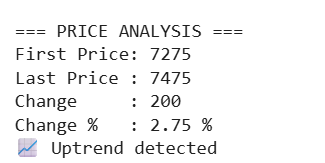
Cell 7 — OHLCV Price Analysis
This cell calculates the price change between the first and last closing price.
print("\n=== PRICE ANALYSIS ===")

if len(ohlcv) > 0:
    first_price = ohlcv[0]["close"]
    last_price = ohlcv[-1]["close"]

    change = last_price - first_price
    percent = (change / first_price) * 100

    print("First Price:", first_price)
    print("Last Price :", last_price)
    print("Change     :", round(change, 2))
    print("Change %   :", round(percent, 2), "%")

    if percent > 0:
        print("📈 Uptrend detected")
    else:
        print("📉 Downtrend detected")
else:
    print("❌ No data available")
This analysis compares the first and last closing prices in the selected date range.
If the percentage change is positive, the code detects an uptrend. If it is negative, the code detects a downtrend.
Result:
Cell 8 — Volume Analysis
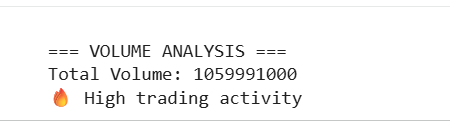
This cell calculates the total trading volume.
print("\n=== VOLUME ANALYSIS ===")

total_volume = sum([x["volume"] for x in ohlcv])

print("Total Volume:", total_volume)

if total_volume > 100000000:
    print("🔥 High trading activity")
else:
    print("⚠️ Low trading activity")
Volume is an important indicator in stock analysis because it shows market activity.
High volume usually indicates strong investor interest, while low volume may suggest weaker participation.
Result:
Conclusion
This project demonstrates how a simple Google Colab notebook can evolve into a powerful financial data analysis pipeline. By combining OHLCV stock data with commodity impact insights, we gain a broader understanding of market dynamics—moving beyond basic price tracking into more meaningful analysis.
Throughout this tutorial, we’ve covered the full workflow:
Connecting to a real-world financial API
Fetching and inspecting structured JSON data
Extracting relevant OHLCV information
Performing price trend analysis
Evaluating trading volume activity
These steps represent the core building blocks of many real-world applications, including trading algorithms, financial dashboards, and data-driven investment strategies.
However, this is just the beginning. To take this project further, you could:
Add technical indicators like RSI or MACD
Visualize trends using interactive charts
Build predictive models using machine learning
Automate data collection for real-time monitoring
The key takeaway is this: understanding the data pipeline is more important than just writing code. Once you master how data flows—from API to analysis—you unlock the ability to build scalable and intelligent financial systems.
If you're serious about data-driven finance, this kind of workflow is an essential skill to develop.