MarketFlow Trader Intelligence: Fundamental Stock Analysis Using Earnings Estimates, Analyst Revisions, and Corporate Actions
1. Introduction
Stock market analysis requires an understanding of both market behavior and the financial information that influences investor expectations. While technical analysis focuses on historical prices and trading patterns, fundamental analysis examines financial indicators, earnings expectations, and corporate events that may affect a company's valuation.
Earnings per share (EPS) is one of the important indicators used to evaluate a company's profitability. Analyst estimates provide information about expected future earnings, while revisions to those estimates can indicate changes in analysts' expectations. Historical earnings surprises, which compare reported EPS with consensus estimates, provide additional information about whether a company has exceeded, met, or fallen short of market expectations.
Corporate actions are another important component of stock analysis. A stock split changes the number of outstanding shares and the nominal price per share without directly changing the company's total market capitalization. Identifying these events can help analysts interpret historical price and share-related data more accurately.
Application programming interfaces (APIs) make it possible to integrate these different sources of information into a single analytical workflow. By retrieving earnings details and stock split events programmatically, analysts can organize financial data, identify trends in earnings expectations, evaluate analyst revisions, and summarize selected corporate events.
This article presents a Python-based analytical framework called MarketFlow Trader Intelligence. The framework uses the MarketFlow All-in-One Market Finance API through RapidAPI to retrieve earnings information and stock split events. It then processes earnings estimates, EPS revisions, historical earnings surprises, and corporate actions to produce a structured analytical dashboard.
The objective is to demonstrate how financial API integration and Python data processing can support preliminary fundamental stock analysis. The resulting dashboard is intended to organize information for further investigation rather than independently determine whether a stock should be purchased or sold.
2. Methodology
The analytical framework consists of five computational stages. Each stage performs a distinct task, from API configuration and data retrieval to fundamental interpretation and visualization.
The default stock ticker is AMG.US, and the stock split search uses a rolling 30-day date window. These parameters can be modified according to the instrument and analysis period of interest.
The system retrieves earnings details and stock split events through separate API endpoints. It then normalizes the returned JSON data into structures that can be processed using Pandas. Earnings estimates, revenue estimates, analyst revisions, and historical EPS surprises are analyzed separately before their outputs are combined into the final dashboard.
The framework is designed to tolerate several common API response structures. However, successful execution depends on the API subscription, endpoint availability, ticker support, and actual field names returned by the service.
3. Implementation and Code
Cell 1 — Import Libraries and Configure the Analysis
The first cell initializes the Python environment and defines the parameters used throughout the analysis. Requests handles HTTP communication, Pandas manages tabular data, NumPy supports numerical operations, and Matplotlib is used to visualize earnings growth estimates.
The API key is obtained from the RAPIDAPI_KEY environment variable when available. Otherwise, the program requests the key interactively. The key is passed through the request headers rather than being embedded directly in the API URL.
The ticker and date range are configurable. The default period covers the current date and the preceding 30 calendar days. This period is used to retrieve stock split events; it does not automatically restrict the historical earnings data returned by the earnings endpoint.
Code — Cell 1
# CELL 1 — IMPORT LIBRARIES & CONFIGURATION

import os
import json
import requests
import pandas as pd
import numpy as np
import matplotlib.pyplot as plt

from datetime import date, timedelta
from IPython.display import display

BASE_URL = (
    "https://marketflow-all-in-one-market-finance-api"
    ".p.rapidapi.com"
)

API_HOST = (
    "marketflow-all-in-one-market-finance-api.p.rapidapi.com"
)

# Configure the RapidAPI key through an environment variable.
API_KEY = os.getenv("RAPIDAPI_KEY", "").strip()

if not API_KEY:
    API_KEY = input("Masukkan RapidAPI Key: ").strip()

if not API_KEY:
    raise ValueError("RapidAPI key belum diisi.")

HEADERS = {
    "x-rapidapi-key": API_KEY,
    "x-rapidapi-host": API_HOST
}

# Analysis parameters
TICKER = "AMG.US"

END_DATE = date.today()
START_DATE = END_DATE - timedelta(days=30)

START_DATE = START_DATE.isoformat()
END_DATE = END_DATE.isoformat()

print("MARKETFLOW TRADER INTELLIGENCE")
print("Ticker       :", TICKER)
print("Periode split:", START_DATE, "s/d", END_DATE)
print("Konfigurasi siap.")
Cell 2 — API Client and JSON Data Normalization
The second cell implements the API communication layer. The api_get() function sends GET requests with authentication headers, a 30-second timeout, and error handling for unsuccessful HTTP responses, connection failures, and invalid JSON responses.
The function returns the decoded JSON payload when the request succeeds. If a request fails, it displays diagnostic information and returns None, allowing the remaining notebook to distinguish unavailable data from successfully retrieved records.
The extract_records() function standardizes several common response formats. If the response is already a list, it is returned directly. If the response is a dictionary containing a recognized list field, that list is extracted. A dictionary containing a single record is wrapped in a list.
This normalization makes downstream processing more consistent, although the exact response schema still needs to be verified against the API documentation and actual payload.
Code — Cell 2
# CELL 2 — API CLIENT

def api_get(endpoint, params=None):
    """Send an authenticated GET request and return JSON data."""

    url = f"{BASE_URL}{endpoint}"

    try:
        response = requests.get(
            url,
            headers=HEADERS,
            params=params or {},
            timeout=30
        )

        response.raise_for_status()

        return response.json()

    except requests.exceptions.HTTPError as e:
        print("HTTP ERROR:", e)
        print("Respons:", response.text[:1000])

    except requests.exceptions.RequestException as e:
        print("CONNECTION ERROR:", e)

    except ValueError as e:
        print("JSON ERROR:", e)

    return None


def extract_records(data):
    """Normalize common JSON response structures into a list."""

    if data is None:
        return []

    if isinstance(data, list):
        return data

    if isinstance(data, dict):
        for key in (
            "data",
            "results",
            "items",
            "events",
            "splits",
            "records",
            "earnings"
        ):
            value = data.get(key)

            if isinstance(value, list):
                return value

            if isinstance(value, dict):
                return [value]

        return [data]

    return []


print("API client siap digunakan.")
Cell 3 — Retrieve Earnings Details and Stock Split Events
The third cell retrieves the two principal datasets used by the framework.
The earnings endpoint, /earnings-details/{TICKER}, retrieves earnings-related information for the configured stock. The response may contain analyst estimates, revenue estimates, EPS revisions, and historical earnings surprises, depending on the data supplied by the API.
The stock split endpoint, /splits-events, retrieves corporate event records within the configured date range. The program sends the starting date, ending date, and pagination offset as request parameters.
The raw responses are printed in formatted JSON form, subject to a character limit, to facilitate inspection of the returned data structure. The program also reports the number of records extracted from each response.
Inspecting the raw payload before interpreting financial data is important because missing fields, different field names, or unsupported tickers may affect subsequent calculations.
Code — Cell 3
# CELL 3 — FETCH MARKET DATA

earnings_raw = api_get(
    f"/earnings-details/{TICKER}",
    params={"lang": "en"}
)

splits_raw = api_get(
    "/splits-events",
    params={
        "skip": 0,
        "start_date": START_DATE,
        "end_date": END_DATE
    }
)

earnings_records = extract_records(earnings_raw)
split_records = extract_records(splits_raw)

print("=" * 60)
print("EARNINGS DETAILS")
print("=" * 60)

if earnings_raw is not None:
    print(
        json.dumps(
            earnings_raw,
            indent=2,
            ensure_ascii=False,
            default=str
        )[:6000]
    )
else:
    print("Data earnings tidak berhasil diambil.")

print("\n" + "=" * 60)
print("STOCK SPLITS")
print("=" * 60)

if splits_raw is not None:
    print(
        json.dumps(
            splits_raw,
            indent=2,
            ensure_ascii=False,
            default=str
        )[:6000]
    )
else:
    print("Data stock splits tidak berhasil diambil.")

print("\nJumlah record earnings:", len(earnings_records))
print("Jumlah record splits  :", len(split_records))
Cell 4 — Earnings Intelligence and Corporate Action Analysis
The fourth cell transforms the retrieved data into analytical tables. The program first extracts the trend section from the earnings response and identifies three categories: earnings estimates, revenue estimates, and EPS revisions.
The dated_records() function converts date-indexed dictionaries into DataFrames. Period values are converted to datetime objects and sorted chronologically. This allows the latest available estimate or revision record to be identified more consistently.
Historical EPS surprise data are processed separately. The flatten_historical() function supports both list-based and date-indexed dictionary structures. A supporting flatten_dict() function normalizes nested dictionaries into flat field names, making it easier to identify actual EPS and estimated EPS values.
The cell also converts stock split records into a DataFrame and filters events by ticker. This filtering step is important because an endpoint may return events for multiple instruments.
The resulting tables provide the analytical inputs required by the final dashboard. Missing fields are not interpreted as zero or as evidence that an event never occurred; they are treated as unavailable information.
Code — Cell 4
# CELL 4 — EARNINGS INTELLIGENCE & CORPORATE ACTION FILTER

# 1. Extract trend information from the earnings response
trend = (
    earnings_raw.get("trend", {})
    if isinstance(earnings_raw, dict)
    else {}
)

eps_trend = trend.get("earnings_estimate", {})
revenue_trend = trend.get("revenue_estimate", {})
revision_trend = trend.get("eps_revisions", {})


def dated_records(data, prefix=None):
    """Convert date-indexed dictionaries into a DataFrame."""

    rows = []

    if isinstance(data, dict):
        for period, values in data.items():
            if isinstance(values, dict):
                rows.append({
                    "period": period,
                    **values
                })

    elif isinstance(data, list):
        for item in data:
            if isinstance(item, dict):
                rows.append(item)

    df = pd.DataFrame(rows)

    if not df.empty and "period" in df.columns:
        df["period"] = pd.to_datetime(
            df["period"],
            errors="coerce"
        )

        df = (
            df.sort_values("period")
            .reset_index(drop=True)
        )

    return df


eps_trend_df = dated_records(eps_trend, "eps")
revenue_trend_df = dated_records(revenue_trend, "revenue")
revision_df = dated_records(revision_trend, "revision")


# 2. Extract historical actual-versus-estimate EPS records
historical = (
    earnings_raw.get("historical_eps_surprise", {})
    if isinstance(earnings_raw, dict)
    else {}
)


def flatten_dict(data, parent_key="", sep="_"):
    """Flatten nested dictionaries into simple field names."""

    items = {}

    if not isinstance(data, dict):
        return items

    for key, value in data.items():
        new_key = (
            f"{parent_key}{sep}{key}"
            if parent_key
            else str(key)
        )

        if isinstance(value, dict):
            items.update(
                flatten_dict(value, new_key, sep=sep)
            )
        else:
            items[new_key] = value

    return items


def flatten_historical(data):
    """Support list and dictionary historical data formats."""

    rows = []

    if isinstance(data, list):
        for item in data:
            if isinstance(item, dict):
                rows.append(flatten_dict(item))

    elif isinstance(data, dict):
        recognized_fields = {
            "epsactual",
            "epsestimate",
            "actualeps",
            "estimateeps",
            "surprise",
            "surprisepercent"
        }

        normalized_keys = {
            "".join(
                c for c in str(k).lower() if c.isalnum()
            )
            for k in data
        }

        if normalized_keys & recognized_fields:
            rows.append(flatten_dict(data))

        else:
            for period, item in data.items():
                if isinstance(item, dict):
                    rows.append({
                        "period": period,
                        **flatten_dict(item)
                    })

    return pd.DataFrame(rows)


historical_df = flatten_historical(historical)


# 3. Normalize stock split records
splits_df = pd.DataFrame(split_records)

if not splits_df.empty and "ticker" in splits_df.columns:
    target_splits = splits_df[
        splits_df["ticker"].astype(str).str.upper()
        == TICKER.upper()
    ].copy()
else:
    target_splits = pd.DataFrame()


# 4. Display the analytical tables
print("=== EPS ESTIMATE TREND ===")
print("Jumlah periode:", len(eps_trend_df))
display(eps_trend_df.head(10))

print("\n=== REVENUE ESTIMATE TREND ===")
display(revenue_trend_df.head(10))

print("\n=== EPS REVISIONS ===")
display(revision_df.head(10))

print("\n=== HISTORICAL EPS SURPRISE ===")
print("Kolom:", historical_df.columns.tolist())
display(historical_df.head(10))

print(f"\n=== CORPORATE ACTIONS: {TICKER} ===")
print("Event ditemukan:", len(target_splits))
display(target_splits)
Cell 5 — Trader Intelligence Dashboard and Fundamental Interpretation
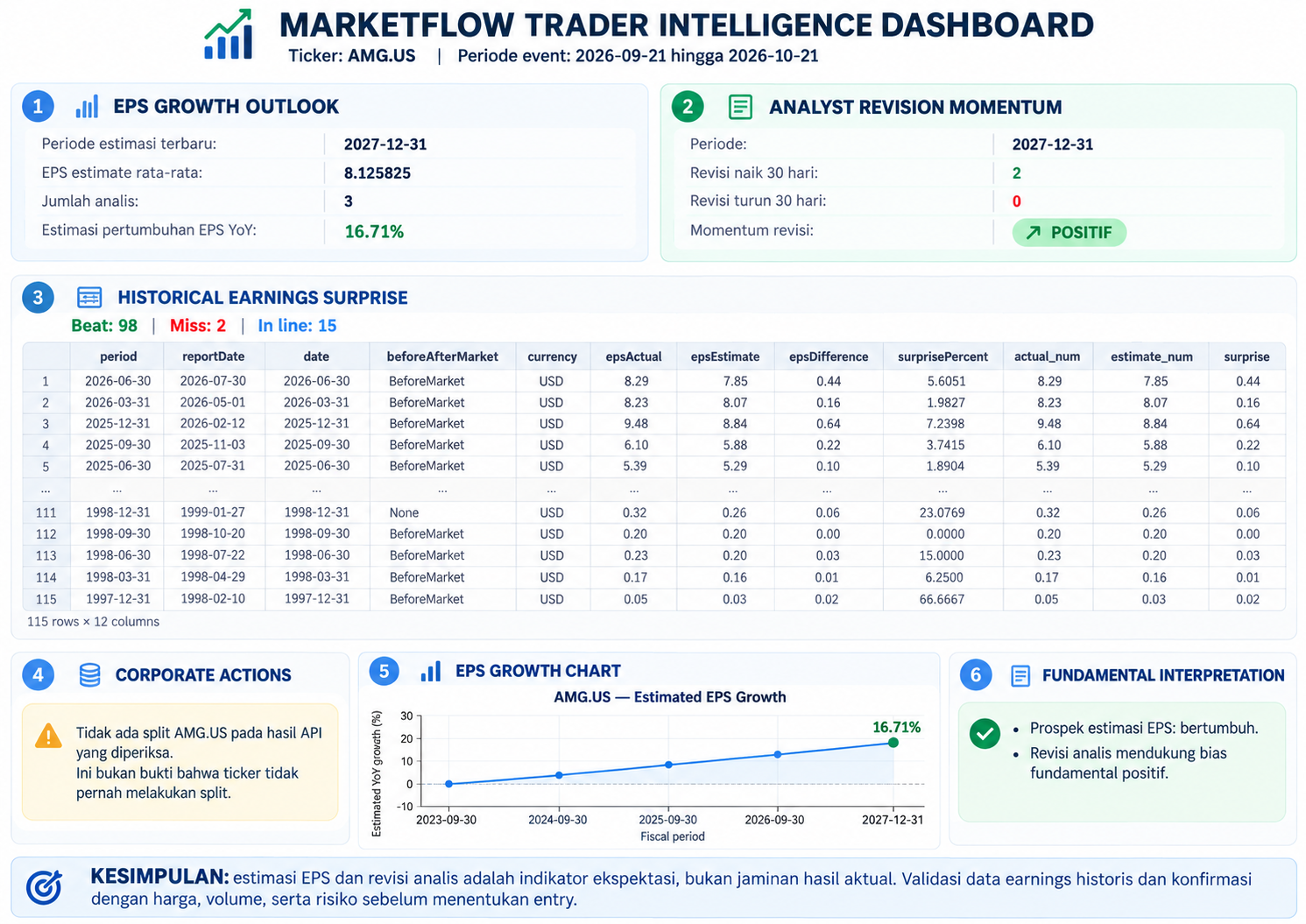
The fifth cell consolidates the outputs into a fundamental analysis dashboard. It evaluates the latest available EPS estimate, analyst revision momentum, historical earnings surprises, and stock split events.
The EPS growth section reads the latest available earnings estimate and extracts the average EPS estimate, the number of contributing analysts, and the estimated year-over-year growth rate when those fields are available.
The analyst revision section compares the number of upward and downward EPS revisions over the last 30 days, provided the corresponding fields exist in the response. More upward revisions than downward revisions are classified as positive revision momentum, while the opposite pattern is classified as negative. Equal counts are classified as balanced.
The historical earnings surprise section identifies actual and estimated EPS columns, calculates their differences, and counts positive surprises, negative surprises, and results that match estimates. These classifications are descriptive measures of reported performance relative to expectations, not direct measurements of stock returns.
The corporate actions section displays stock split records matching the selected ticker. Finally, an EPS growth chart visualizes the estimated growth rate across available fiscal periods, and the dashboard produces a preliminary fundamental interpretation based on the retrieved data.
If essential fields are missing, the program reports that the relevant analysis cannot be completed. This is preferable to assigning unsupported numerical values or drawing conclusions from unavailable information.
Code — Cell 5
# CELL 5 — FINAL TRADER DASHBOARD

print("=" * 68)
print("MARKETFLOW TRADER INTELLIGENCE DASHBOARD")
print("=" * 68)

print("Ticker:", TICKER)
print("Periode event:", START_DATE, "hingga", END_DATE)

# Initialize values so missing API fields do not cause errors.
growth = np.nan
estimate = np.nan
analysts = None
up_total = np.nan
down_total = np.nan


# A. EPS growth outlook
print("\n[1] EPS GROWTH OUTLOOK")

if not eps_trend_df.empty:
    latest = eps_trend_df.iloc[-1]

    growth = pd.to_numeric(
        pd.Series([latest.get("earningsEstimateGrowth")]),
        errors="coerce"
    ).iloc[0]

    estimate = pd.to_numeric(
        pd.Series([latest.get("earningsEstimateAvg")]),
        errors="coerce"
    ).iloc[0]

    analysts = latest.get(
        "earningsEstimateNumberOfAnalysts"
    )

    period = latest.get("period")

    print("Periode estimasi terbaru:", period)
    print("EPS estimate rata-rata:", estimate)
    print("Jumlah analis:", analysts)

    if pd.notna(growth):
        print(
            f"Estimasi pertumbuhan EPS YoY: "
            f"{growth * 100:.2f}%"
        )
    else:
        print("Pertumbuhan EPS: tidak tersedia.")
else:
    print("Data estimasi EPS tidak tersedia.")


# B. Analyst revision momentum
print("\n[2] ANALYST REVISION MOMENTUM")

if not revision_df.empty:
    latest_revision = revision_df.iloc[-1]

    up_total = pd.to_numeric(
        pd.Series([
            latest_revision.get(
                "epsRevisionsUpLast30days"
            )
        ]),
        errors="coerce"
    ).iloc[0]

    down_total = pd.to_numeric(
        pd.Series([
            latest_revision.get(
                "epsRevisionsDownLast30days"
            )
        ]),
        errors="coerce"
    ).iloc[0]

    print(
        "Periode:",
        latest_revision.get("period")
    )

    print("Revisi naik 30 hari:", up_total)
    print("Revisi turun 30 hari:", down_total)

    if pd.notna(up_total) and pd.notna(down_total):
        if up_total > down_total:
            print("Momentum revisi: POSITIF")
        elif up_total < down_total:
            print("Momentum revisi: NEGATIF")
        else:
            print("Momentum revisi: BERIMBANG")
    else:
        print("Jumlah revisi analis tidak lengkap.")
else:
    print("Data revisi analis tidak tersedia.")


# C. Historical earnings surprise
print("\n[3] HISTORICAL EARNINGS SURPRISE")


def locate_column(df, candidates):
    """
    Identify columns by normalized names.
    Supports flattened field names with prefixes.
    """

    for col in df.columns:
        normalized = "".join(
            c for c in str(col).lower()
            if c.isalnum()
        )

        if any(
            normalized == candidate
            or normalized.endswith(candidate)
            for candidate in candidates
        ):
            return col

    return None


actual_col = (
    locate_column(
        historical_df,
        {"epsactual", "actualeps", "reportedeps"}
    )
    if not historical_df.empty
    else None
)

estimate_col = (
    locate_column(
        historical_df,
        {"epsestimate", "estimateeps", "consensuseps"}
    )
    if not historical_df.empty
    else None
)


if actual_col and estimate_col:
    historical_df["actual_num"] = pd.to_numeric(
        historical_df[actual_col],
        errors="coerce"
    )

    historical_df["estimate_num"] = pd.to_numeric(
        historical_df[estimate_col],
        errors="coerce"
    )

    valid = historical_df.dropna(
        subset=["actual_num", "estimate_num"]
    ).copy()

    valid["surprise"] = (
        valid["actual_num"]
        - valid["estimate_num"]
    )

    beat = int((valid["surprise"] > 0).sum())
    miss = int((valid["surprise"] < 0).sum())
    inline = int((valid["surprise"] == 0).sum())

    print(
        "Beat:", beat,
        "| Miss:", miss,
        "| In line:", inline
    )

    if not valid.empty:
        display(valid)
    else:
        print(
            "Belum ada record dengan angka aktual "
            "dan estimasi yang valid."
        )

else:
    print(
        "Field EPS aktual dan estimasi historis "
        "belum teridentifikasi."
    )

    print(
        "Kolom tersedia:",
        historical_df.columns.tolist()
    )


# D. Corporate actions
print("\n[4] CORPORATE ACTIONS")

if target_splits.empty:
    print(
        f"Tidak ada split {TICKER} pada hasil API "
        "yang diperiksa."
    )

    print(
        "Ini bukan bukti bahwa ticker tidak pernah "
        "melakukan split."
    )
else:
    display(target_splits)


# E. EPS growth visualization
print("\n[5] EPS GROWTH CHART")

if (
    not eps_trend_df.empty
    and "earningsEstimateGrowth" in eps_trend_df.columns
):
    chart_df = eps_trend_df.copy()

    chart_df["growth_pct"] = pd.to_numeric(
        chart_df["earningsEstimateGrowth"],
        errors="coerce"
    ) * 100

    chart_df = chart_df.dropna(
        subset=["growth_pct"]
    )

    if not chart_df.empty:
        plt.figure(figsize=(11, 4))

        plt.plot(
            chart_df["period"],
            chart_df["growth_pct"],
            marker="o"
        )

        plt.axhline(0, linewidth=1)
        plt.title(f"{TICKER} — Estimated EPS Growth")
        plt.xlabel("Fiscal period")
        plt.ylabel("Estimated YoY growth (%)")
        plt.xticks(rotation=45)
        plt.grid(alpha=0.25)
        plt.tight_layout()
        plt.show()

    else:
        print(
            "Belum ada data pertumbuhan yang "
            "bisa diplot."
        )
else:
    print("Field pertumbuhan EPS tidak tersedia.")


# F. Fundamental interpretation
print("\n[6] FUNDAMENTAL INTERPRETATION")

if pd.notna(growth):
    if growth > 0:
        print("Prospek estimasi EPS: bertumbuh.")
    elif growth < 0:
        print("Prospek estimasi EPS: menurun.")
    else:
        print("Prospek estimasi EPS: relatif datar.")
else:
    print("Prospek EPS belum dapat ditentukan.")


if pd.notna(up_total) and pd.notna(down_total):
    if up_total > down_total:
        print(
            "Revisi analis mendukung bias "
            "fundamental positif."
        )
    elif up_total < down_total:
        print(
            "Revisi analis mendukung bias "
            "fundamental negatif."
        )
    else:
        print(
            "Revisi analis belum menunjukkan "
            "arah dominan."
        )
else:
    print(
        "Bias revisi analis belum dapat "
        "ditentukan dari data yang tersedia."
    )


print(
    "\nKESIMPULAN: estimasi EPS dan revisi analis "
    "merupakan indikator ekspektasi, bukan jaminan "
    "hasil aktual. Validasi data earnings historis "
    "dan konfirmasi dengan harga, volume, serta "
    "risiko sebelum menentukan entry."
)
Result:
4. Results and Discussion
4.1. Earnings Estimate Analysis
The earnings estimate module organizes the available EPS projections into a chronological table. When the API provides the required fields, the dashboard identifies the latest estimate period, average estimated EPS, number of contributing analysts, and expected year-over-year EPS growth.
Positive estimated EPS growth may indicate that analysts expect earnings to increase relative to the relevant comparison period. Conversely, negative growth may indicate expectations of declining earnings. These interpretations must be considered in the context of the company's financial condition, valuation, and broader market environment.
Estimated earnings growth is not equivalent to realized earnings growth. Analysts can revise their projections as new information becomes available, and actual results may differ substantially from expectations.
4.2. Analyst Revision Momentum
The analyst revision module compares upward and downward revisions over the preceding 30 days when the corresponding fields are available.
An excess of upward revisions is classified as positive revision momentum, while an excess of downward revisions is classified as negative revision momentum. Balanced revision counts indicate that neither direction dominates according to the selected measure.
This approach provides a simple summary of changes in analyst expectations. Nevertheless, the number of revisions does not capture their magnitude, the credibility of individual forecasts, or the reasons behind the revisions. A more comprehensive model could incorporate the size of each estimate change, analyst coverage, and the historical accuracy of individual forecasts.
4.3. Historical Earnings Surprise
The historical earnings surprise module compares actual EPS with estimated EPS for records that contain both values.
A positive difference indicates that reported EPS exceeded the estimate, a negative difference indicates that reported EPS fell short, and a zero difference indicates that actual EPS matched the estimate.
The counts of positive, negative, and in-line results provide a compact summary of historical earnings performance relative to expectations. However, the magnitude of each surprise is also important. A small positive surprise and a substantial positive surprise should not necessarily receive equal analytical weight.
The analysis is limited by the availability and consistency of historical records returned by the API. The program does not assume that missing actual or estimated EPS values represent zero.
4.4. Corporate Actions Analysis
The corporate actions module filters stock split records by the configured ticker. When matching events are returned, the dashboard displays the relevant records for further inspection.
Stock splits can affect the comparability of historical per-share data. Analysts should verify whether earnings-per-share figures and price series have been adjusted consistently for corporate actions before drawing conclusions from historical comparisons.
If no matching split event is returned, the dashboard reports that no event was found in the examined API results. This does not establish that the company has never conducted a stock split. The conclusion depends on the endpoint's coverage, pagination, date range, and response quality.
4.5. Integrated Fundamental Interpretation
The final dashboard combines EPS growth estimates, analyst revision momentum, historical earnings surprises, and stock split information into a single workflow.
The combination helps analysts organize several dimensions of fundamental information. For example, positive estimated earnings growth accompanied by more upward than downward revisions may suggest improving analyst expectations. However, such a pattern does not independently establish that a stock is undervalued or that its price will increase.
A more advanced implementation could incorporate valuation ratios, revenue growth, cash flow, debt levels, price performance, trading volume, and benchmark returns. Such additions would provide a broader foundation for assessing financial strength and market expectations.
All conclusions remain conditional on the completeness and correctness of the retrieved data. Since the program has not been executed against a verified API response in this article, no specific financial performance or investment outcome is claimed.}
5. Conclusion
This article presents MarketFlow Trader Intelligence, a Python-based framework for preliminary fundamental stock analysis using the MarketFlow All-in-One Market Finance API. The system retrieves earnings details and stock split events, processes EPS and revenue estimates, examines analyst revisions, evaluates historical earnings surprises, and summarizes matching corporate actions.
By integrating these components into a structured dashboard, the framework provides a practical method for organizing financial information and identifying areas that require further investigation. Its modular design also supports future expansion into valuation analysis, historical price comparisons, and broader financial risk assessment.
Nevertheless, analyst estimates are expectations rather than guaranteed outcomes, and historical earnings surprises do not independently determine future share-price movements. The usefulness of the framework depends on API data quality, endpoint coverage, correct interpretation of financial fields, and additional validation against company reports and market data.
Future development should prioritize data validation, explicit handling of missing fields, broader financial indicators, and systematic testing of any investment rules derived from the dashboard. The resulting system should be treated as a decision-support tool rather than an autonomous buy-or-sell recommendation.