Understanding an investor’s reported trading activity and portfolio composition can provide useful insights into investment behavior. Trade activity records describe reported transactions within a selected period, while portfolio snapshots represent holdings at a particular reporting date. Although these datasets are related, they provide different perspectives and should not be interpreted as if they were collected at the same time.
Python provides a practical environment for retrieving, processing, analyzing, and visualizing financial data. By integrating an API with libraries such as Pandas, NumPy, and Matplotlib, analysts can summarize reported transactions, identify frequently appearing assets, rank transactions by reported value, measure portfolio concentration, and produce visual reports.
This article presents MarketFlow Trader Intelligence, a Python-based framework that uses the MarketFlow All-in-One Market Finance API to analyze investor trade activity and portfolio composition. The implementation retrieves reported buy transactions associated with the investor identifier warren-buffett from April 1 to July 1, 2025, and a portfolio snapshot dated June 30, 2024.
The framework generates transaction summaries, portfolio concentration metrics, visualizations, and an Excel report. Its purpose is to demonstrate a reproducible financial-data analysis workflow rather than to provide a direct investment recommendation.
2. Methodology
The analysis is divided into five computational cells. Each cell performs a specific function:
API configuration and analysis parameters.
Retrieval of trade activity and portfolio data.
Normalization of API responses into structured tables.
Transaction analysis and portfolio concentration measurement.
Dashboard generation, visualization, summary reporting, and Excel export.
The analysis uses the fields returned by the API. Because the actual response structure may vary, the program includes flexible column detection and data-cleaning functions. However, the meaning and units of the retrieved fields must still be verified against the API documentation.
The trade activity period and portfolio snapshot date are deliberately kept separate. Consequently, the portfolio snapshot should not be interpreted as a representation of the investor’s holdings during the transaction period.
3. Implementation and Python Code
Cell 1 — Setup and Configuration
The first cell imports the required Python libraries and configures the API connection. Requests handles HTTP communication, Pandas manages tabular data, NumPy supports numerical calculations, and Matplotlib provides visualization capabilities.
The RapidAPI key is retrieved from the RAPIDAPI_KEY environment variable. If the variable is unavailable, the program requests the key interactively using getpass, preventing the credential from being displayed as ordinary input.
The configuration defines the investor identifier, transaction type, transaction period, pagination parameters, portfolio snapshot date, and maximum number of records displayed in summary tables.
Code — Cell 1
# CELL 1 — SETUP & CONFIGURATION

%pip -q install requests pandas numpy matplotlib openpyxl

import os
import json
import requests
import numpy as np
import pandas as pd
import matplotlib.pyplot as plt

from getpass import getpass
from IPython.display import display

HOST = "marketflow-all-in-one-market-finance-api.p.rapidapi.com"
BASE_URL = f"https://{HOST}"

API_KEY = os.getenv("RAPIDAPI_KEY", "").strip()
if not API_KEY:
    API_KEY = getpass("Masukkan RapidAPI Key: ").strip()

if not API_KEY:
    raise ValueError("RapidAPI Key belum diisi.")

HEADERS = {
    "x-rapidapi-key": API_KEY,
    "x-rapidapi-host": HOST
}

# Parameter transaksi
INVESTOR = "warren-buffett"
TRADE_TYPE = "buy"
START_DATE = "2025-04-01"
END_DATE = "2025-07-01"
TRADE_LIMIT = 100
TRADE_SKIP = 0

# Snapshot portofolio
REPORT_DATE = "2024-06-30"

# Batas analisis
TOP_N = 10

print("MarketFlow Trader Intelligence siap.")
print(f"Investor       : {INVESTOR}")
print(f"Periode trade  : {START_DATE} s.d. {END_DATE}")
print(f"Jenis transaksi: {TRADE_TYPE}")
print(f"Snapshot       : {REPORT_DATE}")
Cell 2 — API Data Extraction
The second cell defines a reusable function named fetch_api() to retrieve data from the MarketFlow API. The function sends an authenticated GET request, applies a 30-second timeout, checks the HTTP response status, and returns the response as JSON when successful.
If a request fails, the function displays the relevant error information and returns None. This allows the notebook to report retrieval problems without immediately terminating the entire workflow.
Two endpoints are queried. The trade-activity endpoint retrieves reported transactions based on the selected investor, transaction type, and period. The portofolio-checks endpoint retrieves portfolio information for the specified snapshot date.
The raw JSON responses are previewed before further processing. This helps verify the response structure and identify potential differences in field names or data organization.
Code — Cell 2
# CELL 2 — API DATA EXTRACTION

def fetch_api(endpoint, params):
    url = f"{BASE_URL}/{endpoint}"

    try:
        response = requests.get(
            url,
            headers=HEADERS,
            params=params,
            timeout=30
        )

        print(f"{endpoint}: HTTP {response.status_code}")
        response.raise_for_status()
        return response.json()

    except requests.exceptions.RequestException as e:
        print(f"Gagal mengambil {endpoint}: {e}")
        if getattr(e, "response", None) is not None:
            print(e.response.text[:1000])
        return None

    except ValueError:
        print(f"Respons {endpoint} bukan JSON yang valid.")
        return None


trade_raw = fetch_api(
    "trade-activity",
    {
        "skip": TRADE_SKIP,
        "trade_type": TRADE_TYPE,
        "limit": TRADE_LIMIT,
        "slug": INVESTOR,
        "time_range": f"{START_DATE}:{END_DATE}"
    }
)

portfolio_raw = fetch_api(
    "portofolio-checks",
    {
        "lang": "en",
        "report_date": REPORT_DATE,
        "slug": INVESTOR
    }
)

def preview_response(name, data):
    print(f"\n--- {name} ---")
    if data is None:
        print("Data tidak tersedia.")
    else:
        print(json.dumps(
            data, indent=2, ensure_ascii=False, default=str
        )[:2500])

preview_response("TRADE ACTIVITY", trade_raw)
preview_response("PORTFOLIO CHECKS", portfolio_raw)
Cell 3 — JSON to DataFrame
The third cell converts the nested JSON responses into structured Pandas DataFrames. The extract_records() function searches the response for lists of dictionaries and selects the largest candidate list as the primary dataset.
If a suitable list is not found, the function attempts to normalize the response dictionary directly. Empty or unavailable responses are converted into empty DataFrames.
The clean_columns() function standardizes column names by converting them to lowercase and replacing spaces with underscores. This simplifies subsequent column matching and numerical processing.
Finally, the cell displays the dimensions, sample records, and column names of the transaction and portfolio datasets. These outputs help determine which variables are available for the analysis.
Code — Cell 3
# CELL 3 — JSON TO DATAFRAME

def extract_records(obj):
    """Cari list of dictionaries paling besar dalam respons JSON."""
    candidates = []

    def walk(x, path="root"):
        if isinstance(x, list):
            if x and all(isinstance(item, dict) for item in x):
                candidates.append((len(x), path, x))
            for i, item in enumerate(x):
                if isinstance(item, (dict, list)):
                    walk(item, f"{path}[{i}]")

        elif isinstance(x, dict):
            for key, value in x.items():
                if isinstance(value, (dict, list)):
                    walk(value, f"{path}.{key}")

    walk(obj)

    if candidates:
        candidates.sort(key=lambda x: x[0], reverse=True)
        _, path, records = candidates[0]
        print(f"Record ditemukan: {path} ({len(records)} baris)")
        return pd.json_normalize(records, sep="_")

    if isinstance(obj, dict) and obj:
        return pd.json_normalize(obj, sep="_")

    if isinstance(obj, list) and obj:
        return pd.DataFrame({"value": obj})

    return pd.DataFrame()


trades = extract_records(trade_raw)
portfolio = extract_records(portfolio_raw)

# Bersihkan nama kolom untuk memudahkan pencocokan
def clean_columns(df):
    df = df.copy()
    df.columns = [
        str(c).strip().lower().replace(" ", "_")
        for c in df.columns
    ]
    return df

trades = clean_columns(trades)
portfolio = clean_columns(portfolio)

print("\nTRADE DATA:", trades.shape)
display(trades.head(10))

print("\nPORTFOLIO DATA:", portfolio.shape)
display(portfolio.head(10))

print("\nKolom transaksi:", trades.columns.tolist())
print("\nKolom portofolio:", portfolio.columns.tolist())
Cell 4 — Trader Analytics and Portfolio Concentration
The fourth cell performs the principal analytical calculations. The find_col() function searches for columns whose names contain specified keywords. This makes the analysis adaptable to some variations in API field names.
The numeric_series() function converts common numeric string formats into numeric values. It removes commas, dollar signs, percentage symbols, and surrounding whitespace before conversion.
The transaction analysis identifies likely ticker, transaction date, reported transaction value, and share-count fields. When a suitable ticker field is available, the program calculates transaction frequency by asset. When a transaction value field is detected, it ranks records by reported value.
The portfolio analysis identifies potential portfolio weights or position values. If portfolio weights are available, the program normalizes them and calculates the Herfindahl–Hirschman Index (HHI). If weights are unavailable, the program attempts to calculate concentration from reported position values.
The HHI is calculated as the sum of squared normalized portfolio shares:
\[ HHI=\sum_{i=1}^{n}s_i^2 \]
where \(s_i\) is the normalized weight of position \(i\). A higher HHI indicates that a greater proportion of the measured portfolio is concentrated in fewer positions.
Code — Cell 4
# CELL 4 — TRADER ANALYTICS

def find_col(df, keywords):
    """Temukan kolom berdasarkan nama yang mengandung keyword."""
    for col in df.columns:
        name = col.lower()
        if any(k in name for k in keywords):
            return col
    return None

def numeric_series(series):
    """Konversi angka dari API, termasuk format string umum."""
    cleaned = (
        series.astype(str)
        .str.replace(",", "", regex=False)
        .str.replace("$", "", regex=False)
        .str.replace("%", "", regex=False)
        .str.strip()
    )
    return pd.to_numeric(cleaned, errors="coerce")

# Cari kolom penting secara fleksibel
ticker_col = find_col(
    trades, ["ticker", "symbol", "stock_symbol", "company", "security", "asset"]
)
date_col = find_col(
    trades, ["trade_date", "transaction_date", "activity_date", "date", "filing_date"]
)
value_col = find_col(
    trades, ["transaction_value", "trade_value", "market_value",
             "value_usd", "amount", "total_value", "value"]
)
shares_col = find_col(
    trades, ["shares", "quantity", "share_count", "units"]
)

portfolio_ticker_col = find_col(
    portfolio, ["ticker", "symbol", "company", "security", "asset"]
)
weight_col = find_col(
    portfolio, ["portfolio_weight", "weight_pct", "weight_percent",
                "allocation_pct", "percentage", "weight"]
)
portfolio_value_col = find_col(
    portfolio, ["market_value", "position_value", "holding_value",
                "value_usd", "portfolio_value", "value"]
)

# Standarisasi tanggal transaksi
if date_col:
    trades[date_col] = pd.to_datetime(
        trades[date_col], errors="coerce", utc=True
    )

# Statistik transaksi
print("=" * 65)
print("TRADER ACTIVITY SUMMARY")
print("=" * 65)
print("Total baris transaksi :", len(trades))
print("Kolom saham           :", ticker_col)
print("Kolom tanggal         :", date_col)
print("Kolom nilai transaksi :", value_col)
print("Kolom jumlah saham    :", shares_col)

if date_col and trades[date_col].notna().any():
    print("Tanggal paling awal   :", trades[date_col].min())
    print("Tanggal paling akhir  :", trades[date_col].max())

if ticker_col:
    trade_frequency = (
        trades.groupby(ticker_col, dropna=False)
        .size()
        .sort_values(ascending=False)
        .rename("transaction_count")
        .reset_index()
    )
    print("\nSaham dengan transaksi terbanyak:")
    display(trade_frequency.head(TOP_N))
else:
    trade_frequency = pd.DataFrame()
    print("\nKolom saham tidak terdeteksi otomatis.")

# Urutan transaksi berdasarkan nilai, jika tersedia
if value_col:
    trades["_analysis_value"] = numeric_series(trades[value_col])
    top_trades = trades.sort_values(
        "_analysis_value", ascending=False, na_position="last"
    )
    print("\nTransaksi dengan nilai terbesar (jika nilai tersedia):")
    display(top_trades.head(TOP_N))
else:
    top_trades = trades.copy()
    print("\nNilai transaksi tidak ditemukan; ranking nominal dilewati.")

# Analisis konsentrasi portofolio
print("\n" + "=" * 65)
print("PORTFOLIO CONCENTRATION")
print("=" * 65)

if portfolio_ticker_col:
    print("Jumlah posisi/record:", len(portfolio))
    display(portfolio.head(TOP_N))

portfolio_weights = None
portfolio_values = None
hhi = None

if weight_col:
    portfolio_weights = numeric_series(portfolio[weight_col])

    # Deteksi apakah angka bobot dinyatakan dalam persen atau pecahan
    valid_w = portfolio_weights.dropna()
    if len(valid_w) and valid_w.max() <= 1:
        portfolio_weights = portfolio_weights * 100

    valid_w = portfolio_weights.dropna()
    if len(valid_w):
        print(f"Total bobot terdeteksi: {valid_w.sum():.2f}%")
        if valid_w.sum() > 0:
            shares = valid_w / valid_w.sum()
            hhi = float((shares ** 2).sum())
            print(f"HHI konsentrasi (0–1): {hhi:.4f}")
            print("Catatan: HHI dihitung dari bobot yang tersedia.")

elif portfolio_value_col:
    portfolio_values = numeric_series(portfolio[portfolio_value_col])
    valid_v = portfolio_values.dropna()
    if len(valid_v) and valid_v.sum() > 0:
        shares = valid_v / valid_v.sum()
        hhi = float((shares ** 2).sum())
        print(f"HHI berdasarkan nilai posisi: {hhi:.4f}")
    else:
        print("Nilai posisi tidak cukup untuk menghitung konsentrasi.")
else:
    print("Bobot/nilai portofolio tidak terdeteksi; HHI dilewati.")

print("\nAnalisis selesai. Periksa kembali nama kolom dan satuan dari API.")
Cell 5 — Final Trader Dashboard and Excel Export
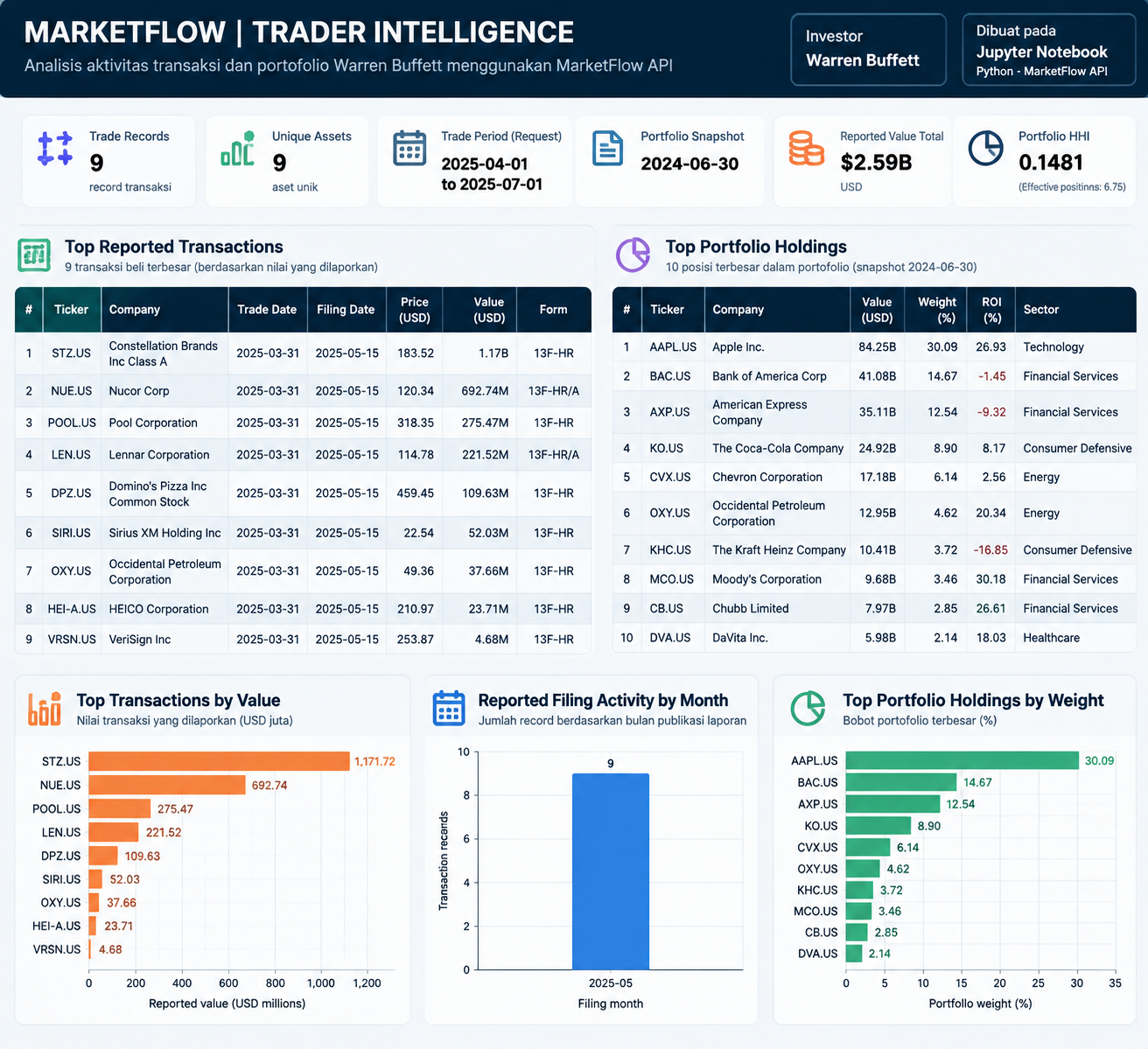
The fifth cell integrates the preceding calculations into a dashboard. It uses the field names returned by the API to summarize transaction activity, count unique assets, calculate reported transaction values, and analyze the portfolio snapshot.
The portfolio concentration analysis uses the portfolio_ratio field when available. If no valid portfolio weights are available, the code attempts to calculate weights from reported position values. The weights are normalized before calculating HHI and the effective number of positions.
Three visualizations may be generated: the largest reported transactions by value, reported filing activity by month, and the largest portfolio holdings by weight. The program also compiles a summary table and exports the results to an Excel workbook containing separate sheets for summary data, trade activity, portfolio holdings, and portfolio analysis.
The excel_safe() function removes timezone information from timestamps before exporting them because Excel does not support timezone-aware datetime values in the same way as Pandas.
Code — Cell 5
# CELL 5 — FINAL TRADER DASHBOARD & EXPORT
# Berdasarkan kolom API MarketFlow yang sudah terverifikasi

import os
import numpy as np
import pandas as pd
import matplotlib.pyplot as plt

TOP_N = 10

# --------------------------------------------------
# 1. NORMALISASI DATA
# --------------------------------------------------

tr = trades.copy()
pf = portfolio.copy()

# Konversi tanggal ke datetime tanpa timezone
for col in ["trade_date", "filing_date"]:
    if col in tr.columns:
        tr[col] = pd.to_datetime(
            tr[col], errors="coerce", utc=True
        ).dt.tz_localize(None)

# Kolom numerik aktual dari API
for col in ["value", "price", "shares_before",
            "shares_after", "change_in_shares",
            "change_in_value"]:
    if col in tr.columns:
        tr[col] = pd.to_numeric(tr[col], errors="coerce")

for col in ["value", "portfolio_ratio", "roi",
            "change_in_value", "change_in_shares",
            "price", "shares", "avg_buy_price"]:
    if col in pf.columns:
        pf[col] = pd.to_numeric(pf[col], errors="coerce")

# Gunakan nama saham yang mudah dibaca
tr["asset"] = tr["company"].fillna(tr["t"])
pf["asset"] = pf["company"].fillna(pf["t"])

# --------------------------------------------------
# 2. ANALISIS TRADE ACTIVITY
# --------------------------------------------------

trade_count = len(tr)
unique_assets = tr["t"].nunique()

total_reported_value = tr["value"].sum(min_count=1)

# Gunakan filing_date untuk tren publikasi laporan
filings = tr.dropna(subset=["filing_date"]).copy()
filings["_month"] = filings["filing_date"].dt.to_period("M")

monthly = filings.groupby("_month").size()

print("=" * 65)
print("MARKETFLOW | TRADER INTELLIGENCE")
print("=" * 65)

print(f"Investor             : {INVESTOR}")
print(f"Trade records        : {trade_count}")
print(f"Unique assets        : {unique_assets}")
print(f"Trade type requested : {TRADE_TYPE}")
print(f"Portfolio snapshot   : {REPORT_DATE}")

if pd.notna(total_reported_value):
    print(f"Reported value total : ${total_reported_value:,.2f}")

if not tr.empty:
    print("\nTOP REPORTED TRANSACTIONS")
    cols = [
        c for c in [
            "t", "company", "trade_date", "filing_date",
            "change_in_shares", "price", "value", "form"
        ] if c in tr.columns
    ]
    display(
        tr.sort_values("value", ascending=False)[cols]
        .head(TOP_N)
    )

# --------------------------------------------------
# 3. PORTFOLIO CONCENTRATION — PORTFOLIO_RATIO
# --------------------------------------------------

pf["weight"] = pf["portfolio_ratio"]

# Fallback hanya jika bobot tidak tersedia sama sekali
if pf["weight"].notna().sum() == 0:
    if pf["value"].notna().sum() > 0:
        pf["weight"] = pf["value"] / pf["value"].sum()
        weight_source = "Calculated from reported position value"
    else:
        weight_source = "Unavailable"
else:
    weight_source = "API portfolio_ratio"

valid_pf = pf.dropna(subset=["weight"]).copy()
valid_pf = valid_pf[valid_pf["weight"] >= 0]

hhi = np.nan
effective_positions = np.nan

if len(valid_pf) > 0 and valid_pf["weight"].sum() > 0:
    # Normalisasi menghindari bias jika bobot tidak berjumlah 100%
    valid_pf["weight_norm"] = (
        valid_pf["weight"] / valid_pf["weight"].sum()
    )

    hhi = (valid_pf["weight_norm"] ** 2).sum()
    effective_positions = 1 / hhi if hhi > 0 else np.nan

    valid_pf = valid_pf.sort_values(
        "weight_norm", ascending=False
    )

print("\nPORTFOLIO CONCENTRATION")
print(f"Portfolio records    : {len(pf)}")
print(f"Weight source        : {weight_source}")

if pd.notna(hhi):
    print(f"HHI (0–1)            : {hhi:.4f}")
    print(f"HHI (0–10,000)       : {hhi * 10000:.2f}")
    print(f"Effective positions  : {effective_positions:.2f}")
    print("\nTOP PORTFOLIO HOLDINGS")

    display(
        valid_pf[
            ["t", "company", "value", "weight_norm", "roi", "sector"]
        ].head(TOP_N)
        if "sector" in valid_pf.columns
        else valid_pf[
            ["t", "company", "value", "weight_norm", "roi"]
        ].head(TOP_N)
    )
else:
    print("HHI tidak dapat dihitung dari data yang tersedia.")

# --------------------------------------------------
# 4. VISUAL DASHBOARD
# --------------------------------------------------

figures_created = 0

# A. Nilai transaksi yang dilaporkan
plot_tr = tr.dropna(subset=["value"]).nlargest(TOP_N, "value")

if not plot_tr.empty:
    plot_tr = plot_tr.sort_values("value")

    plt.figure(figsize=(11, 6))
    plt.barh(plot_tr["asset"], plot_tr["value"] / 1e6)
    plt.title("Top Reported Transactions by Value")
    plt.xlabel("Reported value (USD millions)")
    plt.ylabel("Asset")
    plt.tight_layout()
    plt.show()
    plt.close()
    figures_created += 1

# B. Aktivitas publikasi laporan per bulan
if not monthly.empty:
    plt.figure(figsize=(10, 4))
    plt.bar(monthly.index.astype(str), monthly.values)
    plt.title("Reported Filing Activity by Month")
    plt.xlabel("Filing month")
    plt.ylabel("Number of records")
    plt.xticks(rotation=45)
    plt.tight_layout()
    plt.show()
    plt.close()
    figures_created += 1

# C. Bobot portofolio
if pd.notna(hhi):
    top_pf = valid_pf.head(TOP_N).sort_values("weight_norm")

    plt.figure(figsize=(11, 6))
    plt.barh(
        top_pf["asset"],
        top_pf["weight_norm"] * 100
    )
    plt.title("Top Portfolio Holdings by Weight")
    plt.xlabel("Portfolio weight (%)")
    plt.ylabel("Asset")
    plt.tight_layout()
    plt.show()
    plt.close()
    figures_created += 1

# --------------------------------------------------
# 5. RINGKASAN TRADER
# --------------------------------------------------

summary = pd.DataFrame({
    "Metric": [
        "Investor",
        "Trade records",
        "Unique assets",
        "Trade period requested",
        "Portfolio report date",
        "Portfolio records",
        "Reported transaction value (USD)",
        "Portfolio weight source",
        "Portfolio HHI (0-1)",
        "Effective positions",
        "Charts generated"
    ],
    "Value": [
        INVESTOR,
        trade_count,
        unique_assets,
        f"{START_DATE} to {END_DATE}",
        REPORT_DATE,
        len(pf),
        total_reported_value,
        weight_source,
        hhi,
        effective_positions,
        figures_created
    ]
})

print("\n" + "=" * 65)
print("INVESTMENT INTELLIGENCE SUMMARY")
print("=" * 65)
display(summary)

print("\nINTERPRETATION")
print(f"- API mengembalikan {trade_count} record dan {unique_assets} aset unik.")
print("- Filing date menunjukkan waktu laporan tersedia, bukan tanggal eksekusi.")
print("- Nilai transaksi mengikuti definisi kolom value dari API.")
if pd.notna(hhi):
    print("- HHI mengukur konsentrasi bobot pada snapshot portofolio.")
print("- Snapshot portofolio dan aktivitas transaksi harus dianalisis")
print("  berdasarkan tanggal masing-masing; jangan dianggap sezaman.")

# --------------------------------------------------
# 6. EXPORT EXCEL — TIMEZONE SAFE
# --------------------------------------------------

def excel_safe(df):
    out = df.copy()

    for col in out.columns:
        if isinstance(out[col].dtype, pd.DatetimeTZDtype):
            out[col] = out[col].dt.tz_localize(None)

        elif out[col].dtype == "object":
            out[col] = out[col].map(
                lambda x: (
                    x.tz_convert("UTC").tz_localize(None)
                    if isinstance(x, pd.Timestamp)
                    and x.tzinfo is not None
                    else x
                )
            )

    return out

output_file = "marketflow_trader_intelligence.xlsx"

with pd.ExcelWriter(output_file, engine="openpyxl") as writer:
    summary.to_excel(writer, sheet_name="Summary", index=False)
    excel_safe(tr).to_excel(
        writer, sheet_name="Trade Activity", index=False
    )
    excel_safe(pf).to_excel(
        writer, sheet_name="Portfolio", index=False
    )

    if not valid_pf.empty:
        excel_safe(valid_pf).to_excel(
            writer, sheet_name="Portfolio Analysis", index=False
        )

print(f"\nExcel berhasil disimpan: {output_file}")

try:
    from google.colab import files
    files.download(output_file)
except ImportError:
    print("File tersimpan di direktori kerja notebook.")
Result:
4. Results and Discussion
4.1. Trade Activity Summary
The trade activity module reports the number of transaction records returned by the API and the number of unique assets identified in the dataset. When suitable ticker or symbol fields are available, the framework ranks assets by transaction frequency. It also ranks transactions by reported value when a numerical transaction-value field is detected.
These outputs provide a descriptive overview of the retrieved trading activity. However, the number of records should not automatically be interpreted as the total number of transactions made by the investor. The result depends on the endpoint's coverage, the selected date range, pagination settings, and the API's reporting methodology.
The transaction ranking can help identify assets that appear frequently or have relatively large reported transaction values. Nevertheless, transaction frequency and transaction size do not independently establish the quality or profitability of an investment decision.
4.2. Filing Activity and Reported Transaction Values
The monthly filing chart summarizes the number of records grouped by filing date. This provides an overview of when transaction reports were filed or made available in the retrieved dataset.
Filing dates must be distinguished from execution dates. A filing date indicates the reporting timeline, whereas a trade date represents the date on which a transaction occurred, if that information is supplied by the API.
The transaction-value chart displays the largest reported values in USD millions. Its interpretation depends on whether the API's value field represents comparable monetary amounts denominated in US dollars. If the field uses another unit or definition, the chart labels and interpretation must be adjusted accordingly.
4.3. Portfolio Concentration Analysis
Portfolio concentration is estimated using the reported portfolio weights or, when weights are unavailable, the reported position values.
The Herfindahl–Hirschman Index (HHI) summarizes the distribution of portfolio weights. A relatively high HHI indicates that a larger share of the measured portfolio is concentrated in fewer holdings. A lower HHI indicates a more distributed allocation.
The framework also calculates the effective number of positions as the reciprocal of HHI:
\[ N_{\mathrm{effective}}=\frac{1}{HHI} \]
This measure provides an alternative way to interpret concentration. For example, a lower effective number of positions indicates that the portfolio's weight distribution behaves as though it were concentrated in fewer equally weighted holdings.
Both measures depend on the completeness and accuracy of the portfolio data. Missing positions, duplicate records, inconsistent weight units, or incomplete holdings may affect the results. Therefore, the calculated HHI should be treated as an estimate based on the available records rather than a definitive description of the entire portfolio.
4.4. Dashboard Visualization and Excel Reporting
The final dashboard integrates the transaction summaries, portfolio concentration measures, and graphical outputs. Depending on the availability of the required fields, the system generates three charts:
Top reported transactions by value.
Reported filing activity by month.
Top portfolio holdings by weight.
The summary table consolidates the investor identifier, transaction record count, unique asset count, requested transaction period, portfolio snapshot date, reported transaction value, portfolio weight source, HHI, effective positions, and number of charts generated.
The Excel export function separates the outputs into worksheets for summary statistics, trade activity, portfolio holdings, and portfolio analysis. This structure allows users to inspect the results, conduct additional calculations, and preserve the retrieved data for subsequent analysis.
However, successful generation of the dashboard depends on the response schema. The supplied Cell 5 expects fields such as company, t, value, and portfolio_ratio. If those fields are absent or named differently, the code must be adjusted to match the actual API response.
4.5. Limitations and Interpretation
Several limitations should be considered when interpreting the results.
First, the transaction period is April 1 to July 1, 2025, while the portfolio snapshot is dated June 30, 2024. These datasets represent different periods and must not be treated as contemporaneous.
Second, the API may return only a subset of reported records. The default configuration requests up to 100 transaction records with an offset of zero. Additional pagination may be required if the endpoint contains more records than the configured limit.
Third, the flexible column-detection method used in Cell 4 does not guarantee that every identified field has the intended meaning. For example, a field containing the word value might represent transaction value, market value, or another financial measure. Field names and units should be verified against the API documentation.
Finally, the framework provides descriptive financial analysis rather than a validated investment strategy. Transaction history and portfolio concentration do not guarantee future performance, and the outputs should not be interpreted as instructions to copy trades.
5. Conclusion
This article presents MarketFlow Trader Intelligence, a Python-based framework for analyzing reported investor trade activity and portfolio composition using the MarketFlow All-in-One Market Finance API.
The implementation integrates API configuration, transaction and portfolio data retrieval, JSON normalization, transaction frequency analysis, reported transaction-value ranking, portfolio concentration measurement, dashboard visualization, and Excel export. The framework uses Pandas, NumPy, Matplotlib, Requests, and OpenPyXL to create a repeatable workflow for financial-data exploration.
The portfolio concentration analysis uses the Herfindahl–Hirschman Index and effective number of positions to summarize the distribution of available holdings. The visualization and reporting components make the retrieved information easier to inspect and compare.
Nevertheless, the reliability of the analysis depends on API coverage, field definitions, pagination, data completeness, and the correct interpretation of reporting dates. The transaction records and portfolio snapshot also refer to different periods and must be analyzed separately.
Future improvements could include automatic pagination, stricter API schema validation, more comprehensive data-quality checks, and comparisons with independently verified financial records. Overall, MarketFlow Trader Intelligence provides a useful foundation for organizing and exploring financial datasets, but its outputs should be treated as descriptive analytical information rather than personalized investment advice.