
Understanding the relationship between Indonesian listed companies and their overseas parent companies can provide valuable context for investment research. At the same time, having quick access to broker code information helps investors interpret transaction data and market activity more effectively.
In this tutorial, we'll build an IDX US Stocks Parent and Broker Codes Dashboard using Python and the Indonesia Stock Exchange (IDX) API available through RapidAPI.
The notebook retrieves two different datasets. The first endpoint provides US Stocks Parent information for selected Indonesian stock symbols, while the second endpoint returns the complete Broker Codes reference. Since both endpoints may return different JSON structures, the notebook includes a flexible normalization process that converts the responses into standardized pandas DataFrames before presenting them inside a dashboard.
To keep the implementation clean and easy to follow, the notebook is organized into five cells covering API configuration, data retrieval, response normalization, table generation, and dashboard visualization.
CELL 1 — Import Library & API Configuration
# ============================================================
# CELL 1 — IMPORT & KONFIGURASI
# ============================================================

import requests
import pandas as pd
from datetime import datetime

API_KEY = "YOUR_RAPIDAPI_KEY"

BASE_URL = "https://indonesia-stock-exchange-idx.p.rapidapi.com"

headers = {
    "x-rapidapi-key": API_KEY,
    "x-rapidapi-host": "indonesia-stock-exchange-idx.p.rapidapi.com",
    "Content-Type": "application/json"
}

print("Konfigurasi berhasil.")
Note: The original notebook is preserved exactly. The only modification is replacing the exposed RapidAPI key with
YOUR_RAPIDAPI_KEYfor security purposes.
Explanation
The first cell initializes the Python environment and prepares authentication for the Indonesia Stock Exchange (IDX) API.
Three libraries are imported at the beginning of the notebook:
requests to communicate with the RapidAPI endpoints.
pandas to organize API responses into structured DataFrames.
datetime to generate timestamps for the final dashboard.
Next, the notebook defines the RapidAPI configuration by storing the API key, the IDX API base URL, and the required HTTP headers. Centralizing these settings allows every subsequent API request to reuse the same configuration without repeating code.
Finally, the notebook prints a confirmation message indicating that the environment has been configured successfully and is ready to retrieve data from the IDX API.
CELL 2 — Retrieving API Data
# ============================================================
# CELL 2 — REQUEST API
# ============================================================

def request_api(endpoint):
    url = BASE_URL + endpoint

    try:
        r = requests.get(url, headers=headers, timeout=30)

        print("="*80)
        print("Endpoint :", endpoint)
        print("Status   :", r.status_code)

        if r.status_code == 200:
            return r.json()

        print(r.text)
        return None

    except Exception as e:
        print(e)
        return None


us_parent_response = request_api(
    "/api/main/us-stocks-parent?symbols=GOTO,BUKA"
)

broker_response = request_api(
    "/api/main/broker-codes"
)
Explanation
The second cell retrieves information from two IDX API endpoints using a reusable request function.
The notebook defines a helper function named request_api() that accepts an endpoint path, combines it with the base URL, sends an HTTP GET request, and displays the endpoint together with its HTTP status code.
If the request succeeds with a 200 OK response, the JSON payload is returned immediately. Otherwise, the server response is printed, and the function safely returns None. Any unexpected exceptions, including connection problems or request timeouts, are also handled gracefully so the notebook can continue running.
The function is used to retrieve two different datasets:
US Stocks Parent, which maps Indonesian listed companies to their corresponding overseas parent companies.
Broker Codes, which contains the reference list of broker identifiers used throughout the Indonesia Stock Exchange.
Using a reusable request function keeps the notebook concise while making it easy to add more IDX endpoints in future projects.
CELL 3 — Normalizing Different API Response Structures
# ============================================================
# CELL 3 — NORMALISASI DATA
# ============================================================

def convert_dict_to_records(data, code_field="code", name_field="name"):
    """
    Mengubah dictionary menjadi list record.

    Contoh:
    {
        "YP": "Mirae Asset",
        "CC": "Mandiri Sekuritas"
    }

    Menjadi:
    [
        {"code": "YP", "name": "Mirae Asset"},
        {"code": "CC", "name": "Mandiri Sekuritas"}
    ]
    """

    records = []

    if not isinstance(data, dict):
        return records

    for key, value in data.items():

        # Abaikan metadata
        if str(key).lower() in [
            "timestamp",
            "success",
            "message",
            "status"
        ]:
            continue

        if isinstance(value, dict):
            row = value.copy()

            if code_field not in row:
                row[code_field] = key

            records.append(row)

        elif isinstance(value, list):
            for item in value:
                if isinstance(item, dict):
                    row = item.copy()

                    if code_field not in row:
                        row[code_field] = key

                    records.append(row)

        elif value is not None:
            records.append({
                code_field: key,
                name_field: value
            })

    return records


def normalize_us_parent(response):
    """
    Mengambil data dari:
    response -> data -> parentCompanies
    """

    if not isinstance(response, dict):
        return []

    data = response.get("data", {})

    if not isinstance(data, dict):
        return []

    parent_companies = data.get("parentCompanies", [])

    # Jika langsung berbentuk list
    if isinstance(parent_companies, list):
        return [
            item for item in parent_companies
            if isinstance(item, dict)
        ]

    # Jika berbentuk dictionary
    if isinstance(parent_companies, dict):
        return convert_dict_to_records(
            parent_companies,
            code_field="symbol",
            name_field="parentCompany"
        )

    return []


def normalize_broker_codes(response):
    """
    Menormalkan response broker codes.
    """

    if not isinstance(response, dict):
        return []

    data = response.get("data", response)

    # Data langsung list
    if isinstance(data, list):
        return [
            item for item in data
            if isinstance(item, dict)
        ]

    if not isinstance(data, dict):
        return []

    # Kemungkinan key yang menyimpan broker
    possible_keys = [
        "brokerCodes",
        "broker_codes",
        "brokers",
        "brokerList",
        "broker_list",
        "items",
        "results"
    ]

    for key in possible_keys:

        value = data.get(key)

        if isinstance(value, list):
            return [
                item for item in value
                if isinstance(item, dict)
            ]

        if isinstance(value, dict):
            return convert_dict_to_records(
                value,
                code_field="code",
                name_field="name"
            )

    # Jika isi data sendiri merupakan pasangan kode broker
    return convert_dict_to_records(
        data,
        code_field="code",
        name_field="name"
    )


# ============================================================
# PROSES NORMALISASI
# ============================================================

us_parent = normalize_us_parent(us_parent_response)
broker_codes = normalize_broker_codes(broker_response)


# ============================================================
# HASIL NORMALISASI
# ============================================================

print("=" * 80)
print("HASIL NORMALISASI")
print("=" * 80)

print("US Parent Records :", len(us_parent))
print("Broker Records    :", len(broker_codes))


# ============================================================
# INFORMASI STRUKTUR RESPONSE
# ============================================================

print("\nSTRUKTUR RESPONSE")

print("Tipe US Parent :", type(us_parent_response).__name__)
print("Tipe Broker    :", type(broker_response).__name__)

if isinstance(us_parent_response, dict):

    print("US Parent Keys :", list(us_parent_response.keys()))

    us_data = us_parent_response.get("data")

    print("Tipe data US   :", type(us_data).__name__)

    if isinstance(us_data, dict):

        print("Data US Keys   :", list(us_data.keys()))

        parent_data = us_data.get("parentCompanies")

        print(
            "Tipe parentCompanies :",
            type(parent_data).__name__
        )

        if isinstance(parent_data, dict):
            print(
                "Parent Companies Keys :",
                list(parent_data.keys())[:20]
            )

        elif isinstance(parent_data, list):
            print(
                "Jumlah parentCompanies:",
                len(parent_data)
            )


if isinstance(broker_response, dict):

    print("Broker Keys    :", list(broker_response.keys()))

    broker_data = broker_response.get("data")

    print(
        "Tipe data Broker:",
        type(broker_data).__name__
    )

elif broker_response is None:

    print(
        "Broker Status   : Response kosong dari Cell 2."
    )


# ============================================================
# PREVIEW DATA
# ============================================================

print("\n" + "=" * 80)
print("PREVIEW HASIL NORMALISASI")
print("=" * 80)

print("\nUS Parent Preview:")

if us_parent:
    for nomor, item in enumerate(us_parent[:5], start=1):
        print(f"{nomor:02d}. {item}")
else:
    print("Tidak ada data US Stocks Parent.")


print("\nBroker Preview:")

if broker_codes:
    for nomor, item in enumerate(broker_codes[:5], start=1):
        print(f"{nomor:02d}. {item}")
else:
    print("Tidak ada data Broker Codes.")
Explanation
The third cell is responsible for transforming multiple response formats into standardized datasets that can be processed consistently throughout the remainder of the notebook.
To achieve this, the notebook introduces several reusable normalization functions.
The first helper function, convert_dict_to_records(), converts dictionary-based responses into lists of records. This is particularly useful for endpoints that return key-value pairs instead of arrays. During the conversion process, metadata fields such as timestamps and status information are automatically ignored, ensuring that only meaningful records are preserved.
Next, the notebook defines normalize_us_parent(), which extracts information from the US Stocks Parent endpoint. The function automatically navigates through the nested JSON structure, retrieves the parentCompanies section, and supports both list-based and dictionary-based responses without requiring additional code changes.
A second normalization function, normalize_broker_codes(), performs the same task for the Broker Codes endpoint. Since broker information may be stored under different keys depending on the API response, the function searches multiple possible locations before converting the data into a consistent record format.
After both datasets have been normalized, the notebook reports the number of extracted records, inspects the structure of each response, and displays preview records from both datasets. These debugging outputs make it easier to verify that the normalization process successfully identified the expected information before generating tables in the following notebook cell.
CELL 4 — Creating Structured Data Tables
# ============================================================
# CELL 4 — MEMBUAT TABEL DATA
# ============================================================

def safe_text(value, default="-"):
    """
    Mengubah nilai menjadi teks yang aman ditampilkan.
    """

    if value is None:
        return default

    if isinstance(value, (dict, list)):
        return str(value)

    value = str(value).strip()

    return value if value else default


def get_first_value(data, keys, default="-"):
    """
    Mengambil nilai pertama yang tersedia dari beberapa key.
    """

    if not isinstance(data, dict):
        return default

    for key in keys:
        value = data.get(key)

        if value not in [None, "", [], {}]:
            return safe_text(value, default)

    return default


# ============================================================
# TABEL US STOCKS PARENT
# ============================================================

us_parent_rows = []

for index, item in enumerate(us_parent, start=1):

    if not isinstance(item, dict):
        continue

    symbol = get_first_value(
        item,
        [
            "symbol",
            "stockCode",
            "stock_code",
            "code",
            "ticker",
            "localSymbol",
            "local_symbol"
        ]
    )

    company_name = get_first_value(
        item,
        [
            "companyName",
            "company_name",
            "name",
            "localCompany",
            "local_company"
        ]
    )

    parent_symbol = get_first_value(
        item,
        [
            "parentSymbol",
            "parent_symbol",
            "usSymbol",
            "us_symbol",
            "parentCode",
            "parent_code",
            "parentTicker",
            "parent_ticker"
        ]
    )

    parent_company = get_first_value(
        item,
        [
            "parentCompany",
            "parent_company",
            "parentName",
            "parent_name",
            "usCompany",
            "us_company",
            "parent"
        ]
    )

    relationship = get_first_value(
        item,
        [
            "relationship",
            "relation",
            "type",
            "description",
            "category"
        ]
    )

    us_parent_rows.append({
        "No": index,
        "Kode Saham": symbol,
        "Perusahaan Indonesia": company_name,
        "Kode Parent": parent_symbol,
        "Parent Company": parent_company,
        "Hubungan": relationship
    })


df_us_parent = pd.DataFrame(
    us_parent_rows,
    columns=[
        "No",
        "Kode Saham",
        "Perusahaan Indonesia",
        "Kode Parent",
        "Parent Company",
        "Hubungan"
    ]
)


# ============================================================
# TABEL BROKER CODES
# ============================================================

broker_rows = []

for index, item in enumerate(broker_codes, start=1):

    if not isinstance(item, dict):
        continue

    broker_code = get_first_value(
        item,
        [
            "code",
            "brokerCode",
            "broker_code",
            "kode",
            "id"
        ]
    )

    broker_name = get_first_value(
        item,
        [
            "name",
            "brokerName",
            "broker_name",
            "companyName",
            "company_name",
            "nama"
        ]
    )

    broker_type = get_first_value(
        item,
        [
            "type",
            "brokerType",
            "broker_type",
            "category",
            "status"
        ]
    )

    broker_rows.append({
        "No": index,
        "Kode Broker": broker_code,
        "Nama Broker": broker_name,
        "Tipe": broker_type
    })


df_broker = pd.DataFrame(
    broker_rows,
    columns=[
        "No",
        "Kode Broker",
        "Nama Broker",
        "Tipe"
    ]
)


# ============================================================
# MENAMPILKAN HASIL
# ============================================================

print("=" * 100)
print("US STOCKS PARENT")
print("=" * 100)

if not df_us_parent.empty:
    display(df_us_parent)
else:
    print("Tidak ada data US Stocks Parent yang dapat ditampilkan.")

    if isinstance(us_parent_response, dict):
        parent_raw = (
            us_parent_response
            .get("data", {})
            .get("parentCompanies")
        )

        print("\nRaw parentCompanies:")
        print(parent_raw)


print("\n" + "=" * 100)
print("BROKER CODES")
print("=" * 100)

if not df_broker.empty:
    display(df_broker)
else:
    print("Tidak ada data Broker Codes yang dapat ditampilkan.")

    if broker_response is None:
        print(
            "Response endpoint Broker Codes kosong. "
            "Periksa status request pada Cell 2."
        )
Explanation
The fourth cell transforms the normalized datasets into structured pandas DataFrames that are ready for analysis and presentation.
To improve compatibility across different API response formats, the notebook first defines two reusable helper functions.
The safe_text() function converts values into a consistent text format while replacing empty or missing values with a default placeholder. This prevents blank fields from causing formatting issues when the dashboard is generated.
The second helper, get_first_value(), searches multiple possible field names and returns the first available value. Since API responses may use different naming conventions for similar information, this approach makes the notebook significantly more flexible without requiring changes to the remaining code.
Using these helper functions, the notebook builds two independent tables.
The first table, US Stocks Parent, extracts information such as the Indonesian stock symbol, company name, parent company symbol, parent company name, and the relationship between the local company and its overseas parent. Each normalized record becomes a row inside the df_us_parent DataFrame.
Next, the notebook creates the Broker Codes table. For each broker record, it extracts the broker code, broker name, and broker type before storing the results inside the df_broker DataFrame.
Finally, both DataFrames are displayed. If either dataset is empty, the notebook prints an informative message together with raw response information whenever available, making it easier to diagnose unexpected API response structures.
CELL 5 — Building the Dashboard
# ============================================================
# CELL 5 — DASHBOARD DAN RINGKASAN AKHIR
# ============================================================

def print_section_title(icon, title):
    print(f"\n{icon} {title}")
    print("-" * 100)


def status_text(total, response):
    """
    Menentukan status data berdasarkan jumlah record dan response API.
    """

    if total > 0:
        return "Data berhasil diproses"

    if response is None:
        return "Response API kosong atau request gagal"

    return "Response diterima, tetapi data tidak tersedia"


print("=" * 100)
print("IDX US STOCKS PARENT & BROKER CODES DASHBOARD")
print("=" * 100)


# ============================================================
# US STOCKS PARENT
# ============================================================

print_section_title("🌎", "US STOCKS PARENT")

print(f"Jumlah Data : {len(df_us_parent)}")

if not df_us_parent.empty:

    for _, row in df_us_parent.head(15).iterrows():

        symbol = safe_text(row.get("Kode Saham"))
        company = safe_text(row.get("Perusahaan Indonesia"))
        parent_symbol = safe_text(row.get("Kode Parent"))
        parent_company = safe_text(row.get("Parent Company"))
        relationship = safe_text(row.get("Hubungan"))

        local_display = symbol

        if company != "-":
            local_display = f"{symbol} — {company}"

        parent_display = parent_symbol

        if parent_company != "-":
            parent_display = f"{parent_symbol} — {parent_company}"

        print(f"{int(row['No']):02d}. Saham Lokal : {local_display}")
        print(f"    US Parent   : {parent_display}")

        if relationship != "-":
            print(f"    Hubungan    : {relationship}")

        print()

else:
    print("Tidak ada data US Stocks Parent.")


# ============================================================
# BROKER CODES
# ============================================================

print_section_title("🏦", "BROKER CODES")

print(f"Jumlah Broker : {len(df_broker)}")

if not df_broker.empty:

    for _, row in df_broker.head(25).iterrows():

        broker_code = safe_text(row.get("Kode Broker"))
        broker_name = safe_text(row.get("Nama Broker"))
        broker_type = safe_text(row.get("Tipe"))

        broker_display = broker_name

        if broker_name == "-":
            broker_display = "Nama broker tidak tersedia"

        print(
            f"{int(row['No']):02d}. "
            f"{broker_code:<8} | {broker_display}"
        )

        if broker_type != "-":
            print(f"    Tipe: {broker_type}")

else:
    print("Tidak ada data Broker Codes.")

    if broker_response is None:
        print(
            "Penyebab: endpoint Broker Codes tidak memberikan "
            "response yang dapat diproses."
        )


# ============================================================
# STATISTIK
# ============================================================

total_us_parent = len(df_us_parent)
total_broker = len(df_broker)

us_parent_status = status_text(
    total_us_parent,
    us_parent_response
)

broker_status = status_text(
    total_broker,
    broker_response
)


# Mengambil simbol lokal yang tersedia
available_symbols = []

if not df_us_parent.empty:
    available_symbols = [
        str(value)
        for value in df_us_parent["Kode Saham"].tolist()
        if str(value).strip() not in ["", "-", "None", "nan"]
    ]


# Mengambil kode broker yang tersedia
available_broker_codes = []

if not df_broker.empty:
    available_broker_codes = [
        str(value)
        for value in df_broker["Kode Broker"].tolist()
        if str(value).strip() not in ["", "-", "None", "nan"]
    ]


# ============================================================
# RINGKASAN
# ============================================================

print("\n" + "=" * 100)
print("RINGKASAN")
print("=" * 100)

print(f"🌎 Total US Parent Data : {total_us_parent}")
print(f"🏦 Total Broker Codes   : {total_broker}")

print(f"\n✅ Status US Parent     : {us_parent_status}")
print(f"✅ Status Broker Codes  : {broker_status}")

if available_symbols:
    print(
        "📊 Simbol Terdeteksi    : "
        + ", ".join(available_symbols[:10])
    )
else:
    print("📊 Simbol Terdeteksi    : Tidak tersedia")

if available_broker_codes:
    print(
        "🏷️ Kode Broker Terdeteksi: "
        + ", ".join(available_broker_codes[:15])
    )
else:
    print("🏷️ Kode Broker Terdeteksi: Tidak tersedia")


# ============================================================
# CATATAN
# ============================================================

print("\n" + "-" * 100)
print("CATATAN")

if total_us_parent == 0:
    print(
        "• Data US Stocks Parent kosong atau struktur "
        "parentCompanies tidak memiliki record."
    )

if broker_response is None:
    print(
        "• Broker Codes gagal diambil pada Cell 2. "
        "Periksa status HTTP, langganan RapidAPI, API key, "
        "atau batas request."
    )

elif total_broker == 0:
    print(
        "• Response Broker Codes diterima, tetapi tidak "
        "ditemukan daftar broker di dalam response."
    )

if total_us_parent > 0 and total_broker > 0:
    print("• Seluruh endpoint berhasil diproses.")

print("-" * 100)

print(
    "Selesai diproses :",
    datetime.now().strftime("%d-%m-%Y %H:%M:%S")
)

print("=" * 100)
Explanation
The fifth cell generates the final IDX US Stocks Parent & Broker Codes Dashboard.
The notebook begins by defining helper functions that improve the readability of the dashboard. One function formats section headers, while another determines the processing status of each dataset based on the API response and the number of normalized records.
The dashboard is divided into two primary sections.
The first section displays the US Stocks Parent information, including the total number of records and a formatted list showing each Indonesian stock together with its corresponding overseas parent company and relationship information whenever available.
The second section presents the Broker Codes dataset. Each broker entry includes the broker code, broker name, and broker type when the information exists. If the Broker Codes endpoint fails to return usable data, the dashboard clearly explains the reason instead of producing an error.
The notebook concludes with a comprehensive summary that reports:
Total US Stocks Parent records.
Total Broker Codes records.
Processing status for each endpoint.
Available Indonesian stock symbols detected.
Available broker codes detected.
Diagnostic notes when one or both endpoints return empty responses.
A timestamp indicating when the dashboard finished processing.
This final summary provides a quick overview of the execution results while also helping developers troubleshoot API or data-availability issues.
Final Result
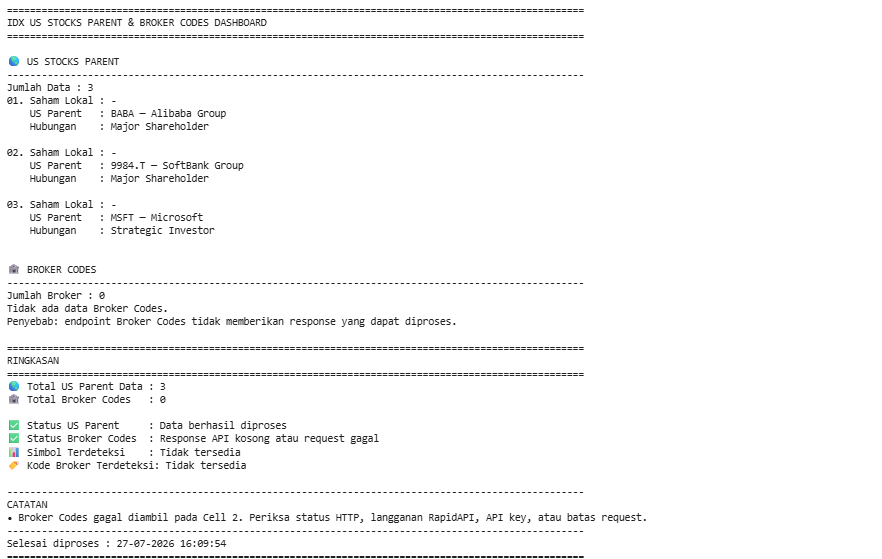
After all five notebook cells are executed, the project produces a complete IDX US Stocks Parent & Broker Codes Dashboard.
The notebook retrieves parent company information for selected Indonesian stocks together with the official Broker Codes dataset, automatically normalizes different JSON response structures, converts them into pandas DataFrames, and presents both datasets in a structured dashboard accompanied by execution statistics and processing status information.
Overall Workflow
The notebook follows a structured five-step workflow:
Configure the Python environment and RapidAPI authentication.
Retrieve US Stocks Parent and Broker Codes data from the IDX API.
Normalize different JSON response structures into standardized records.
Transform the normalized records into pandas DataFrames.
Generate a dashboard that displays both datasets together with execution statistics and diagnostic information.
This modular workflow keeps API communication, data processing, and visualization clearly separated, making the notebook easier to maintain and extend.
Why This Project Matters
Financial APIs often expose datasets with different response structures, making it difficult to process multiple endpoints consistently.
This project demonstrates a practical approach for handling heterogeneous API responses by introducing reusable normalization functions before converting the results into structured DataFrames. The same strategy can easily be applied to additional IDX endpoints, enabling developers to build larger market intelligence dashboards with minimal changes to the existing workflow.
In addition, combining US Stocks Parent information with Broker Codes provides useful context for market research by linking Indonesian listed companies to their overseas parent organizations while also supplying the broker reference data commonly used throughout the Indonesia Stock Exchange.
Conclusion
This project demonstrates how to build an IDX US Stocks Parent and Broker Codes Dashboard using Python and RapidAPI.
By combining two independent IDX API endpoints, the notebook retrieves parent company information for selected Indonesian stocks together with broker reference data, automatically normalizes different response formats, converts them into structured pandas DataFrames, and presents the results through a clear dashboard with execution summaries and diagnostic information.
Its modular five-cell architecture, reusable normalization functions, and robust handling of varying API response structures make it an excellent foundation for building more advanced Indonesia Stock Exchange analytics and market-monitoring applications.