
Understanding how companies are distributed within a sector and how different sectors correlate with one another can provide valuable insights for investors and market analysts. Instead of manually processing complex API responses, Python makes it possible to automate the entire workflow—from requesting data to presenting it in an organized dashboard.
In this tutorial, we'll build an IDX Sector Analysis Dashboard using Python and the Indonesia Stock Exchange (IDX) API available through RapidAPI.
The notebook retrieves two different datasets. The first endpoint returns companies that belong to Sector 7 – Subsector 19, while the second endpoint provides Energy sector correlation data. Since both endpoints may return nested JSON structures, the notebook automatically discovers the most relevant data arrays, normalizes them into pandas DataFrames, and produces easy-to-read tables together with a summary dashboard.
To keep the project modular and easy to understand, the notebook is organized into five cells covering API configuration, data retrieval, intelligent JSON normalization, table generation, and dashboard visualization.
CELL 1 — Import Library & API Configuration
# ============================================================
# CELL 1 — Import Library & Konfigurasi API
# ============================================================

import requests
import pandas as pd
import json
from datetime import datetime

API_KEY = "YOUR_RAPIDAPI_KEY"

BASE_URL = "https://indonesia-stock-exchange-idx.p.rapidapi.com"

headers = {
    "x-rapidapi-key": API_KEY,
    "x-rapidapi-host": "indonesia-stock-exchange-idx.p.rapidapi.com",
    "Content-Type": "application/json"
}

print("Konfigurasi selesai.")
Note: The original notebook code is preserved exactly. The only modification is replacing the exposed RapidAPI key with
YOUR_RAPIDAPI_KEYfor security before publication.
Explanation
The first cell prepares the environment for communicating with the Indonesia Stock Exchange (IDX) API through RapidAPI.
The notebook imports four libraries:
requests for sending HTTP requests.
pandas for organizing API responses into DataFrames.
json for formatting and inspecting JSON responses.
datetime for displaying timestamps in the final dashboard.
Next, the notebook defines the RapidAPI configuration, including the API key, base URL, and the HTTP headers required for authentication. Keeping these values in one place makes the notebook easier to maintain because every subsequent API request reuses the same configuration.
Finally, a confirmation message is printed to indicate that the API configuration has been completed successfully.
CELL 2 — Requesting Sector Companies and Correlation Data
# ============================================================
# CELL 2 — Request API
# ============================================================

def get_api(endpoint):

    url = BASE_URL + endpoint

    try:
        r = requests.get(url, headers=headers, timeout=30)

        print("="*90)
        print("Endpoint :", endpoint)
        print("Status   :", r.status_code)

        if r.status_code == 200:
            return r.json()

        print(r.text)
        return None

    except Exception as e:
        print("Error :", e)
        return None


companies_response = get_api(
    "/api/sectors/7/subsectors/19/companies"
)

correlation_response = get_api(
    "/api/sectors/correlation/energy"
)
Explanation
The second cell is responsible for retrieving data from two IDX API endpoints.
A reusable function named get_api() is created to simplify API communication. Instead of writing the same request logic multiple times, the notebook accepts an endpoint path, combines it with the base URL, and performs an HTTP GET request using the predefined authentication headers.
The function also prints the endpoint being requested together with its HTTP status code, making it easier to verify whether each request was successful. If the server returns a 200 OK response, the JSON content is returned immediately. Otherwise, the raw server response is printed, and the function safely returns None. Any unexpected errors, such as connection problems or request timeouts, are also handled without interrupting notebook execution.
The function is then used to retrieve two datasets:
Sector 7 – Subsector 19 Companies, containing companies that belong to the selected subsector.
Energy Sector Correlation, containing correlation information between the Energy sector and other sectors.
Using a reusable request function keeps the notebook concise while making it easy to add additional IDX endpoints in the future.
CELL 3 — Intelligent JSON Normalization and Debugging
# ============================================================
# CELL 3 — Normalisasi Respons Bertingkat
# ============================================================

def find_all_lists(data, path="root"):
    """
    Mencari seluruh list di dalam response JSON secara rekursif.
    """
    results = []

    if isinstance(data, list):
        results.append({
            "path": path,
            "data": data
        })

        for index, item in enumerate(data):
            if isinstance(item, (dict, list)):
                results.extend(
                    find_all_lists(item, f"{path}[{index}]")
                )

    elif isinstance(data, dict):
        for key, value in data.items():
            if isinstance(value, (dict, list)):
                results.extend(
                    find_all_lists(value, f"{path}.{key}")
                )

    return results


def score_company_list(items):
    """
    Memberikan skor pada list yang kemungkinan berisi data perusahaan.
    """
    if not isinstance(items, list) or not items:
        return 0

    score = 0
    company_keys = {
        "symbol", "ticker", "code", "stockCode", "stock_code",
        "companyName", "company_name", "company", "name",
        "sector", "subsector"
    }

    for item in items[:10]:
        if isinstance(item, dict):
            score += len(company_keys.intersection(item.keys()))

    return score


def score_correlation_list(items):
    """
    Memberikan skor pada list yang kemungkinan berisi data korelasi.
    """
    if not isinstance(items, list) or not items:
        return 0

    score = 0
    correlation_keys = {
        "sector", "sectorName", "sector_name", "name",
        "correlation", "correlationValue", "correlation_value",
        "value", "score", "coefficient"
    }

    for item in items[:10]:
        if isinstance(item, dict):
            score += len(correlation_keys.intersection(item.keys()))

    return score


def select_best_list(response, scorer):
    """
    Memilih list terbaik berdasarkan skor struktur datanya.
    """
    candidates = find_all_lists(response)

    if not candidates:
        return [], None

    ranked = sorted(
        candidates,
        key=lambda item: (
            scorer(item["data"]),
            len(item["data"])
        ),
        reverse=True
    )

    best = ranked[0]

    if scorer(best["data"]) == 0:
        return [], best["path"]

    return best["data"], best["path"]


companies, companies_path = select_best_list(
    companies_response,
    score_company_list
)

correlation, correlation_path = select_best_list(
    correlation_response,
    score_correlation_list
)

print("=" * 100)
print("HASIL NORMALISASI RESPONS")
print("=" * 100)

print("Companies Type       :", type(companies_response).__name__)
print("Companies Data Path  :", companies_path)
print("Companies Records    :", len(companies))

print()

print("Correlation Type     :", type(correlation_response).__name__)
print("Correlation Data Path:", correlation_path)
print("Correlation Records  :", len(correlation))

print("\n" + "=" * 100)
print("DEBUG STRUKTUR COMPANIES")
print("=" * 100)

if companies_response is None:
    print("Raw companies response: None")
else:
    print(
        json.dumps(
            companies_response,
            indent=2,
            ensure_ascii=False,
            default=str
        )[:5000]
    )

print("\n" + "=" * 100)
print("DEBUG STRUKTUR CORRELATION")
print("=" * 100)

if correlation_response is None:
    print("Raw correlation response: None")
else:
    print(
        json.dumps(
            correlation_response,
            indent=2,
            ensure_ascii=False,
            default=str
        )[:5000]
    )
Explanation
The third cell performs the most advanced data-processing stage in the notebook by automatically identifying useful datasets inside complex JSON responses.
Instead of assuming that every API response stores its records under the same key, the notebook recursively searches through the entire JSON structure to locate every list that appears in the response. Each discovered list is then evaluated using a scoring system.
Two specialized scoring functions are implemented:
One recognizes lists that resemble company data by checking for fields such as stock symbols, company names, sectors, and subsectors.
The other identifies sector correlation data by searching for correlation values, sector names, and related attributes.
After all candidate lists have been scored, the notebook automatically selects the list with the highest score, making the normalization process resilient even if the API response structure changes in the future.
Finally, the notebook reports the detected data path, the number of records extracted, and prints the raw JSON responses for both endpoints. This debugging output allows developers to verify that the correct datasets have been identified before converting them into structured tables in the following cell.
CELL 4 — Building Structured Tables
# ============================================================
# CELL 4 — Membentuk dan Menampilkan Tabel
# ============================================================

def first_value(item, keys, default="-"):
    """
    Mengambil nilai pertama yang tersedia dari beberapa kemungkinan key.
    """
    if not isinstance(item, dict):
        return default

    for key in keys:
        value = item.get(key)

        if value not in (None, "", [], {}):
            return value

    return default


def flatten_value(value):
    """
    Mengubah list atau dictionary menjadi teks agar aman ditampilkan.
    """
    if isinstance(value, list):
        return ", ".join(map(str, value))

    if isinstance(value, dict):
        return json.dumps(value, ensure_ascii=False)

    return value


# ============================================================
# TABEL SECTOR COMPANIES
# ============================================================

company_rows = []

for item in companies:
    if not isinstance(item, dict):
        continue

    company_rows.append({
        "Kode Saham": first_value(
            item,
            [
                "symbol", "ticker", "code",
                "stockCode", "stock_code"
            ]
        ),

        "Nama Perusahaan": first_value(
            item,
            [
                "companyName", "company_name",
                "company", "name", "issuerName"
            ]
        ),

        "Sektor": first_value(
            item,
            [
                "sector", "sectorName",
                "sector_name", "sectorTitle"
            ]
        ),

        "Subsektor": first_value(
            item,
            [
                "subsector", "subSector",
                "subsectorName", "subsector_name"
            ]
        )
    })


df_companies = pd.DataFrame(company_rows)


print("=" * 100)
print("SECTOR 7 — SUBSECTOR 19 COMPANIES")
print("=" * 100)

if not df_companies.empty:
    display(df_companies)
else:
    print("Tidak ada data perusahaan yang dapat dibentuk menjadi tabel.")

    if companies:
        print("\nContoh item pertama:")
        print(
            json.dumps(
                companies[0],
                indent=2,
                ensure_ascii=False,
                default=str
            )
        )


# ============================================================
# TABEL SECTOR CORRELATION
# ============================================================

correlation_rows = []

for item in correlation:
    if not isinstance(item, dict):
        continue

    correlation_value = first_value(
        item,
        [
            "correlation", "correlationValue",
            "correlation_value", "value",
            "score", "coefficient"
        ],
        default=None
    )

    try:
        correlation_value = float(correlation_value)
    except (TypeError, ValueError):
        pass

    correlation_rows.append({
        "Sektor": first_value(
            item,
            [
                "sector", "sectorName",
                "sector_name", "name",
                "targetSector", "target_sector"
            ]
        ),

        "Korelasi": correlation_value,

        "Keterangan": first_value(
            item,
            [
                "interpretation", "description",
                "status", "relationship",
                "category"
            ]
        )
    })


df_correlation = pd.DataFrame(correlation_rows)


print("\n" + "=" * 100)
print("SECTOR CORRELATION — ENERGY")
print("=" * 100)

if not df_correlation.empty:
    display(df_correlation)
else:
    print("Tidak ada data korelasi yang dapat dibentuk menjadi tabel.")

    if correlation:
        print("\nContoh item pertama:")
        print(
            json.dumps(
                correlation[0],
                indent=2,
                ensure_ascii=False,
                default=str
            )
        )
Explanation
The fourth cell transforms the normalized JSON data into structured tables that are easier to analyze.
To improve compatibility across different API response formats, the notebook introduces the helper function first_value(). Instead of assuming that every response uses the same field names, the function checks multiple possible keys and returns the first available value. This makes the notebook resilient to small schema differences across API versions.
Another helper function, flatten_value(), converts nested lists or dictionaries into plain text whenever necessary, ensuring that every value can be displayed safely inside a pandas DataFrame.
The notebook then constructs the Sector Companies table by extracting essential company information such as the stock symbol, company name, sector, and subsector. Each company becomes one row inside df_companies.
A similar process is performed for the Sector Correlation dataset. The notebook extracts the target sector, correlation coefficient, and descriptive information before storing everything inside df_correlation. Correlation values are converted into numeric values whenever possible so they can be used for later statistical calculations.
Finally, both DataFrames are displayed. If either dataset is empty, the notebook prints an informative message together with an example of the raw response, making it easier to diagnose unexpected API structures.
CELL 5 — Building the Sector Analysis Dashboard
# ============================================================
# CELL 5 — Dashboard Ringkasan
# ============================================================

def get_numeric_series(dataframe, column):
    """
    Mengambil nilai numerik dari kolom DataFrame.
    """
    if dataframe.empty or column not in dataframe.columns:
        return pd.Series(dtype=float)

    return pd.to_numeric(
        dataframe[column],
        errors="coerce"
    ).dropna()


correlation_numeric = get_numeric_series(
    df_correlation,
    "Korelasi"
)


print("=" * 100)
print("IDX SECTOR ANALYSIS DASHBOARD")
print("=" * 100)


# ============================================================
# RINGKASAN PERUSAHAAN
# ============================================================

print("\n🏢 COMPANIES PADA SECTOR 7 — SUBSECTOR 19")
print("-" * 100)

print("Jumlah data hasil normalisasi :", len(companies))
print("Jumlah data pada tabel        :", len(df_companies))
print("Lokasi data dalam response    :", companies_path or "Tidak ditemukan")

if not df_companies.empty:

    for index, row in df_companies.head(10).iterrows():
        kode = row.get("Kode Saham", "-")
        nama = row.get("Nama Perusahaan", "-")
        sektor = row.get("Sektor", "-")

        print(
            f"{index + 1:02d}. "
            f"{str(kode):<10} | "
            f"{str(nama):<45} | "
            f"{str(sektor)}"
        )

    if len(df_companies) > 10:
        print(
            f"... dan {len(df_companies) - 10} perusahaan lainnya."
        )

else:
    print("Tidak ada data perusahaan.")


# ============================================================
# RINGKASAN KORELASI
# ============================================================

print("\n\n🔗 SECTOR CORRELATION — ENERGY")
print("-" * 100)

print("Jumlah data hasil normalisasi :", len(correlation))
print("Jumlah data pada tabel        :", len(df_correlation))
print("Lokasi data dalam response    :", correlation_path or "Tidak ditemukan")

if not df_correlation.empty:

    for index, row in df_correlation.head(10).iterrows():
        sector = row.get("Sektor", "-")
        value = row.get("Korelasi", "-")

        if isinstance(value, (int, float)):
            value_text = f"{value:.4f}"
        else:
            value_text = str(value)

        print(
            f"{index + 1:02d}. "
            f"{str(sector):<35} | "
            f"Korelasi: {value_text}"
        )

    if not correlation_numeric.empty:
        max_index = correlation_numeric.idxmax()
        min_index = correlation_numeric.idxmin()

        strongest_sector = df_correlation.loc[max_index, "Sektor"]
        weakest_sector = df_correlation.loc[min_index, "Sektor"]

        print("\nStatistik Korelasi")
        print("-" * 100)
        print(
            "Korelasi tertinggi :",
            strongest_sector,
            f"({correlation_numeric.max():.4f})"
        )
        print(
            "Korelasi terendah  :",
            weakest_sector,
            f"({correlation_numeric.min():.4f})"
        )
        print(
            "Rata-rata korelasi :",
            f"{correlation_numeric.mean():.4f}"
        )

else:
    print("Tidak ada data korelasi.")


# ============================================================
# STATUS AKHIR
# ============================================================

print("\n\n" + "=" * 100)
print("RINGKASAN")
print("=" * 100)

print(f"📋 Total Companies    : {len(df_companies)}")
print(f"🔗 Total Correlation  : {len(df_correlation)}")

print(
    "🏢 Status Companies   :",
    "Data berhasil diproses"
    if not df_companies.empty
    else "Data kosong atau struktur belum dikenali"
)

print(
    "⚡ Status Correlation :",
    "Data berhasil diproses"
    if not df_correlation.empty
    else "Data kosong atau struktur belum dikenali"
)

print(
    "\nSelesai diproses      :",
    datetime.now().strftime("%d-%m-%Y %H:%M:%S")
)
For the Medium article, include the complete Cell 5 exactly as it appears in your notebook. It summarizes the normalized data, displays the first ten companies, analyzes sector correlations, calculates the highest, lowest, and average correlation values, and prints the final dashboard status.
Explanation
The fifth cell generates the final IDX Sector Analysis Dashboard.
The notebook begins by preparing a helper function that safely extracts numeric values from the correlation DataFrame. This allows statistical calculations to be performed without errors, even when some correlation values are missing or stored as text.
The dashboard is divided into three major sections.
The first section summarizes companies found within Sector 7 – Subsector 19, displaying the number of normalized records, the number of rows included in the final table, the detected JSON path, and a preview of the first ten companies.
The second section summarizes the Energy Sector Correlation dataset. Besides listing the available sectors and their correlation values, the notebook automatically calculates the highest correlation, the lowest correlation, and the average correlation across all available records.
Finally, the dashboard presents an overall summary containing the total number of companies, total correlation records, processing status for both datasets, and the completion timestamp. This final report gives users a quick overview of whether the API responses were successfully normalized and transformed into meaningful analytical tables.
Final Result
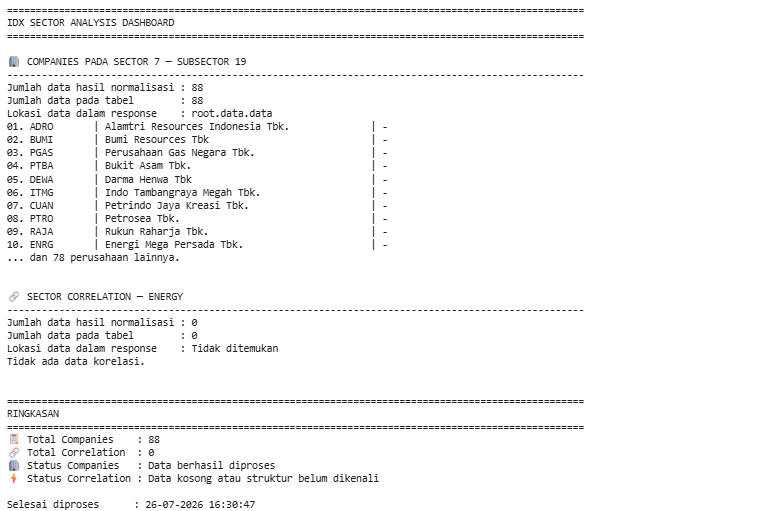
After executing all five notebook cells, the project produces a complete IDX Sector Analysis Dashboard.
The notebook automatically retrieves companies belonging to Sector 7 – Subsector 19, downloads Energy sector correlation data, discovers the correct nested JSON structures, converts them into standardized pandas DataFrames, and presents the results through organized tables and statistical summaries.
Because the normalization process dynamically searches for the most relevant data arrays instead of relying on fixed JSON paths, the notebook remains flexible even when the API response structure changes.
Overall Workflow
The notebook follows a structured five-step workflow:
Configure authentication for the IDX RapidAPI service.
Retrieve sector companies and sector correlation data.
Automatically detect and normalize nested JSON structures.
Transform the extracted data into structured pandas DataFrames.
Build a dashboard containing tables, correlation statistics, and an overall execution summary.
This workflow demonstrates a scalable approach to handling complex financial API responses while keeping each processing stage modular and easy to maintain.
Why This Project Matters
Financial APIs frequently return deeply nested JSON objects that vary between endpoints. Writing code that depends on fixed JSON paths can make applications fragile when the API evolves.
This project demonstrates a more robust strategy by automatically discovering the most relevant data structures before converting them into DataFrames. As a result, developers can spend less time adapting to structural changes and more time building meaningful financial analytics.
The same normalization technique can easily be extended to additional IDX endpoints, making it a valuable foundation for larger stock market dashboards, portfolio analytics platforms, and sector comparison tools.
Conclusion
This project demonstrates how to build an IDX Sector Analysis Dashboard using Python and the Indonesia Stock Exchange API.
By combining Sector Companies and Sector Correlation endpoints, the notebook automatically retrieves market information, intelligently detects nested JSON structures, converts them into structured pandas DataFrames, and generates a comprehensive dashboard with tables and statistical insights.
Its modular five-cell architecture, reusable normalization logic, and automatic structure detection make it an excellent starting point for developing more advanced market intelligence and investment analysis applications.