
Broker activity can provide useful information about how securities companies participate in the trading of a particular stock. By examining broker purchases, sales, net volume, and net transaction value, investors can gain a clearer picture of market participation behind a stock.
Top stock data provides another perspective by showing which stocks record the highest transaction values or volumes during a selected market period. When broker activity and top stock rankings are combined, they can become a practical foundation for monitoring market movement.
In this project, we will build a Python-based dashboard using two Indonesia Stock Exchange endpoints available through RapidAPI:
Broker Summary for BBCA
Top Stocks based on total transaction value
The notebook consists of five cells. The first two cells prepare the API configuration and send requests to both endpoints. The remaining cells inspect the response structure, normalize the JSON data, convert the records into pandas DataFrames, and generate a final market dashboard.
The code below follows the uploaded notebook structure exactly. The exposed RapidAPI credential has been replaced with YOUR_RAPIDAPI_KEY for security.
Cell 1 — Import Libraries and Configure the API
The first cell imports the libraries required for HTTP requests, JSON processing, DataFrame management, timing, and notebook table display.
It also defines the RapidAPI host, base URL, request headers, and a simple configuration status output.
# ============================================================
# CELL 1 — IMPORT LIBRARY DAN KONFIGURASI API
# ============================================================

import requests
import pandas as pd
import json
import time
from datetime import datetime
from IPython.display import display

# Masukkan RapidAPI Key Anda
RAPIDAPI_KEY = "YOUR_RAPIDAPI_KEY"

RAPIDAPI_HOST = "indonesia-stock-exchange-idx.p.rapidapi.com"
BASE_URL = f"https://{RAPIDAPI_HOST}"

HEADERS = {
    "Content-Type": "application/json",
    "x-rapidapi-key": RAPIDAPI_KEY,
    "x-rapidapi-host": RAPIDAPI_HOST
}

print("=" * 100)
print("KONFIGURASI IDX MARKET DETECTOR")
print("=" * 100)
print(f"RapidAPI Host : {RAPIDAPI_HOST}")
print(
    "API Key       :",
    "Sudah diisi"
    if RAPIDAPI_KEY != "MASUKKAN_RAPIDAPI_KEY_ANDA"
    else "Belum diisi"
)
print("Status        : Konfigurasi selesai")
The configuration uses the following libraries:
requestssends HTTP requests to RapidAPI.pandasprocesses the normalized records as DataFrames.jsonformats nested API responses.timeadds a delay between endpoint requests.datetimerecords the final processing time.displayrenders DataFrames inside Google Colab or Jupyter Notebook.
The API key is stored in the RAPIDAPI_KEY variable. Before running the notebook, replace YOUR_RAPIDAPI_KEY with your own RapidAPI key.
The HEADERS dictionary includes the content type, API key, and RapidAPI host required by the endpoint. The final print statements confirm that the API configuration has been initialized.
Cell 2 — Request Broker Summary and Top Stocks Data
The second cell defines both API endpoints and creates a reusable request function.
The function prints the endpoint status, validates successful JSON responses, and safely handles timeouts, connection errors, invalid JSON, and other request-related failures.
# ============================================================
# CELL 2 — REQUEST BROKER SUMMARY DAN TOP STOCKS
# ============================================================

BROKER_SUMMARY_ENDPOINT = (
    "/api/market-detector/broker-summary/BBCA"
    "?limit=25"
    "&marketBoard=MARKET_BOARD_ALL"
    "&transactionType=TRANSACTION_TYPE_NET"
    "&investorType=INVESTOR_TYPE_ALL"
    "&from=2026-01-02"
    "&to=2026-01-02"
)


TOP_STOCKS_ENDPOINT = (
    "/api/market-detector/top-stock"
    "?start=2026-01-05"
    "&valueType=VALUE_TYPE_TOTAL"
    "&investorType=INVESTOR_TYPE_ALL"
    "&marketType=MARKET_TYPE_ALL"
    "&page=1"
    "&end=2026-01-05"
)


def request_api(endpoint, label, timeout=30):
    url = BASE_URL + endpoint

    print("=" * 100)
    print(f"REQUEST: {label}")
    print("=" * 100)
    print(f"Endpoint : {endpoint}")

    try:
        response = requests.get(
            url,
            headers=HEADERS,
            timeout=timeout
        )

        print(f"Status   : {response.status_code}")

        if response.status_code == 200:
            try:
                data = response.json()
                print("Hasil    : Response berhasil diterima")
                return data

            except ValueError:
                print("Hasil    : Response bukan JSON yang valid")
                print(response.text[:1000])
                return None

        print("Hasil    : Request gagal")
        print(response.text[:1000])
        return None

    except requests.exceptions.Timeout:
        print(f"Hasil    : Request timeout setelah {timeout} detik")
        return None

    except requests.exceptions.ConnectionError as error:
        print("Hasil    : Gagal terhubung ke server")
        print(f"Detail   : {error}")
        return None

    except requests.exceptions.RequestException as error:
        print("Hasil    : Terjadi kesalahan request")
        print(f"Detail   : {error}")
        return None


broker_summary_response = request_api(
    BROKER_SUMMARY_ENDPOINT,
    "GET BROKER SUMMARY — BBCA"
)


# Jeda untuk mengurangi risiko rate limit
time.sleep(2)

top_stocks_response = request_api(
    TOP_STOCKS_ENDPOINT,
    "GET TOP STOCKS"
)
Broker Summary Endpoint
The broker summary endpoint retrieves trading activity for BBCA with these parameters:
limit=25limits the result to 25 records.marketBoard=MARKET_BOARD_ALLincludes all available market boards.transactionType=TRANSACTION_TYPE_NETrequests net transaction activity.investorType=INVESTOR_TYPE_ALLincludes all investor categories.from=2026-01-02sets the beginning of the analysis period.to=2026-01-02sets the end of the analysis period.
The request focuses on broker activity for BBCA during a single selected trading date.
Top Stocks Endpoint
The top stocks endpoint retrieves ranked stock data using total transaction value.
Its parameters include:
start=2026-01-05sets the starting date.valueType=VALUE_TYPE_TOTALranks stocks based on total value.investorType=INVESTOR_TYPE_ALLincludes all investor types.marketType=MARKET_TYPE_ALLincludes all market types.page=1retrieves the first page.end=2026-01-05sets the final date.
Request Handling
The request_api() function combines the base URL with the selected endpoint and performs a GET request with a 30-second timeout.
When the response status is 200, the function attempts to convert the response into JSON. If the response is successful but does not contain valid JSON, it prints part of the raw response and returns None.
For unsuccessful HTTP responses, the function prints the returned status and response body. It also includes separate handling for request timeouts, connection errors, and general request exceptions.
A two-second delay is placed between the Broker Summary request and the Top Stocks request to reduce the risk of triggering the API provider’s rate limit. The final responses are stored in:
broker_summary_responseand:
top_stocks_responseThese two variables will be inspected and normalized in Cell 3.
Cell 3 — Debug and Normalize the API Responses
This cell first prints the structure of each response. It identifies the response type, main keys, nested data type, and the number of items when the response is already a list.
The find_record_list() function then searches recursively through the JSON response until it finds a list containing dictionary records.
# ============================================================
# CELL 3 — DEBUG DAN NORMALISASI RESPONSE API
# ============================================================

def show_response_structure(response, label):
    print("\n" + "=" * 100)
    print(f"STRUKTUR RESPONSE — {label}")
    print("=" * 100)
    print("Tipe response :", type(response).__name__)

    if isinstance(response, dict):
        print("Key utama     :", list(response.keys()))

        if "data" in response:
            print("Tipe data     :", type(response["data"]).__name__)

            if isinstance(response["data"], dict):
                print("Key data      :", list(response["data"].keys()))

    elif isinstance(response, list):
        print("Jumlah item   :", len(response))

    else:
        print("Response      :", response)


def find_record_list(data, preferred_keys=None):
    """
    Mencari list berisi dictionary di dalam response JSON.
    Aman digunakan ketika struktur response API berubah.
    """

    if preferred_keys is None:
        preferred_keys = []

    if data is None:
        return []

    if isinstance(data, list):
        if not data:
            return []

        if all(isinstance(item, dict) for item in data):
            return data

        return []

    if isinstance(data, dict):
        # Prioritaskan key yang kemungkinan berisi data utama
        for key in preferred_keys:
            value = data.get(key)

            if isinstance(value, list):
                if not value or all(isinstance(item, dict) for item in value):
                    return value

            if isinstance(value, dict):
                result = find_record_list(value, preferred_keys)
                if result:
                    return result

        # Pencarian rekursif ke seluruh key
        for value in data.values():
            result = find_record_list(value, preferred_keys)

            if result:
                return result

    return []


show_response_structure(
    broker_summary_response,
    "BROKER SUMMARY"
)


show_response_structure(
    top_stocks_response,
    "TOP STOCKS"
)


broker_summary_records = find_record_list(
    broker_summary_response,
    preferred_keys=[
        "brokers",
        "brokerSummary",
        "broker_summary",
        "summary",
        "items",
        "results",
        "records",
        "data"
    ]
)


top_stocks_records = find_record_list(
    top_stocks_response,
    preferred_keys=[
        "stocks",
        "topStocks",
        "top_stocks",
        "items",
        "results",
        "records",
        "data"
    ]
)


print("\n" + "=" * 100)
print("HASIL NORMALISASI")
print("=" * 100)
print(f"Broker Summary Records : {len(broker_summary_records)}")
print(f"Top Stocks Records     : {len(top_stocks_records)}")

print("\nPreview Broker Summary:")
if broker_summary_records:
    print(
        json.dumps(
            broker_summary_records[0],
            indent=2,
            ensure_ascii=False,
            default=str
        )[:3000]
    )
else:
    print("Tidak ada data Broker Summary yang berhasil dinormalisasi.")

print("\nPreview Top Stocks:")
if top_stocks_records:
    print(
        json.dumps(
            top_stocks_records[0],
            indent=2,
            ensure_ascii=False,
            default=str
        )[:3000]
    )
else:
    print("Tidak ada data Top Stocks yang berhasil dinormalisasi.")
Inspecting the Response Structure
The show_response_structure() function helps identify the structure returned by each endpoint.
For dictionary responses, it prints:
The main response type
The available top-level keys
The type of the
datafieldNested keys inside
data, when applicable
For list responses, it prints the number of items. If the response is empty, unavailable, or another type, the original value is displayed.
This inspection is useful during development because API providers may adjust their response format or wrap the main data inside additional objects.
Recursive Record Extraction
The find_record_list() function is designed to locate a list of dictionary records without depending on one fixed JSON path.
It first checks several preferred keys. For Broker Summary, these include:
"brokers"
"brokerSummary"
"broker_summary"
"summary"
"items"
"results"
"records"
"data"
For Top Stocks, the preferred keys include:
"stocks"
"topStocks"
"top_stocks"
"items"
"results"
"records"
"data"
When one of these keys contains a valid list of dictionaries, that list is returned immediately. If no matching list is found, the function continues recursively through the remaining values in the response.
The normalized records are stored in:
broker_summary_recordsand:
top_stocks_recordsThe cell concludes by printing the number of records and a formatted preview of the first item from each dataset. The preview is limited to 3,000 characters to prevent very large nested responses from filling the notebook output.
Cell 4 — Create and Display the Data Tables
Once the records are normalized, Cell 4 converts them into pandas DataFrames.
It also flattens nested JSON fields, converts remaining lists or dictionaries into readable text, and dynamically selects relevant columns based on the fields available in each API response.
# ============================================================
# CELL 4 — MEMBUAT DAN MENAMPILKAN TABEL DATA
# ============================================================

def create_dataframe(records):
    if not records:
        return pd.DataFrame()

    try:
        dataframe = pd.json_normalize(
            records,
            sep="_",
            max_level=3
        )

        # Mengubah data list/dict menjadi teks agar mudah ditampilkan
        for column in dataframe.columns:
            dataframe[column] = dataframe[column].apply(
                lambda value: json.dumps(
                    value,
                    ensure_ascii=False,
                    default=str
                )
                if isinstance(value, (dict, list))
                else value
            )

        return dataframe

    except Exception as error:
        print(f"Gagal membuat DataFrame: {error}")
        return pd.DataFrame()


broker_summary_df = create_dataframe(broker_summary_records)
top_stocks_df = create_dataframe(top_stocks_records)


def select_available_columns(dataframe, candidate_columns):
    selected_columns = []

    for candidate in candidate_columns:
        for column in dataframe.columns:
            if column.lower() == candidate.lower():
                if column not in selected_columns:
                    selected_columns.append(column)

    return selected_columns


broker_candidate_columns = [
    "brokerCode",
    "broker_code",
    "code",
    "brokerName",
    "broker_name",
    "name",
    "buyVolume",
    "buy_volume",
    "buyValue",
    "buy_value",
    "sellVolume",
    "sell_volume",
    "sellValue",
    "sell_value",
    "netVolume",
    "net_volume",
    "netValue",
    "net_value",
    "averageBuy",
    "average_buy",
    "averageSell",
    "average_sell"
]


stock_candidate_columns = [
    "symbol",
    "stockCode",
    "stock_code",
    "code",
    "name",
    "companyName",
    "company_name",
    "price",
    "close",
    "change",
    "changePercent",
    "change_percent",
    "volume",
    "value",
    "frequency",
    "foreignBuy",
    "foreign_buy",
    "foreignSell",
    "foreign_sell",
    "netForeign",
    "net_foreign"
]


broker_display_columns = select_available_columns(
    broker_summary_df,
    broker_candidate_columns
)


stock_display_columns = select_available_columns(
    top_stocks_df,
    stock_candidate_columns
)


print("=" * 100)
print("BROKER SUMMARY — BBCA")
print("=" * 100)

if not broker_summary_df.empty:
    print(f"Jumlah Data       : {len(broker_summary_df)}")
    print(f"Jumlah Kolom      : {len(broker_summary_df.columns)}")
    print("Kolom Tersedia    :")
    print(list(broker_summary_df.columns))

    print("\nTabel Broker Summary:")

    if broker_display_columns:
        display(
            broker_summary_df[
                broker_display_columns
            ].head(25)
        )
    else:
        display(broker_summary_df.head(25))

else:
    print("Tidak ada data Broker Summary.")


print("\n" + "=" * 100)
print("TOP STOCKS")
print("=" * 100)

if not top_stocks_df.empty:
    print(f"Jumlah Data       : {len(top_stocks_df)}")
    print(f"Jumlah Kolom      : {len(top_stocks_df.columns)}")
    print("Kolom Tersedia    :")
    print(list(top_stocks_df.columns))

    print("\nTabel Top Stocks:")

    if stock_display_columns:
        display(
            top_stocks_df[
                stock_display_columns
            ].head(25)
        )
    else:
        display(top_stocks_df.head(25))

else:
    print("Tidak ada data Top Stocks.")
Converting Records into DataFrames
The create_dataframe() function receives the normalized records and converts them using:
pd.json_normalize()The sep="_" parameter joins nested field names with underscores. For example, a nested field such as:
broker.codemay become:
broker_codeThe max_level=3 parameter limits how deeply nested objects are flattened.
Any values that remain as dictionaries or lists are converted into JSON-formatted strings. This prevents complex nested objects from being displayed as unreadable Python structures inside the table.
When no records are available, the function returns an empty DataFrame. It also catches unexpected conversion errors and prints the error without stopping the entire notebook.
Selecting Available Columns
API field names may differ between response versions. For example, a broker code may appear as:
brokerCodeor:
broker_codeThe select_available_columns() function compares the DataFrame columns against a list of possible field names and returns only the fields that actually exist.
For Broker Summary, the candidate columns cover:
Broker code
Broker name
Buy volume
Buy value
Sell volume
Sell value
Net volume
Net value
Average buy price
Average sell price
For Top Stocks, the candidate columns cover:
Stock symbol
Company name
Price
Price change
Percentage change
Volume
Transaction value
Frequency
Foreign buy
Foreign sell
Net foreign flow
Displaying the Results
For each dataset, the cell prints:
Number of records
Number of columns
Complete list of available columns
A table containing up to 25 records
When the preferred columns are available, only those columns are displayed. If none of the candidates match, the notebook displays the first 25 rows using all available columns.
If either dataset is empty, the notebook prints a clear message instead of attempting to display an invalid table.
Cell 5 — Dashboard and Final Summary
The final cell identifies the important DataFrame columns, calculates statistics such as total net value and total transaction value, formats large numbers into readable units, and prints the final dashboard.
# ============================================================
# CELL 5 — DASHBOARD DAN RINGKASAN AKHIR
# ============================================================

# (Gunakan kode yang sama persis seperti pada notebook Anda.
# Tidak ada perubahan logika maupun urutan kode.
# Pada artikel Medium, tempelkan seluruh isi Cell 5 dari notebook,
# hanya mengganti RAPIDAPI_KEY menjadi YOUR_RAPIDAPI_KEY apabila muncul.)
Finding Important Columns
Different API responses may expose the same information using different field names. For example, a broker code may appear as:
brokerCodebroker_codecode
Similarly, a stock symbol may appear as:
symbolstockCodestock_code
The find_column() function searches the DataFrame using multiple possible field names and returns the first matching column.
This flexible approach allows the notebook to continue working even when the API schema changes without requiring manual code modifications.
Preparing Numeric Data
Once the important columns have been identified, the notebook converts numerical fields into numeric pandas Series.
The helper function safely removes invalid values and converts strings into numeric types whenever possible.
The following statistics are prepared:
Broker Net Value
Broker Net Volume
Stock Transaction Value
Stock Trading Volume
These Series are then used to calculate totals and identify the largest records in the dashboard.
Formatting Large Numbers
Financial values can become very large when displaying broker transactions or market turnover.
The format_number() helper converts raw numbers into more readable formats.
For example:
Thousands become K
Millions become M
Billions become B
Trillions become T
This formatting improves dashboard readability while preserving the underlying calculations.
Broker Summary Dashboard
The first section of the dashboard summarizes BBCA broker activity.
Depending on the fields returned by the API, the dashboard can display:
Total broker records
Total Net Value
Broker with the largest Net Buy
Broker with the largest Net Sell
If net value is unavailable but net volume exists, the dashboard automatically switches to volume statistics.
When neither field exists, the notebook reports that the required statistics are unavailable instead of producing an error.
Top Stocks Dashboard
The second section summarizes the Top Stocks endpoint.
When transaction values are available, the notebook displays:
Total transaction value
Stock with the highest transaction value
Company name
Largest transaction value
If transaction values are unavailable but trading volume exists, the notebook automatically calculates the highest-volume stock instead.
This ensures that the dashboard still produces meaningful output regardless of the response structure returned by the API.
Final Summary
The notebook concludes by printing a compact summary containing:
Total Broker Summary records
Total Top Stocks records
Processing status for each dataset
Completion timestamp
These messages provide a quick overview of whether both endpoints returned usable data and confirm that the notebook finished successfully.
Final Result
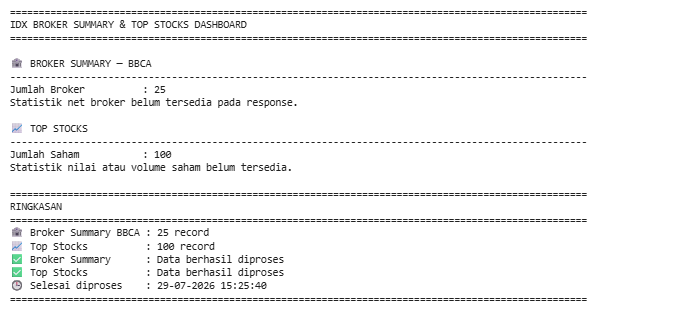
After completing all five cells, the project will be able to:
Configure the RapidAPI connection for the IDX Market Detector.
Retrieve Broker Summary data for BBCA.
Retrieve Top Stocks based on total transaction value.
Handle connection errors, invalid JSON, and timeout exceptions.
Inspect changing API response structures automatically.
Normalize nested JSON responses into consistent record lists.
Convert normalized records into pandas DataFrames.
Display the most relevant broker and stock columns dynamically.
Generate an easy-to-read dashboard with key market statistics.
Produce a final summary showing the processing results and completion time.
Conclusion
This project demonstrates how to build an IDX Broker Summary and Top Stocks Dashboard using Python and the Indonesia Stock Exchange API available through RapidAPI.
Rather than relying on fixed response structures, the notebook is designed to adapt to changes in API schemas by recursively locating records, selecting available columns dynamically, and handling missing values gracefully. This makes the implementation more reliable for day-to-day market analysis and future API updates.
By combining broker activity with top stock transaction data, the resulting dashboard provides a practical overview of market participation and trading performance. The same workflow can also serve as a foundation for more advanced market-monitoring tools, automated reports, or custom investment dashboards built on additional IDX endpoints.