
Understanding broker activity is one of the most effective ways to monitor market participation and trading behavior. Broker transaction data can help investors identify which brokers are the most active, where buying pressure is concentrated, and how market participants are positioning themselves.
In this project, we combine Top Brokers data with Broker Activity data from the IDX API. The notebook retrieves broker rankings based on transaction value and also analyzes stock accumulation activity from a selected broker.
The result is a simple IDX Broker Intelligence Dashboard that helps investors monitor broker performance and trading activity from a single workflow.
CELL 1 — Install & Import
import requests
import pandas as pd
import time
from IPython.display import display, Markdown
Explanation
Cell 1 imports the required Python libraries.
The notebook uses:
requestsfor API communication.pandasfor dataframe processing.timefor delay handling.displayandMarkdownfor dashboard presentation.
These libraries provide the foundation for retrieving, processing, and displaying broker intelligence data.
CELL 2 — Konfigurasi API
RAPIDAPI_KEY = "YOUR_API_KEY"

BASE_URL = "https://indonesia-stock-exchange-idx.p.rapidapi.com"

HEADERS = {
    "Content-Type": "application/json",
    "x-rapidapi-host": "indonesia-stock-exchange-idx.p.rapidapi.com",
    "x-rapidapi-key": RAPIDAPI_KEY
}
Explanation
Cell 2 defines the API configuration used throughout the notebook.
The notebook stores the API key, base URL, and request headers required to access the Indonesia Stock Exchange API.
All subsequent API requests use these settings.
CELL 3 — Function Fetch API
def fetch_api(endpoint, params=None, max_retries=3):
    url = BASE_URL + endpoint

    for attempt in range(max_retries):
        try:
            response = requests.get(url, headers=HEADERS, params=params, timeout=30)

            if response.status_code == 429:
                wait_time = 5 * (attempt + 1)
                print(f"Rate limit terkena. Menunggu {wait_time} detik...")
                time.sleep(wait_time)
                continue

            response.raise_for_status()
            return response.json()

        except requests.exceptions.RequestException as e:
            print(f"Percobaan {attempt + 1} gagal: {e}")
            time.sleep(3)

    return None


def extract_list(data):
    if data is None:
        return []

    if isinstance(data, list):
        return data

    if isinstance(data, dict):
        for key in ["data", "result", "results", "items", "brokers", "activities"]:
            if key in data and isinstance(data[key], list):
                return data[key]

        for value in data.values():
            if isinstance(value, list):
                return value

    return []
Explanation
Cell 3 creates helper functions for retrieving and processing API data.
The fetch_api() function sends requests to the IDX API and includes retry handling when rate limits occur. If the API responds with status code 429, the notebook automatically waits before retrying.
The extract_list() function helps normalize API responses by extracting list-based data structures from different response formats.
These functions make the notebook more reliable and flexible when handling API responses.
CELL 4 — Ambil Data dari 2 API
top_brokers_raw = fetch_api(
    "/api/market-detector/top-broker",
    top_brokers_params
)

time.sleep(5)

broker_code = "DH"

broker_activity_raw = fetch_api(
    f"/api/market-detector/broker-activity/{broker_code}",
    broker_activity_params
)

# TOP BROKERS
top_brokers_data = (
    top_brokers_raw
    .get("data", {})
    .get("data", {})
    .get("list", [])
)

# BROKER ACTIVITY
broker_buy_data = (
    broker_activity_raw
    .get("data", {})
    .get("data", {})
    .get("broker_summary", {})
    .get("brokers_buy", [])
)

top_brokers_df = pd.DataFrame(top_brokers_data)
broker_activity_df = pd.DataFrame(broker_buy_data)
Explanation
Cell 4 retrieves data from two IDX API endpoints.
The first endpoint retrieves Top Broker information and stores the response in top_brokers_raw.
The notebook then waits for five seconds before retrieving Broker Activity data for broker code DH.
After both API calls are completed:
Top Broker data is extracted into
top_brokers_data.Broker Activity data is extracted into
broker_buy_data.
Finally, both datasets are converted into pandas dataframes:
top_brokers_dfbroker_activity_df
CELL 5 — Dashboard Analisis
display(Markdown("# 📊 IDX Broker Intelligence Dashboard"))

display(Markdown("## 🏆 Top 20 Brokers Berdasarkan Total Value"))

top_brokers_display = (
    top_brokers_df[
        [
            "code",
            "name",
            "total_value",
            "net_value",
            "buy_value",
            "sell_value",
            "group"
        ]
    ]
    .sort_values("total_value", ascending=False)
    .head(20)
)

display(top_brokers_display)

display(Markdown("---"))

display(Markdown(f"## 🔍 Aktivitas Broker {broker_code}"))

broker_activity_display = (
    broker_activity_df[
        [
            "netbs_stock_code",
            "bval",
            "blot",
            "netbs_buy_avg_price",
            "type"
        ]
    ]
    .sort_values("bval", ascending=False)
    .head(20)
)

display(broker_activity_display)

display(Markdown("---"))

display(Markdown("## 📈 Insight Broker"))

top_broker = top_brokers_df.sort_values(
    "total_value",
    ascending=False
).iloc[0]

display(pd.DataFrame({
    "Metric": [
        "Broker Teraktif",
        "Kode Broker",
        "Total Value",
        "Net Value",
        "Kategori"
    ],
    "Value": [
        top_broker["name"],
        top_broker["code"],
        f"Rp {int(top_broker['total_value']):,}",
        f"Rp {int(top_broker['net_value']):,}",
        top_broker["group"]
    ]
}))
Explanation
Cell 5 builds the final dashboard.
The dashboard consists of three sections.
Result:
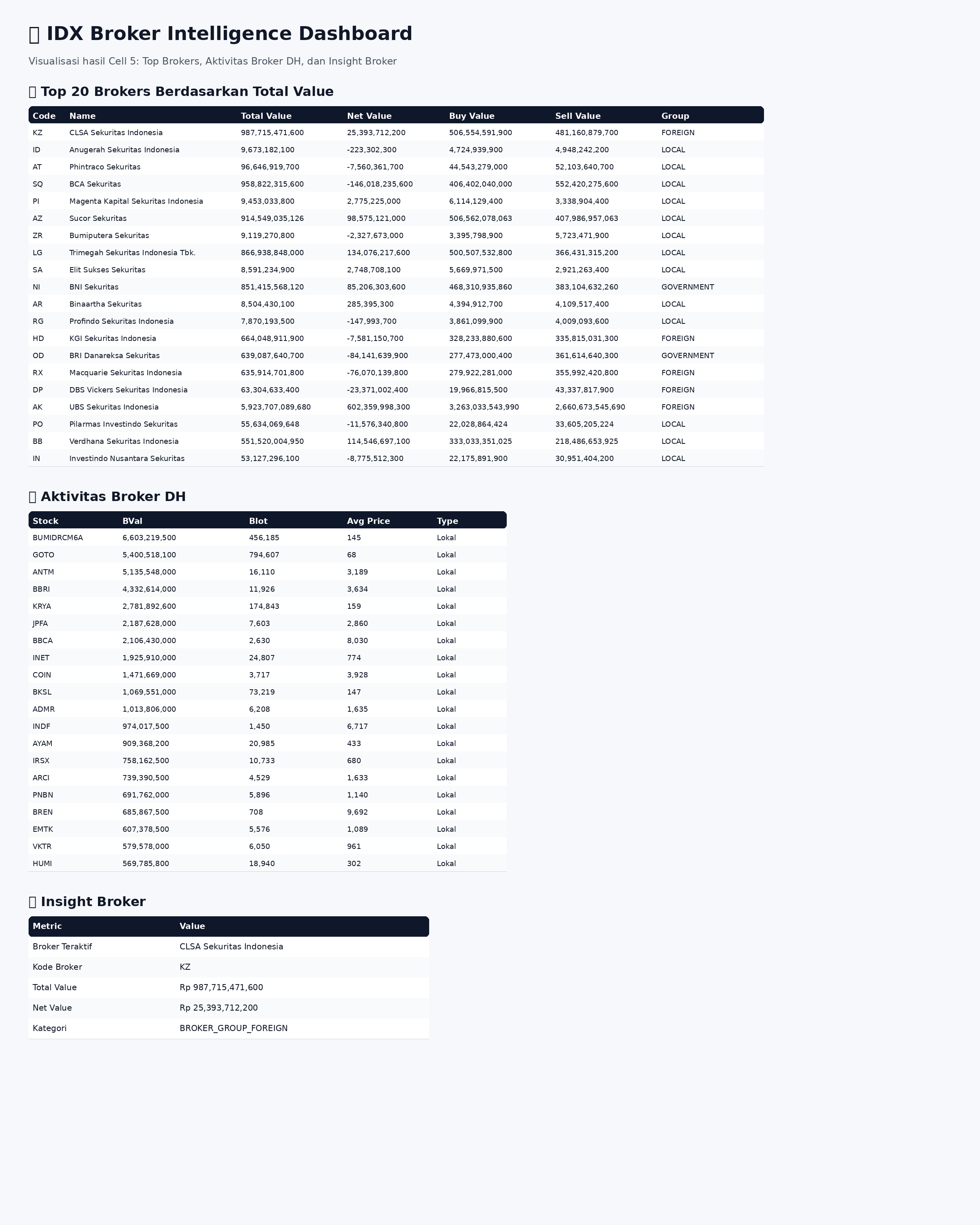
Top 20 Brokers Berdasarkan Total Value
The notebook selects broker information from top_brokers_df, sorts the data by total_value, and displays the top twenty brokers.
Aktivitas Broker DH
The notebook displays broker accumulation activity for broker code DH.
The dataset includes:
Stock code
Buy value
Lot volume
Average buy price
Activity type
The results are sorted by buy value and limited to the top twenty records.
Insight Broker
The notebook identifies the broker with the highest transaction value and creates a summary table containing:
Broker Teraktif
Kode Broker
Total Value
Net Value
Kategori
This provides a quick overview of the most active broker in the dataset.
OVERALL WORKFLOW
This notebook starts by importing the required Python libraries and configuring API access.
Next, it creates helper functions for API retrieval and data extraction.
The notebook then retrieves Top Broker data and Broker Activity data for broker code DH.
After converting both responses into dataframes, the notebook creates a dashboard that displays:
Top 20 brokers by transaction value.
Broker DH activity data.
Broker insight summary.
The workflow ends by presenting a concise broker intelligence dashboard.
WHY THIS CASE MATTERS
Broker transaction activity can provide useful information about market participation and buying behavior.
Monitoring Top Brokers helps investors identify the most active market participants, while Broker Activity data helps reveal which stocks are being accumulated by a specific broker.
By combining both datasets into a single dashboard, investors gain a clearer understanding of broker behavior and market activity.
CONCLUSION
This tutorial demonstrates how to build an IDX Broker Intelligence Dashboard using Python and the IDX API.
The notebook retrieves Top Broker data, retrieves Broker Activity data, converts both responses into structured dataframes, and presents the results through a simple dashboard.
The final workflow provides:
Top broker monitoring
Broker activity analysis
Transaction value ranking
Stock accumulation tracking
Broker intelligence reporting
For investors, traders, analysts, and fintech developers, this project provides a practical foundation for broker intelligence and market activity analysis.