Analyzing investor portfolio performance is an important part of financial research because it provides insight into the distribution of investment holdings, reported profit and loss, and the performance metrics associated with individual securities. By examining these indicators, analysts can identify large portfolio positions, compare reported returns, and evaluate how investment value is distributed across available holdings.
Portfolio performance analysis involves several related variables. Market value indicates the reported value of a position, while unrealized profit and loss (P&L) represents the reported gain or loss on holdings that have not been fully realized. Return percentages provide another perspective on performance, although their interpretation depends on the definition and calculation method used by the data provider. Examining these variables together can help analysts understand portfolio composition and identify positions that warrant further investigation.
Python provides an efficient environment for automating portfolio analysis. By connecting to a financial application programming interface (API), analysts can retrieve portfolio data, normalize JSON responses, identify relevant numerical fields, calculate portfolio weights, generate visualizations, and export the results into reusable files. Libraries such as Requests, Pandas, NumPy, and Matplotlib support these tasks within a single analytical workflow.
This article presents Guru Performance Analysis, a Python-based framework that uses the MarketFlow All-in-One Market Finance API through RapidAPI. The implementation retrieves performance data for the investor identifier warren-buffett, using a historical reporting date of June 30, 2024, and requests up to ten top holdings.
The framework consists of five computational cells covering API configuration, documentation retrieval, investor performance data extraction, JSON normalization, and portfolio dashboard generation. The analysis identifies available fields for stock symbols, position values, unrealized P&L, and return percentages. When the necessary information is available, the program calculates portfolio weights, ranks holdings, visualizes the largest positions, and exports the processed and raw data.
The objective is to demonstrate a reproducible workflow for financial portfolio analysis. The resulting outputs describe the data returned by the API and should not be interpreted as a real-time representation of the investor's portfolio or as automatic buy and sell recommendations.
2. Methodology
The Guru Performance Analysis workflow is divided into five computational cells.
Cell 1 — API configuration: imports the required Python libraries, configures RapidAPI authentication, defines the investor identifier and reporting date, and establishes a reusable HTTP request function.
Cell 2 — API documentation retrieval: requests the MarketFlow Smart Money API usage guide and displays the returned documentation.
Cell 3 — Performance data retrieval: requests the investor performance dataset for the selected reporting date and top-holdings limit.
Cell 4 — JSON normalization: searches the nested response for structured records and converts them into a Pandas DataFrame.
Cell 5 — Portfolio analysis and reporting: identifies relevant columns, converts numerical fields, calculates portfolio weights, ranks positions, creates a chart, and exports the results.
The implementation uses Requests for HTTP communication, Pandas for data processing, NumPy for numerical classification support, Matplotlib for visualization, and Python's built-in JSON module for handling API responses.
Portfolio weight calculation
When a usable market-value column is available, the program calculates the portfolio weight of each position as:
\[ w_i=\frac{V_i}{\sum_{j=1}^{n}V_j}\times100\% \]
where \(V_i\) represents the reported value of position \(i\), and the denominator represents the sum of the reported position values included in the dataset.
The program also calculates the combined share of the five largest positions:
\[ C_5=\frac{\sum_{i=1}^{5}V_{(i)}}{\sum_{j=1}^{n}V_j}\times100\% \]
Here, \(V_{(i)}\) denotes the position values ranked from largest to smallest. A higher value of \(C_5\) indicates that the five largest positions account for a larger proportion of the analyzed portfolio.
These calculations depend on the completeness of the returned records and the meaning of the API's market-value field. If the endpoint returns only selected holdings, the calculated percentages describe the retrieved dataset rather than necessarily representing the investor's entire portfolio.
3. Implementation and Python Code
The implementation below follows the five-cell structure of the supplied Python file. Each cell performs a separate stage of the analysis and uses variables established in the preceding cells.
Cell 1 — Installation, Configuration, and API Functions
The first cell imports the required libraries and configures authentication through RapidAPI. The API key is read from the RAPIDAPI_KEY environment variable or requested interactively using getpass.
The investor identifier is set to warren-buffett, the reporting date to June 30, 2024, and the number of requested top holdings to ten. The api_get() function sends authenticated GET requests, applies a 30-second timeout, checks HTTP errors, and returns the decoded JSON response.
Code — Cell 1
%pip -q install requests pandas numpy matplotlib

import os
import json
import getpass
import requests
import numpy as np
import pandas as pd
import matplotlib.pyplot as plt
from IPython.display import display

API_HOST = "marketflow-all-in-one-market-finance-api.p.rapidapi.com"
BASE_URL = f"https://{API_HOST}"

API_KEY = os.getenv("RAPIDAPI_KEY", "").strip()
if not API_KEY:
    API_KEY = getpass.getpass("Masukkan RapidAPI Key: ").strip()

if not API_KEY:
    raise ValueError("RapidAPI Key wajib diisi.")

HEADERS = {
    "x-rapidapi-key": API_KEY,
    "x-rapidapi-host": API_HOST
}

# Parameter analisis — dapat diubah
INVESTOR_SLUG = "warren-buffett"
REPORT_DATE = "2024-06-30"
TOP_HOLDINGS = 10

def api_get(endpoint, params=None):
    response = requests.get(
        f"{BASE_URL}{endpoint}",
        headers=HEADERS,
        params=params or {},
        timeout=30
    )
    if not response.ok:
        raise RuntimeError(
            f"HTTP {response.status_code}: {response.text[:1000]}"
        )
    data = response.json()
    if isinstance(data, dict) and data.get("error"):
        raise RuntimeError(str(data["error"]))
    return data

print("MarketFlow siap digunakan.")
print("Investor:", INVESTOR_SLUG)
print("Tanggal laporan:", REPORT_DATE)
Cell 2 — Retrieving the Smart Money API Documentation
The second cell retrieves the usage guide from the /smartmoney/how-to-use endpoint. The response is displayed in formatted JSON to help the analyst inspect the API documentation and understand the supported parameters or expected response structure.
The request is wrapped in a try-except block. If the documentation endpoint is unavailable, the error is displayed and the variable HOW_TO_USE is assigned None. The workflow can then proceed to the performance endpoint if that endpoint remains accessible.
Code — Cell 2
try:
    HOW_TO_USE = api_get("/smartmoney/how-to-use")

    print("=== PANDUAN SMART MONEY API ===")
    print(json.dumps(HOW_TO_USE, indent=2, ensure_ascii=False)[:12000])

except Exception as e:
    HOW_TO_USE = None
    print("Dokumentasi gagal diambil:", e)
    print("Lanjutkan dengan endpoint performa jika akses tersedia.")
Cell 3 — Retrieving Investor Performance Data
The third cell requests the selected investor's performance information through the /smartmoney/guru-performance endpoint. The request includes the reporting date, requested number of top holdings, and investor slug.
The resulting JSON response is stored in PERFORMANCE and displayed in formatted form. If the request fails, the exception is reported and raised again so that the notebook does not silently continue with an unavailable performance dataset.
This step provides the source data for the portfolio analysis performed in the following cells.
Code — Cell 3
try:
    PERFORMANCE = api_get(
        "/smartmoney/guru-performance",
        params={
            "report_date": REPORT_DATE,
            "top_holdings": TOP_HOLDINGS,
            "slug": INVESTOR_SLUG
        }
    )

    print("=== PERFORMA INVESTOR ===")
    print(json.dumps(PERFORMANCE, indent=2, ensure_ascii=False)[:15000])

except Exception as e:
    PERFORMANCE = None
    print("Gagal mengambil performa investor:", e)
    raise
Cell 4 — Converting JSON into an Analytical Table
The fourth cell transforms the API response into a structured DataFrame. The find_records() function recursively searches nested dictionaries and lists for collections of dictionary records.
When one or more candidate lists are found, the function selects the largest list and normalizes it using pd.json_normalize(). This allows nested JSON fields to be represented as columns for further analysis.
If no record list is identified, the program instead normalizes the top-level response into a DataFrame. This fallback allows the user to inspect the response structure even when the API returns a summary object rather than a list of holdings.
The resulting table and its column names are displayed to support validation before the analytical calculations begin.
Code — Cell 4
def find_records(obj, path="root"):
    """Cari daftar berisi record di dalam JSON bertingkat."""
    candidates = []

    if isinstance(obj, list):
        if obj and all(isinstance(x, dict) for x in obj):
            candidates.append((len(obj), path, obj))

        for i, value in enumerate(obj):
            candidates.extend(find_records(value, f"{path}[{i}]"))

    elif isinstance(obj, dict):
        for key, value in obj.items():
            candidates.extend(
                find_records(value, f"{path}.{key}")
            )

    return candidates


if PERFORMANCE is None:
    raise ValueError("Data performa belum tersedia. Jalankan Cell 3.")

records_found = find_records(PERFORMANCE)

if records_found:
    _, RECORD_PATH, records = max(
        records_found, key=lambda item: item[0]
    )
    df = pd.json_normalize(records, sep="_")
    print("Lokasi record:", RECORD_PATH)
    print("Jumlah record:", len(df))
else:
    df = pd.json_normalize(
        PERFORMANCE if isinstance(PERFORMANCE, dict)
        else {"response": PERFORMANCE},
        sep="_"
    )
    print("Tidak ditemukan daftar record; menampilkan struktur ringkas.")

df.columns = [str(c) for c in df.columns]
display(df.head(20))

print("\nKolom tersedia:")
print(df.columns.tolist())
Cell 5 — Portfolio Performance Dashboard, Interpretation, and Export
The fifth cell performs the main portfolio analysis. It identifies likely columns for stock symbols, market values, unrealized profit and loss, and return percentages using a flexible column-detection function.
The detected numerical fields are converted to numeric types after removing common formatting characters such as commas, dollar signs, and percentage symbols. When market values are available, the program calculates the percentage weight of each position and ranks the largest holdings. It also calculates the combined weight of the five largest positions.
If market values are unavailable, the program attempts to use return percentages or P&L as alternative ranking metrics. A horizontal bar chart is generated using the selected metric, and a conditional interpretation is printed when return data are available.
Finally, the processed dataset is exported to guru_performance_analysis.csv, while the original API response is saved to guru_performance_raw.json.
Code — Cell 5
def find_col(keywords):
    for col in df.columns:
        name = col.lower().replace("_", " ")
        if any(k in name for k in keywords):
            return col
    return None


# Cari kolom secara fleksibel
symbol_col = find_col(["symbol", "ticker", "stock", "company"])
value_col = find_col([
    "market value", "position value", "holding value",
    "current value", "value usd", "marketvalue"
])
pnl_col = find_col([
    "unrealized pnl", "unrealized profit", "pnl",
    "profit loss", "gain loss"
])
return_col = find_col([
    "return percent", "pnl percent", "profit percent",
    "return pct", "gain percent"
])

# Konversi kolom yang relevan ke numerik
for col in [value_col, pnl_col, return_col]:
    if col:
        df[col] = pd.to_numeric(
            df[col].astype(str)
              .str.replace(",", "", regex=False)
              .str.replace("$", "", regex=False)
              .str.replace("%", "", regex=False)
              .str.strip(),
            errors="coerce"
        )

print("=== RINGKASAN DATA ===")
print("Jumlah record:", len(df))
print("Kolom saham:", symbol_col)
print("Kolom nilai posisi:", value_col)
print("Kolom P&L:", pnl_col)
print("Kolom return:", return_col)

# Analisis konsentrasi portofolio jika nilai posisi tersedia
if value_col and df[value_col].notna().any():
    df["portfolio_weight_pct"] = (
        df[value_col] / df[value_col].sum() * 100
    )
    display(
        df.sort_values(value_col, ascending=False).head(TOP_HOLDINGS)
    )

    print(
        "Porsi 5 posisi terbesar:",
        round(
            df.nlargest(min(5, len(df)), value_col)[value_col].sum()
            / df[value_col].sum() * 100, 2
        ), "%"
    )

    plot_col = "portfolio_weight_pct"
    plot_title = "Bobot Kepemilikan Portofolio (%)"

elif return_col and df[return_col].notna().any():
    display(df.sort_values(return_col, ascending=False))
    plot_col = return_col
    plot_title = "Return Posisi (%)"

elif pnl_col and df[pnl_col].notna().any():
    display(df.sort_values(pnl_col, ascending=False))
    plot_col = pnl_col
    plot_title = "Profit/Loss per Posisi"

else:
    plot_col = None
    print(
        "Belum ada kolom numerik yang dikenali untuk grafik. "
        "Periksa nama kolom di Cell 4."
    )

# Visualisasi
if plot_col and symbol_col:
    chart_df = df.dropna(subset=[plot_col]).copy()
    chart_df = chart_df.nlargest(
        min(TOP_HOLDINGS, len(chart_df)),
        plot_col
    ).sort_values(plot_col)

    if not chart_df.empty:
        plt.figure(figsize=(10, 6))
        plt.barh(
            chart_df[symbol_col].astype(str),
            chart_df[plot_col]
        )
        plt.title(plot_title)
        plt.xlabel(plot_col)
        plt.ylabel("Saham")
        plt.tight_layout()
        plt.show()

# Interpretasi bersyarat, bukan sinyal beli/jual otomatis
if return_col and df[return_col].notna().any():
    avg_return = df[return_col].mean()
    print(f"Rata-rata return kolom terpilih: {avg_return:.2f}%")
    print(
        "Interpretasi:",
        "positif secara rata-rata pada metrik yang tersedia."
        if avg_return > 0 else
        "nol atau negatif secara rata-rata pada metrik yang tersedia."
    )
else:
    print(
        "Return belum dapat disimpulkan secara andal dari kolom yang "
        "teridentifikasi. Periksa definisi metrik dari API."
    )

# Ekspor hasil
df.to_csv("guru_performance_analysis.csv", index=False)

with open("guru_performance_raw.json", "w", encoding="utf-8") as f:
    json.dump(PERFORMANCE, f, indent=2, ensure_ascii=False)

print("\nFile tersimpan:")
print("- guru_performance_analysis.csv")
print("- guru_performance_raw.json")
Resultt:
4. Results and Discussion
4.1. Investor Performance Data Retrieval
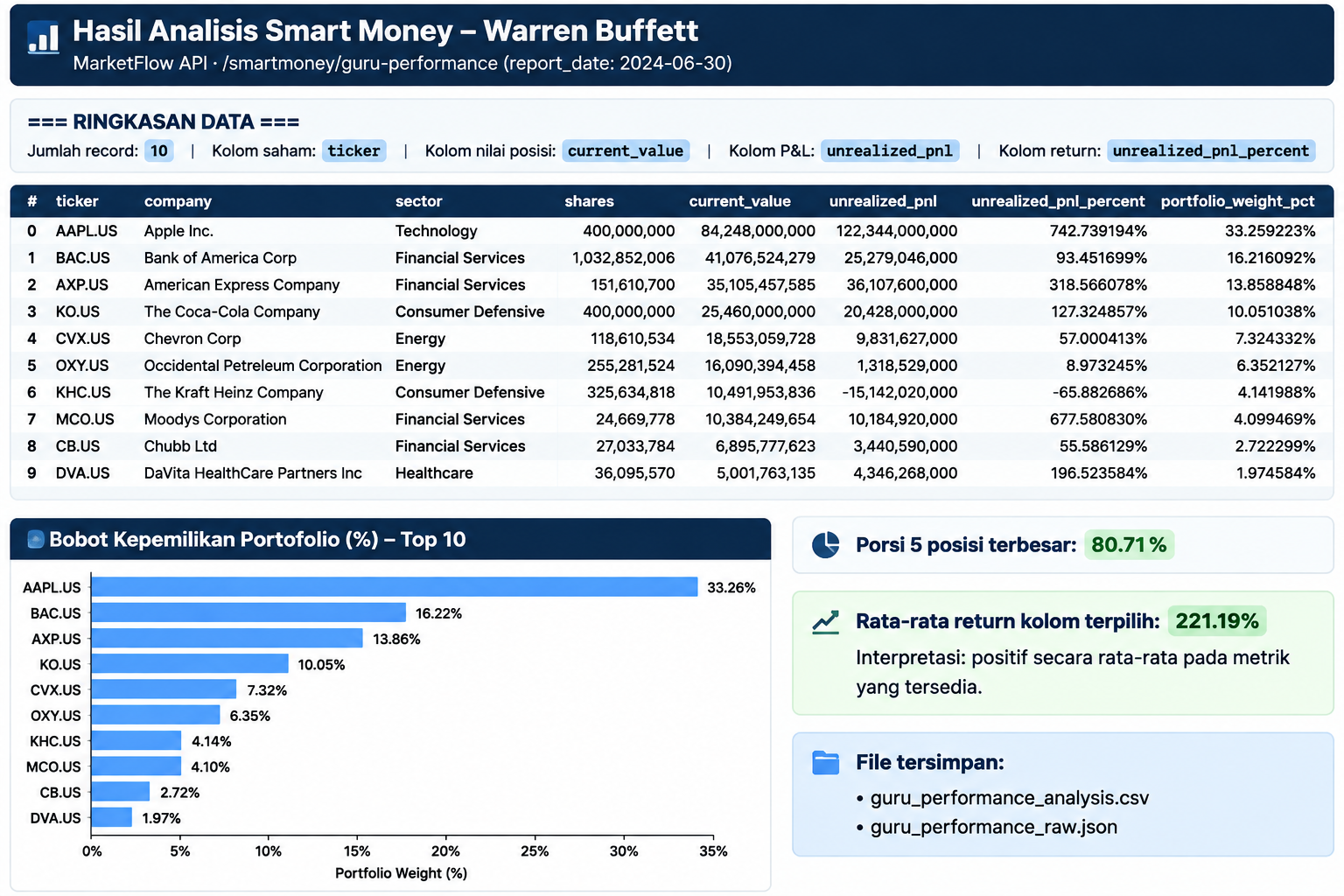
The investor performance module retrieves the data returned by the MarketFlow API for the selected investor and reporting date. The program then identifies candidate transaction or portfolio records within the nested JSON response.
The number of extracted records provides an initial overview of the available dataset. However, it should not automatically be interpreted as the total number of securities in the investor's complete portfolio. The result depends on the API's coverage, the requested top-holdings limit, and the structure of the returned response.
4.2. Portfolio Position Ranking
The framework attempts to identify market value, unrealized P&L, and return percentage fields. When market values are available, the positions are sorted in descending order, and the largest holdings are displayed.
This ranking helps analysts identify positions that account for relatively large reported values. When market values are unavailable, the implementation can use return percentages or P&L as alternative ranking metrics.
These rankings measure different characteristics. A position with a large market value is not necessarily the position with the highest return, and a large unrealized gain does not automatically indicate that a security is attractively valued at the current market price.
4.3. Portfolio Weight and Concentration
Portfolio weight measures the share of the analyzed portfolio represented by an individual position. The framework calculates this metric by dividing each reported market value by the sum of the values included in the dataset.
The combined weight of the five largest positions provides a simple indicator of concentration. A higher percentage indicates that a larger proportion of the analyzed value is represented by the five largest holdings.
This calculation depends on the completeness of the data and the consistency of the market-value field. If the API returns only the top ten holdings, the calculated weights are relative to those retrieved holdings unless the endpoint provides a complete portfolio or independently calculated portfolio weights.
The denominator should also be checked for zero values, missing records, or negative values before the resulting percentages are interpreted.
4.4. Return and Unrealized Profit-and-Loss Analysis
When the API supplies return percentages, the framework calculates their arithmetic mean and presents a basic interpretation of the resulting average. Unrealized P&L provides a complementary measure of the reported gains or losses associated with individual positions.
These metrics should be interpreted according to the provider's definitions. A return percentage may represent a position-level return, a change over a specified period, or another performance measure. Without confirming the calculation method, it should not automatically be interpreted as a standardized investment return.
Similarly, the arithmetic mean of individual position returns is not necessarily equivalent to the portfolio's overall return because positions may have different weights.
4.5. Visualization and Data Export
The dashboard generates a horizontal bar chart of the largest positions using the selected analytical metric. The chart makes comparisons easier by displaying the selected values alongside their corresponding stock symbols or company identifiers.
The CSV export preserves the processed dataset for further analysis, while the JSON export retains the original API response. Keeping both files allows users to compare the normalized output with the source data and investigate potential discrepancies.
The workflow therefore supports exploratory financial analysis and provides a starting point for additional calculations, such as sector allocation, historical portfolio comparisons, and weighted portfolio returns.
4.6. Limitations and Future Improvements
Several limitations should be considered when interpreting the results.
First, the reporting date is June 30, 2024. The results should be treated as historical information rather than a representation of current holdings.
Second, the API's response structure determines which fields can be analyzed. Automatic column detection is convenient, but it cannot guarantee that every matched field has the intended financial meaning.
Third, the portfolio weights depend on the retrieved market values. If the dataset contains only selected holdings, the calculated percentages describe the selected dataset rather than necessarily representing the entire portfolio.
Fourth, the program's average return calculation does not account for differences in portfolio weights. A more comprehensive analysis would require consistent return definitions, appropriate weighting, and sufficient information about the underlying positions.
Future improvements could include stronger API schema validation, explicit currency normalization, verification of portfolio completeness, weighted return calculations, and comparisons across multiple reporting dates.
5. Conclusion
Guru Performance Analysis demonstrates how Python can be used to retrieve, process, analyze, and visualize investor portfolio performance through the MarketFlow All-in-One Market Finance API.
The framework integrates API authentication, documentation retrieval, investor performance data extraction, JSON normalization, automatic column detection, portfolio weight calculations, position ranking, visualization, and data export. These components create a repeatable workflow for examining reported holdings, unrealized profit and loss, and available return metrics.
The analysis provides an initial overview of portfolio composition and concentration. The ranking of the largest positions and the calculation of their combined weight help identify holdings that account for a substantial share of the analyzed dataset. The visualization and export functions also make the results easier to inspect and reuse in further financial research.
Nevertheless, the reliability of the findings depends on the completeness of the API response, the accuracy of field identification, and the definitions of the reported financial metrics. Historical portfolio information should not be treated as a real-time trading signal, and position-level returns should not automatically be interpreted as overall portfolio performance.
Future development should prioritize stronger data validation, more accurate return calculations, and comparisons across multiple reporting dates. With these improvements, Guru Performance Analysis can serve as a useful foundation for structured portfolio research and financial-data exploration.