
Financial markets are influenced by a constant flow of information. Economic announcements can shape investor expectations, while strong stock performance often signals shifts in market sentiment and capital allocation.
For investors, monitoring these two sources of information separately can be inefficient. Economic events provide macroeconomic context, while market movers reveal where momentum is currently concentrated. Combining both perspectives into a single dashboard creates a more comprehensive view of market conditions.
This notebook demonstrates how to build an Economic Calendar and Market Mover Dashboard using Python and the IDX API. The workflow retrieves economic calendar data and top gainer stock data, organizes the responses into structured tables, and presents the results through a simple dashboard designed for market monitoring and investment research.
CELL 1 — Import Libraries
import requests
import pandas as pd
import time
from IPython.display import display, Markdown
Explanation
Cell 1 imports the Python libraries required throughout the notebook.
The notebook uses:
requestsfor API communication.pandasfor dataframe creation and data manipulation.timefor controlling delays between API requests.displayandMarkdownfor building a cleaner dashboard presentation.
These libraries provide the foundation for data collection, transformation, and visualization.
CELL 2 — Project Configuration
RAPIDAPI_KEY = "YOUR_API_KEY"

BASE_URL = "https://indonesia-stock-exchange-idx.p.rapidapi.com"

HEADERS = {
    "Content-Type": "application/json",
    "x-rapidapi-host": "indonesia-stock-exchange-idx.p.rapidapi.com",
    "x-rapidapi-key": RAPIDAPI_KEY
}

FILTER_STOCKS = "FILTER_STOCKS_TYPE_MAIN_BOARD,FILTER_STOCKS_TYPE_DEVELOPMENT_BOARD"
Explanation
Cell 2 defines the project configuration.
The notebook stores the API credentials, request headers, base URL, and stock filters that will be used throughout the workflow.
The selected filter focuses on Main Board and Development Board stocks, allowing the Market Mover endpoint to retrieve top-performing stocks from major IDX market segments.
By centralizing these settings, future modifications become easier and the notebook remains more maintainable.
CELL 3 — Safe API Utilities
def fetch_api(endpoint, params=None, retries=3, delay=3):
    url = f"{BASE_URL}{endpoint}"

    for attempt in range(retries):
        response = requests.get(url, headers=HEADERS, params=params)

        if response.status_code == 200:
            return response.json()

        if response.status_code == 429:
            print(f"Rate limit terkena. Menunggu {delay} detik...")
            time.sleep(delay)
            delay *= 2
            continue

        print("Error:", response.status_code)
        print(response.text)
        return None

    return None


def extract_list(response):
    if response is None:
        return []

    if isinstance(response, list):
        return response

    if isinstance(response, dict):
        data = response.get("data", response)

        if isinstance(data, list):
            return data

        if isinstance(data, dict):
            for value in data.values():
                if isinstance(value, list):
                    return value

    return []
Explanation
Cell 3 creates two helper functions that improve the reliability and flexibility of the notebook.
The fetch_api() function is responsible for sending requests to the IDX API and returning responses in JSON format. The function also includes retry logic to handle rate-limit responses. If the API returns status code 429, the notebook automatically waits and retries the request using an increasing delay.
The extract_list() function simplifies data extraction from API responses. Since API responses can be returned in different structures, the function automatically searches for and returns the first available list. This makes downstream processing more consistent and reduces the need for manual response handling.
CELL 4 — Retrieve and Combine API Data
economic_calendar = fetch_api("/api/calendar/economic")

time.sleep(5)

market_mover = fetch_api(
    "/api/movers/top-gainer",
    params={
        "filterStocks": FILTER_STOCKS
    }
)

api_result = {
    "getEconomicCalendar": economic_calendar,
    "getMarketMover": market_mover
}

print("Data berhasil diambil dan digabung")
Explanation
Cell 4 retrieves data from two IDX API endpoints.
The first request calls the Economic Calendar API, which provides information related to scheduled economic events and market-relevant announcements.
A short delay is introduced before the second request to reduce the likelihood of rate-limit issues.
The second request calls the Market Mover API using the Top Gainer endpoint. The selected stock filters ensure that only stocks from the Main Board and Development Board are included.
After both requests are completed, the notebook stores the responses in a single dictionary named api_result.
This combined structure creates a centralized data source for the dashboard.
CELL 5 — Dashboard Display
from IPython.display import display, Markdown
import pandas as pd

display(Markdown("# 📊 IDX Economic Calendar & Market Mover Dashboard"))

economic_raw = api_result["getEconomicCalendar"]
mover_raw = api_result["getMarketMover"]

# =========================
# FUNCTION AMAN UNTUK AMBIL LIST
# =========================
def find_first_list(obj):
    if isinstance(obj, list):
        return obj

    if isinstance(obj, dict):
        for value in obj.values():
            result = find_first_list(value)
            if isinstance(result, list):
                return result

    return []

# =========================
# ECONOMIC CALENDAR
# =========================
display(Markdown("## 🗓️ Kalender Ekonomi"))

economic_content = economic_raw.get("data", {}).get("data", {})

today = economic_content.get("today", "-")
timezone = economic_content.get("timezone", "-")

display(Markdown(f"""
**Tanggal Data:** {today}
**Timezone:** {timezone}
"""))

economic_events = find_first_list(economic_content)
economic_df = pd.DataFrame(economic_events)

if economic_df.empty:
    display(Markdown("✅ Tidak ada event kalender ekonomi yang tersedia."))
else:
    display(economic_df)

# =========================
# MARKET MOVER
# =========================
display(Markdown("## 🚀 Saham Top Gainer"))

mover_data = find_first_list(mover_raw)
mover_df = pd.DataFrame(mover_data)

if mover_df.empty:
    display(Markdown("✅ Tidak ada data saham top gainer yang tersedia."))
else:
    display(mover_df)

# =========================
# RINGKASAN SEDERHANA
# =========================
display(Markdown("## 📌 Ringkasan Sederhana"))

summary_df = pd.DataFrame([{
    "Tanggal Data": today,
    "Jumlah Event Ekonomi": len(economic_df),
    "Jumlah Saham Top Gainer": len(mover_df),
    "Jenis Market Mover": "Top Gainer",
    "Papan Saham": "Main Board & Development Board"
}])

display(summary_df)
Explanation
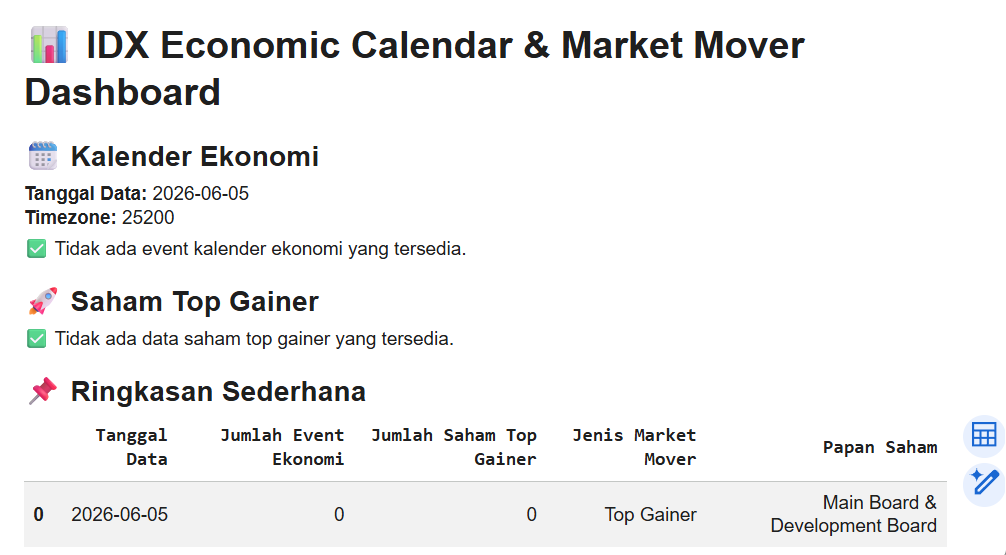
Cell 5 builds the final dashboard.
The notebook first extracts information from the Economic Calendar response, including the reporting date and timezone. A helper function called find_first_list() is used to locate economic event records regardless of how deeply they are nested within the response structure.
The economic events are converted into a dataframe and displayed to the user. If no events are available, the dashboard displays a notification instead.
The notebook then processes the Market Mover response using the same approach. Top Gainer stocks are extracted, converted into a dataframe, and displayed in a dedicated section.
Finally, the dashboard generates a summary table that combines information from both datasets. The summary includes the reporting date, number of economic events, number of Top Gainer stocks, market mover type, and stock board coverage.
This structure creates a simple but practical monitoring dashboard that combines macroeconomic information and market momentum data in one place.
Result":
OVERALL WORKFLOW
This notebook follows a structured market intelligence workflow.
First, it imports the required Python libraries.
Second, it configures API authentication and stock filter settings.
Third, it creates reusable helper functions for API communication and data extraction.
Fourth, it retrieves Economic Calendar and Market Mover data from the IDX API.
Fifth, it combines both datasets into a centralized structure.
Finally, it generates a dashboard containing economic events, top gainer stocks, and a concise market summary.
WHY THIS CASE MATTERS
Investors often monitor stock performance and economic developments separately.
However, market behavior is frequently influenced by both macroeconomic conditions and market momentum at the same time.
Economic Calendar data helps investors prepare for upcoming announcements and scheduled events that may influence sentiment. Market Mover data highlights stocks currently receiving strong market attention.
By combining these datasets into a single workflow, investors gain a broader perspective of market conditions and can make more informed decisions.
CONCLUSION
This tutorial demonstrates how to build an Economic Calendar and Market Mover Dashboard using Python and the IDX API.
The notebook retrieves economic event data, collects Top Gainer stock information, organizes both datasets into structured tables, and presents the results through a simple dashboard.
The final workflow provides:
Economic event monitoring
Top Gainer tracking
Market mover analysis
Dashboard reporting
Market intelligence support
For investors, analysts, and fintech developers, this project provides a practical foundation for building market monitoring and investment research tools.