Corporate actions are one of the most important signals investors monitor in the stock market. While price movements show what is happening in the market, corporate calendars help investors understand what may happen next.
Dividends can attract income-focused investors because they represent cash distributions from companies to shareholders. Bonus shares, on the other hand, may affect share ownership structure and investor expectations. When both events are monitored together, investors gain a clearer view of upcoming corporate actions.
This notebook demonstrates how to build a Dividend and Bonus Calendar Dashboard using Python and the IDX API. The workflow retrieves dividend calendar data, retrieves bonus calendar data, combines both API responses, and displays the results in a simple dashboard.
CELL 1 — Import Libraries
import requests
import pandas as pd
import time
from IPython.display import display, Markdown
Explanation
Cell 1 imports the required Python libraries.
The notebook uses requests to communicate with the API, pandas to convert API responses into dataframes, time to create a delay between API calls, and display with Markdown to present the dashboard in a cleaner format.
CELL 2 — API Configuration
RAPIDAPI_KEY = "YOUR_API_KEY"

BASE_URL = "https://indonesia-stock-exchange-idx.p.rapidapi.com"

HEADERS = {
    "Content-Type": "application/json",
    "x-rapidapi-host": "indonesia-stock-exchange-idx.p.rapidapi.com",
    "x-rapidapi-key": RAPIDAPI_KEY
}
Explanation
Cell 2 defines the API configuration used throughout the notebook.
The notebook stores the RapidAPI key, the base URL, and the request headers required to access the Indonesia Stock Exchange API. These settings are later used by the API request function to retrieve dividend and bonus calendar data.
CELL 3 — Safe API Function and Data Cleaner
def fetch_api(endpoint, params=None, retries=3, delay=3):
    url = f"{BASE_URL}{endpoint}"

    for attempt in range(retries):
        response = requests.get(url, headers=HEADERS, params=params)

        if response.status_code == 200:
            return response.json()

        if response.status_code == 429:
            print(f"Rate limit terkena. Menunggu {delay} detik...")
            time.sleep(delay)
            delay *= 2
            continue

        print("Error:", response.status_code)
        print(response.text)
        return None

    return None


def find_first_list(obj):
    if isinstance(obj, list):
        return obj

    if isinstance(obj, dict):
        for value in obj.values():
            result = find_first_list(value)
            if isinstance(result, list):
                return result

    return []


def clean_dataframe(response):
    data = find_first_list(response)

    if data:
        return pd.DataFrame(data)

    if isinstance(response, dict):
        try:
            return pd.json_normalize(response)
        except:
            return pd.DataFrame()

    return pd.DataFrame()
Explanation
Cell 3 creates helper functions for API communication and dataframe preparation.
The fetch_api() function sends requests to the selected API endpoint and returns the response in JSON format. It also includes retry handling for rate limits. If the API returns status code 429, the notebook waits before retrying.
The find_first_list() function searches through nested API responses and returns the first list it finds. This is useful because API responses can have different JSON structures.
The clean_dataframe() function converts the API response into a pandas dataframe. If the response contains a list, it converts that list into a table. If the response is a dictionary, it attempts to normalize the dictionary into a dataframe. If no valid data is found, it returns an empty dataframe.
CELL 4 — Retrieve and Combine API Data
dividend_calendar = fetch_api("/api/calendar/dividend")

time.sleep(5)

bonus_calendar = fetch_api("/api/calendar/bonus")

api_result = {
    "getDividendCalendar": dividend_calendar,
    "getBonusCalendar": bonus_calendar
}

print("Data berhasil diambil dan digabung")
Explanation
Cell 4 retrieves data from two API endpoints.
The first request retrieves data from the Dividend Calendar endpoint. After that, the notebook waits for five seconds before making the second request to the Bonus Calendar endpoint.
Both responses are stored in a dictionary named api_result.
This structure keeps the two API results organized and makes them easier to use in the dashboard section.
CELL 5 — Dividend and Bonus Calendar Dashboard
display(Markdown("# 💰 IDX Dividend & Bonus Calendar Dashboard"))

# =========================
# DIVIDEND CALENDAR
# =========================
display(Markdown("## 💵 Dividend Calendar"))

dividend_df = clean_dataframe(api_result["getDividendCalendar"])

if dividend_df.empty:
    display(Markdown("✅ Tidak ada data dividend calendar yang tersedia."))
else:
    display(dividend_df)

# =========================
# BONUS CALENDAR
# =========================
display(Markdown("## 🎁 Bonus Calendar"))

bonus_df = clean_dataframe(api_result["getBonusCalendar"])

if bonus_df.empty:
    display(Markdown("✅ Tidak ada data bonus calendar yang tersedia."))
else:
    display(bonus_df)

# =========================
# SUMMARY
# =========================
display(Markdown("## 📌 Ringkasan Project"))

summary_df = pd.DataFrame([{
    "Dividend Calendar Data": len(dividend_df),
    "Bonus Calendar Data": len(bonus_df),
    "Project Type": "Dividend + Bonus Corporate Action Calendar"
}])

display(summary_df)
Explanation
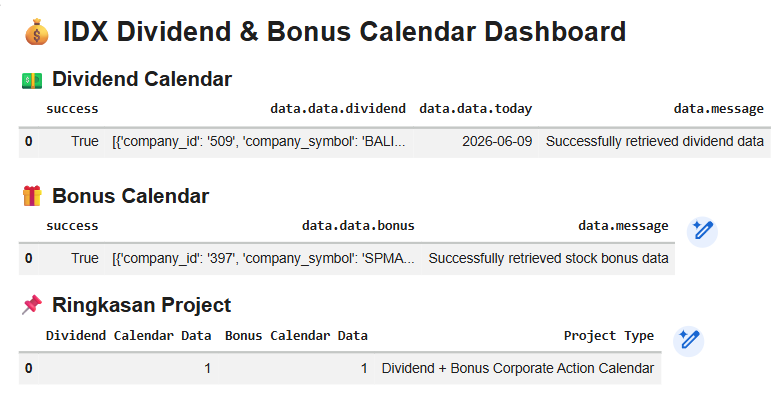
Cell 5 builds the final dashboard.
The first section displays the Dividend Calendar data. The response is processed using clean_dataframe() and shown as a table. If no dividend data is available, the dashboard displays a message instead.
The second section displays the Bonus Calendar data using the same process.
The final section creates a summary table containing the number of dividend calendar records, the number of bonus calendar records, and the project type.
This dashboard gives investors a simple way to monitor dividend and bonus-related corporate actions in one place.
Result:
OVERALL WORKFLOW
This notebook follows a simple corporate action monitoring workflow.
First, it imports the required Python libraries.
Second, it configures the API connection.
Third, it creates reusable helper functions for fetching API data and converting responses into dataframes.
Fourth, it retrieves Dividend Calendar and Bonus Calendar data from the IDX API.
Fifth, it stores both responses inside a single dictionary.
Finally, it displays a dashboard containing dividend data, bonus data, and a project summary.
WHY THIS CASE MATTERS
Many investors focus only on price charts, but corporate actions can also influence market decisions.
Dividend calendar data helps investors track potential income-related events, while bonus calendar data helps investors monitor share-related corporate actions.
By combining both datasets, investors can review important corporate action schedules from a single dashboard instead of checking multiple sources separately.
This makes the workflow useful for investment research, market monitoring, and corporate action tracking.
CONCLUSION
This tutorial demonstrates how to build a Dividend and Bonus Calendar Dashboard using Python and the IDX API.
The notebook retrieves dividend calendar data, retrieves bonus calendar data, processes both API responses into structured dataframes, and displays the results through a clean dashboard.
The final workflow provides:
Dividend calendar monitoring
Bonus calendar tracking
Corporate action visibility
Dataframe-based reporting
Investment research support
For investors, analysts, and fintech developers, this project provides a practical foundation for building automated corporate action monitoring tools.