
Economic calendars are one of the most important resources for traders, investors, and analysts. Important announcements such as employment reports, inflation releases, GDP growth, and central bank interest rate decisions often trigger significant movements across financial markets.
Instead of manually checking multiple financial websites every day, developers can automate the entire process by integrating directly with the Economic Calendar API available on RapidAPI.
In this tutorial, we'll build an Economic Calendar Dashboard capable of retrieving both Yesterday's Economic Events and Next Month's Scheduled Events. The notebook also includes an automatic fallback mechanism that switches to sample data whenever the API returns subscription errors, rate limits, or unexpected failures, ensuring the project remains fully demonstrable.
Throughout the notebook, the API responses are normalized into a consistent structure before being displayed inside a readable dashboard complete with statistical summaries and country-based event distributions.
CELL 1 — Import Library & API Configuration
import requests
import pandas as pd
from datetime import datetime

# ==========================================================
# RAPIDAPI CONFIG
# ==========================================================

API_KEY = "YOUR_RAPIDAPI_KEY"

BASE_URL = "https://economic-calendar-api.p.rapidapi.com"

HEADERS = {
    "x-rapidapi-key": API_KEY,
    "x-rapidapi-host": "economic-calendar-api.p.rapidapi.com",
    "Content-Type": "application/json"
}

print("CELL 1 SELESAI")
The API key from the original notebook has been replaced with
YOUR_RAPIDAPI_KEYfor publication security. The remaining code is unchanged.
Explanation
The first cell prepares the Python environment and configures the connection to the Economic Calendar API.
The notebook imports requests for communicating with RapidAPI, pandas for creating structured tables, and datetime for date-related functionality.
The API configuration is then stored in three variables:
API_KEYstores the RapidAPI credential.BASE_URLstores the main Economic Calendar API address.HEADERScontains the authentication and content-type information sent with every request.
At the end of the cell, the notebook prints a confirmation message indicating that the first configuration stage has finished successfully.
CELL 2 — Request API with Automatic Sample Data Fallback
# ==========================================================
# REQUEST API + AUTO FALLBACK SAMPLE DATA
# ==========================================================

def sample_next_month():
    return [
        {
            "date": "2026-08-03",
            "country": "USD",
            "event": "Non-Farm Payrolls",
            "actual": "-",
            "forecast": "180K",
            "previous": "165K",
            "volatility": "HIGH"
        },
        {
            "date": "2026-08-06",
            "country": "EUR",
            "event": "ECB Interest Rate Decision",
            "actual": "-",
            "forecast": "2.75%",
            "previous": "2.75%",
            "volatility": "HIGH"
        },
        {
            "date": "2026-08-10",
            "country": "JPY",
            "event": "GDP Growth Rate",
            "actual": "-",
            "forecast": "0.8%",
            "previous": "0.6%",
            "volatility": "MEDIUM"
        }
    ]


def sample_yesterday():
    return [
        {
            "date": "2026-07-23",
            "country": "USD",
            "event": "Initial Jobless Claims",
            "actual": "238K",
            "forecast": "240K",
            "previous": "242K",
            "volatility": "MEDIUM"
        },
        {
            "date": "2026-07-23",
            "country": "GBP",
            "event": "Manufacturing PMI",
            "actual": "51.3",
            "forecast": "50.9",
            "previous": "50.8",
            "volatility": "MEDIUM"
        }
    ]


def get_api(endpoint, fallback):

    url = BASE_URL + endpoint

    try:

        response = requests.get(
            url,
            headers=HEADERS,
            timeout=30
        )

        print("="*90)
        print("Endpoint :", endpoint)
        print("Status   :", response.status_code)

        if response.status_code == 200:
            return response.json()

        if response.status_code == 403:
            print("❌ Belum subscribe API.")
            print("✅ Menggunakan Sample Data.\n")
            return fallback()

        if response.status_code == 429:
            print("❌ Rate Limit RapidAPI tercapai.")
            print("✅ Menggunakan Sample Data.\n")
            return fallback()

        print(response.text)
        return fallback()

    except Exception as e:

        print("ERROR :", e)
        print("Menggunakan Sample Data.")
        return fallback()


next_month_response = get_api(
    "/calendar/history/next-month?timezone=GMT+0&limit=50&volatility=NONE",
    sample_next_month
)

yesterday_response = get_api(
    "/calendar/history/yesterday?timezone=GMT+0&volatility=NONE&limit=50",
    sample_yesterday
)
Explanation
The second cell handles the complete API retrieval process and includes an automatic sample-data fallback.
Two sample-data functions are defined first:
sample_next_month()provides three scheduled economic events for the following month.sample_yesterday()provides two completed economic events from the previous day.
These records use the same basic fields expected from the API, including the event date, country or currency code, event name, actual result, forecast, previous result, and volatility level.
The get_api() function then combines the base URL with the requested endpoint and sends an authenticated GET request with a 30-second timeout.
When the server returns HTTP 200, the function returns the JSON response. When HTTP 403 indicates that the account has not subscribed to the API, or HTTP 429 indicates that the RapidAPI rate limit has been reached, the function automatically calls the corresponding fallback function.
Any other HTTP response or unexpected Python exception also causes the notebook to use sample data. This ensures that the project can still run and demonstrate its complete processing workflow even when the live API is unavailable.
The cell ends by requesting the next-month and yesterday endpoints independently.
CELL 3 — Data Normalization
# ==========================================================
# NORMALISASI
# ==========================================================

def normalize(data):

    if data is None:
        return []

    if isinstance(data, list):
        return data

    if isinstance(data, dict):

        for key in [
            "data",
            "result",
            "results",
            "calendar",
            "events",
            "history"
        ]:

            if key in data and isinstance(data[key], list):
                return data[key]

    return []


next_month = normalize(next_month_response)
yesterday = normalize(yesterday_response)

print("="*80)
print("HASIL NORMALISASI")
print("="*80)

print("Next Month :", len(next_month))
print("Yesterday  :", len(yesterday))

print("\nDEBUG")

print("Next Month Response :", type(next_month_response).__name__)
print("Yesterday Response  :", type(yesterday_response).__name__)
Explanation
The third cell converts different API response formats into consistent Python lists.
The normalize() function checks the incoming response in several stages. A None response becomes an empty list, while an existing list is returned directly.
When the response is a dictionary, the function searches several common wrapper keys:
dataresultresultscalendareventshistory
When one of these keys contains a list, that list is returned as the normalized dataset.
The function is applied separately to the next-month and yesterday responses. The notebook then prints the number of normalized events in each dataset and displays the original response types for debugging.
This normalization stage ensures that the dashboard cells can process the data consistently, regardless of whether it comes from the live API or the built-in sample-data fallback.
CELL 4 — Economic Calendar Dashboard
# ==========================================================
# DASHBOARD
# ==========================================================

def show(events, title):

    print("\n")
    print("="*120)
    print(title.upper())
    print("="*120)

    if len(events) == 0:
        print("Tidak ada data.")
        return

    rows = []

    for item in events[:20]:

        rows.append({

            "Date":
                item.get("date")
                or item.get("datetime")
                or item.get("time")
                or "-",

            "Country":
                item.get("country")
                or item.get("countryCode")
                or "-",

            "Event":
                item.get("event")
                or item.get("title")
                or item.get("name")
                or "-",

            "Actual":
                item.get("actual","-"),

            "Forecast":
                item.get("forecast","-"),

            "Previous":
                item.get("previous","-"),

            "Volatility":
                item.get("volatility")
                or item.get("importance")
                or "-"
        })

    df = pd.DataFrame(rows)

    print(df.to_string(index=False))


show(next_month, "Economic Calendar - Next Month")
show(yesterday, "Economic Calendar - Yesterday")
Explanation
Cell 4 converts the normalized event lists into readable economic calendar tables.
The show() function accepts two arguments: the economic event list and the title that will appear above the table. It first prints a formatted section header and checks whether the dataset contains any records.
When the event list is empty, the function prints Tidak ada data. and stops processing that section.
When records are available, the function processes up to 20 events and creates a standardized dictionary for each event. The table contains the following fields:
DateCountryEventActualForecastPreviousVolatility
The function also supports several alternative field names. For example, the date can come from date, datetime, or time, while the event name can come from event, title, or name.
After the rows are collected, they are converted into a pandas DataFrame and printed without displaying the DataFrame index.
The function is called twice to create separate dashboards for next month's scheduled events and yesterday's completed economic events.
CELL 5 — Summary and Statistics
# ==========================================================
# SUMMARY
# ==========================================================

print("\n")
print("="*100)
print("ECONOMIC CALENDAR SUMMARY")
print("="*100)

print(f"📅 Next Month Events : {len(next_month)}")
print(f"📅 Yesterday Events  : {len(yesterday)}")

print("-"*100)

if len(next_month):

    countries = {}

    for item in next_month:

        c = (
            item.get("country")
            or item.get("countryCode")
            or "Unknown"
        )

        countries[c] = countries.get(c, 0) + 1

    print("\n🌍 Top Countries (Next Month)")

    for country, total in sorted(
        countries.items(),
        key=lambda x: x[1],
        reverse=True
    )[:10]:

        print(f"{country:<20} {total:>3} events")

else:
    print("\nTidak ada data Next Month.")

print("-"*100)

if len(yesterday):

    countries = {}

    for item in yesterday:

        c = (
            item.get("country")
            or item.get("countryCode")
            or "Unknown"
        )

        countries[c] = countries.get(c, 0) + 1

    print("\n🌍 Top Countries (Yesterday)")

    for country, total in sorted(
        countries.items(),
        key=lambda x: x[1],
        reverse=True
    )[:10]:

        print(f"{country:<20} {total:>3} events")

else:
    print("\nTidak ada data Yesterday.")

print("="*100)
print("STATUS")
print("="*100)

print("✅ Next Month :", "Berhasil" if next_month_response else "Gagal")
print("✅ Yesterday  :", "Berhasil" if yesterday_response else "Gagal")

print("="*100)
print("Project selesai.")
Explanation
Cell 5 creates the final summary and statistical overview of the economic calendar data.
The first section displays the number of events found in each dataset:
Next month events
Yesterday events
The notebook then calculates the distribution of events by country or currency code.
For the next-month dataset, every event is inspected and its country or countryCode value is counted inside a dictionary. When neither field is available, the event is grouped under Unknown.
The resulting country totals are sorted from highest to lowest, and the dashboard displays up to ten countries with the most economic events.
The same process is repeated independently for yesterday's dataset.
At the end of the cell, the notebook prints a status section. Each dataset is marked as Berhasil when its original response contains data and Gagal when the response is empty.
Because Cell 2 automatically uses fallback sample data when the API fails, this status may still show a successful result even when the displayed records come from the sample-data functions.
Final Result
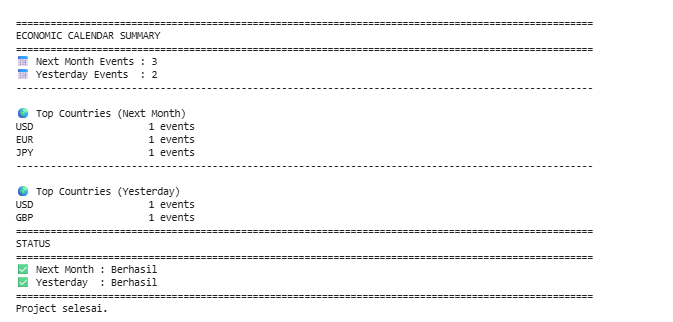
After all five cells are executed, the notebook produces two separate economic calendar tables.
The first table shows scheduled events for the next month, while the second table displays economic events from yesterday. Each event includes its date, country or currency code, event name, actual result, forecast, previous result, and volatility level.
The final summary reports how many records were processed and identifies the countries or currencies with the highest number of economic events.
When the live API returns HTTP 403, HTTP 429, another unsuccessful response, or a request exception, the project automatically switches to the built-in sample records. This allows the complete normalization, dashboard, and summary workflow to remain operational.
Overall Workflow
The project follows a five-stage workflow:
Import the required Python libraries and configure RapidAPI.
Request next-month and yesterday economic events with automatic fallback data.
Normalize the API responses into consistent Python lists.
Convert the records into readable pandas tables.
Generate event totals, country statistics, and request-status information.
This structure separates API communication, data processing, presentation, and statistics into clearly defined notebook cells.
Why This Project Matters
Economic calendar data can help traders and investors anticipate periods of increased market volatility.
Events such as Non-Farm Payrolls, central bank interest-rate decisions, GDP reports, jobless claims, and manufacturing surveys can influence currencies, stocks, commodities, and other financial assets.
By automating the retrieval and presentation process, this notebook reduces the need to collect economic events manually. The fallback system also makes the project suitable for demonstrations and testing when the RapidAPI subscription is unavailable or its request limit has been reached.
Conclusion
This project demonstrates how Python can be used to build a practical Economic Calendar Dashboard using the Economic Calendar API on RapidAPI.
The notebook retrieves events from the next-month and yesterday endpoints, handles common API failures, switches automatically to sample data, normalizes different JSON structures, and displays the results in organized tables.
It also generates summary statistics showing the number of events and their distribution by country or currency code.
The project provides a straightforward foundation for more advanced financial applications, including macroeconomic monitoring systems, market-event alerts, trading dashboards, and scheduled economic-data reports.