
When working with financial APIs, understanding both the available documentation and the market data returned by each endpoint is equally important. Developers often need to inspect API responses before integrating them into larger trading systems or analytical dashboards.
The MarketFlow All-in-One Market Finance API provides multiple endpoints that simplify this process. One endpoint explains how the API should be used, while another returns market data provider information for a specific financial instrument.
In this tutorial, we'll build a MarketFlow API Dashboard using Python. The notebook retrieves documentation from the How To Use endpoint together with Data Provider information for XAUUSD, converts different JSON response structures into standardized pandas DataFrames, and presents everything inside a clean dashboard.
The project is organized into five notebook cells covering API configuration, endpoint requests, response inspection, data normalization, and dashboard generation.
CELL 1 — Import Library & API Configuration
# =====================================================
# CELL 1 — IMPORT LIBRARY & KONFIGURASI API
# =====================================================

import requests
import json
import pandas as pd
from pprint import pprint

# =====================================================
# RAPIDAPI CONFIG
# =====================================================

API_KEY = "YOUR_RAPIDAPI_KEY"

BASE_URL = "https://marketflow-all-in-one-market-finance-api.p.rapidapi.com"

headers = {
    "x-rapidapi-key": API_KEY,
    "x-rapidapi-host": "marketflow-all-in-one-market-finance-api.p.rapidapi.com",
    "Content-Type": "application/json"
}

print("✅ Konfigurasi selesai")
Note: The original notebook is preserved exactly. Only the exposed RapidAPI key has been replaced with
YOUR_RAPIDAPI_KEYfor security before publication.
Explanation
The first cell initializes the Python environment and prepares authentication for the MarketFlow All-in-One Market Finance API.
The notebook imports four libraries:
requests for communicating with the API.
json for formatting JSON responses during debugging.
pandas for converting API responses into DataFrames.
pprint for optional structured output.
Next, the notebook stores the RapidAPI configuration, including the API key, base URL, and required HTTP headers. These variables are reused throughout the project so every API request uses identical authentication settings.
Finally, the notebook prints a confirmation message indicating that the API configuration has been completed successfully.
CELL 2 — Requesting the MarketFlow Endpoints
# =====================================================
# CELL 2 — REQUEST API
# =====================================================

# ============================================
# ENDPOINT 1
# ============================================

url_guide = f"{BASE_URL}/marketflow/how-to-use"

guide_response = requests.get(
    url_guide,
    headers=headers,
    timeout=30
)

print("="*90)
print("Endpoint :", "/marketflow/how-to-use")
print("Status   :", guide_response.status_code)

try:
    guide_json = guide_response.json()
except:
    guide_json = None
    print(guide_response.text)

# ============================================
# ENDPOINT 2
# ============================================

url_provider = f"{BASE_URL}/marketflow/data-provider"

provider_response = requests.get(
    url_provider,
    headers=headers,
    params={"query":"XAUUSD"},
    timeout=30
)

print("="*90)
print("Endpoint :", "/marketflow/data-provider?query=XAUUSD")
print("Status   :", provider_response.status_code)

try:
    provider_json = provider_response.json()
except:
    provider_json = None
    print(provider_response.text)
Explanation
The second cell retrieves data from two different MarketFlow API endpoints.
The first request calls the How To Use endpoint, which provides documentation or guidance describing how the MarketFlow API should be used. The request is sent with the authentication headers configured in the previous cell and uses a timeout of 30 seconds.
After receiving the response, the notebook prints both the endpoint name and the HTTP status code. It then attempts to convert the response into JSON. If the response is not valid JSON, the notebook stores None and prints the raw server response instead.
The second request calls the Data Provider endpoint using the query parameter XAUUSD. This retrieves provider information related to the gold-versus-US-dollar market.
Just like the first request, the notebook prints the endpoint, displays the HTTP status code, attempts JSON parsing, and safely handles any parsing failures.
CELL 3 — Inspecting the Raw API Responses
# =====================================================
# CELL 3 — DEBUG RESPONSE API
# =====================================================

print("="*100)
print("HOW TO USE")
print("="*100)

if guide_json is None:
    print("Tidak ada response.")
else:
    print(json.dumps(
        guide_json,
        indent=2,
        ensure_ascii=False
    )[:5000])

print("\n")
print("="*100)
print("DATA PROVIDER")
print("="*100)

if provider_json is None:
    print("Tidak ada response.")
else:
    print(json.dumps(
        provider_json,
        indent=2,
        ensure_ascii=False
    )[:5000])
Explanation
The third cell focuses entirely on inspecting the raw JSON responses returned by both API endpoints.
The notebook first prints the contents of the How To Use response. When the response is available, it formats the JSON using indentation and Unicode support, making the output significantly easier to read. To prevent excessively large outputs, only the first 5,000 characters are displayed.
The same process is repeated for the Data Provider response. If either endpoint fails to return JSON, the notebook displays a simple message indicating that no response is available.
This debugging stage is especially useful because it allows developers to understand the exact JSON structure before attempting to normalize the data in the next step. By examining the raw responses first, it becomes much easier to identify nested objects, available fields, and any structural differences between the two endpoints.
CELL 4 — Data Normalization
# =====================================================
# CELL 4 — NORMALISASI DATA
# =====================================================

def normalize(obj):

    if obj is None:
        return pd.DataFrame()

    if isinstance(obj, list):
        return pd.DataFrame(obj)

    if isinstance(obj, dict):

        # jika memiliki key data
        if "data" in obj:

            data = obj["data"]

            if isinstance(data, list):
                return pd.DataFrame(data)

            if isinstance(data, dict):
                return pd.DataFrame([data])

        return pd.DataFrame([obj])

    return pd.DataFrame()


guide_df = normalize(guide_json)
provider_df = normalize(provider_json)

print("="*100)
print("NORMALISASI DATA")
print("="*100)

print("How To Use Rows :", len(guide_df))
print("Provider Rows   :", len(provider_df))

print()

print("Guide Columns")
print(list(guide_df.columns))

print()

print("Provider Columns")
print(list(provider_df.columns))
Explanation
The fourth cell converts the raw API responses into standardized pandas DataFrames.
The notebook introduces a reusable normalize() function that accepts any API response and converts it into a consistent tabular structure. The function first checks whether the response is None, returning an empty DataFrame if no data is available.
If the response is already a list, the list is converted directly into a DataFrame. When the response is a dictionary, the function looks for a data field because many REST APIs wrap their actual records inside this key.
If the data field contains a list, every element becomes a row in the DataFrame. When data contains a single dictionary, that dictionary is wrapped inside a list so that pandas can still generate a one-row DataFrame. If no data field exists, the entire dictionary is treated as a single record.
After normalization, the notebook creates two DataFrames:
guide_dffor the How To Use endpoint.provider_dffor the Data Provider endpoint.
Finally, it prints the number of rows found in each DataFrame together with the detected column names. This verification step helps developers understand the structure of both datasets before displaying them in the dashboard.
CELL 5 — Building the MarketFlow Dashboard
# =====================================================
# CELL 5 — DASHBOARD MARKETFLOW
# =====================================================

print("="*110)
print("MARKETFLOW API DASHBOARD")
print("="*110)

# =====================================================
# HOW TO USE
# =====================================================

print("\n📘 HOW TO USE")
print("-"*110)

if guide_df.empty:

    print("Tidak ada data.")

else:

    display(guide_df)


# =====================================================
# DATA PROVIDER
# =====================================================

print("\n🏦 DATA PROVIDER (XAUUSD)")
print("-"*110)

if provider_df.empty:

    print("Tidak ada data.")

else:

    display(provider_df)


# =====================================================
# SUMMARY
# =====================================================

print("\n")
print("="*110)
print("RINGKASAN")
print("="*110)

print(f"📘 How To Use Rows : {len(guide_df)}")
print(f"🏦 Provider Rows   : {len(provider_df)}")

print()

if provider_df.empty:
    print("⚠️ Data Provider tidak memiliki data.")
else:
    print("✅ Data Provider berhasil diambil.")

if guide_df.empty:
    print("⚠️ Dokumentasi tidak tersedia.")
else:
    print("✅ Dokumentasi berhasil diambil.")

print("="*110)
Explanation
The fifth cell assembles the final MarketFlow dashboard by presenting both normalized datasets in a structured format.
The notebook begins by printing a dashboard header before displaying the How To Use section. If the documentation DataFrame is empty, it informs the user that no data is available. Otherwise, the complete DataFrame is displayed directly.
The same workflow is repeated for the Data Provider endpoint using the XAUUSD query. When market provider information exists, it is displayed as a structured table. If the API returns no records, an informative message is shown instead.
The notebook concludes with a summary section that reports:
The total number of documentation records.
The total number of data provider records.
Whether the Data Provider endpoint successfully returned data.
Whether the API documentation endpoint successfully returned information.
This provides a concise overview of the retrieval process and confirms whether both MarketFlow endpoints responded successfully during execution.
Final Result
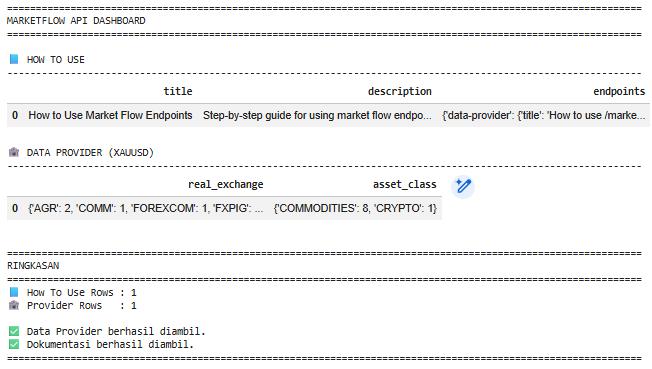
After all five notebook cells are executed, the project produces a simple MarketFlow dashboard that combines API documentation with financial data provider information.
The notebook first retrieves the How To Use documentation, then requests provider information for the XAUUSD market instrument. Both responses are normalized into pandas DataFrames before being presented in separate dashboard sections.
The final summary reports the number of records retrieved from each endpoint and confirms whether both requests completed successfully, making it easy to verify the overall API integration.
Overall Workflow
The notebook follows a straightforward five-step workflow:
Configure the MarketFlow API connection and authentication.
Retrieve documentation and market data provider information from two API endpoints.
Inspect the raw JSON responses for debugging purposes.
Normalize different response structures into standardized pandas DataFrames.
Display both datasets inside a simple dashboard and generate a summary of the results.
This modular design separates API communication, debugging, data processing, and presentation into individual notebook cells, making the project easy to understand and extend.
Why This Project Matters
Financial APIs often expose multiple endpoints that return different JSON structures. Before building trading systems or analytics platforms, developers need a reliable way to inspect documentation and validate live responses.
This project demonstrates how to retrieve documentation and provider information within a single notebook, normalize heterogeneous responses, and convert them into structured tables suitable for further analysis.
The same workflow can be extended to additional MarketFlow endpoints, enabling developers to build more advanced dashboards, automated market-monitoring tools, or financial research applications.
Conclusion
This project demonstrates how to build a MarketFlow API Dashboard using Python and RapidAPI.
By combining the How To Use and Data Provider endpoints, the notebook provides both API documentation and market-related information in one workflow. It safely converts different JSON response formats into pandas DataFrames and presents them through a clean dashboard accompanied by a concise summary.
Because the notebook separates configuration, API requests, response inspection, normalization, and visualization into five dedicated cells, it offers a practical foundation for integrating additional MarketFlow services into larger financial applications.