
This tutorial demonstrates a BBCA Stock Fundamental and Insight Analysis workflow using Python and the IDX API. The project combines earnings data and stock insights into a single dashboard for investment research and market intelligence.
Successful investing requires more than simply tracking stock prices. Investors often look deeper into a company’s financial performance and qualitative insights to better understand its long-term potential.
Earnings data helps investors evaluate how a company performs financially over time, while stock insights provide additional context that can support investment research and decision-making.
This notebook demonstrates how to combine getStockEarnings and getStockInsights using Python and the IDX API. Instead of reviewing financial performance and stock insights separately, the workflow retrieves both datasets and presents them in a single dashboard for easier analysis.
CELL 1 — Import Library
import requests
import pandas as pd
import time
from IPython.display import display, Markdown
Explanation
Cell 1 imports the Python libraries used throughout the project.
The notebook uses:
requestsfor API communication.pandasfor dataframe creation and data processing.timefor handling delays between API requests.displayandMarkdownfor creating a cleaner dashboard presentation.
These libraries provide the foundation for retrieving, processing, and displaying stock-related information.
CELL 2 — Konfigurasi Project
RAPIDAPI_KEY = "YOUR_API_KEY"

BASE_URL = "https://indonesia-stock-exchange-idx.p.rapidapi.com"

HEADERS = {
    "Content-Type": "application/json",
    "x-rapidapi-host": "indonesia-stock-exchange-idx.p.rapidapi.com",
    "x-rapidapi-key": RAPIDAPI_KEY
}

STOCK_SYMBOL = "BBCA"
Explanation
Cell 2 configures the project settings.
The notebook defines:
API authentication credentials.
IDX API base URL.
Request headers.
The stock symbol used throughout the analysis.
In this project, the selected stock symbol is BBCA, allowing the workflow to retrieve both earnings data and stock insights for the same company.
CELL 3 — Function API & Parser Data
def fetch_api(endpoint, params=None, retries=3, delay=3):
    url = f"{BASE_URL}{endpoint}"

    for attempt in range(retries):
        response = requests.get(url, headers=HEADERS, params=params)

        if response.status_code == 200:
            return response.json()

        if response.status_code == 429:
            print(f"Rate limit terkena. Menunggu {delay} detik...")
            time.sleep(delay)
            delay *= 2
            continue

        print("Error:", response.status_code)
        print(response.text)
        return None

    return None


def find_first_list(obj):
    if isinstance(obj, list):
        return obj

    if isinstance(obj, dict):
        for value in obj.values():
            result = find_first_list(value)
            if isinstance(result, list):
                return result

    return []


def flatten_response(response):
    if response is None:
        return pd.DataFrame()

    list_data = find_first_list(response)

    if list_data:
        return pd.DataFrame(list_data)

    try:
        return pd.json_normalize(response)
    except:
        return pd.DataFrame()
Explanation
Cell 3 creates helper functions used throughout the notebook.
The fetch_api() function is responsible for communicating with the IDX API. It includes retry logic that automatically handles rate-limit responses by waiting before attempting another request.
The find_first_list() function searches nested API responses and returns the first available list. This is useful because different API endpoints may return data in different JSON structures.
The flatten_response() function converts API responses into pandas dataframes. It automatically detects list-based responses and normalizes nested structures into a tabular format suitable for dashboard presentation.
Together, these helper functions make the notebook more flexible and easier to maintain.
CELL 4 — Ambil & Gabungkan API
stock_earnings = fetch_api(f"/api/beta/earnings/{STOCK_SYMBOL}")

time.sleep(5)

stock_insights = fetch_api(f"/api/beta/insights/{STOCK_SYMBOL}")

api_result = {
    "getStockEarnings": stock_earnings,
    "getStockInsights": stock_insights
}

print("Data berhasil diambil dan digabung")
Explanation
Cell 4 retrieves data from two IDX API endpoints.
Stock Earnings
The Stock Earnings endpoint provides earnings-related information for the selected stock symbol.
This data can help investors evaluate company performance and review historical earnings information.
Stock Insights
The Stock Insights endpoint provides additional information and insights related to the selected stock.
These insights can support research and provide a broader perspective beyond financial figures alone.
After retrieving both datasets, the notebook stores them inside a single dictionary named api_result.
This centralized structure simplifies dashboard generation and future analysis.
CELL 5 — Dashboard Fundamental & Insight
display(Markdown(f"# 📊 {STOCK_SYMBOL} Stock Fundamental & Insight Dashboard"))

# =========================
# STOCK EARNINGS
# =========================
display(Markdown("## 💰 Earnings Data"))

earnings_df = flatten_response(api_result["getStockEarnings"])

if earnings_df.empty:
    display(Markdown("✅ Data earnings belum tersedia atau format response berbeda."))
    print(api_result["getStockEarnings"])
else:
    display(earnings_df)

# =========================
# STOCK INSIGHTS
# =========================
display(Markdown("## 🧠 Stock Insights"))

insights_df = flatten_response(api_result["getStockInsights"])

if insights_df.empty:
    display(Markdown("✅ Data insights belum tersedia atau format response berbeda."))
    print(api_result["getStockInsights"])
else:
    display(insights_df)

# =========================
# SUMMARY PROJECT
# =========================
display(Markdown("## 📌 Ringkasan Project"))

summary_df = pd.DataFrame([{
    "Stock Symbol": STOCK_SYMBOL,
    "Earnings Data Rows": len(earnings_df),
    "Insights Data Rows": len(insights_df),
    "Project Type": "Stock Fundamental + Insight Analysis"
}])

display(summary_df)
Explanation
Cell 5 generates the final dashboard.
The dashboard begins by displaying earnings data retrieved from the Stock Earnings endpoint. The response is converted into a dataframe using the flatten_response() function. If no data is available, the notebook displays an informative message instead.
The second section displays Stock Insights data. Similar to the earnings section, the notebook transforms the API response into a dataframe and displays the results.
Finally, the notebook creates a project summary table that includes:
Stock symbol.
Number of earnings records.
Number of insight records.
Project type.
This summary provides a quick overview of the retrieved datasets and the overall analysis workflow.
Result:
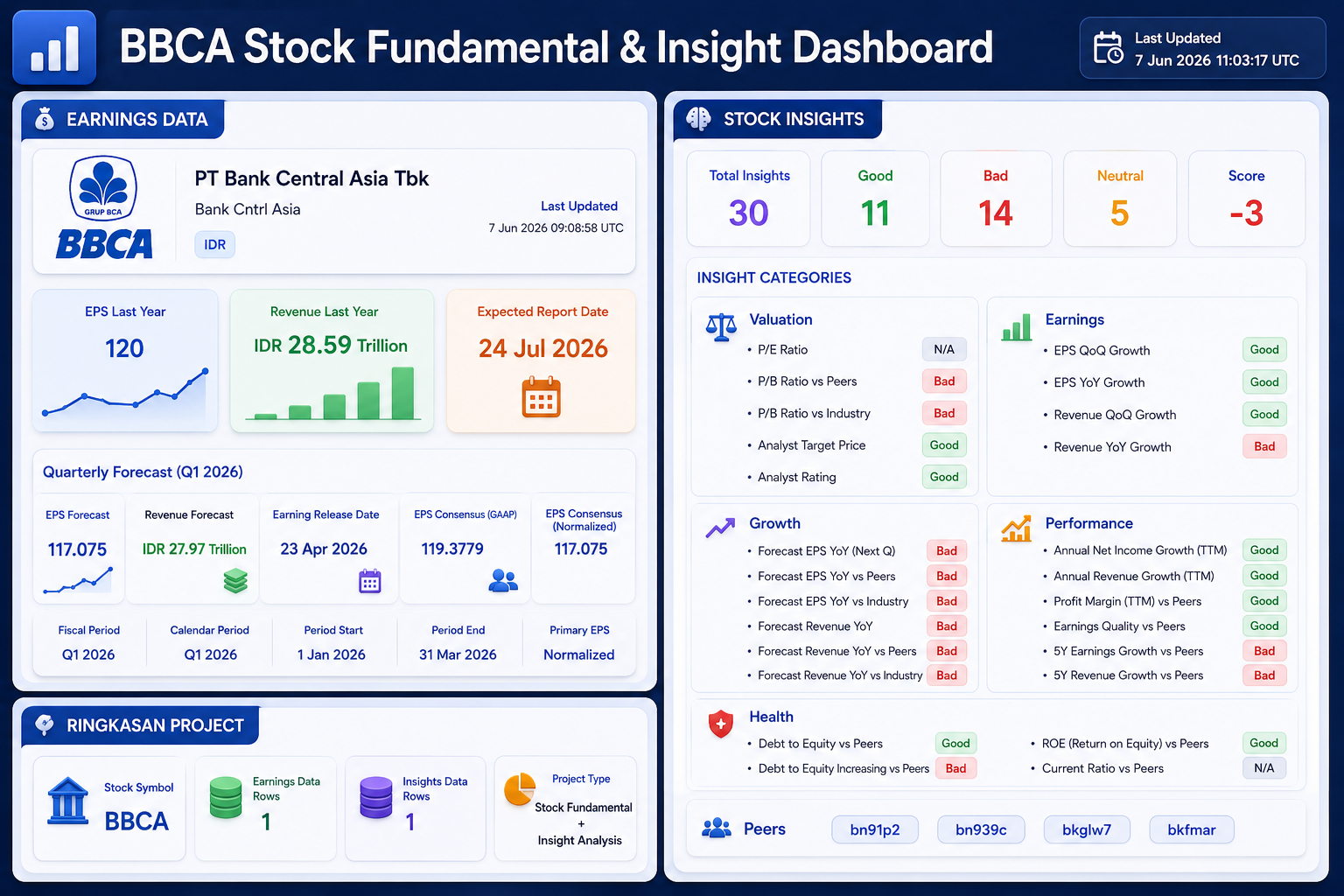
Note: This image is an illustration of the expected dashboard output and is provided for visualization purposes only. The actual results generated by the notebook will reflect the latest data returned by the IDX API.
OVERALL WORKFLOW
This notebook follows a simple stock analysis workflow.
First, it imports the required Python libraries.
Second, it configures API authentication and project settings.
Third, it creates helper functions for API communication and response parsing.
Fourth, it retrieves Stock Earnings and Stock Insights data from the IDX API.
Fifth, it combines both responses into a centralized structure.
Finally, it generates a dashboard that displays earnings data, stock insights, and a project summary.
Why BBCA Stock Fundamental and Insight Analysis Matters
Investors often review financial performance and stock insights separately.
However, combining both datasets into a single workflow creates a more efficient research process.
Earnings data helps investors understand financial performance, while stock insights provide additional context that may support investment decisions.
By bringing these two perspectives together, investors can evaluate a stock using both quantitative and qualitative information within a single dashboard.
CONCLUSION
This BBCA Stock Fundamental and Insight Analysis dashboard helps investors evaluate earnings performance, stock insights, valuation metrics, growth potential, and financial health through a unified workflow.
This tutorial demonstrates how to build a Stock Earnings and Stock Insights Dashboard using Python and the IDX API.
The notebook retrieves earnings information, collects stock insights, transforms API responses into structured dataframes, and presents the results through a unified dashboard.
The final workflow provides:
Earnings monitoring
Stock insight analysis
Data normalization
Dashboard reporting
Investment research support
For investors, analysts, and fintech developers, this project provides a practical foundation for building stock research and market intelligence tools