
Finding company information and keeping up with the latest market news are two common activities before analyzing a stock. Instead of searching manually through multiple sources, both tasks can be automated using the Indonesia Stock Exchange API.
This notebook combines two API endpoints into a single workflow. The first endpoint searches listed companies based on a keyword, while the second retrieves the latest Morning Briefing published by the Indonesia Stock Exchange.
In this tutorial, we build an IDX Stock Search and Morning Briefing Dashboard using Python. The notebook authenticates through RapidAPI, retrieves company search results and Morning Briefing data, normalizes multiple JSON response formats, displays the information as structured tables, and generates a dashboard summarizing both datasets in one place.
The notebook consists of five sections covering API configuration, secure API requests, data retrieval, response normalization, and dashboard generation.
CELL 1 — Import Library dan Konfigurasi API
import requests
import pandas as pd
import json
import time
from IPython.display import display, Markdown

# ============================================================
# KONFIGURASI RAPIDAPI
# ============================================================

API_KEY = "YOUR_RAPIDAPI_KEY"

BASE_URL = "https://indonesia-stock-exchange-idx.p.rapidapi.com"

HEADERS = {
    "x-rapidapi-key": API_KEY,
    "x-rapidapi-host": "indonesia-stock-exchange-idx.p.rapidapi.com",
    "Content-Type": "application/json"
}

# Parameter pencarian saham
SEARCH_TYPE = "company"
SEARCH_KEYWORD = "BBCA"
SEARCH_PAGE = 0

print("✅ Konfigurasi berhasil dibuat.")
print("Keyword pencarian :", SEARCH_KEYWORD)
Catatan: Saat mempublikasikan notebook atau artikel, ganti API Key asli menjadi
YOUR_RAPIDAPI_KEYuntuk menjaga keamanan kredensial API.
Explanation
The first cell prepares the Python environment and configures every parameter required before communicating with the Indonesia Stock Exchange API.
The notebook imports several libraries that will be used throughout the project.
The requests library is responsible for sending HTTP requests to the IDX API, while pandas processes the returned JSON responses into structured DataFrames for easier analysis.
The json module is used when displaying raw API responses during debugging, allowing complex JSON structures to be printed in a readable format.
The time library provides short delays between API requests. These pauses help reduce the possibility of triggering RapidAPI rate limits when multiple endpoints are accessed consecutively.
Finally, display and Markdown from IPython.display allow DataFrames and formatted output to be rendered clearly inside Google Colab or Jupyter Notebook.
After importing the required libraries, the notebook defines the RapidAPI configuration.
The API key, base URL, and HTTP request headers are stored in dedicated variables so every request can reuse the same authentication settings.
The notebook also defines three search parameters:
SEARCH_TYPEspecifies that the API will search for listed companies.SEARCH_KEYWORDdetermines the stock keyword, which is set to BBCA.SEARCH_PAGEspecifies the first page of search results.
At the end of the cell, the notebook prints the active configuration so users can verify the selected keyword before sending any API requests.
CELL 2 — Fungsi Request API yang Aman
def request_api(endpoint, params=None, timeout=40, max_retry=2):
    """
    Mengambil data API dengan penanganan:
    - Timeout
    - Rate limit 429
    - Forbidden 403
    - Respons non-JSON
    - Server error
    """

    url = f"{BASE_URL}{endpoint}"

    for attempt in range(1, max_retry + 1):
        try:
            response = requests.get(
                url,
                headers=HEADERS,
                params=params,
                timeout=timeout
            )

            print("\n" + "=" * 90)
            print("Endpoint :", endpoint)
            print("Status   :", response.status_code)

            if response.url:
                print("URL      :", response.url)

            if response.status_code == 200:
                try:
                    result = response.json()
                    print("✅ Data berhasil diterima.")
                    return result

                except ValueError:
                    print("❌ Respons API bukan JSON.")
                    print("Response:", response.text[:1000])
                    return None

            elif response.status_code == 403:
                print("⚠️ Akses ditolak.")
                print("Pastikan akun RapidAPI sudah berlangganan API ini.")
                return None

            elif response.status_code == 429:
                print("⚠️ Rate limit RapidAPI tercapai.")

                if attempt < max_retry:
                    print("Mencoba kembali setelah 5 detik...")
                    time.sleep(5)
                    continue

                return None

            elif response.status_code == 401:
                print("⚠️ API Key tidak valid atau belum dimasukkan.")
                return None

            elif response.status_code >= 500:
                print("⚠️ Server API sedang mengalami gangguan.")

                if attempt < max_retry:
                    print("Mencoba kembali setelah 3 detik...")
                    time.sleep(3)
                    continue

                return None

            else:
                print("❌ Request gagal.")
                print("Response:", response.text[:1000])
                return None

        except requests.exceptions.Timeout:
            print("\n❌ Request mengalami timeout.")

            if attempt < max_retry:
                print("Mencoba kembali...")
                time.sleep(3)
                continue

            return None

        except requests.exceptions.ConnectionError:
            print("\n❌ Gagal terhubung ke server API.")
            return None

        except requests.exceptions.RequestException as error:
            print("\n❌ Terjadi kesalahan request:", error)
            return None

    return None
Explanation
The second cell creates a reusable API request function that handles communication with the Indonesia Stock Exchange API.
The request_api() function accepts four parameters:
endpointspecifies the API endpoint to access.paramsstores optional query parameters.timeoutdetermines how long the notebook waits before considering a request unsuccessful.max_retryspecifies the maximum number of retry attempts.
For every request, the notebook prints useful diagnostic information, including the endpoint being accessed, the returned HTTP status code, and the final request URL whenever it is available.
When the server returns an HTTP 200 response, the notebook attempts to convert the response into JSON. If the conversion succeeds, the parsed data is returned immediately. If the response cannot be parsed as JSON, part of the raw response body is displayed to assist with debugging.
The function also includes defensive handling for several common API situations:
403 Forbidden indicates that the RapidAPI subscription does not include access to the requested endpoint.
429 Too Many Requests indicates that the RapidAPI rate limit has been reached. The notebook waits five seconds before attempting another request.
401 Unauthorized indicates that the API key is missing or invalid.
HTTP 5xx responses indicate temporary server-side problems, prompting another attempt after a short delay.
Beyond HTTP responses, the function also catches timeout errors, connection failures, and other request exceptions to prevent the notebook from terminating unexpectedly.
By centralizing all request logic inside a single reusable function, the notebook maintains consistent error handling while making subsequent API requests significantly simpler.
CELL 3 — Mengambil Search Stocks dan Morning Briefing
# ============================================================
# SEARCH STOCKS
# ============================================================

search_params = {
    "type": SEARCH_TYPE,
    "keyword": SEARCH_KEYWORD,
    "page": SEARCH_PAGE
}

search_response = request_api(
    endpoint="/api/main/search",
    params=search_params
)

# Jeda untuk mengurangi risiko rate limit
time.sleep(2)

# ============================================================
# MORNING BRIEFING
# ============================================================

morning_response = request_api(
    endpoint="/api/main/morning-briefing"
)

print("\n" + "=" * 90)
print("RINGKASAN RESPONS API")
print("=" * 90)
print("Search Stocks    :", "Ada" if search_response is not None else "Tidak ada")
print("Morning Briefing :", "Ada" if morning_response is not None else "Tidak ada")
Explanation
The third cell uses the reusable request_api() function from Cell 2 to retrieve the two datasets required by the project.
The first section prepares the query parameters for the stock-search endpoint. These parameters use the configuration defined in Cell 1:
typeis set tocompany.keywordis set toBBCA.pageis set to0.
The parameters are stored inside the search_params dictionary and passed to the /api/main/search endpoint. The returned JSON response is stored in search_response.
After the first API request, the notebook pauses for two seconds. This delay is intentionally included to reduce the possibility of reaching the RapidAPI request limit when the second endpoint is accessed immediately afterward.
The notebook then sends another request to /api/main/morning-briefing. This endpoint does not require additional query parameters, so only the endpoint path is passed to the request function. Its response is stored in morning_response.
At the end of the cell, the notebook prints a response summary. Each response is marked as Ada when the API returns a value other than None, or Tidak ada when the request fails or no response is available.
This cell only retrieves and checks the API responses. The conversion into structured DataFrames is performed in the next cell.
CELL 4 — Normalisasi dan Menampilkan Data
def extract_records(response):
    """
    Mengambil daftar record dari berbagai kemungkinan struktur JSON.
    """

    if response is None:
        return []

    if isinstance(response, list):
        return response

    if not isinstance(response, dict):
        return []

    # Kemungkinan lokasi data
    candidates = [
        response.get("data"),
        response.get("result"),
        response.get("results"),
        response.get("items"),
        response.get("content"),
        response.get("stocks"),
        response.get("companies")
    ]

    for candidate in candidates:
        if isinstance(candidate, list):
            return candidate

        if isinstance(candidate, dict):
            nested_candidates = [
                candidate.get("data"),
                candidate.get("results"),
                candidate.get("items"),
                candidate.get("content"),
                candidate.get("stocks"),
                candidate.get("companies")
            ]

            for nested in nested_candidates:
                if isinstance(nested, list):
                    return nested

            # Jika dictionary merupakan satu record
            return [candidate]

    # Gunakan dictionary utama jika tidak ada wrapper data
    ignored_keys = {"success", "message", "status", "timestamp"}

    meaningful_data = {
        key: value
        for key, value in response.items()
        if key not in ignored_keys
    }

    return [meaningful_data] if meaningful_data else []


def normalize_dataframe(records):
    """
    Mengubah daftar dictionary menjadi DataFrame.
    Aman terhadap record string atau format campuran.
    """

    if not records:
        return pd.DataFrame()

    clean_records = []

    for item in records:
        if isinstance(item, dict):
            clean_records.append(item)
        else:
            clean_records.append({"value": item})

    try:
        return pd.json_normalize(clean_records)
    except Exception:
        return pd.DataFrame(clean_records)


search_records = extract_records(search_response)
morning_records = extract_records(morning_response)

df_search = normalize_dataframe(search_records)
df_morning = normalize_dataframe(morning_records)

# ============================================================
# TAMPILKAN SEARCH STOCKS
# ============================================================

print("\n" + "=" * 100)
print(f"SEARCH STOCKS — KEYWORD: {SEARCH_KEYWORD}")
print("=" * 100)

if not df_search.empty:
    display(df_search)
    print("Jumlah hasil pencarian :", len(df_search))
else:
    print("Tidak ada data hasil pencarian saham.")

    if search_response is not None:
        print("\nDEBUG RESPONSE SEARCH STOCKS:")
        print(json.dumps(search_response, indent=2, ensure_ascii=False)[:5000])

# ============================================================
# TAMPILKAN MORNING BRIEFING
# ============================================================

print("\n" + "=" * 100)
print("MORNING BRIEFING")
print("=" * 100)

if not df_morning.empty:
    display(df_morning)
    print("Jumlah record briefing :", len(df_morning))
else:
    print("Tidak ada data Morning Briefing.")

    if morning_response is not None:
        print("\nDEBUG RESPONSE MORNING BRIEFING:")
        print(json.dumps(morning_response, indent=2, ensure_ascii=False)[:5000])
Explanation
The fourth cell normalizes the two API responses and displays their contents as pandas DataFrames.
API responses do not always use the same JSON structure. Some endpoints return a list directly, while others place the main data inside wrapper fields such as data, result, results, items, content, stocks, or companies.
To handle these variations, the notebook defines the extract_records() function.
Extracting Records from Different JSON Structures
The function first checks whether the response is available.
When the response is None, an empty list is returned. When the response is already a list, it can be returned immediately without additional processing.
If the response is not a dictionary, the function also returns an empty list because the structure cannot be processed as a standard API object.
For dictionary responses, the function checks several possible wrapper fields. When one of those fields contains a list, the list is returned as the main collection of records.
When a wrapper contains another dictionary, the function performs a second search inside that dictionary. This allows it to process responses where the actual data is nested more than one level deep.
If the nested dictionary appears to represent a single record rather than a collection, it is placed inside a list so it can still be processed consistently.
As a final fallback, the notebook removes metadata fields such as success, message, status, and timestamp. Any remaining meaningful content is then treated as one record.
Converting Records into DataFrames
The normalize_dataframe() function converts the extracted records into a pandas DataFrame.
When the record list is empty, the function returns an empty DataFrame.
Each dictionary is added directly to clean_records. Non-dictionary values, such as strings, are wrapped inside a dictionary using the field name value. This prevents mixed record formats from causing an error.
The function first attempts to create the DataFrame using pd.json_normalize(). This method can flatten nested JSON objects into columns. If normalization fails, the notebook uses the standard pd.DataFrame() constructor as a fallback.
The stock-search and Morning Briefing responses are then processed separately:
search_records = extract_records(search_response)
morning_records = extract_records(morning_response)
The extracted records are converted into:
df_search
df_morning
Displaying Search Stocks Data
The first output section displays the normalized stock-search results.
When df_search contains data, the entire DataFrame is displayed and the notebook prints the number of search results.
When the DataFrame is empty, the notebook prints that no stock-search data is available. If the original API response still exists, up to 5,000 characters of the raw JSON response are printed for debugging.
Displaying Morning Briefing Data
The same process is applied to the Morning Briefing response.
When records are available, the normalized DataFrame and total number of briefing records are displayed.
When no records can be extracted, the notebook prints a warning. The original JSON response is also displayed when available, allowing users to inspect whether the API returned an unexpected response structure.
This cell ensures that both endpoints can still be processed even when their JSON formats differ.
CELL 5 — Dashboard Ringkasan
def find_first_value(data, possible_keys, default="-"):
    """
    Mencari nilai pertama dari beberapa kemungkinan nama kolom.
    """

    if data is None or data.empty:
        return default

    for key in possible_keys:
        if key in data.columns:
            values = data[key].dropna()

            if not values.empty:
                value = values.iloc[0]

                if isinstance(value, list):
                    return ", ".join(map(str, value))

                return value

    return default


def shorten_text(value, max_length=300):
    value = str(value)

    if len(value) > max_length:
        return value[:max_length].rstrip() + "..."

    return value


# ============================================================
# INFORMASI HASIL PENCARIAN
# ============================================================

stock_symbol = find_first_value(
    df_search,
    [
        "symbol",
        "ticker",
        "code",
        "stockCode",
        "stock_code",
        "company.symbol",
        "company.code"
    ]
)

company_name = find_first_value(
    df_search,
    [
        "name",
        "companyName",
        "company_name",
        "company.name",
        "description",
        "title"
    ]
)

sector = find_first_value(
    df_search,
    [
        "sector",
        "sectorName",
        "sector_name",
        "company.sector",
        "industry"
    ]
)

# ============================================================
# INFORMASI MORNING BRIEFING
# ============================================================

briefing_title = find_first_value(
    df_morning,
    [
        "title",
        "headline",
        "subject",
        "name",
        "data.title"
    ]
)

briefing_summary = find_first_value(
    df_morning,
    [
        "summary",
        "description",
        "content",
        "briefing",
        "message",
        "overview",
        "data.summary"
    ]
)

briefing_date = find_first_value(
    df_morning,
    [
        "date",
        "createdAt",
        "created_at",
        "publishedAt",
        "published_at",
        "timestamp",
        "analysis_date"
    ]
)

briefing_summary = shorten_text(briefing_summary)

# ============================================================
# DASHBOARD
# ============================================================

print("=" * 100)
print("IDX STOCK SEARCH & MORNING BRIEFING DASHBOARD")
print("=" * 100)

print("\n🔎 HASIL PENCARIAN SAHAM")
print("-" * 100)
print("Keyword              :", SEARCH_KEYWORD)
print("Jumlah hasil         :", len(df_search))
print("Kode saham teratas   :", stock_symbol)
print("Nama perusahaan      :", company_name)
print("Sektor/industri      :", sector)

print("\n🌅 MORNING BRIEFING")
print("-" * 100)
print("Jumlah record        :", len(df_morning))
print("Tanggal              :", briefing_date)
print("Judul                :", briefing_title)
print("Ringkasan            :", briefing_summary)

print("\n📊 STATUS DATA")
print("-" * 100)
print(
    "Search Stocks        :",
    "✅ Berhasil" if not df_search.empty else "⚠️ Tidak tersedia"
)
print(
    "Morning Briefing     :",
    "✅ Berhasil" if not df_morning.empty else "⚠️ Tidak tersedia"
)

print("\n" + "=" * 100)

if df_search.empty or df_morning.empty:
    print("CATATAN:")
    print("Data kosong dapat disebabkan oleh struktur respons berbeda,")
    print("rate limit RapidAPI, endpoint belum termasuk paket langganan,")
    print("atau API sedang tidak menyediakan data.")
else:
    print("✅ Seluruh data berhasil diproses.")
Explanation
The fifth cell combines the normalized stock-search and Morning Briefing DataFrames into one concise dashboard.
The cell begins by defining two helper functions. These functions allow the notebook to search for values flexibly and keep long briefing text readable inside the final output.
Finding Values Across Different Column Names
The find_first_value() function accepts a DataFrame, a collection of possible column names, and a default value.
The function first checks whether the DataFrame exists and contains data. When the DataFrame is empty, the default value "-" is returned immediately.
It then searches through every candidate column name. When a matching column is found, missing values are removed and the first valid value is selected.
When the selected value is a list, the function converts the list into comma-separated text. This allows values containing multiple items to be printed cleanly inside the dashboard.
This flexible search is necessary because API column names may differ between endpoints or response versions.
Shortening the Briefing Text
The shorten_text() function converts the supplied value into text and limits its length to 300 characters.
When the Morning Briefing summary exceeds this limit, the remaining content is removed and an ellipsis is added. This keeps the final dashboard compact while still presenting the beginning of the market summary.
Extracting Stock-Search Information
The notebook searches df_search for three important values.
The first is the stock symbol. Several possible column names are checked, including:
symboltickercodestockCodestock_codecompany.symbolcompany.code
The same strategy is used to identify the company name and sector or industry. This enables the notebook to continue working even when the API returns slightly different field names.
Extracting Morning Briefing Information
The notebook also retrieves three values from df_morning:
briefing title,
briefing summary,
briefing date.
The title can be found through fields such as title, headline, subject, or name.
The summary may be stored under summary, description, content, briefing, message, or overview.
The date is searched using several common timestamp and publication-date field names.
Once found, the briefing summary is passed into shorten_text() before being displayed.
Building the Final Dashboard
The final dashboard is separated into three sections.
The Hasil Pencarian Saham section displays:
the search keyword,
total search results,
the top stock symbol,
company name,
sector or industry.
The Morning Briefing section presents:
total briefing records,
publication date,
briefing title,
shortened briefing summary.
The Status Data section verifies whether each DataFrame contains usable records.
A successful dataset is marked with ✅ Berhasil, while an empty dataset is marked with ⚠️ Tidak tersedia.
When either dataset is empty, the notebook prints a note explaining several possible causes, including an unexpected response structure, RapidAPI rate limits, subscription restrictions, or temporarily unavailable API data.
When both datasets are available, the dashboard confirms that all data has been processed successfully.
Result
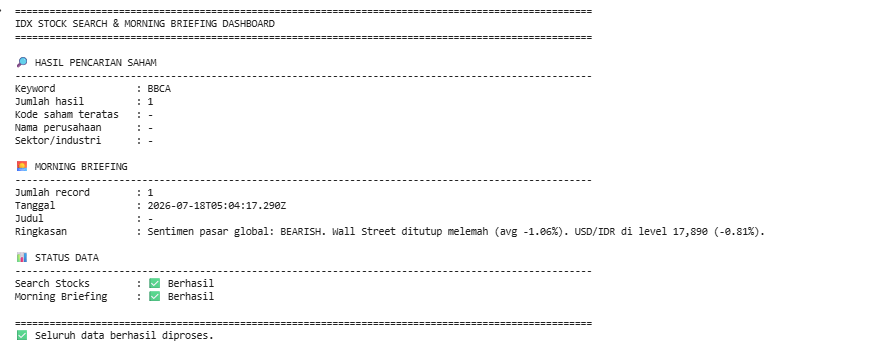
The completed notebook produces three principal outputs.
Stock Search Results
The first output displays the normalized response from the Search Stocks endpoint.
Using the keyword BBCA, the notebook requests companies matching the selected search parameter and converts the returned records into a pandas DataFrame.
Depending on the API response, the table may contain information such as:
stock symbol,
company name,
company description,
sector,
industry,
other company-related fields returned by the endpoint.
The notebook also prints the total number of records found for the selected keyword.
Morning Briefing Data
The second output displays the normalized Morning Briefing response.
The notebook converts the response into a DataFrame even when the data is nested inside common wrapper fields. When the endpoint returns usable records, the complete normalized table and total record count are displayed.
When the response cannot be normalized, the notebook prints part of the original JSON response for debugging.
Final Summary Dashboard
The final dashboard combines key information from both endpoints.
The stock-search section highlights the selected keyword, number of matches, top stock symbol, company name, and sector.
The Morning Briefing section highlights the number of records, date, title, and shortened market summary.
The dashboard concludes with a status section showing whether each endpoint produced usable data.
Overall Workflow
The notebook follows this workflow:
Import the required Python libraries.
Configure RapidAPI authentication.
Define the company-search parameters.
Create a reusable API request function.
Handle timeout, authentication, subscription, rate-limit, and server errors.
Request stock-search results using the keyword BBCA.
Pause briefly to reduce the risk of reaching the request limit.
Retrieve the latest Morning Briefing.
Extract records from different JSON response structures.
Convert mixed records into pandas DataFrames.
Display the stock-search and Morning Briefing tables.
Print raw responses when normalization produces no records.
Search dynamically for relevant columns.
Shorten long Morning Briefing summaries.
Generate the final dashboard and data-status summary.
Why This Project Matters
A stock symbol alone does not always provide enough context for market analysis. Investors may also need the official company name, its sector or industry, and a summary of current market developments.
The Search Stocks endpoint helps locate listed companies using a flexible keyword. This is useful when users know only part of a company name or stock code.
The Morning Briefing endpoint adds broader market context by supplying the latest briefing data available from the API.
Combining both endpoints creates a practical starting point for daily stock research. Users can confirm company information while reviewing recent market commentary in the same notebook.
The project also demonstrates several important API-processing techniques, including reusable request functions, retry handling, flexible JSON extraction, DataFrame normalization, dynamic field detection, debugging output, and compact dashboard presentation.
Conclusion
The IDX Stock Search and Morning Briefing Dashboard demonstrates how Python can combine company-search information with daily market briefing data from the Indonesia Stock Exchange API.
Using requests, pandas, and standard JSON processing, the notebook searches for BBCA-related company records, retrieves the Morning Briefing, handles different API response structures, converts the results into readable tables, and summarizes the most relevant information inside one dashboard.
The flexible extraction and dynamic column-search functions make the notebook more resistant to variations in API responses. At the same time, its request handling provides clear messages when errors occur because of rate limits, invalid credentials, subscription restrictions, connection problems, or unavailable data.
The result is a reusable workflow for locating IDX-listed companies and reviewing current market briefing information without manually checking multiple data sources.