
Historical price data is one of the most important resources when analyzing stock performance. However, price movements alone often provide only part of the picture. Understanding how a sector behaves and how companies within that sector correlate with one another can provide additional context before making investment decisions.
The Indonesia Stock Exchange API provides endpoints that allow developers to retrieve both historical OHLCV (Open, High, Low, Close, Volume) data and sector correlation information through a single platform.
In this tutorial, we build an IDX Latest OHLCV and Sector Correlation Dashboard using Python. The notebook authenticates with RapidAPI, retrieves the latest OHLCV records for a selected stock together with sector correlation data, normalizes multiple JSON response structures, converts them into pandas DataFrames, visualizes historical price movements, analyzes sector relationships, and presents the results through a concise analytical dashboard.
The notebook is organized into five sections covering API configuration, secure API requests, JSON normalization, data presentation, statistical analysis, visualization, and dashboard generation.
CELL 1 — Import Library dan Konfigurasi API
# ============================================================
# CELL 1 — IMPORT LIBRARY DAN KONFIGURASI API
# ============================================================

import requests
import pandas as pd
import matplotlib.pyplot as plt
import json
import time
from datetime import datetime

# Masukkan RapidAPI Key Anda
API_KEY = "YOUR_RAPIDAPI_KEY"

BASE_URL = "https://indonesia-stock-exchange-idx.p.rapidapi.com"

HEADERS = {
    "Content-Type": "application/json",
    "x-rapidapi-host": "indonesia-stock-exchange-idx.p.rapidapi.com",
    "x-rapidapi-key": API_KEY
}

# Parameter utama
STOCK_SYMBOL = "BBCA"
OHLCV_LIMIT = 100
SECTOR_NAME = "energy"

print("✅ Konfigurasi berhasil.")
print(f"Saham       : {STOCK_SYMBOL}")
print(f"Limit OHLCV : {OHLCV_LIMIT}")
print(f"Sektor      : {SECTOR_NAME.title()}")
Catatan: Saat membagikan notebook atau artikel ke publik, ganti API Key asli dengan
YOUR_RAPIDAPI_KEYagar kredensial RapidAPI tetap aman.
Explanation
The first cell prepares the notebook by importing every library required throughout the project and configuring the connection to the Indonesia Stock Exchange API.
Several Python libraries are imported to support different stages of the analysis.
The requests library handles communication with the API, while pandas is used to organize JSON responses into structured DataFrames. The notebook also imports matplotlib.pyplot to visualize historical stock prices and sector correlation results. The json module assists with debugging API responses, time provides delays between requests to reduce the chance of hitting rate limits, and datetime is available for handling date-related operations.
After importing the required libraries, the notebook defines the RapidAPI configuration.
The API key, base URL, and request headers are stored in dedicated variables so every API request can reuse the same authentication settings without repeating configuration code.
Three primary parameters are also defined.
STOCK_SYMBOL specifies the stock that will be analyzed, OHLCV_LIMIT determines how many historical OHLCV records should be retrieved, and SECTOR_NAME specifies the sector whose correlation data will be requested.
Finally, the notebook prints the active configuration, allowing users to verify the selected stock symbol, OHLCV record limit, and sector before the API requests begin.
CELL 2 — Fungsi Request dan Pengambilan Data API
# ============================================================
# CELL 2 — REQUEST DATA DARI API
# ============================================================

def request_api(endpoint, timeout=40, retries=2):
    """
    Mengambil data API dengan penanganan:
    - Timeout
    - Rate limit 429
    - Forbidden 403
    - Response bukan JSON
    """

    url = f"{BASE_URL}{endpoint}"

    for attempt in range(1, retries + 1):
        try:
            response = requests.get(
                url,
                headers=HEADERS,
                timeout=timeout
            )

            print(f"\nEndpoint : {endpoint}")
            print(f"Status   : {response.status_code}")

            if response.status_code == 200:
                try:
                    return response.json()
                except ValueError:
                    print("❌ Respons API bukan JSON yang valid.")
                    print("Response:", response.text[:500])
                    return None

            elif response.status_code == 403:
                print("⚠️ Akses ditolak. Pastikan akun sudah berlangganan API.")
                return None

            elif response.status_code == 429:
                print("⚠️ Rate limit tercapai.")

                if attempt < retries:
                    print("Mencoba kembali dalam 3 detik...")
                    time.sleep(3)
                    continue

                return None

            else:
                print(f"❌ Request gagal dengan status {response.status_code}.")
                print("Response:", response.text[:500])
                return None

        except requests.exceptions.Timeout:
            print(f"\n⚠️ Request timeout pada percobaan {attempt}/{retries}.")

            if attempt < retries:
                time.sleep(2)
                continue

            return None

        except requests.exceptions.RequestException as error:
            print(f"\n❌ Terjadi kesalahan koneksi: {error}")
            return None

    return None


# Endpoint API
ohlcv_endpoint = (
    f"/api/chart/{STOCK_SYMBOL}/daily/latest"
    f"?limit={OHLCV_LIMIT}"
)

sector_endpoint = (
    f"/api/sectors/correlation/{SECTOR_NAME}"
)


# Mengambil data
ohlcv_response = request_api(ohlcv_endpoint)
sector_response = request_api(sector_endpoint)

print("\n" + "=" * 75)
print("STATUS PENGAMBILAN DATA")
print("=" * 75)
print("Latest OHLCV       :", "✅ Berhasil" if ohlcv_response else "❌ Tidak tersedia")
print("Sector Correlation :", "✅ Berhasil" if sector_response else "❌ Tidak tersedia")
Explanation
The second cell retrieves market data from the Indonesia Stock Exchange API using a reusable request function.
The request_api() function centralizes every HTTP request so the notebook can apply consistent error handling to all API endpoints.
For every request, the function displays the endpoint being accessed together with the returned HTTP status code. When the request succeeds with an HTTP 200 response, the JSON content is returned immediately.
The function also handles several common API situations, including invalid JSON responses, subscription restrictions (403), RapidAPI rate limits (429), timeout exceptions, and general connection errors. When a temporary rate limit or timeout occurs, the notebook automatically retries the request before giving up.
After defining the request function, the notebook builds two API endpoints.
The first endpoint retrieves the latest OHLCV historical data for the selected stock using the configured record limit.
The second endpoint retrieves sector correlation data for the selected industry.
Both endpoints are requested through the same reusable function, producing two independent responses:
ohlcv_responsesector_response
Finally, the notebook prints a status summary indicating whether each endpoint successfully returned data before the normalization process begins.
CELL 3 — Normalisasi Struktur JSON
def find_record_list(obj):
    """
    Mencari list berisi dictionary dari struktur JSON bertingkat.
    """

    if isinstance(obj, list):
        if not obj:
            return []

        if all(isinstance(item, dict) for item in obj):
            return obj

        for item in obj:
            result = find_record_list(item)
            if result:
                return result

    elif isinstance(obj, dict):
        preferred_keys = [
            "data",
            "results",
            "result",
            "items",
            "records",
            "chart",
            "ohlcv",
            "correlations",
            "correlation",
            "stocks",
            "companies"
        ]

        for key in preferred_keys:
            if key in obj:
                result = find_record_list(obj[key])
                if result:
                    return result

        for value in obj.values():
            result = find_record_list(value)
            if result:
                return result

    return []


def normalize_dataframe(response):
    """
    Mengubah response API menjadi DataFrame.
    """

    records = find_record_list(response)

    if records:
        try:
            return pd.json_normalize(records)
        except Exception as error:
            print("⚠️ Gagal melakukan normalisasi:", error)

    if isinstance(response, dict):
        data = response.get("data", response)

        if isinstance(data, dict):
            try:
                return pd.json_normalize([data])
            except Exception:
                pass

    return pd.DataFrame()


def standardize_ohlcv(df):
    """
    Menyesuaikan nama kolom OHLCV agar lebih konsisten.
    """

    if df.empty:
        return df

    df = df.copy()

    rename_map = {}

    aliases = {
        "date": ["date", "datetime", "timestamp", "time", "trade_date"],
        "open": ["open", "open_price", "price_open", "o"],
        "high": ["high", "high_price", "price_high", "h"],
        "low": ["low", "low_price", "price_low", "l"],
        "close": ["close", "close_price", "price_close", "c"],
        "volume": ["volume", "total_volume", "vol", "v"]
    }

    lower_columns = {
        str(column).lower(): column
        for column in df.columns
    }

    for standard_name, alternatives in aliases.items():
        for alternative in alternatives:
            if alternative in lower_columns:
                rename_map[lower_columns[alternative]] = standard_name
                break

    df = df.rename(columns=rename_map)

    numeric_columns = ["open", "high", "low", "close", "volume"]

    for column in numeric_columns:
        if column in df.columns:
            df[column] = pd.to_numeric(
                df[column],
                errors="coerce"
            )

    if "date" in df.columns:
        df["date"] = pd.to_datetime(
            df["date"],
            errors="coerce"
        )

        df = df.sort_values("date").reset_index(drop=True)

    return df


# Normalisasi kedua response
ohlcv_df = normalize_dataframe(ohlcv_response)
sector_df = normalize_dataframe(sector_response)

ohlcv_df = standardize_ohlcv(ohlcv_df)

print("=" * 75)
print("HASIL NORMALISASI")
print("=" * 75)
print(f"Jumlah data OHLCV             : {len(ohlcv_df)}")
print(f"Jumlah data Sector Correlation: {len(sector_df)}")

if not ohlcv_df.empty:
    print("\nKolom OHLCV:")
    print(list(ohlcv_df.columns))
else:
    print("\n⚠️ Data OHLCV kosong.")

if not sector_df.empty:
    print("\nKolom Sector Correlation:")
    print(list(sector_df.columns))
else:
    print("\n⚠️ Data Sector Correlation kosong.")
Explanation
The third cell converts both API responses into standardized DataFrames that are ready for analysis.
Because the IDX API may return different JSON structures across endpoints, the notebook first defines the find_record_list() function. This recursive function searches through nested dictionaries and lists until it finds the collection of records that contains the actual data. It recognizes common wrapper keys such as data, results, items, chart, ohlcv, and correlation, allowing the notebook to process multiple response formats automatically.
Once the record collection has been identified, the normalize_dataframe() function converts it into a pandas DataFrame. The notebook primarily uses pd.json_normalize() to flatten nested JSON objects. When the response consists of a single dictionary instead of a list, the function converts that dictionary into a one-row DataFrame. If no valid records are found, an empty DataFrame is returned.
The notebook then standardizes the OHLCV dataset using the standardize_ohlcv() function.
This function maps different API field names into a consistent naming convention for the OHLCV columns:
dateopenhighlowclosevolume
It also converts price and volume fields into numeric values, transforms the date column into a datetime object, and sorts the historical records chronologically.
Finally, both API responses are normalized into:
ohlcv_dfsector_df
The notebook prints the total number of records in each DataFrame together with the detected column names. This verification step confirms that the normalization process succeeded before the notebook continues to the data presentation and visualization stage.
CELL 4 — Menampilkan Tabel OHLCV dan Korelasi Sektor
# ============================================================
# CELL 4 — MENAMPILKAN DATA DALAM BENTUK TABEL
# ============================================================

print("=" * 100)
print(f"LATEST OHLCV — {STOCK_SYMBOL}")
print("=" * 100)

if not ohlcv_df.empty:
    preferred_ohlcv_columns = [
        column for column in
        ["date", "open", "high", "low", "close", "volume"]
        if column in ohlcv_df.columns
    ]

    if preferred_ohlcv_columns:
        display(ohlcv_df[preferred_ohlcv_columns].tail(20))
    else:
        display(ohlcv_df.tail(20))

else:
    print("Tidak ada data Latest OHLCV.")


print("\n\n" + "=" * 100)
print(f"SECTOR CORRELATION — {SECTOR_NAME.upper()}")
print("=" * 100)

if not sector_df.empty:
    correlation_columns = [
        column for column in sector_df.columns
        if any(keyword in str(column).lower() for keyword in [
            "correlation",
            "coefficient",
            "corr",
            "symbol",
            "ticker",
            "sector",
            "name",
            "company"
        ])
    ]

    if correlation_columns:
        display(sector_df[correlation_columns].head(30))
    else:
        display(sector_df.head(30))

else:
    print("Tidak ada data Sector Correlation.")


print("\n" + "=" * 100)
print("DEBUG RESPONSE API")
print("=" * 100)

if ohlcv_response is None:
    print("\nRaw Latest OHLCV Response:")
    print("null")

if sector_response is None:
    print("\nRaw Sector Correlation Response:")
    print("null")
Explanation
The fourth cell presents the normalized data in a format that is easier to read before moving on to the analytical stage.
The notebook first displays the Latest OHLCV dataset.
Whenever the standardized OHLCV DataFrame contains data, the notebook searches for the most important market columns, including the trading date together with the Open, High, Low, Close, and Volume values. If all of these standardized columns are available, only those columns are displayed, making the historical price table much cleaner and easier to interpret.
If one or more standardized columns are unavailable because of differences in the API response structure, the notebook displays the last twenty rows of the entire DataFrame instead. This fallback mechanism ensures that users can still inspect the returned data without modifying the notebook.
The second section displays the Sector Correlation dataset.
Unlike OHLCV data, sector correlation responses may use different field names depending on the endpoint version. To accommodate these differences, the notebook searches dynamically for columns containing keywords such as correlation, coefficient, corr, symbol, ticker, sector, name, and company.
When matching columns are found, only those columns are displayed, allowing users to focus directly on the relationship between stocks and their correlation values. Otherwise, the notebook displays the first thirty rows of the complete DataFrame.
Finally, the notebook prints a debugging section.
If either API request returned None, the notebook prints null for the corresponding response. This makes it immediately clear whether the missing data was caused by an unsuccessful API request or by the normalization process rather than a visualization problem.
CELL 5 — Dashboard Analisis dan Visualisasi
# ============================================================
# CELL 5 — DASHBOARD ANALISIS DAN VISUALISASI
# ============================================================

def find_column(df, keywords):
    """
    Mencari nama kolom berdasarkan beberapa kata kunci.
    """

    for column in df.columns:
        column_lower = str(column).lower()

        if any(keyword in column_lower for keyword in keywords):
            return column

    return None


print("=" * 80)
print("IDX MARKET ANALYSIS DASHBOARD")
print("=" * 80)

# ------------------------------------------------------------
# ANALISIS OHLCV
# ------------------------------------------------------------

print(f"\n📈 ANALISIS HARGA {STOCK_SYMBOL}")
print("-" * 80)

if not ohlcv_df.empty and "close" in ohlcv_df.columns:
    valid_close = ohlcv_df.dropna(subset=["close"]).copy()

    if not valid_close.empty:
        latest_row = valid_close.iloc[-1]
        latest_close = latest_row["close"]

        previous_close = (
            valid_close.iloc[-2]["close"]
            if len(valid_close) >= 2
            else None
        )

        highest_price = (
            valid_close["high"].max()
            if "high" in valid_close.columns
            else valid_close["close"].max()
        )

        lowest_price = (
            valid_close["low"].min()
            if "low" in valid_close.columns
            else valid_close["close"].min()
        )

        average_close = valid_close["close"].mean()

        print(f"Harga penutupan terakhir : Rp {latest_close:,.0f}")
        print(f"Harga tertinggi periode  : Rp {highest_price:,.0f}")
        print(f"Harga terendah periode   : Rp {lowest_price:,.0f}")
        print(f"Rata-rata harga penutupan: Rp {average_close:,.0f}")

        if previous_close is not None and previous_close != 0:
            daily_change = latest_close - previous_close
            daily_change_percent = daily_change / previous_close * 100

            direction = (
                "NAIK"
                if daily_change > 0
                else "TURUN"
                if daily_change < 0
                else "TETAP"
            )

            print(
                f"Perubahan terakhir       : "
                f"Rp {daily_change:,.0f} "
                f"({daily_change_percent:.2f}%)"
            )
            print(f"Arah pergerakan          : {direction}")

        if "volume" in valid_close.columns:
            average_volume = valid_close["volume"].mean()
            latest_volume = latest_row.get("volume")

            if pd.notna(latest_volume):
                print(f"Volume terakhir          : {latest_volume:,.0f}")
                print(f"Rata-rata volume         : {average_volume:,.0f}")

        # Visualisasi harga penutupan
        plt.figure(figsize=(14, 5))

        if "date" in valid_close.columns:
            x_axis = valid_close["date"]
        else:
            x_axis = valid_close.index

        plt.plot(
            x_axis,
            valid_close["close"],
            marker="o",
            markersize=3
        )

        plt.title(
            f"Pergerakan Harga Penutupan {STOCK_SYMBOL}"
        )
        plt.xlabel("Tanggal")
        plt.ylabel("Harga Penutupan")
        plt.grid(True, alpha=0.3)
        plt.xticks(rotation=45)
        plt.tight_layout()
        plt.show()

    else:
        print("Tidak ada nilai harga penutupan yang valid.")

else:
    print("Tidak ada data OHLCV untuk dianalisis.")


# ------------------------------------------------------------
# ANALISIS SECTOR CORRELATION
# ------------------------------------------------------------

print(f"\n🔗 ANALISIS KORELASI SEKTOR {SECTOR_NAME.upper()}")
print("-" * 80)

if not sector_df.empty:
    correlation_column = find_column(
        sector_df,
        ["correlation", "coefficient", "corr"]
    )

    symbol_column = find_column(
        sector_df,
        ["symbol", "ticker", "stock", "code"]
    )

    name_column = find_column(
        sector_df,
        ["company_name", "company", "name"]
    )

    if correlation_column:
        sector_df[correlation_column] = pd.to_numeric(
            sector_df[correlation_column],
            errors="coerce"
        )

        valid_correlation = sector_df.dropna(
            subset=[correlation_column]
        ).copy()

        valid_correlation = valid_correlation.sort_values(
            correlation_column,
            ascending=False
        )

        if not valid_correlation.empty:
            average_correlation = valid_correlation[
                correlation_column
            ].mean()

            strongest_row = valid_correlation.iloc[0]
            weakest_row = valid_correlation.iloc[-1]

            label_column = (
                symbol_column
                if symbol_column
                else name_column
            )

            strongest_label = (
                strongest_row.get(label_column, "-")
                if label_column
                else "-"
            )

            weakest_label = (
                weakest_row.get(label_column, "-")
                if label_column
                else "-"
            )

            print(
                f"Jumlah pasangan korelasi : "
                f"{len(valid_correlation)}"
            )

            print(
                f"Rata-rata korelasi       : "
                f"{average_correlation:.4f}"
            )

            print(
                f"Korelasi tertinggi       : "
                f"{strongest_label} "
                f"({strongest_row[correlation_column]:.4f})"
            )

            print(
                f"Korelasi terendah        : "
                f"{weakest_label} "
                f"({weakest_row[correlation_column]:.4f})"
            )

            if average_correlation >= 0.7:
                interpretation = "Korelasi sektor sangat kuat"
            elif average_correlation >= 0.4:
                interpretation = "Korelasi sektor cukup kuat"
            elif average_correlation >= 0:
                interpretation = "Korelasi sektor relatif lemah"
            else:
                interpretation = "Korelasi sektor cenderung negatif"

            print(f"Interpretasi             : {interpretation}")

            # Grafik korelasi jika tersedia label saham
            if label_column:
                chart_data = valid_correlation.head(15)

                plt.figure(figsize=(12, 6))
                plt.barh(
                    chart_data[label_column].astype(str),
                    chart_data[correlation_column]
                )

                plt.title(
                    f"Top Korelasi Sektor {SECTOR_NAME.title()}"
                )
                plt.xlabel("Nilai Korelasi")
                plt.ylabel("Saham")
                plt.gca().invert_yaxis()
                plt.grid(axis="x", alpha=0.3)
                plt.tight_layout()
                plt.show()

        else:
            print("Nilai korelasi tidak ditemukan.")

    else:
        print("Kolom nilai korelasi tidak ditemukan.")
        print("Kolom tersedia:", list(sector_df.columns))

else:
    print("Tidak ada data korelasi sektor untuk dianalisis.")


# ------------------------------------------------------------
# RINGKASAN AKHIR
# ------------------------------------------------------------

print("\n" + "=" * 80)
print("RINGKASAN")
print("=" * 80)

print(
    f"Data OHLCV {STOCK_SYMBOL:<12}: "
    f"{len(ohlcv_df)} record"
)

print(
    f"Data korelasi {SECTOR_NAME.title():<9}: "
    f"{len(sector_df)} record"
)

if ohlcv_df.empty:
    print("⚠️ Data OHLCV belum tersedia atau struktur respons berbeda.")

if sector_df.empty:
    print("⚠️ Data Sector Correlation belum tersedia atau struktur respons berbeda.")

print("\n✅ Proses analisis selesai.")
Explanation
The fifth cell combines descriptive statistics, visualization, sector analysis, and a final dashboard into one comprehensive market analysis workflow.
The notebook begins by defining the find_column() helper function, which searches a DataFrame for column names containing one or more keywords. This approach allows the analysis to continue even when the API changes its field names.
OHLCV Price Analysis
The first analytical section evaluates the historical OHLCV data.
When valid closing prices are available, the notebook calculates several important statistics, including:
latest closing price,
highest price during the observation period,
lowest price,
average closing price,
daily price change,
daily percentage change,
average trading volume,
latest trading volume.
The notebook also determines whether the most recent trading session moved NAIK, TURUN, or remained TETAP compared with the previous closing price.
To complement the numerical analysis, a line chart is generated using Matplotlib. The visualization plots historical closing prices over time, allowing users to observe market trends more easily.
Sector Correlation Analysis
The second analytical section focuses on the sector correlation dataset.
The notebook automatically searches for the correlation column together with the stock symbol or company name.
After converting correlation values into numeric data, the notebook calculates several descriptive statistics, including:
total correlation pairs,
average sector correlation,
strongest correlation,
weakest correlation.
The average correlation is then interpreted using predefined thresholds.
For example:
values above 0.70 indicate a very strong sector relationship,
values above 0.40 indicate a reasonably strong relationship,
values near zero indicate weak correlation,
negative values indicate an inverse relationship.
When stock labels are available, the notebook generates a horizontal bar chart displaying the companies with the highest sector correlation values.
Final Summary
The notebook concludes by printing a concise summary containing:
the total number of OHLCV records,
the total number of sector correlation records,
notifications when either dataset is unavailable,
confirmation that the entire analytical process has completed successfully.
By combining descriptive statistics, visualization, automatic interpretation, and defensive error handling inside one cell, the notebook transforms raw API responses into a complete analytical dashboard suitable for daily market research.
Result
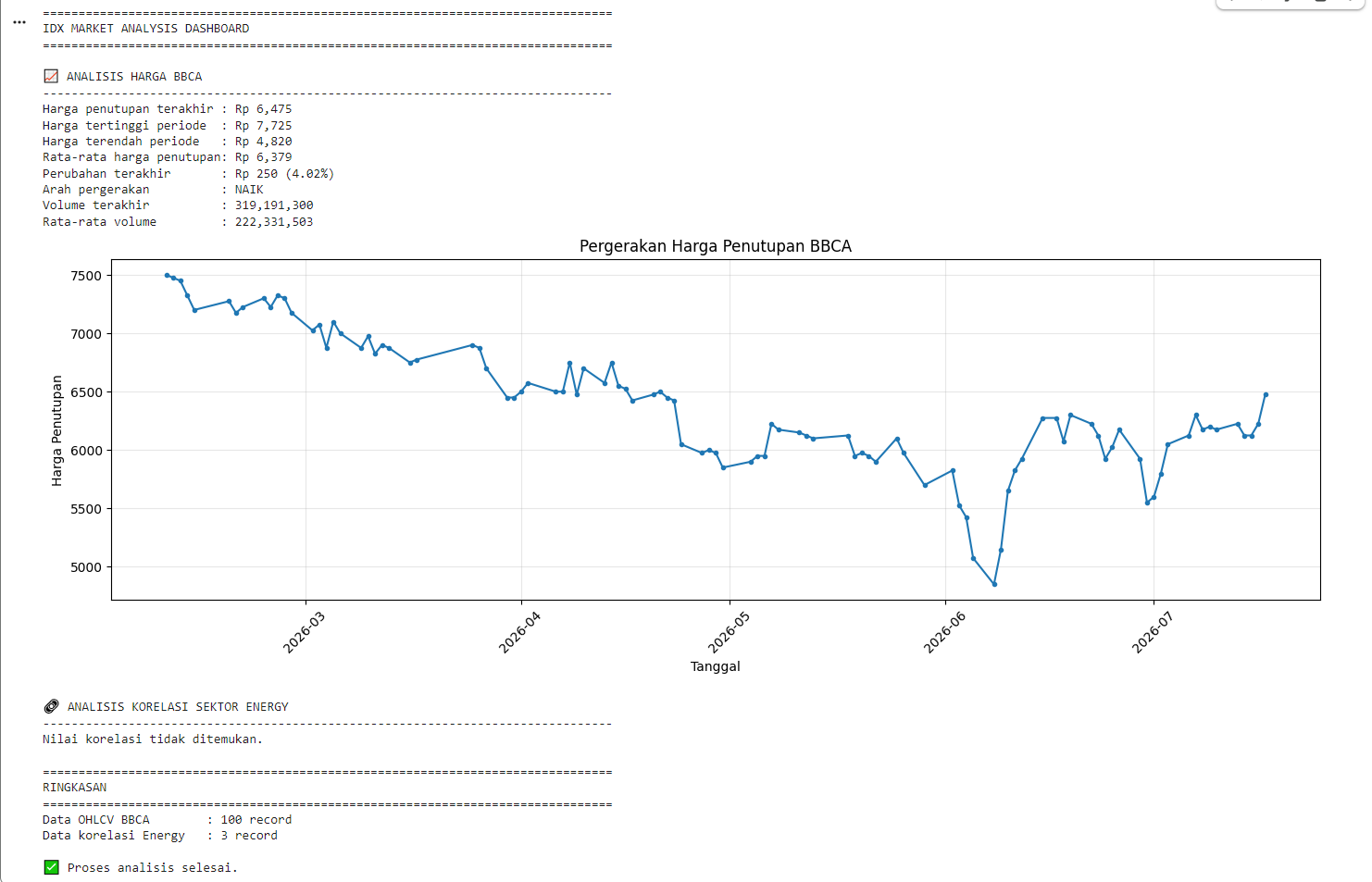
After the notebook finishes executing, users receive four major outputs.
The first output is a normalized table containing the latest OHLCV historical data for the selected stock. The table presents standardized price and volume information that is ready for analysis.
The second output is the Sector Correlation table. Depending on the response returned by the API, this table displays correlation coefficients together with related company or sector identifiers.
The third output consists of two visualizations. The notebook generates a line chart illustrating historical closing-price movements and a horizontal bar chart showing the strongest sector correlations when correlation values are available.
The final output is an analytical dashboard summarizing the most important market statistics, including recent price performance, trading volume, average sector correlation, the strongest and weakest correlated stocks, and the overall processing status.
Overall Workflow
The notebook follows the workflow below:
Import the required Python libraries.
Configure RapidAPI authentication.
Define the stock symbol, OHLCV limit, and sector.
Create a reusable API request function.
Retrieve the latest OHLCV historical data.
Retrieve sector correlation information.
Normalize multiple JSON response structures.
Standardize OHLCV column names.
Convert both responses into pandas DataFrames.
Display normalized market tables.
Calculate descriptive statistics from OHLCV data.
Analyze sector correlation values.
Generate historical price and correlation charts.
Produce a final analytical dashboard summarizing the market data.
Why This Project Matters
Historical price analysis becomes significantly more valuable when combined with sector-level relationships.
While OHLCV data explains how an individual stock has traded over time, sector correlation reveals whether stocks within the same industry tend to move together or independently.
By integrating both datasets into one notebook, users can evaluate historical price performance while simultaneously understanding broader sector dynamics.
The notebook also demonstrates several reusable techniques for working with financial APIs, including recursive JSON parsing, automatic column standardization, flexible field detection, defensive request handling, statistical analysis, and data visualization.
These techniques can easily be reused in other financial dashboards and market-monitoring applications.
Conclusion
The IDX Latest OHLCV and Sector Correlation Dashboard demonstrates how Python can combine historical market data with sector relationship analysis using the Indonesia Stock Exchange API.
Through a single workflow, the notebook retrieves the latest OHLCV records together with sector correlation data, normalizes different JSON response structures, standardizes historical price columns, converts both responses into pandas DataFrames, generates descriptive statistics, visualizes price movements and sector relationships, and summarizes the results in a comprehensive analytical dashboard.
The notebook is designed to remain resilient against varying API response structures through recursive JSON extraction, dynamic column detection, and consistent error handling for timeout, subscription, and rate-limit scenarios.
The result is a practical and reusable dashboard that helps investors, analysts, and developers evaluate both historical stock performance and sector-wide relationships using data obtained directly from the Indonesia Stock Exchange API.