
Monitoring corporate actions is an important part of understanding activity in the stock market. Corporate actions can provide information about events that may affect shareholders, company structure, or investment decisions.
Two types of information that are often monitored are Tender Offer schedules and Corporate Actions that occur on a particular day. Having access to these datasets in a single dashboard can make it easier to review information directly from the Indonesia Stock Exchange API.
In this project, we build an IDX Tender Offer & Corporate Actions Dashboard using Python and the Indonesia Stock Exchange API. The notebook retrieves Tender Offer Calendar data and Today Corporate Actions data, processes the responses, and displays the information through a simple dashboard interface.
The notebook is divided into five main sections. The first section imports the required libraries, followed by API configuration, helper functions, data retrieval, and dashboard generation.
What This Project Builds
This project creates an IDX Tender Offer & Corporate Actions Dashboard that combines:
Tender Offer Calendar data
Today Corporate Actions data
Structured dataframe output
Dashboard monitoring interface
By combining both datasets into a single workflow, users can review Tender Offer schedules and Corporate Actions from one dashboard.
CELL 1 — Import Required Libraries
import requests
import pandas as pd
import time
from IPython.display import display, Markdown

pd.set_option("display.max_columns", None)
pd.set_option("display.width", 1000)
Explanation
The project begins by importing the required libraries.
The requests library is used to communicate with the IDX API, while pandas is used to process and display structured data. The time library is used to create delays between API requests, and display together with Markdown is used to create a cleaner dashboard presentation inside Google Colab.
The notebook also configures pandas display settings to allow wider output and full column visibility.
CELL 2 — Configure API Connection
BASE_URL = "https://indonesia-stock-exchange-idx.p.rapidapi.com"

HEADERS = {
    "Content-Type": "application/json",
    "x-rapidapi-host": "indonesia-stock-exchange-idx.p.rapidapi.com",
    "x-rapidapi-key": "your_api_key"
}
Explanation
Cell 2 contains the API configuration used throughout the notebook.
The BASE_URL variable stores the IDX API endpoint, while HEADERS contains the request configuration required for communication with the API service.
These settings are reused whenever the notebook requests Tender Offer Calendar data and Today Corporate Actions data.
CELL 3 — Create API Helper Functions
def fetch_api(endpoint, retries=3, delay=5):
    url = BASE_URL + endpoint

    for attempt in range(retries):
        try:
            response = requests.get(
                url,
                headers=HEADERS,
                timeout=30
            )

            if response.status_code == 429:
                print(f"Rate limit tercapai. Menunggu {delay} detik...")
                time.sleep(delay)
                continue

            response.raise_for_status()
            return response.json()

        except Exception as e:
            print(f"Percobaan {attempt+1} gagal: {e}")
            time.sleep(delay)

    return None


def extract_list(data):
    if data is None:
        return []

    if isinstance(data, list):
        return data

    if isinstance(data, dict):

        keys = [
            "data",
            "list",
            "items",
            "result",
            "tenderoffer",
            "corporate_actions",
            "calendar"
        ]

        for key in keys:
            if key in data:

                value = data[key]

                if isinstance(value, list):
                    return value

                if isinstance(value, dict):

                    for v in value.values():
                        if isinstance(v, list):
                            return v

    return []
Explanation
Cell 3 creates helper functions used throughout the project.
The fetch_api() function retrieves data from the IDX API. The function includes retry handling and rate-limit management so the notebook can continue attempting requests if temporary issues occur.
The extract_list() function is designed to extract list-based data from different API response structures. This allows the notebook to process Tender Offer Calendar data and Today Corporate Actions data more consistently.
CELL 4 — Retrieve IDX Data
tender_offer_raw = fetch_api(
    "/api/calendar/tender-offer"
)

time.sleep(5)

today_corporate_actions_raw = fetch_api(
    "/api/calendar/today"
)
Explanation
Cell 4 retrieves the required datasets from the IDX API.
The notebook first requests Tender Offer Calendar data and stores the response in tender_offer_raw.
After a five-second delay, the notebook retrieves Today Corporate Actions data and stores the response in today_corporate_actions_raw.
Both datasets are then used by the dashboard in the next section.
CELL 5 — Dashboard Hasil
display(Markdown("# 📊 IDX Tender Offer & Corporate Actions Dashboard"))

display(Markdown("""
Dashboard sederhana untuk memantau data Tender Offer dan Corporate Actions
yang terjadi di Bursa Efek Indonesia.
"""))

# Tender Offer
display(Markdown("## 🤝 Tender Offer Calendar"))

tender_offer = extract_list(tender_offer_raw)

if len(tender_offer) > 0:
    df_tender = pd.json_normalize(tender_offer)
    display(Markdown(f"Jumlah data Tender Offer yang berhasil ditampilkan: **{len(df_tender)} data**"))
    display(df_tender)
else:
    display(Markdown("""
**Status:** Tidak ada data Tender Offer yang tersedia saat ini.

Artinya, berdasarkan response API, tidak terdapat agenda Tender Offer aktif
atau data Tender Offer belum tersedia pada endpoint ini.
"""))

# Today Corporate Actions
display(Markdown("## 📅 Today Corporate Actions"))

today_actions = extract_list(today_corporate_actions_raw)

if len(today_actions) > 0:
    df_today = pd.json_normalize(today_actions)
    display(Markdown(f"Jumlah Corporate Actions hari ini yang berhasil ditampilkan: **{len(df_today)} data**"))
    display(df_today)
else:
    display(Markdown("""
**Status:** Tidak ada data Corporate Actions hari ini.

Artinya, pada tanggal pengecekan saat ini belum ada aksi korporasi yang
dikembalikan oleh API untuk endpoint Today Corporate Actions.
"""))

display(Markdown("✅ Dashboard berhasil dibuat."))
Explanation
Cell 5 builds the final IDX Tender Offer & Corporate Actions Dashboard.
The dashboard begins by displaying a title and a short description explaining that the dashboard is designed to monitor Tender Offer data and Corporate Actions from the Indonesia Stock Exchange.
The first section focuses on Tender Offer Calendar data. If data is available, the notebook converts the response into a dataframe, displays the total number of records, and shows the resulting dataframe. If no data is available, the dashboard displays a status message indicating that no Tender Offer information is currently available.
The second section focuses on Today Corporate Actions data. If data is available, the notebook converts the response into a dataframe, displays the total number of records, and shows the resulting dataframe. If no data is available, the dashboard displays a status message indicating that no Corporate Actions data is available for the current date.
After both sections are completed, the notebook displays a confirmation message indicating that the dashboard has been successfully created.
Result :
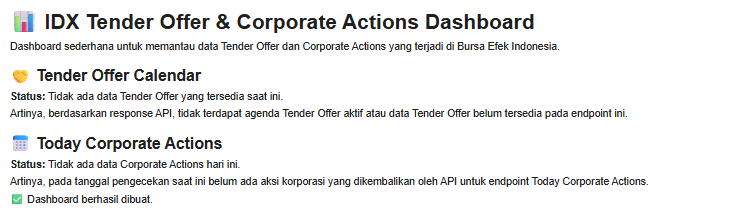
Dashboard Output
Tender Offer Calendar
The dashboard displays Tender Offer Calendar information returned by the IDX API. If data exists, the records are presented in dataframe format. Otherwise, a status message explains that no Tender Offer data is currently available.
Today Corporate Actions
The dashboard displays Corporate Actions information returned by the IDX API for the current date. If data exists, the records are presented in dataframe format. Otherwise, a status message explains that no Corporate Actions data is currently available.
Overall Workflow
Import required libraries.
Configure IDX API access.
Create helper functions for data retrieval and processing.
Retrieve Tender Offer Calendar data.
Retrieve Today Corporate Actions data.
Process API responses.
Display the information through the dashboard.
Why This Project Matters
Tender Offer and Corporate Actions information are important components of market monitoring.
By combining both datasets into a single dashboard, users can access information from two IDX API endpoints through one workflow and review the data in a structured format.
Conclusion
The IDX Tender Offer & Corporate Actions Dashboard demonstrates how Python can be used to retrieve, process, and display Tender Offer Calendar data and Today Corporate Actions data from the Indonesia Stock Exchange API.
The notebook combines both datasets into a single dashboard, making market monitoring simpler and easier to understand.