
Stock Split Calendar and RUPS Calendar Intelligence is an important approach for investors who want to monitor corporate actions and shareholder meetings in a single workflow.
This tutorial demonstrates how to build a Stock Split Calendar and RUPS Calendar Intelligence workflow using Python and the Indonesia Stock Exchange IDX API.
Corporate actions and shareholder meetings are important events that investors need to monitor. Stock split events may affect stock liquidity and trading activity, while RUPS events provide information about upcoming corporate meetings and company agendas.
This notebook demonstrates how to combine getStockSplitCalendar and getRupsCalendar using Python and the Indonesia Stock Exchange IDX API.
Stock Split Calendar and RUPS Calendar Intelligence
The Stock Split Calendar and RUPS Calendar Intelligence workflow combines stock split schedules and upcoming RUPS events into a centralized monitoring system for investment research.
Cell 1 — Import Library
import requests
import pandas as pd
import time
from IPython.display import display
Explanation
Cell 1 imports the required Python libraries.
The notebook uses requests to call the API, pandas to process API responses into dataframes, time to add delay between API requests, and display to show results clearly in Google Colab.
Cell 2 — Konfigurasi API
RAPIDAPI_KEY = "YOUR_API_KEY"

BASE_URL = "https://indonesia-stock-exchange-idx.p.rapidapi.com"

HEADERS = {
    "Content-Type": "application/json",
    "x-rapidapi-host": "indonesia-stock-exchange-idx.p.rapidapi.com",
    "x-rapidapi-key": RAPIDAPI_KEY
}
Explanation
Cell 2 configures the API connection.
The notebook defines the RapidAPI key, base URL, and request headers required to access the Indonesia Stock Exchange API.
These headers are used for every API request in the notebook.
Cell 3 — Function API Aman
def safe_call_api(endpoint, retries=3, delay=3):
    for attempt in range(retries):
        response = requests.get(
            f"{BASE_URL}{endpoint}",
            headers=HEADERS
        )

        if response.status_code == 200:
            return response.json()

        elif response.status_code == 429:
            print(f"Rate limit terkena. Menunggu {delay} detik...")
            time.sleep(delay)
            delay *= 2

        else:
            print("Error:", response.status_code)
            print(response.text)
            return None

    return None
Explanation
Cell 3 creates a safe API caller function.
The function sends a GET request to the selected endpoint and returns the response in JSON format when successful.
If the API returns status code 429, the function waits before retrying. This helps reduce errors caused by rate limits.
Cell 4 — Ambil & Gabungkan 2 API
stock_split_calendar = safe_call_api("/api/calendar/stock-split")

time.sleep(5)

rups_calendar = safe_call_api("/api/calendar/rups")

api_result = {
    "getStockSplitCalendar": stock_split_calendar,
    "getRupsCalendar": rups_calendar
}

print("Data berhasil digabung")
Explanation
Cell 4 retrieves data from two APIs.
The notebook calls the Stock Split Calendar API first, waits for five seconds, and then calls the RUPS Calendar API.
Both API responses are stored in one dictionary named api_result.
This makes the workflow easier to manage because both datasets are available in one combined structure.
Cell 5 — Tampilkan Hasil
print("Stock Split Calendar:")
stock_split_data = api_result["getStockSplitCalendar"]

if stock_split_data is None:
    print("Data Stock Split kosong / gagal diambil")
elif isinstance(stock_split_data, dict):
    display(pd.json_normalize(stock_split_data))
elif isinstance(stock_split_data, list):
    display(pd.DataFrame(stock_split_data))
else:
    print(type(stock_split_data))
    print(stock_split_data)


print("RUPS Calendar:")
rups_data = api_result["getRupsCalendar"]

if rups_data is None:
    print("Data RUPS kosong / gagal diambil")
elif isinstance(rups_data, dict):
    display(pd.json_normalize(rups_data))
elif isinstance(rups_data, list):
    display(pd.DataFrame(rups_data))
else:
    print(type(rups_data))
    print(rups_data)
Explanation
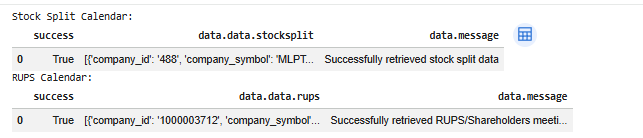
Cell 5 displays the final results from both APIs.
For Stock Split Calendar, the notebook checks whether the response is empty, a dictionary, or a list.
If the response is a dictionary, it is normalized using pd.json_normalize(). If the response is a list, it is converted into a dataframe using pd.DataFrame().
The same process is applied to the RUPS Calendar data.
This flexible handling is useful because API responses may have different JSON structures.
Result:
OVERALL WORKFLOW
This notebook follows a simple corporate event monitoring workflow.
First, it imports the required libraries.
Second, it configures the API connection.
Third, it creates a safe API request function.
Fourth, it retrieves Stock Split Calendar and RUPS Calendar data.
Fifth, it stores both API responses in one combined dictionary.
Finally, it displays both datasets in structured dataframe format.
WHY THIS CASE MATTERS
The Stock Split Calendar and RUPS Calendar Intelligence approach helps investors monitor important corporate events more efficiently. Investors need to monitor more than just stock prices.
Stock split events may affect stock liquidity, affordability, and investor interest.
RUPS events help investors track corporate meetings, shareholder decisions, and important company agendas.
By combining Stock Split Calendar and RUPS Calendar data, investors can monitor corporate events more efficiently in one workflow.
CONCLUSION
This tutorial demonstrates how to combine getStockSplitCalendar and getRupsCalendar using Python and the IDX API.
The notebook retrieves stock split data, collects RUPS calendar data, handles API rate limits, combines the responses, and displays the results in dataframe format.
The final workflow provides a practical foundation for corporate event monitoring, investment research, and market intelligence analysis. The Stock Split Calendar and RUPS Calendar Intelligence workflow provides investors, analysts, and fintech developers with a practical foundation for corporate event monitoring and market intelligence.