
INTRODUCTION
A stock screener becomes more useful when it can filter companies by sector and subsector.
In the Indonesian stock market, sector classification helps investors narrow down the market into more specific groups. Instead of analyzing every listed company at once, we can focus on a particular sector, then inspect the companies inside a selected subsector.
This notebook builds a simple case study: creating an IDX sector stock screener using Python.
The workflow combines two APIs. The first one is getAllSectors, which retrieves IDX sector and subsector reference data. The second one is getSectorCompanies, which retrieves companies from a selected sector and subsector.
By combining both datasets, the notebook creates a structured output that can be used as a foundation for sector-based stock screening, sector dashboards, company mapping, or further stock analysis.
Cell 1 — Import Library + Config API
import os
import json
import time
from typing import Any, Dict, List, Optional, Union

import requests
import pandas as pd


RAPIDAPI_HOST = "indonesia-stock-exchange-idx.p.rapidapi.com"
BASE_URL = f"https://{RAPIDAPI_HOST}"

# Ganti dengan RapidAPI Key Anda
RAPIDAPI_KEY = "ISI_RAPIDAPI_KEY_ANDA_DI_SINI"

# Alternatif jika memakai environment variable:
# RAPIDAPI_KEY = os.getenv("RAPIDAPI_KEY")

if not RAPIDAPI_KEY or RAPIDAPI_KEY == "ISI_RAPIDAPI_KEY_ANDA_DI_SINI":
    raise ValueError("Masukkan RapidAPI Key Anda dulu pada variabel RAPIDAPI_KEY.")

HEADERS = {
    "Content-Type": "application/json",
    "x-rapidapi-host": RAPIDAPI_HOST,
    "x-rapidapi-key": RAPIDAPI_KEY,
}

print("API configuration ready.")
Explanation
Cell 1 prepares the notebook environment and API configuration.
The notebook imports several important libraries. os is prepared for environment variable usage. json is used to preview raw API responses in readable JSON format. time is used to add delays between requests. requests is used to call the API endpoints, while pandas is used to process the API response into dataframes.
The typing module imports Any, Dict, List, Optional, and Union. These are used later in helper functions to make the function inputs and outputs clearer.
The API configuration starts with RAPIDAPI_HOST, which stores the RapidAPI host for the Indonesia Stock Exchange IDX API. BASE_URL is then created from that host.
The RAPIDAPI_KEY variable stores the API key. In a public article, this value should be replaced with a placeholder to avoid exposing private credentials.
The notebook also provides an alternative option for using an environment variable:
# RAPIDAPI_KEY = os.getenv("RAPIDAPI_KEY")This is useful if the project is moved into a safer or production-like environment.
The validation block checks whether the API key is empty or still using the placeholder. If the key has not been filled in, the notebook raises a ValueError.
Finally, HEADERS is created. It contains Content-Type, x-rapidapi-host, and x-rapidapi-key. These headers are used in every API request.
Cell 2 — Helper Function
def request_get(
    endpoint: str,
    params: Optional[Dict[str, Any]] = None,
    timeout: int = 30,
    max_retries: int = 5,
    wait_seconds: int = 3
) -> Union[Dict[str, Any], List[Any]]:

    url = f"{BASE_URL}{endpoint}"

    for attempt in range(1, max_retries + 1):
        time.sleep(wait_seconds)

        response = requests.get(
            url,
            headers=HEADERS,
            params=params,
            timeout=timeout
        )

        try:
            payload = response.json()
        except Exception:
            payload = response.text

        if response.ok:
            return payload

        if response.status_code == 429:
            print(
                f"Rate limit terkena 429. "
                f"Percobaan {attempt}/{max_retries}. "
                f"Tunggu {wait_seconds} detik..."
            )
            time.sleep(wait_seconds)
            continue

        raise RuntimeError(
            f"Request gagal. Status: {response.status_code}\n"
            f"URL: {response.url}\n"
            f"Response: {payload}"
        )

    raise RuntimeError(
        f"Request gagal karena rate limit 429 setelah {max_retries} percobaan. "
        f"Coba jalankan ulang beberapa saat lagi."
    )


def find_first_list(obj: Any) -> List[Dict[str, Any]]:
    if isinstance(obj, list):
        return obj if all(isinstance(item, dict) for item in obj) else []

    if isinstance(obj, dict):
        priority_keys = [
            "data", "result", "results", "items", "rows",
            "content", "sectors", "subsectors", "companies"
        ]

        for key in priority_keys:
            if key in obj:
                found = find_first_list(obj[key])
                if found:
                    return found

        for value in obj.values():
            found = find_first_list(value)
            if found:
                return found

    return []


def json_to_dataframe(payload: Union[Dict[str, Any], List[Any]]) -> pd.DataFrame:
    records = find_first_list(payload)

    if records:
        return pd.json_normalize(records)

    if isinstance(payload, dict):
        return pd.json_normalize(payload)

    return pd.DataFrame()


def detect_column(df: pd.DataFrame, keywords: List[str]) -> Optional[str]:
    if df.empty:
        return None

    lower_map = {col.lower(): col for col in df.columns}

    for keyword in keywords:
        if keyword.lower() in lower_map:
            return lower_map[keyword.lower()]

    for col in df.columns:
        col_lower = col.lower()
        if any(keyword.lower() in col_lower for keyword in keywords):
            return col

    return None


def safe_series(df: pd.DataFrame, col: Optional[str], default_value="") -> pd.Series:
    if col is None or col not in df.columns:
        return pd.Series([default_value] * len(df), index=df.index)

    return df[col]
Explanation
Cell 2 contains helper functions that make the notebook more stable and flexible.
The first function is request_get. This function sends a GET request to an API endpoint. It combines BASE_URL with the selected endpoint, waits for a few seconds, and then sends the request using requests.get.
This function also includes retry handling. If the API returns status code 429, which means rate limit, the notebook prints a message, waits again, and retries the request. The function allows up to max_retries = 5 attempts.
If the response is successful, the function returns the parsed payload. If the API returns another error status, the function raises a RuntimeError containing the status code, URL, and response.
The second function is find_first_list. This function searches a nested JSON object and tries to find the first list of dictionaries. It checks common keys such as data, result, results, items, rows, content, sectors, subsectors, and companies.
The third function is json_to_dataframe. This function converts an API payload into a dataframe. If a list of records is found, it normalizes the list using pd.json_normalize. If no list is found but the payload is a dictionary, it normalizes the dictionary directly.
The fourth function is detect_column. This function detects a column based on possible keyword names. It first checks exact lowercase matches, then checks whether any keyword exists inside the column name.
The fifth function is safe_series. This function safely returns a dataframe column. If the column does not exist, it returns a default series with the same length as the dataframe.
Together, these helper functions help the notebook handle different API response formats and reduce errors caused by missing or changing column names.
Cell 3 — Ambil Data dari Dua API
# Parameter dari endpoint getSectorCompanies
SECTOR_ID = 7
SUBSECTOR_ID = 19

print("Mengambil data getAllSectors...")
all_sectors_payload = request_get(
    endpoint="/api/sectors",
    wait_seconds=3
)

# Tambahkan jeda manual agar tidak kena rate limit per second
time.sleep(5)

print("Mengambil data getSectorCompanies...")
sector_companies_payload = request_get(
    endpoint=f"/api/sectors/{SECTOR_ID}/subsectors/{SUBSECTOR_ID}/companies",
    wait_seconds=3
)

all_sectors_df = json_to_dataframe(all_sectors_payload)
sector_companies_df = json_to_dataframe(sector_companies_payload)

all_sectors_df["source_api"] = "getAllSectors"
sector_companies_df["source_api"] = "getSectorCompanies"

print("All Sectors shape:", all_sectors_df.shape)
print("Sector Companies shape:", sector_companies_df.shape)

display(all_sectors_df.head())
display(sector_companies_df.head())

print("Preview All Sectors JSON:")
print(json.dumps(all_sectors_payload, indent=2, ensure_ascii=False)[:1500])

print("\nPreview Sector Companies JSON:")
print(json.dumps(sector_companies_payload, indent=2, ensure_ascii=False)[:1500])
Explanation
Cell 3 retrieves data from the two main APIs.
The notebook first defines the parameters used for getSectorCompanies:
SECTOR_ID = 7
SUBSECTOR_ID = 19
These two values determine which sector and subsector will be used when requesting company data.
The first API request calls:
/api/sectors
This endpoint represents getAllSectors. It retrieves the available IDX sector and subsector reference data.
After that, the notebook adds a manual delay using:
time.sleep(5)
This delay is included to reduce the risk of hitting the API rate limit per second.
The second API request calls:
/api/sectors/{SECTOR_ID}/subsectors/{SUBSECTOR_ID}/companies
With the current parameter values, the endpoint requests companies from sector ID 7 and subsector ID 19.
The API responses are stored in:
all_sectors_payload
and
sector_companies_payload
Both payloads are converted into dataframes using json_to_dataframe.
The resulting dataframes are:
all_sectors_df
and
sector_companies_df
The notebook then adds a source_api column to each dataframe. This helps identify where each dataset comes from.
At the end of the cell, the notebook prints the shapes of both dataframes, displays their first rows, and prints raw JSON previews limited to 1500 characters.
This cell is the main data collection stage for the IDX sector stock screener.
Cell 4 — Cleaning Data Sektor dan Perusahaan
# Deteksi kolom pada data sektor
sector_id_col = detect_column(
    all_sectors_df,
    ["id", "sectorId", "sector_id", "code"]
)

sector_name_col = detect_column(
    all_sectors_df,
    ["name", "sectorName", "sector_name", "title"]
)

subsector_id_col = detect_column(
    all_sectors_df,
    ["subsectorId", "subsector_id", "id"]
)

subsector_name_col = detect_column(
    all_sectors_df,
    ["subsectorName", "subsector_name", "name", "title"]
)


# Deteksi kolom pada data perusahaan
company_symbol_col = detect_column(
    sector_companies_df,
    ["symbol", "ticker", "stockCode", "stock_code", "code", "securityCode"]
)

company_name_col = detect_column(
    sector_companies_df,
    ["name", "companyName", "company_name", "stockName", "stock_name", "issuer"]
)

company_sector_col = detect_column(
    sector_companies_df,
    ["sector", "sectorName", "sector_name"]
)

company_subsector_col = detect_column(
    sector_companies_df,
    ["subsector", "subsectorName", "subsector_name"]
)


print("Detected All Sectors columns:")
print("sector id      :", sector_id_col)
print("sector name    :", sector_name_col)
print("subsector id   :", subsector_id_col)
print("subsector name :", subsector_name_col)

print("\nDetected Sector Companies columns:")
print("symbol         :", company_symbol_col)
print("company name   :", company_name_col)
print("sector         :", company_sector_col)
print("subsector      :", company_subsector_col)


sectors_clean = pd.DataFrame({
    "sector_id": safe_series(all_sectors_df, sector_id_col, ""),
    "sector_name": safe_series(all_sectors_df, sector_name_col, ""),
    "subsector_id": safe_series(all_sectors_df, subsector_id_col, ""),
    "subsector_name": safe_series(all_sectors_df, subsector_name_col, ""),
})

sectors_clean["source_api"] = "getAllSectors"


companies_clean = pd.DataFrame({
    "symbol": (
        safe_series(sector_companies_df, company_symbol_col, "")
        .astype(str)
        .str.upper()
        .str.strip()
    ),
    "company_name": safe_series(sector_companies_df, company_name_col, ""),
    "sector": safe_series(sector_companies_df, company_sector_col, ""),
    "subsector": safe_series(sector_companies_df, company_subsector_col, ""),
})

companies_clean = companies_clean[companies_clean["symbol"].ne("")].copy()
companies_clean["sector_id_request"] = SECTOR_ID
companies_clean["subsector_id_request"] = SUBSECTOR_ID
companies_clean["source_api"] = "getSectorCompanies"

display(sectors_clean.head(20))
display(companies_clean.head(20))
Explanation
Cell 4 cleans and standardizes the sector and company datasets.
The first part detects columns from all_sectors_df. The notebook tries to find the sector ID, sector name, subsector ID, and subsector name columns.
For example, the sector ID column may appear as id, sectorId, sector_id, or code. The sector name column may appear as name, sectorName, sector_name, or title.
The second part detects columns from sector_companies_df. The notebook tries to find company symbol, company name, sector, and subsector columns.
For example, the company symbol may appear as symbol, ticker, stockCode, stock_code, code, or securityCode.
After the column detection step, the notebook prints all detected columns. This makes it easier for the user to check whether the API response was interpreted correctly.
Next, the notebook creates sectors_clean. This dataframe standardizes the sector data into:
sector_id
sector_name
subsector_id
subsector_name
It also adds:
source_api = "getAllSectors"
Then, the notebook creates companies_clean. This dataframe standardizes the company data into:
symbol
company_name
sector
subsector
The symbol column is converted to uppercase and stripped of extra spaces. Rows with empty symbols are removed.
The notebook also adds:
sector_id_request
subsector_id_request
source_api = "getSectorCompanies"
This makes the company output traceable to the selected sector and subsector request.
At the end, the notebook displays the first 20 rows of both cleaned datasets.
This cell turns raw API responses into cleaner datasets that are easier to use for sector-based stock analysis.
Cell 5 — Gabungkan Data Menjadi Project Output
# Ambil informasi sektor/subsektor dari all sectors jika memungkinkan
sector_info = sectors_clean.copy()

sector_info["sector_id_str"] = sector_info["sector_id"].astype(str)
sector_info["subsector_id_str"] = sector_info["subsector_id"].astype(str)

matched_sector = sector_info[
    (sector_info["sector_id_str"] == str(SECTOR_ID)) |
    (sector_info["subsector_id_str"] == str(SUBSECTOR_ID))
].copy()

if not matched_sector.empty:
    selected_sector_name = matched_sector["sector_name"].dropna().astype(str).head(1).values[0]
    selected_subsector_name = matched_sector["subsector_name"].dropna().astype(str).head(1).values[0]
else:
    selected_sector_name = ""
    selected_subsector_name = ""


project_output = companies_clean.copy()
project_output["sector_name_from_master"] = selected_sector_name
project_output["subsector_name_from_master"] = selected_subsector_name
project_output["project_note"] = (
    "Data perusahaan pada sektor/subsektor tertentu digabungkan "
    "dengan master data sektor IDX."
)


summary_df = pd.DataFrame({
    "description": [
        "Total sektor dari getAllSectors",
        "Total perusahaan dari getSectorCompanies",
        "Sector ID request",
        "Subsector ID request"
    ],
    "value": [
        len(sectors_clean),
        len(companies_clean),
        SECTOR_ID,
        SUBSECTOR_ID
    ]
})


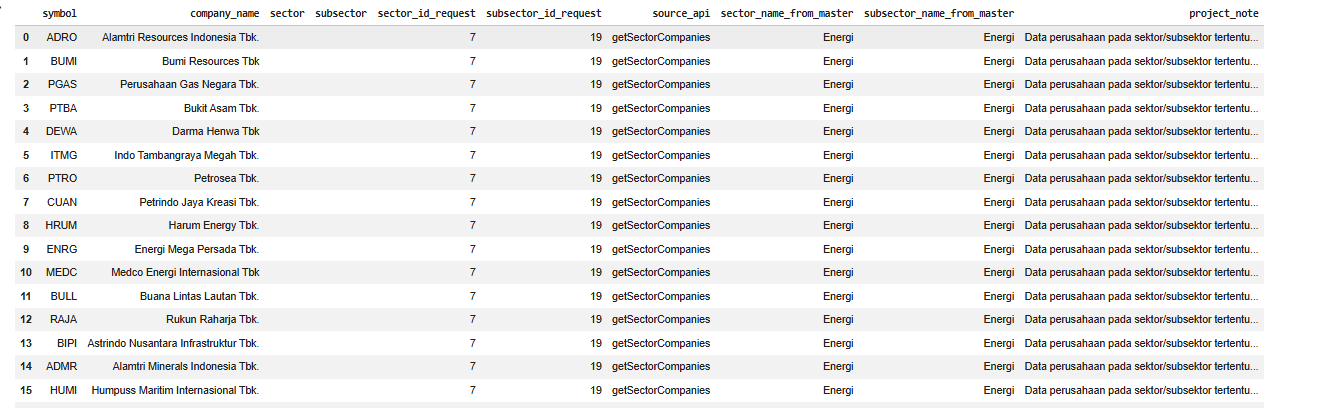
display(project_output.head(30))
display(summary_df)
Explanation
Cell 5 combines the cleaned company data with sector reference information.
The notebook first copies sectors_clean into sector_info.
Then, it creates two string-based helper columns:
sector_id_str
and
subsector_id_str
These columns are used to match the selected SECTOR_ID and SUBSECTOR_ID with the sector reference data.
The notebook then creates matched_sector by filtering rows where either the sector ID matches SECTOR_ID or the subsector ID matches SUBSECTOR_ID.
If a match is found, the notebook extracts:
selected_sector_name
and
selected_subsector_name
If no match is found, both values are set to empty strings.
Next, the notebook creates project_output by copying companies_clean.
It then adds:
sector_name_from_master
subsector_name_from_master
project_note
The project_note explains that company data from a selected sector and subsector is combined with IDX sector master data.
Finally, the notebook creates summary_df, which contains four summary rows:
Total sektor dari getAllSectors
Total perusahaan dari getSectorCompanies
Sector ID request
Subsector ID request
At the end, the notebook displays the first 30 rows of project_output and the summary dataframe.
This final cell produces the main output of the project: a clean list of companies from a selected IDX sector and subsector, enriched with sector information from the master sector data.
Result:
Overall Workflow
This notebook follows a simple but practical workflow.
First, it prepares the API configuration and required Python libraries.
Second, it defines helper functions for API requests, rate limit handling, JSON parsing, dataframe conversion, column detection, and safe column selection.
Third, it retrieves sector reference data from getAllSectors.
Fourth, it retrieves company data from getSectorCompanies using selected sector and subsector IDs.
Fifth, it cleans and standardizes both datasets.
Finally, it combines company data with sector master information and creates a summary output.
The result is an IDX sector stock screener that can be used as a foundation for more advanced stock analysis projects.
Why This Case Matters
Sector-based analysis is one of the most practical ways to understand a stock market.
Instead of looking at all listed companies at once, analysts can focus on a specific sector or subsector. This helps reduce noise and makes the analysis more targeted.
For example, a user can start from sector reference data, choose a specific sector and subsector ID, then retrieve companies that belong to that category. This structure can later be expanded into dashboards, watchlists, valuation screens, liquidity filters, or sector rotation analysis.
By combining getAllSectors and getSectorCompanies, this notebook builds the first layer of a sector-based stock analysis system.
It is not only about calling two APIs. It is about creating a structured sector-company mapping that can support many IDX stock analysis workflows.
Conclusion
This tutorial shows how to build an IDX sector stock screener using Python, getAllSectors, and getSectorCompanies.
The notebook starts by configuring the API connection and preparing helper functions. It then retrieves all sector data, requests companies from a selected sector and subsector, cleans both datasets, and combines company data with master sector information.
The final output gives users a clean view of companies inside a selected IDX sector and subsector, along with request metadata and project notes.
This workflow is useful because it creates a foundation for sector-based stock research. Once the sector-company mapping is ready, it can be extended into stock screening, watchlist creation, dashboard development, or deeper market analysis.
For traders, investors, analysts, and data enthusiasts, this project is a practical starting point for organizing IDX companies by sector before moving into more advanced analysis.