
Understanding a listed company's profile is one of the first steps before conducting deeper investment analysis. Information such as sector classification, industry, listing board, and corporate profile provides important context about the business itself. At the same time, insider trading disclosures offer additional transparency by showing transactions performed by company insiders during a selected reporting period.
Instead of collecting this information manually from multiple sources, both datasets can be obtained automatically through the Indonesia Stock Exchange API available on RapidAPI.
In this project, we will build a Python dashboard using two API endpoints:
getEmitenInfo
getInsiderTradingBySymbol
The notebook consists of five cells. The first two cells configure the API connection and retrieve data from both endpoints. The remaining cells normalize nested JSON responses, convert them into pandas DataFrames, clean the resulting tables, export CSV files, and generate a final dashboard summarizing company information together with insider trading activity.
For security purposes, the RapidAPI key used in the notebook should be replaced with YOUR_RAPIDAPI_KEY. Apart from that replacement, every notebook cell should remain identical to the original implementation.
Cell 1 — Import Libraries and Configure the API
The first cell imports the required Python libraries and prepares the configuration used throughout the notebook.
It defines the RapidAPI host, authentication headers, stock symbol, insider trading period, request delay, and prints a summary of the current project configuration.
# ============================================================
# CELL 1 — IMPORT LIBRARY DAN KONFIGURASI RAPIDAPI
# ============================================================

import requests
import pandas as pd
import json
import time

from datetime import datetime
from IPython.display import display

# Masukkan RapidAPI Key Anda
RAPIDAPI_KEY = "YOUR_API_KEY"

BASE_URL = "https://indonesia-stock-exchange-idx.p.rapidapi.com"
RAPIDAPI_HOST = "indonesia-stock-exchange-idx.p.rapidapi.com"

HEADERS = {
    "Content-Type": "application/json",
    "x-rapidapi-key": RAPIDAPI_KEY,
    "x-rapidapi-host": RAPIDAPI_HOST
}

# Konfigurasi emiten
SYMBOL = "BBCA"

# Konfigurasi Insider Trading
DATE_START = "2025-11-01"
DATE_END = "2025-12-31"
INSIDER_LIMIT = 20
INSIDER_PAGE = 1

# Jeda antarequest untuk mengurangi risiko rate limit
REQUEST_DELAY = 5

print("=" * 100)
print("IDX EMITEN INFO & INSIDER TRADING PROJECT")
print("=" * 100)
print(f"Kode saham        : {SYMBOL}")
print(f"Periode insider   : {DATE_START} sampai {DATE_END}")
print(f"RapidAPI Host     : {RAPIDAPI_HOST}")
print(f"Jeda antarequest  : {REQUEST_DELAY} detik")

if RAPIDAPI_KEY == "MASUKKAN_RAPIDAPI_KEY_ANDA":
    print("\n⚠️ Masukkan RapidAPI Key Anda sebelum menjalankan Cell 2.")
else:
    print("\n✅ Konfigurasi API sudah siap.")
The notebook imports several libraries to support data collection and processing.
requests performs HTTP requests to the RapidAPI endpoint.
pandas converts normalized records into DataFrames.
json formats nested API responses during debugging.
time creates delays between requests to reduce the possibility of rate limiting.
datetime records the execution timestamp.
display renders DataFrames neatly inside Google Colab.
Besides configuring the RapidAPI connection, this cell also defines:
Stock symbol (BBCA)
Insider trading period
Maximum request delay between endpoints
These values will be reused throughout the remainder of the notebook.
Cell 2 — Request Company Information and Insider Trading Data
The second cell introduces a reusable API request function before retrieving data from both RapidAPI endpoints.
# ============================================================
# CELL 2 — REQUEST EMITEN INFO DAN INSIDER TRADING
# ============================================================

def get_api_data(name, endpoint, params=None, timeout=30):
    """
    Mengambil data dari RapidAPI satu kali tanpa retry otomatis.
    """

    url = f"{BASE_URL}{endpoint}"

    result = {
        "name": name,
        "endpoint": endpoint,
        "request_url": None,
        "status": None,
        "success": False,
        "message": "",
        "response": None
    }

    try:
        response = requests.get(
            url,
            headers=HEADERS,
            params=params,
            timeout=timeout
        )

        result["request_url"] = response.url
        result["status"] = response.status_code

        try:
            response_data = response.json()
        except ValueError:
            response_data = {
                "raw_text": response.text[:3000]
            }

        result["response"] = response_data

        if response.status_code == 200:
            result["success"] = True
            result["message"] = "Data berhasil diambil."

        elif response.status_code == 401:
            result["message"] = (
                "RapidAPI Key tidak valid atau belum dimasukkan."
            )

        elif response.status_code == 403:
            result["message"] = (
                "Akses ditolak atau endpoint belum termasuk "
                "paket langganan."
            )

        elif response.status_code == 404:
            result["message"] = (
                "Endpoint atau data emiten tidak ditemukan."
            )

        elif response.status_code == 422:
            result["message"] = (
                "Parameter query ditolak oleh validasi API."
            )

        elif response.status_code == 429:
            result["message"] = (
                "Batas request per detik paket BASIC terlampaui."
            )

        elif response.status_code >= 500:
            result["message"] = (
                "Server atau gateway penyedia API mengalami gangguan."
            )

        else:
            result["message"] = (
                f"Request gagal dengan HTTP status "
                f"{response.status_code}."
            )

    except requests.exceptions.Timeout:
        result["message"] = (
            "Request timeout karena server terlalu lama merespons."
        )

    except requests.exceptions.ConnectionError:
        result["message"] = (
            "Tidak dapat terhubung ke server RapidAPI."
        )

    except requests.exceptions.RequestException as error:
        result["message"] = f"Request error: {error}"

    except Exception as error:
        result["message"] = f"Terjadi error: {error}"

    return result


def print_api_status(result):
    """
    Menampilkan status request dan response error.
    """

    print("=" * 100)
    print(result["name"])
    print("-" * 100)
    print(f"Endpoint    : {result['endpoint']}")
    print(f"Request URL : {result['request_url']}")
    print(f"Status      : {result['status']}")
    print(f"Success     : {result['success']}")
    print(f"Pesan       : {result['message']}")

    if not result["success"] and result["response"] is not None:
        print("\nResponse API:")
        print(
            json.dumps(
                result["response"],
                indent=2,
                ensure_ascii=False
            )[:3000]
        )


# ------------------------------------------------------------
# ENDPOINT 1 — getEmitenInfo
# ------------------------------------------------------------

emiten_endpoint = f"/api/emiten/{SYMBOL}/info"

emiten_result = get_api_data(
    name="getEmitenInfo",
    endpoint=emiten_endpoint,
    timeout=30
)

print_api_status(emiten_result)


# ------------------------------------------------------------
# JEDA UNTUK MENGURANGI RISIKO RATE LIMIT
# ------------------------------------------------------------

print(
    f"\n⏳ Memberikan jeda {REQUEST_DELAY} detik "
    "sebelum request berikutnya..."
)

time.sleep(REQUEST_DELAY)


# ------------------------------------------------------------
# ENDPOINT 2 — getInsiderTradingBySymbol
# ------------------------------------------------------------

insider_endpoint = f"/api/emiten/{SYMBOL}/insider"

insider_params = {
    "date_end": DATE_END,
    "date_start": DATE_START,
    "limit": INSIDER_LIMIT,
    "source_type": "SOURCE_TYPE_UNSPECIFIED",
    "action_type": "ACTION_TYPE_UNSPECIFIED",
    "page": INSIDER_PAGE
}

insider_result = get_api_data(
    name="getInsiderTradingBySymbol",
    endpoint=insider_endpoint,
    params=insider_params,
    timeout=30
)

print()
print_api_status(insider_result)


# ------------------------------------------------------------
# RINGKASAN REQUEST
# ------------------------------------------------------------

print("\n" + "=" * 100)
print("RINGKASAN REQUEST")
print("=" * 100)

print(
    f"{'✅' if emiten_result['success'] else '❌'} "
    f"getEmitenInfo: {emiten_result['message']}"
)

print(
    f"{'✅' if insider_result['success'] else '❌'} "
    f"getInsiderTradingBySymbol: {insider_result['message']}"
)
getEmitenInfo Endpoint
The first request retrieves general company information for BBCA.
The endpoint returns company profile data that may include information such as:
Company profile
Sector
Industry
Listing board
Website
Address
Additional corporate information
The notebook stores the complete response together with its HTTP status and validation message for later processing.
getInsiderTradingBySymbol Endpoint
The second request retrieves insider trading transactions for the selected stock symbol.
The request uses the following parameters:
Symbol: BBCA
Period: 1 November 2025 – 31 December 2025
Maximum records: 20
All source types
All action types
Page 1
These parameters provide insider transaction data for the specified reporting period.
Robust API Request Handling
Instead of calling the API directly, the notebook wraps every request inside the reusable function:
get_api_data()This function automatically records:
Request URL
HTTP Status Code
Success status
Response body
Human-readable error message
It also handles common API scenarios, including:
HTTP 200 (Success)
HTTP 401 (Invalid API Key)
HTTP 403 (Access denied or subscription required)
HTTP 404 (Endpoint not found)
HTTP 422 (Validation error)
HTTP 429 (Rate limit exceeded)
HTTP 5xx (Server error)
Timeout exceptions
Connection failures
General request exceptions
Between the two endpoint requests, the notebook waits for five seconds to reduce the risk of triggering the RapidAPI BASIC plan rate limit.
Finally, both requests are summarized so users can immediately determine whether each endpoint completed successfully before moving on to the normalization process.
Cell 3 — Normalize API Responses into DataFrames
This cell searches nested JSON structures, extracts the relevant records, and converts them into flat pandas DataFrames.
# ============================================================
# CELL 3 — NORMALISASI RESPONSE API MENJADI DATAFRAME
# ============================================================

def find_record_lists(data, path="root"):
    """
    Mencari seluruh list berisi dictionary dalam JSON bertingkat.
    """

    candidates = []

    if isinstance(data, list):
        if data and all(isinstance(item, dict) for item in data):
            candidates.append({
                "path": path,
                "records": data,
                "length": len(data)
            })

        for index, item in enumerate(data[:20]):
            candidates.extend(
                find_record_lists(
                    item,
                    path=f"{path}[{index}]"
                )
            )

    elif isinstance(data, dict):
        for key, value in data.items():
            candidates.extend(
                find_record_lists(
                    value,
                    path=f"{path}.{key}"
                )
            )

    return candidates


def extract_records(data, preferred_keys=None, single_dict=False):
    """
    Mengambil record dari berbagai kemungkinan struktur response.

    single_dict=True:
    Mengubah satu dictionary informasi menjadi satu baris.
    """

    if preferred_keys is None:
        preferred_keys = []

    if data is None:
        return []

    if isinstance(data, list):
        return data

    if not isinstance(data, dict):
        return [{"value": data}]

    # Periksa key yang diprioritaskan
    for key in preferred_keys:
        if key not in data:
            continue

        value = data.get(key)

        if isinstance(value, list):
            return value

        if isinstance(value, dict):
            if single_dict:
                return [value]

            nested = extract_records(
                value,
                preferred_keys=preferred_keys,
                single_dict=single_dict
            )

            if nested:
                return nested

    # Periksa key umum API
    common_keys = [
        "data",
        "items",
        "results",
        "records",
        "content",
        "list",
        "rows",
        "company",
        "companyInfo",
        "company_info",
        "info",
        "emiten",
        "profile",
        "insiderTrading",
        "insider_trading",
        "insiders",
        "transactions"
    ]

    for key in common_keys:
        if key not in data:
            continue

        value = data.get(key)

        if isinstance(value, list):
            return value

        if isinstance(value, dict):
            if single_dict:
                return [value]

            nested = extract_records(
                value,
                preferred_keys=preferred_keys,
                single_dict=single_dict
            )

            if nested:
                return nested

    # Untuk informasi emiten, dictionary dapat menjadi satu record
    if single_dict:
        return [data]

    # Fallback: mencari list dictionary terbesar
    candidates = find_record_lists(data)

    if candidates:
        largest = max(
            candidates,
            key=lambda item: item["length"]
        )
        return largest["records"]

    return []


def records_to_dataframe(records):
    """
    Mengubah list record menjadi DataFrame datar.
    """

    if not records:
        return pd.DataFrame()

    valid_records = []

    for item in records:
        if isinstance(item, dict):
            valid_records.append(item)
        else:
            valid_records.append({"value": item})

    try:
        return pd.json_normalize(
            valid_records,
            sep="_"
        )

    except Exception as error:
        print(f"Gagal melakukan normalisasi JSON: {error}")
        return pd.DataFrame(valid_records)


# ------------------------------------------------------------
# NORMALISASI EMITEN INFO
# ------------------------------------------------------------

emiten_records = extract_records(
    emiten_result.get("response"),
    preferred_keys=[
        "companyInfo",
        "company_info",
        "company",
        "emiten",
        "profile",
        "info",
        "data"
    ],
    single_dict=True
)

emiten_df = records_to_dataframe(emiten_records)


# ------------------------------------------------------------
# NORMALISASI INSIDER TRADING
# ------------------------------------------------------------

insider_records = extract_records(
    insider_result.get("response"),
    preferred_keys=[
        "insiderTrading",
        "insider_trading",
        "insiders",
        "transactions",
        "items",
        "records",
        "data"
    ],
    single_dict=False
)

insider_df = records_to_dataframe(insider_records)


# ------------------------------------------------------------
# HASIL NORMALISASI
# ------------------------------------------------------------

print("=" * 100)
print("HASIL NORMALISASI")
print("=" * 100)
print(f"Emiten Info Records      : {len(emiten_df)}")
print(f"Insider Trading Records  : {len(insider_df)}")

print("\n" + "-" * 100)
print("STRUKTUR RESPONSE EMITEN INFO")
print("-" * 100)
print(
    "Tipe response :",
    type(emiten_result.get("response")).__name__
)

if isinstance(emiten_result.get("response"), dict):
    print(
        "Key utama   :",
        list(emiten_result["response"].keys())
    )

print(
    "Kolom hasil :",
    list(emiten_df.columns)
    if not emiten_df.empty
    else "Tidak ada kolom."
)

print("\n" + "-" * 100)
print("STRUKTUR RESPONSE INSIDER TRADING")
print("-" * 100)
print(
    "Tipe response :",
    type(insider_result.get("response")).__name__
)

if isinstance(insider_result.get("response"), dict):
    print(
        "Key utama   :",
        list(insider_result["response"].keys())
    )

print(
    "Kolom hasil :",
    list(insider_df.columns)
    if not insider_df.empty
    else "Tidak ada kolom."
)

print("\n" + "-" * 100)
print("PREVIEW DATA")
print("-" * 100)

print("\nEmiten Info Preview:")
if not emiten_df.empty:
    display(emiten_df.head(3))
else:
    print("Tidak ada data Emiten Info yang berhasil dinormalisasi.")

print("\nInsider Trading Preview:")
if not insider_df.empty:
    display(insider_df.head(3))
else:
    print("Tidak ada data Insider Trading yang berhasil dinormalisasi.")
The normalization logic supports a single dictionary for Emiten Info and a list of transactions for Insider Trading. It also prints the response type, available keys, DataFrame columns, and data previews for debugging.
Cell 4 — Clean and Display the Data
This cell converts dictionaries and lists into readable text, selects the most useful columns, formats large numeric values, and displays the final tables.
# ============================================================
# CELL 4 — PEMBERSIHAN DAN PENAMPILAN DATA
# ============================================================

def clean_complex_values(df):
    """
    Mengubah dictionary dan list menjadi teks JSON
    agar aman ditampilkan dan diekspor.
    """

    if df.empty:
        return df.copy()

    cleaned_df = df.copy()

    for column in cleaned_df.columns:
        cleaned_df[column] = cleaned_df[column].apply(
            lambda value: json.dumps(
                value,
                ensure_ascii=False
            )
            if isinstance(value, (dict, list))
            else value
        )

    return cleaned_df


def select_columns(df, keyword_groups, max_columns=15):
    """
    Memilih kolom penting berdasarkan kelompok kata kunci.
    """

    if df.empty:
        return []

    selected = []

    for keyword_group in keyword_groups:
        for column in df.columns:
            column_lower = str(column).lower()

            if any(
                keyword in column_lower
                for keyword in keyword_group
            ):
                if column not in selected:
                    selected.append(column)

                break

    # Jika tidak ada kolom cocok, tampilkan kolom awal
    if not selected:
        selected = list(df.columns)

    return selected[:max_columns]


def format_number(value):
    """
    Memformat nilai numerik besar tanpa merusak teks.
    """

    if value is None or value == "":
        return value

    try:
        number = float(value)

        if abs(number) >= 1_000_000_000_000:
            return f"{number / 1_000_000_000_000:,.2f} T"

        if abs(number) >= 1_000_000_000:
            return f"{number / 1_000_000_000:,.2f} M"

        if abs(number) >= 1_000_000:
            return f"{number / 1_000_000:,.2f} Jt"

        if number.is_integer():
            return f"{number:,.0f}"

        return f"{number:,.2f}"

    except (TypeError, ValueError):
        return value


# Kata kunci kolom penting Emiten Info
emiten_keywords = [
    ["symbol", "ticker", "code", "kode"],
    ["name", "company_name", "companyname", "nama"],
    ["sector", "sektor"],
    ["subsector", "sub_sector", "subsektor"],
    ["industry", "industri"],
    ["listing", "listed"],
    ["board", "papan"],
    ["website", "web"],
    ["address", "alamat"],
    ["phone", "telephone", "telepon"],
    ["email"],
    ["description", "business", "activity"]
]

# Kata kunci kolom penting Insider Trading
insider_keywords = [
    ["date", "transaction_date", "transactiondate"],
    ["name", "insider", "person", "shareholder"],
    ["position", "role", "title", "jabatan"],
    ["action", "transaction_type", "transactiontype", "type"],
    ["price", "harga"],
    ["share", "shares", "quantity", "volume", "amount"],
    ["value", "total", "nilai"],
    ["source"]
]


emiten_clean = clean_complex_values(emiten_df)
insider_clean = clean_complex_values(insider_df)

emiten_columns = select_columns(
    emiten_clean,
    emiten_keywords
)

insider_columns = select_columns(
    insider_clean,
    insider_keywords
)

emiten_display = (
    emiten_clean[emiten_columns].copy()
    if emiten_columns
    else pd.DataFrame()
)

insider_display = (
    insider_clean[insider_columns].copy()
    if insider_columns
    else pd.DataFrame()
)


# Format kolom numerik pada Insider Trading
for column in insider_display.columns:
    column_lower = str(column).lower()

    if any(
        keyword in column_lower
        for keyword in [
            "price",
            "value",
            "total",
            "amount",
            "quantity",
            "volume",
            "share"
        ]
    ):
        insider_display[column] = (
            insider_display[column].apply(format_number)
        )


# ------------------------------------------------------------
# TAMPILKAN EMITEN INFO
# ------------------------------------------------------------

print("=" * 100)
print(f"EMITEN INFORMATION — {SYMBOL}")
print("=" * 100)

if emiten_display.empty:
    print("Tidak ada data Emiten Info.")

    print("\nRaw response preview:")

    if emiten_result.get("response") is not None:
        print(
            json.dumps(
                emiten_result["response"],
                indent=2,
                ensure_ascii=False
            )[:3000]
        )
    else:
        print("None")

else:
    print(f"Jumlah record : {len(emiten_display)}")
    print(f"Jumlah kolom  : {len(emiten_display.columns)}")
    display(emiten_display.reset_index(drop=True))


# ------------------------------------------------------------
# TAMPILKAN INSIDER TRADING
# ------------------------------------------------------------

print("\n" + "=" * 100)
print(f"INSIDER TRADING — {SYMBOL}")
print("=" * 100)

if insider_display.empty:
    print("Tidak ada data Insider Trading.")

    print("\nRaw response preview:")

    if insider_result.get("response") is not None:
        print(
            json.dumps(
                insider_result["response"],
                indent=2,
                ensure_ascii=False
            )[:3000]
        )
    else:
        print("None")

else:
    print(f"Jumlah transaksi : {len(insider_display)}")
    print(f"Jumlah kolom     : {len(insider_display.columns)}")
    display(insider_display.reset_index(drop=True))
The selected columns are based on keywords such as symbol, company name, sector, industry, transaction date, insider name, action, price, shares, and transaction value. When data is empty, the notebook displays a raw response preview to simplify debugging.
Cell 5 — Dashboard Summary and CSV Export
The final cell consolidates all processed information into a single dashboard. Besides summarizing the company profile and insider trading activity, it also exports both datasets into CSV files, making them ready for further analysis or reporting
# ============================================================
# CELL 5 — DASHBOARD RINGKASAN DAN EXPORT CSV
# ============================================================

def find_column(df, keywords):
    """
    Mencari kolom pertama yang sesuai kata kunci.
    """

    if df.empty:
        return None

    for column in df.columns:
        column_lower = str(column).lower()

        if any(
            keyword in column_lower
            for keyword in keywords
        ):
            return column

    return None


def get_first_value(df, keywords, default="-"):
    """
    Mengambil nilai pertama dari kolom yang sesuai.
    """

    column = find_column(df, keywords)

    if column is None or df.empty:
        return default

    value = df.iloc[0][column]

    if pd.isna(value) or value == "":
        return default

    return str(value)


def count_insider_actions(df):
    """
    Menghitung indikasi transaksi beli, jual, dan lainnya.
    """

    result = {
        "buy": 0,
        "sell": 0,
        "other": 0
    }

    if df.empty:
        return result

    action_column = find_column(
        df,
        [
            "action",
            "transaction_type",
            "transactiontype",
            "trade_type"
        ]
    )

    if action_column is None:
        result["other"] = len(df)
        return result

    actions = (
        df[action_column]
        .fillna("")
        .astype(str)
        .str.lower()
    )

    for action in actions:
        if any(
            keyword in action
            for keyword in [
                "buy",
                "beli",
                "purchase",
                "acquisition",
                "increase"
            ]
        ):
            result["buy"] += 1

        elif any(
            keyword in action
            for keyword in [
                "sell",
                "jual",
                "sale",
                "disposal",
                "decrease"
            ]
        ):
            result["sell"] += 1

        else:
            result["other"] += 1

    return result


# Informasi utama emiten
company_symbol = get_first_value(
    emiten_df,
    ["symbol", "ticker", "code"],
    default=SYMBOL
)

company_name = get_first_value(
    emiten_df,
    ["company_name", "companyname", "name", "nama"]
)

company_sector = get_first_value(
    emiten_df,
    ["sector", "sektor"]
)

company_subsector = get_first_value(
    emiten_df,
    ["subsector", "sub_sector", "subsektor"]
)

company_industry = get_first_value(
    emiten_df,
    ["industry", "industri"]
)

company_board = get_first_value(
    emiten_df,
    ["board", "papan"]
)

company_website = get_first_value(
    emiten_df,
    ["website", "web"]
)


# Ringkasan transaksi insider
insider_summary = count_insider_actions(insider_df)


# ------------------------------------------------------------
# EXPORT CSV
# ------------------------------------------------------------

emiten_filename = f"{SYMBOL}_emiten_info.csv"

insider_filename = (
    f"{SYMBOL}_insider_trading_"
    f"{DATE_START}_{DATE_END}.csv"
)

if not emiten_df.empty:
    emiten_df.to_csv(
        emiten_filename,
        index=False,
        encoding="utf-8-sig"
    )

if not insider_df.empty:
    insider_df.to_csv(
        insider_filename,
        index=False,
        encoding="utf-8-sig"
    )


# ------------------------------------------------------------
# DASHBOARD AKHIR
# ------------------------------------------------------------

print("=" * 100)
print("IDX EMITEN PROFILE & INSIDER TRADING DASHBOARD")
print("=" * 100)

print(f"""
🏦 INFORMASI EMITEN
--------------------------------------------------------------------------------
Kode Saham                   : {company_symbol}
Nama Perusahaan              : {company_name}
Sektor                       : {company_sector}
Subsektor                    : {company_subsector}
Industri                     : {company_industry}
Papan Pencatatan             : {company_board}
Website                      : {company_website}

📄 getEmitenInfo
--------------------------------------------------------------------------------
HTTP Status                  : {emiten_result["status"]}
Status Request               : {"Berhasil" if emiten_result["success"] else "Gagal"}
Jumlah Record                : {len(emiten_df)}
Jumlah Kolom                 : {len(emiten_df.columns)}
Status Data                  : {"Data tersedia" if not emiten_df.empty else "Tidak ada data"}

👤 getInsiderTradingBySymbol
--------------------------------------------------------------------------------
HTTP Status                  : {insider_result["status"]}
Status Request               : {"Berhasil" if insider_result["success"] else "Gagal"}
Periode Awal                 : {DATE_START}
Periode Akhir                : {DATE_END}
Limit                        : {INSIDER_LIMIT}
Halaman                      : {INSIDER_PAGE}
Jumlah Transaksi             : {len(insider_df)}
Indikasi Transaksi Beli      : {insider_summary["buy"]}
Indikasi Transaksi Jual      : {insider_summary["sell"]}
Transaksi Lain/Tidak Dikenal : {insider_summary["other"]}

💾 FILE OUTPUT
--------------------------------------------------------------------------------
Emiten Info CSV              : {emiten_filename if not emiten_df.empty else "Tidak dibuat"}
Insider Trading CSV          : {insider_filename if not insider_df.empty else "Tidak dibuat"}

📌 RINGKASAN
--------------------------------------------------------------------------------
Emiten Info                  : {"Berhasil diproses" if not emiten_df.empty else emiten_result["message"]}
Insider Trading              : {"Berhasil diproses" if not insider_df.empty else insider_result["message"]}
Waktu Pemrosesan             : {datetime.now().strftime("%d-%m-%Y %H:%M:%S")}
""")

if emiten_result["status"] == 429 or insider_result["status"] == 429:
    print(
        "⚠️ Salah satu endpoint terkena rate limit. "
        "Jangan menjalankan Cell 2 berulang kali dalam waktu singkat."
    )

if emiten_result["status"] == 403 or insider_result["status"] == 403:
    print(
        "⚠️ Periksa paket langganan RapidAPI untuk endpoint yang gagal."
    )

if emiten_result["status"] == 401 or insider_result["status"] == 401:
    print(
        "⚠️ Periksa kembali RapidAPI Key pada Cell 1."
    )

if emiten_df.empty and insider_df.empty:
    print(
        "⚠️ Kedua dataset kosong. Periksa raw response pada Cell 4."
    )

print("=" * 100)
print("✅ SELURUH PROSES SELESAI")
print("=" * 100)
Company Information Summary
The first section of the dashboard summarizes the most important information retrieved from the getEmitenInfo endpoint.
Depending on the available API response, the dashboard may display:
Stock Symbol
Company Name
Sector
Subsector
Industry
Listing Board
Company Website
Instead of relying on fixed column names, the notebook dynamically searches the DataFrame for matching fields. This approach improves compatibility with different API response structures and future endpoint updates.
Insider Trading Summary
The dashboard then analyzes the Insider Trading dataset.
Using the helper function count_insider_actions(), the notebook automatically categorizes each transaction into:
Buy Transactions
Sell Transactions
Other Transactions
Rather than depending on one specific field name, the function searches multiple possible transaction columns, making the analysis more resilient when the API schema changes.
Exporting the Results
Once both datasets have been processed, the notebook exports them into CSV format.
The generated files are:
BBCA_emiten_info.csv
BBCA_insider_trading_2025-11-01_2025-12-31.csv
Each file is created only when the corresponding DataFrame contains valid records, preventing unnecessary empty output files.
Final Dashboard
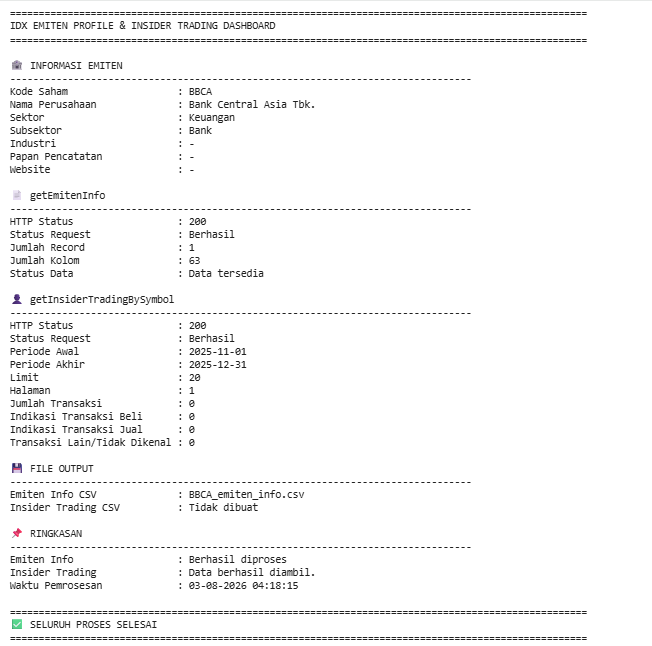
The notebook concludes by generating a comprehensive dashboard that summarizes the execution results.
The dashboard includes:
Company profile information
HTTP request status
Number of retrieved records
Insider trading period
Buy, Sell, and Other transaction counts
Generated CSV filenames
Processing timestamp
In addition, the notebook provides informative warnings whenever common API issues occur, including:
401 — Invalid RapidAPI Key
403 — Endpoint access denied or subscription required
429 — RapidAPI rate limit exceeded
Empty datasets that require checking the raw API response
This final dashboard provides a concise overview of both API endpoints while also helping users quickly identify potential issues during execution.
Final Result
After executing all five notebook cells, this project is capable of:
Retrieving detailed company information for BBCA.
Retrieving Insider Trading transactions for the selected reporting period.
Handling HTTP errors, request failures, and timeout exceptions.
Automatically normalizing nested JSON responses.
Converting API responses into structured pandas DataFrames.
Displaying company information and insider trading tables.
Summarizing Buy, Sell, and Other insider transactions.
Exporting both datasets into CSV files.
Producing a comprehensive dashboard that summarizes the entire execution.
The generated CSV files are:
BBCA_emiten_info.csv
BBCA_insider_trading_2025-11-01_2025-12-31.csv
Both files are exported only when valid records are available.
Conclusion
This project demonstrates how to build an IDX Emiten Information and Insider Trading Dashboard using Python and RapidAPI.
The notebook combines general company information with insider transaction data in one workflow. It retrieves both API responses, handles common request errors, normalizes different JSON structures, selects relevant columns, formats numeric values, exports the results to CSV, and produces a final dashboard.
The flexible normalization and column-selection logic also makes the notebook more resilient to changes in API response structure. This project can serve as a foundation for company profile analysis, insider activity monitoring, automated market reports, and broader Indonesia Stock Exchange research workflows.