
Corporate actions often become one of the most important signals in stock market monitoring.
A dividend schedule can attract investors who are looking for income opportunities. At the same time, today’s corporate actions can help traders and analysts identify stocks that may receive market attention during the current trading day.
Instead of checking dividend calendars and daily corporate action lists separately, this notebook builds a practical case: an IDX corporate action screener using Python.
The project combines two data sources from the Indonesia Stock Exchange API. The first is getDividendCalendar, which retrieves dividend calendar information. The second is getTodayCorporateActions, which retrieves corporate actions happening today.
By merging both datasets by ticker, the notebook creates a structured output that helps users monitor stocks with dividend schedules, today’s corporate actions, or both.
Cell 1 — Import Library + Config API
import os
import json
import time
from typing import Any, Dict, List, Optional, Union

import requests
import pandas as pd
import matplotlib.pyplot as plt


RAPIDAPI_HOST = "indonesia-stock-exchange-idx.p.rapidapi.com"
BASE_URL = f"https://{RAPIDAPI_HOST}"

# Ganti dengan RapidAPI Key Anda
RAPIDAPI_KEY = "ISI_RAPIDAPI_KEY_ANDA_DI_SINI"

# Alternatif jika memakai environment variable:
# RAPIDAPI_KEY = os.getenv("RAPIDAPI_KEY")

if not RAPIDAPI_KEY or RAPIDAPI_KEY == "ISI_RAPIDAPI_KEY_ANDA_DI_SINI":
    raise ValueError("Masukkan RapidAPI Key Anda dulu pada variabel RAPIDAPI_KEY.")

HEADERS = {
    "Content-Type": "application/json",
    "x-rapidapi-host": RAPIDAPI_HOST,
    "x-rapidapi-key": RAPIDAPI_KEY,
}

print("API configuration ready.")
Explanation
Cell 1 prepares the notebook environment and API configuration.
The notebook imports the required libraries. os is prepared for environment variable usage. json is used to preview API responses in a readable format. time is used to add delays between API requests. requests is used to call the API endpoints. pandas is used to process API data into dataframes. matplotlib.pyplot is used later for visualization.
The typing module imports Any, Dict, List, Optional, and Union. These type hints make the helper functions easier to read.
The API configuration starts with RAPIDAPI_HOST, which stores the RapidAPI host for the Indonesia Stock Exchange IDX API. BASE_URL is then created from that host.
The RAPIDAPI_KEY variable stores the API key. For public articles, the real API key should not be exposed, so it is shown here as a placeholder.
The notebook also provides an alternative approach using environment variables:
# RAPIDAPI_KEY = os.getenv("RAPIDAPI_KEY")This is useful for safer credential management.
The validation block checks whether the API key is empty or still using the placeholder. If it is, the notebook raises a ValueError.
Finally, the HEADERS dictionary is created. It contains Content-Type, x-rapidapi-host, and x-rapidapi-key. These headers are used for every API request.
Cell 2 — Helper Function
def request_get(
    endpoint: str,
    params: Optional[Dict[str, Any]] = None,
    timeout: int = 30,
    max_retries: int = 5,
    wait_seconds: int = 3
) -> Union[Dict[str, Any], List[Any]]:

    url = f"{BASE_URL}{endpoint}"

    for attempt in range(1, max_retries + 1):
        time.sleep(wait_seconds)

        response = requests.get(
            url,
            headers=HEADERS,
            params=params,
            timeout=timeout
        )

        try:
            payload = response.json()
        except Exception:
            payload = response.text

        if response.ok:
            return payload

        if response.status_code == 429:
            print(
                f"Rate limit 429. Percobaan {attempt}/{max_retries}. "
                f"Tunggu {wait_seconds} detik..."
            )
            time.sleep(wait_seconds)
            continue

        raise RuntimeError(
            f"Request gagal. Status: {response.status_code}\n"
            f"URL: {response.url}\n"
            f"Response: {payload}"
        )

    raise RuntimeError(
        f"Request gagal karena rate limit 429 setelah {max_retries} percobaan."
    )


def find_first_list(obj: Any) -> List[Dict[str, Any]]:
    if isinstance(obj, list):
        return obj if all(isinstance(item, dict) for item in obj) else []

    if isinstance(obj, dict):
        priority_keys = [
            "data", "result", "results", "items", "rows",
            "content", "calendar", "dividend", "dividends",
            "corporateActions", "corporate_actions", "today", "actions"
        ]

        for key in priority_keys:
            if key in obj:
                found = find_first_list(obj[key])
                if found:
                    return found

        for value in obj.values():
            found = find_first_list(value)
            if found:
                return found

    return []


def json_to_dataframe(payload: Union[Dict[str, Any], List[Any]]) -> pd.DataFrame:
    records = find_first_list(payload)

    if records:
        return pd.json_normalize(records)

    if isinstance(payload, dict):
        return pd.json_normalize(payload)

    return pd.DataFrame()


def detect_column(df: pd.DataFrame, keywords: List[str]) -> Optional[str]:
    if df.empty:
        return None

    lower_map = {col.lower(): col for col in df.columns}

    for keyword in keywords:
        if keyword.lower() in lower_map:
            return lower_map[keyword.lower()]

    for col in df.columns:
        col_lower = col.lower()
        if any(keyword.lower() in col_lower for keyword in keywords):
            return col

    return None


def safe_series(df: pd.DataFrame, col: Optional[str], default_value=None) -> pd.Series:
    if col is None or col not in df.columns:
        return pd.Series([default_value] * len(df), index=df.index)

    return df[col]
Explanation
Cell 2 defines helper functions for requesting and processing API data.
The first function is request_get. It sends a GET request to an API endpoint, handles the response, and returns the payload. The function also includes retry handling for status code 429, which usually indicates rate limiting. If the request keeps failing after the maximum retry attempts, it raises a RuntimeError.
The second function is find_first_list. It searches through nested JSON data and tries to find the first list of dictionaries. This is useful because API responses can have different structures, such as records stored inside data, calendar, dividend, corporateActions, or actions.
The third function is json_to_dataframe. It converts a JSON payload into a pandas dataframe. If a list of records is found, the function normalizes it using pd.json_normalize. If not, it normalizes the dictionary directly.
The fourth function is detect_column. It detects dataframe columns based on possible keyword names. This helps the notebook handle changing or inconsistent API field names.
The final function is safe_series. It safely returns a dataframe column. If the column does not exist, it returns a default series with the same index length.
Together, these helper functions make the IDX corporate action screener more flexible when working with different API response formats.
Cell 3 — Ambil Data dari Dua API
print("Mengambil data getDividendCalendar...")
dividend_payload = request_get(
    endpoint="/api/calendar/dividend",
    wait_seconds=3
)

time.sleep(5)

print("Mengambil data getTodayCorporateActions...")
today_ca_payload = request_get(
    endpoint="/api/calendar/today",
    wait_seconds=3
)


dividend_df = json_to_dataframe(dividend_payload)
today_ca_df = json_to_dataframe(today_ca_payload)

dividend_df["source_api"] = "getDividendCalendar"
today_ca_df["source_api"] = "getTodayCorporateActions"

print("Dividend Calendar shape:", dividend_df.shape)
print("Today Corporate Actions shape:", today_ca_df.shape)

display(dividend_df.head())
display(today_ca_df.head())

print("Preview Dividend Calendar JSON:")
print(json.dumps(dividend_payload, indent=2, ensure_ascii=False)[:1500])

print("\nPreview Today Corporate Actions JSON:")
print(json.dumps(today_ca_payload, indent=2, ensure_ascii=False)[:1500])
Explanation
Cell 3 retrieves data from the two APIs.
The first request calls:
/api/calendar/dividend
This endpoint represents getDividendCalendar, which retrieves dividend calendar data.
After the first request, the notebook pauses for 5 seconds using time.sleep(5). This delay helps reduce the chance of hitting rate limits.
The second request calls:
/api/calendar/today
This endpoint represents getTodayCorporateActions, which retrieves today’s corporate action data.
Both API responses are converted into dataframes using json_to_dataframe.
The resulting dataframes are:
dividend_df
and
today_ca_df
The notebook then adds a source_api column to each dataframe. This makes it easier to identify where each dataset comes from.
At the end of the cell, the notebook prints the shape of both dataframes, displays the first few rows, and prints a preview of the raw JSON responses.
This cell is the main data collection step for the IDX corporate action screener.
Cell 4 — Cleaning Data Dividend dan Corporate Actions
# Deteksi kolom Dividend Calendar
dividend_ticker_col = detect_column(
    dividend_df,
    ["ticker", "symbol", "stockCode", "stock_code", "code", "securityCode"]
)

dividend_name_col = detect_column(
    dividend_df,
    ["name", "stockName", "stock_name", "companyName", "company_name", "issuer"]
)

cum_date_col = detect_column(
    dividend_df,
    ["cumDate", "cum_date", "cum", "cumDividendDate"]
)

ex_date_col = detect_column(
    dividend_df,
    ["exDate", "ex_date", "ex", "exDividendDate"]
)

recording_date_col = detect_column(
    dividend_df,
    ["recordingDate", "recording_date", "recordDate"]
)

payment_date_col = detect_column(
    dividend_df,
    ["paymentDate", "payment_date", "payDate", "distributionDate"]
)

dividend_value_col = detect_column(
    dividend_df,
    ["dividend", "dividendValue", "dividend_value", "cashDividend", "cash_dividend", "amount"]
)


# Deteksi kolom Today Corporate Actions
ca_ticker_col = detect_column(
    today_ca_df,
    ["ticker", "symbol", "stockCode", "stock_code", "code", "securityCode"]
)

ca_name_col = detect_column(
    today_ca_df,
    ["name", "stockName", "stock_name", "companyName", "company_name", "issuer"]
)

ca_date_col = detect_column(
    today_ca_df,
    ["date", "eventDate", "event_date", "calendarDate", "calendar_date"]
)

ca_action_col = detect_column(
    today_ca_df,
    ["action", "actionType", "action_type", "type", "event", "eventType", "title"]
)

ca_description_col = detect_column(
    today_ca_df,
    ["description", "desc", "detail", "remarks", "information"]
)


print("Detected Dividend columns:")
print("ticker         :", dividend_ticker_col)
print("name           :", dividend_name_col)
print("cum date       :", cum_date_col)
print("ex date        :", ex_date_col)
print("recording date :", recording_date_col)
print("payment date   :", payment_date_col)
print("dividend value :", dividend_value_col)

print("\nDetected Corporate Action columns:")
print("ticker      :", ca_ticker_col)
print("name        :", ca_name_col)
print("date        :", ca_date_col)
print("action type :", ca_action_col)
print("description :", ca_description_col)


dividend_clean = pd.DataFrame({
    "ticker": (
        safe_series(dividend_df, dividend_ticker_col, "")
        .astype(str)
        .str.upper()
        .str.strip()
    ),
    "stock_name_dividend": safe_series(dividend_df, dividend_name_col, ""),
    "cum_date": safe_series(dividend_df, cum_date_col, ""),
    "ex_date": safe_series(dividend_df, ex_date_col, ""),
    "recording_date": safe_series(dividend_df, recording_date_col, ""),
    "payment_date": safe_series(dividend_df, payment_date_col, ""),
    "dividend_value": pd.to_numeric(
        safe_series(dividend_df, dividend_value_col, None),
        errors="coerce"
    ),
    "source_api_dividend": "getDividendCalendar"
})

dividend_clean = dividend_clean[dividend_clean["ticker"].ne("")].copy()


today_ca_clean = pd.DataFrame({
    "ticker": (
        safe_series(today_ca_df, ca_ticker_col, "")
        .astype(str)
        .str.upper()
        .str.strip()
    ),
    "stock_name_ca": safe_series(today_ca_df, ca_name_col, ""),
    "corporate_action_date": safe_series(today_ca_df, ca_date_col, ""),
    "corporate_action_type": safe_series(today_ca_df, ca_action_col, ""),
    "corporate_action_description": safe_series(today_ca_df, ca_description_col, ""),
    "source_api_ca": "getTodayCorporateActions"
})

today_ca_clean = today_ca_clean[today_ca_clean["ticker"].ne("")].copy()


display(dividend_clean.head(20))
display(today_ca_clean.head(20))
Explanation
Cell 4 cleans and standardizes both datasets.
The first part detects important columns from dividend_df. The notebook searches for ticker, stock name, cum date, ex date, recording date, payment date, and dividend value columns.
The second part detects important columns from today_ca_df. It searches for ticker, company name, corporate action date, action type, and description.
After detecting the columns, the notebook prints the detected column names so users can verify which fields were found.
Next, the notebook creates dividend_clean. This dataframe standardizes the dividend calendar data into:
ticker
stock_name_dividend
cum_date
ex_date
recording_date
payment_date
dividend_value
source_api_dividend
The ticker is converted into uppercase and stripped of extra spaces. The dividend value is converted into numeric format. Rows with empty tickers are removed.
Then, the notebook creates today_ca_clean. This dataframe standardizes today’s corporate action data into:
ticker
stock_name_ca
corporate_action_date
corporate_action_type
corporate_action_description
source_api_ca
The ticker is also converted into uppercase and cleaned from extra spaces. Rows with empty ticker values are removed.
This cell prepares both datasets so they can be merged by ticker in the next step.
Cell 5 — Gabungkan Data dan Buat Output Project
project_output = dividend_clean.merge(
    today_ca_clean,
    on="ticker",
    how="outer"
)

project_output["stock_name"] = project_output["stock_name_dividend"].fillna(
    project_output["stock_name_ca"]
)

project_output["has_dividend_calendar"] = project_output["source_api_dividend"].notna()
project_output["has_today_corporate_action"] = project_output["source_api_ca"].notna()

project_output["dividend_value"] = pd.to_numeric(
    project_output["dividend_value"],
    errors="coerce"
)

project_output["priority_score"] = 0
project_output.loc[project_output["has_dividend_calendar"], "priority_score"] += 50
project_output.loc[project_output["has_today_corporate_action"], "priority_score"] += 50
project_output["dividend_value_score"] = project_output["dividend_value"].fillna(0)

project_output["final_score"] = (
    project_output["priority_score"]
    + project_output["dividend_value_score"]
)

project_output["project_note"] = (
    "Data getDividendCalendar dan getTodayCorporateActions digabungkan berdasarkan ticker "
    "untuk memantau saham yang memiliki jadwal dividen dan aksi korporasi hari ini."
)

project_output = project_output.sort_values(
    ["priority_score", "dividend_value"],
    ascending=[False, False]
)


summary_df = pd.DataFrame({
    "description": [
        "Total saham dari getDividendCalendar",
        "Total saham dari getTodayCorporateActions",
        "Total saham setelah digabung",
        "Saham yang muncul di kedua API",
        "Saham hanya punya jadwal dividen",
        "Saham hanya punya corporate action hari ini"
    ],
    "value": [
        len(dividend_clean),
        len(today_ca_clean),
        len(project_output),
        len(project_output[
            (project_output["has_dividend_calendar"] == True) &
            (project_output["has_today_corporate_action"] == True)
        ]),
        len(project_output[
            (project_output["has_dividend_calendar"] == True) &
            (project_output["has_today_corporate_action"] == False)
        ]),
        len(project_output[
            (project_output["has_dividend_calendar"] == False) &
            (project_output["has_today_corporate_action"] == True)
        ])
    ]
})


display(project_output.head(30))
display(summary_df)
Explanation
Cell 5 merges the cleaned dividend calendar data and today’s corporate action data.
The merge uses the ticker column and applies how="outer". This means the final output keeps all tickers from both datasets, whether they appear in only the dividend calendar, only today’s corporate action list, or both.
After merging, the notebook creates a unified stock name column:
stock_name
This column uses stock_name_dividend first. If it is missing, it uses stock_name_ca.
Then, the notebook creates two boolean indicators:
has_dividend_calendar
and
has_today_corporate_action
These columns show whether a stock appears in the dividend calendar dataset, the today corporate action dataset, or both.
The notebook then converts dividend_value into numeric format.
Next, it creates a simple scoring system. The priority_score starts from 0. If a stock appears in the dividend calendar, it receives 50 points. If it appears in today’s corporate actions, it receives another 50 points. Therefore, a stock that appears in both datasets can receive 100 priority points.
The notebook also creates dividend_value_score, which uses the dividend value and fills missing values with 0.
Then, final_score is calculated by adding:
priority_score
and
dividend_value_score
This gives priority to stocks that appear in both corporate action sources, while still considering dividend value.
The final output also receives a project_note explaining that getDividendCalendar and getTodayCorporateActions are combined by ticker to monitor stocks with dividend schedules and today’s corporate actions.
After that, project_output is sorted by priority_score and dividend_value.
Finally, the notebook creates summary_df, which summarizes total stocks from each API, total merged stocks, stocks appearing in both APIs, stocks only in dividend calendar, and stocks only in today’s corporate action list.
This cell is the core of the IDX corporate action screener.
Cell 6 — Visualisasi dan Export
status_summary = pd.DataFrame({
    "category": [
        "Dividend Calendar",
        "Today Corporate Action",
        "Both"
    ],
    "total": [
        project_output["has_dividend_calendar"].sum(),
        project_output["has_today_corporate_action"].sum(),
        len(project_output[
            (project_output["has_dividend_calendar"] == True) &
            (project_output["has_today_corporate_action"] == True)
        ])
    ]
})


plt.figure(figsize=(8, 5))
plt.bar(status_summary["category"], status_summary["total"])
plt.xlabel("Category")
plt.ylabel("Total Stocks")
plt.title("Dividend Calendar vs Today Corporate Actions")
plt.tight_layout()
plt.show()


dividend_clean.to_csv("idx_dividend_calendar_clean.csv", index=False)
today_ca_clean.to_csv("idx_today_corporate_actions_clean.csv", index=False)
project_output.to_csv("idx_dividend_today_ca_project.csv", index=False)
summary_df.to_csv("idx_dividend_today_ca_summary.csv", index=False)

with pd.ExcelWriter("idx_dividend_today_ca_project.xlsx", engine="openpyxl") as writer:
    dividend_df.to_excel(writer, sheet_name="dividend_raw", index=False)
    today_ca_df.to_excel(writer, sheet_name="today_ca_raw", index=False)
    dividend_clean.to_excel(writer, sheet_name="dividend_clean", index=False)
    today_ca_clean.to_excel(writer, sheet_name="today_ca_clean", index=False)
    project_output.to_excel(writer, sheet_name="final_output", index=False)
    summary_df.to_excel(writer, sheet_name="summary", index=False)
    status_summary.to_excel(writer, sheet_name="status_summary", index=False)

print("Export selesai:")
print("- idx_dividend_calendar_clean.csv")
print("- idx_today_corporate_actions_clean.csv")
print("- idx_dividend_today_ca_project.csv")
print("- idx_dividend_today_ca_summary.csv")
print("- idx_dividend_today_ca_project.xlsx")
Explanation
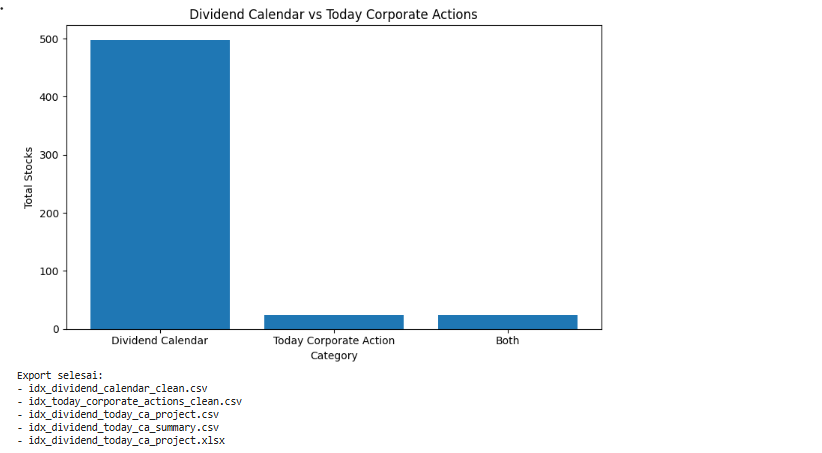
Cell 6 visualizes and exports the final project.
The first part creates status_summary. This dataframe contains three categories:
Dividend Calendar
Today Corporate Action
Both
For each category, the notebook calculates the total number of stocks.
Then, the notebook creates a bar chart using matplotlib. The chart compares how many stocks appear in the dividend calendar, today’s corporate action list, and both datasets.
The chart title is:
Dividend Calendar vs Today Corporate Actions
After visualization, the notebook exports several CSV files:
idx_dividend_calendar_clean.csv
idx_today_corporate_actions_clean.csv
idx_dividend_today_ca_project.csv
idx_dividend_today_ca_summary.csv
Then, the notebook creates an Excel file:
idx_dividend_today_ca_project.xlsx
The Excel file contains multiple sheets:
dividend_raw
today_ca_raw
dividend_clean
today_ca_clean
final_output
summary
status_summary
This makes the final result easy to inspect, share, and reuse in future analysis.
Result:
Overall Workflow
This notebook follows a practical workflow for building an IDX corporate action screener.
First, it prepares the API configuration and required Python libraries.
Second, it creates helper functions for API requests, retry handling, JSON parsing, dataframe conversion, column detection, and safe column selection.
Third, it retrieves dividend calendar data using getDividendCalendar.
Fourth, it retrieves today’s corporate action data using getTodayCorporateActions.
Fifth, it cleans and standardizes both datasets.
Sixth, it merges the datasets by ticker.
Seventh, it creates a simple priority-based scoring system.
Finally, it visualizes the category summary and exports the output into CSV and Excel files.
The final output helps users monitor stocks that have dividend schedules, today’s corporate actions, or both.
Why This Case Matters
Many investors monitor dividend schedules separately from other corporate action events. This makes the process slower and less structured.
An IDX corporate action screener helps bring both sources into one workflow. Dividend data gives a view of potential income-related events, while today’s corporate action data helps identify stocks with current event activity.
When both signals appear on the same ticker, the stock may deserve closer attention for further analysis.
This notebook does not create a buy or sell signal. Instead, it builds a clean monitoring layer for corporate action data. The output can be used as a starting point for watchlists, event tracking, dividend monitoring, or market research.
Conclusion
This tutorial shows how to build an IDX corporate action screener using Python, getDividendCalendar, and getTodayCorporateActions.
The notebook retrieves dividend calendar data and today’s corporate action data, converts both API responses into dataframes, detects important columns, cleans both datasets, merges them by ticker, calculates a priority-based score, visualizes the event categories, and exports the final result.
The value of this workflow is its simplicity. It turns two separate event sources into one structured screener that is easier to read and reuse.
For traders, investors, analysts, and data enthusiasts, this project can become a useful foundation for monitoring corporate action events in the Indonesian stock market.