
Building an IDX Corporate Action Monitor and Warrant Calendar Dashboard Using Python
Monitoring corporate action activity is useful for investors who want to understand what is happening in the stock market beyond daily price movement. Corporate actions such as dividends, public expose schedules, RUPS, stock splits, right issues, tender offers, and warrants can provide important context about listed companies.
In this project, we build an IDX Corporate Action Monitor Hari Ini using Python and the Indonesia Stock Exchange API. The dashboard retrieves today’s corporate action data and Warrant Calendar data, then presents them in a simpler format for beginner investors.
The notebook is divided into five main sections. It starts with library imports, continues with API configuration, helper functions, data retrieval, and ends with a dashboard that summarizes corporate actions and warrant calendar information.
What This Project Builds
This project creates a dashboard that combines:
Today Corporate Actions data
Warrant Calendar data
Corporate action summary table
Dividend list
Public Expose schedule
RUPS schedule
Warrant Calendar table
Beginner investor insights
The goal is to make IDX corporate action data easier to read and understand.
CELL 1 — Install and Import Library
import requests
import pandas as pd
import time
from IPython.display import display, Markdown

pd.set_option("display.max_columns", None)
pd.set_option("display.max_colwidth", 120)
pd.set_option("display.width", 1000)
Explanation
Cell 1 imports the libraries required for this project.
The requests library is used to retrieve data from the IDX API. The pandas library is used to process data into tables. The time library is used to create a delay between API requests, while display and Markdown are used to show dashboard text and tables neatly in Google Colab.
The pandas display settings are also configured so the dashboard can show more columns and longer text values clearly.
CELL 2 — API Configuration
BASE_URL = "https://indonesia-stock-exchange-idx.p.rapidapi.com"

HEADERS = {
    "Content-Type": "application/json",
    "x-rapidapi-host": "indonesia-stock-exchange-idx.p.rapidapi.com",
    "x-rapidapi-key": "YOUR_API_KEY"
}
Explanation
Cell 2 contains the API configuration.
BASE_URL stores the main API URL from RapidAPI. The HEADERS variable contains the request headers needed to access the Indonesia Stock Exchange API.
This configuration is used later when the notebook requests Today Corporate Actions data and Warrant Calendar data.
CELL 3 — Helper Function
def fetch_api(endpoint, retries=3, delay=5):
    url = BASE_URL + endpoint

    for attempt in range(retries):
        try:
            response = requests.get(url, headers=HEADERS, timeout=30)

            if response.status_code == 200:
                return response.json()

            elif response.status_code == 429:
                print(f"Rate limit terkena. Menunggu {delay} detik...")
                time.sleep(delay)
                delay *= 2

            else:
                print(f"Error {response.status_code}: {response.text}")
                return None

        except Exception as e:
            print(f"Gagal mengambil data: {e}")
            return None

    return None


def safe_get_list(data, key):
    try:
        value = data.get("data", {}).get(key, [])
        return value if isinstance(value, list) else []
    except:
        return []


def make_simple_table(data_list, selected_columns=None, rename_columns=None):
    if not data_list:
        return pd.DataFrame()

    df = pd.json_normalize(data_list)

    if selected_columns:
        available_cols = [col for col in selected_columns if col in df.columns]
        df = df[available_cols]

    if rename_columns:
        df = df.rename(columns=rename_columns)

    return df
Explanation
Cell 3 creates helper functions used throughout the notebook.
The fetch_api() function is used to request data from the IDX API. It includes retry handling and rate limit handling. If the API returns status code 429, the notebook waits before trying again.
The safe_get_list() function helps retrieve list data safely from nested API responses.
The make_simple_table() function converts list data into a pandas dataframe, selects available columns, and renames columns when needed. This makes the dashboard output easier to read.
CELL 4 — Fetch Data from IDX API
display(Markdown("## 📥 Fetching Data from IDX API"))

today_corporate_actions_raw = fetch_api("/api/calendar/today")

time.sleep(5)

warrant_calendar_raw = fetch_api("/api/calendar/warrant")

display(Markdown("✅ Data retrieval completed"))
Explanation
Cell 4 retrieves the required data from the IDX API.
The first request retrieves Today Corporate Actions data from the /api/calendar/today endpoint. After that, the notebook waits for five seconds using time.sleep(5) to reduce the risk of hitting the API rate limit.
The second request retrieves Warrant Calendar data from the /api/calendar/warrant endpoint.
After both requests are completed, the notebook displays a message confirming that data retrieval has finished.
CELL 5 — IDX Corporate Actions and Warrant Dashboard
display(Markdown("# 📊 IDX Corporate Action Monitor Hari Ini"))
display(Markdown("Dashboard ini dibuat untuk membaca aktivitas korporasi dari Bursa Efek Indonesia dengan tampilan yang lebih mudah dipahami investor pemula."))

# =========================
# Ambil Tanggal Data
# =========================
tanggal_data = "-"

if isinstance(today_corporate_actions_raw, dict):
    tanggal_data = today_corporate_actions_raw.get("data", {}).get("today", "-")

display(Markdown(f"📅 **Tanggal Data:** {tanggal_data}"))


# =========================
# Ambil Data Corporate Action
# =========================
bonus = safe_get_list(today_corporate_actions_raw, "bonus")
dividend = safe_get_list(today_corporate_actions_raw, "dividend")
economic = safe_get_list(today_corporate_actions_raw, "economic")
ipo = safe_get_list(today_corporate_actions_raw, "ipo")
pubex = safe_get_list(today_corporate_actions_raw, "pubex")
rightissue = safe_get_list(today_corporate_actions_raw, "rightissue")
rups = safe_get_list(today_corporate_actions_raw, "rups")
stock_reverse = safe_get_list(today_corporate_actions_raw, "stock_reverse")
stocksplit = safe_get_list(today_corporate_actions_raw, "stocksplit")
tender = safe_get_list(today_corporate_actions_raw, "tender")
warrant_today = safe_get_list(today_corporate_actions_raw, "warrant")
stock_dividend = safe_get_list(today_corporate_actions_raw, "stock_dividend")


# =========================
# Ringkasan Corporate Action
# =========================
display(Markdown("## 🔔 Ringkasan Corporate Action Hari Ini"))

summary_data = [
    ["💰 Dividen Tunai", len(dividend), "Pembagian keuntungan perusahaan kepada pemegang saham."],
    ["🎁 Dividen Saham", len(stock_dividend), "Dividen yang diberikan dalam bentuk saham."],
    ["🎉 Bonus Share", len(bonus), "Saham bonus yang diberikan kepada pemegang saham."],
    ["📈 IPO", len(ipo), "Perusahaan baru yang masuk ke Bursa Efek Indonesia."],
    ["🏢 Public Expose", len(pubex), "Penyampaian informasi perusahaan kepada publik."],
    ["👥 RUPS", len(rups), "Rapat umum pemegang saham untuk keputusan penting perusahaan."],
    ["🔀 Stock Split", len(stocksplit), "Pemecahan nilai saham agar harga lebih terjangkau."],
    ["🔁 Stock Reverse", len(stock_reverse), "Penggabungan nilai saham."],
    ["💳 Right Issue", len(rightissue), "Penerbitan saham baru kepada pemegang saham lama."],
    ["🤝 Tender Offer", len(tender), "Penawaran pembelian saham oleh pihak tertentu."],
    ["🎫 Waran Hari Ini", len(warrant_today), "Hak untuk membeli saham pada harga tertentu."],
    ["🗓️ Agenda Ekonomi", len(economic), "Agenda ekonomi yang dapat memengaruhi pasar."]
]

df_summary = pd.DataFrame(summary_data, columns=["Jenis Aktivitas", "Jumlah", "Penjelasan Singkat"])
display(df_summary)

total_activity = sum([row[1] for row in summary_data])

if total_activity > 0:
    display(Markdown(f"✅ Hari ini terdapat **{total_activity} aktivitas** yang perlu diperhatikan investor."))
else:
    display(Markdown("Tidak ada aktivitas corporate action yang tersedia hari ini."))


# =========================
# Dividen
# =========================
display(Markdown("## 💰 Daftar Emiten Dividen"))

df_dividend = make_simple_table(
    dividend,
    selected_columns=[
        "company_symbol", "dividend_cash_value", "dividend_cum_date",
        "dividend_ex_date", "dividend_recording_date", "dividend_payment_date"
    ],
    rename_columns={
        "company_symbol": "Kode Saham",
        "dividend_cash_value": "Nilai Dividen",
        "dividend_cum_date": "Cum Date",
        "dividend_ex_date": "Ex Date",
        "dividend_recording_date": "Recording Date",
        "dividend_payment_date": "Payment Date"
    }
)

if not df_dividend.empty:
    display(df_dividend)
else:
    display(Markdown("Tidak ada data dividen hari ini."))


# =========================
# Public Expose
# =========================
display(Markdown("## 🏢 Jadwal Public Expose"))

df_pubex = make_simple_table(
    pubex,
    selected_columns=["company_symbol", "puexp_date", "puexp_time", "puexp_place"],
    rename_columns={
        "company_symbol": "Kode Saham",
        "puexp_date": "Tanggal",
        "puexp_time": "Waktu",
        "puexp_place": "Tempat"
    }
)

if not df_pubex.empty:
    display(df_pubex)
else:
    display(Markdown("Tidak ada jadwal Public Expose hari ini."))


# =========================
# RUPS
# =========================
display(Markdown("## 👥 Jadwal RUPS"))

df_rups = make_simple_table(
    rups,
    selected_columns=["company_symbol", "rups_date", "rups_time", "rups_place"],
    rename_columns={
        "company_symbol": "Kode Saham",
        "rups_date": "Tanggal",
        "rups_time": "Waktu",
        "rups_place": "Tempat"
    }
)

if not df_rups.empty:
    display(df_rups)
else:
    display(Markdown("Tidak ada jadwal RUPS hari ini."))


# =========================
# Warrant Calendar
# =========================
display(Markdown("## 🎫 Warrant Calendar"))

warrant_calendar = []

if isinstance(warrant_calendar_raw, dict):
    warrant_calendar = warrant_calendar_raw.get("data", {}).get("warrant", [])

df_warrant = make_simple_table(
    warrant_calendar,
    selected_columns=[
        "company_symbol", "wrant_code", "wrant_exc_start",
        "wrant_exc_end", "wrant_last_trading_date",
        "wrant_price"
    ],
    rename_columns={
        "company_symbol": "Kode Saham",
        "wrant_code": "Kode Waran",
        "wrant_exc_start": "Mulai Exercise",
        "wrant_exc_end": "Akhir Exercise",
        "wrant_last_trading_date": "Tanggal Terakhir Perdagangan",
        "wrant_price": "Harga Exercise"
    }
)

if not df_warrant.empty:
    display(Markdown(f"Jumlah data Warrant Calendar yang berhasil ditampilkan: **{len(df_warrant)} data**"))
    display(df_warrant.head(20))
else:
    display(Markdown("Tidak ada data Warrant Calendar."))


# =========================
# Insight Investor
# =========================
display(Markdown("## 📌 Insight Investor Pemula"))

insight = []

if len(dividend) > 0:
    insight.append("💰 Ada emiten yang membagikan dividen. Investor bisa memperhatikan cum date dan ex date.")
if len(pubex) > 0:
    insight.append("🏢 Ada Public Expose. Ini penting untuk melihat penjelasan perusahaan kepada publik.")
if len(rups) > 0:
    insight.append("👥 Ada RUPS. Biasanya berkaitan dengan keputusan penting perusahaan.")
if len(warrant_calendar) > 0:
    insight.append("🎫 Ada data waran. Waran memiliki risiko lebih tinggi dibanding saham biasa.")
if len(ipo) == 0:
    insight.append("📈 Tidak ada IPO pada data hari ini.")
if len(stocksplit) == 0:
    insight.append("🔀 Tidak ada Stock Split pada data hari ini.")

if insight:
    for item in insight:
        display(Markdown(f"- {item}"))
else:
    display(Markdown("Belum ada insight khusus dari data hari ini."))

display(Markdown("✅ Dashboard berhasil dibuat dengan tampilan yang lebih mudah dipahami."))
Explanation
Cell 5 builds the final IDX Corporate Action Monitor Hari Ini dashboard.
The dashboard begins by displaying the main title and a short description explaining that the dashboard is designed to read corporate action activity from the Indonesia Stock Exchange in a format that is easier for beginner investors to understand.
The dashboard first retrieves the data date from the Today Corporate Actions response. After that, it extracts several types of corporate action data, including bonus, dividend, economic agenda, IPO, public expose, right issue, RUPS, stock reverse, stock split, tender offer, warrant, and stock dividend.
The first main output is Ringkasan Corporate Action Hari Ini. This section creates a summary table that shows the type of activity, the number of records, and a short explanation for each corporate action category.
Next, the dashboard displays dividend data if available. It selects important dividend-related columns such as stock code, dividend value, cum date, ex date, recording date, and payment date.
The dashboard then displays Public Expose schedules and RUPS schedules if available. Each section converts the data into a simple table with renamed columns so the output becomes easier to read.
After that, the dashboard processes the Warrant Calendar data. It selects important warrant-related columns such as stock code, warrant code, exercise start date, exercise end date, last trading date, and exercise price.
The final section is Insight Investor Pemula. This section creates simple investor-friendly insights based on the available data. For example, if dividend data exists, the dashboard reminds users to pay attention to cum date and ex date. If warrant data exists, it reminds users that warrants carry higher risk than ordinary shares.
At the end, the notebook displays a confirmation message indicating that the dashboard has been successfully created in a more understandable format.
Result:
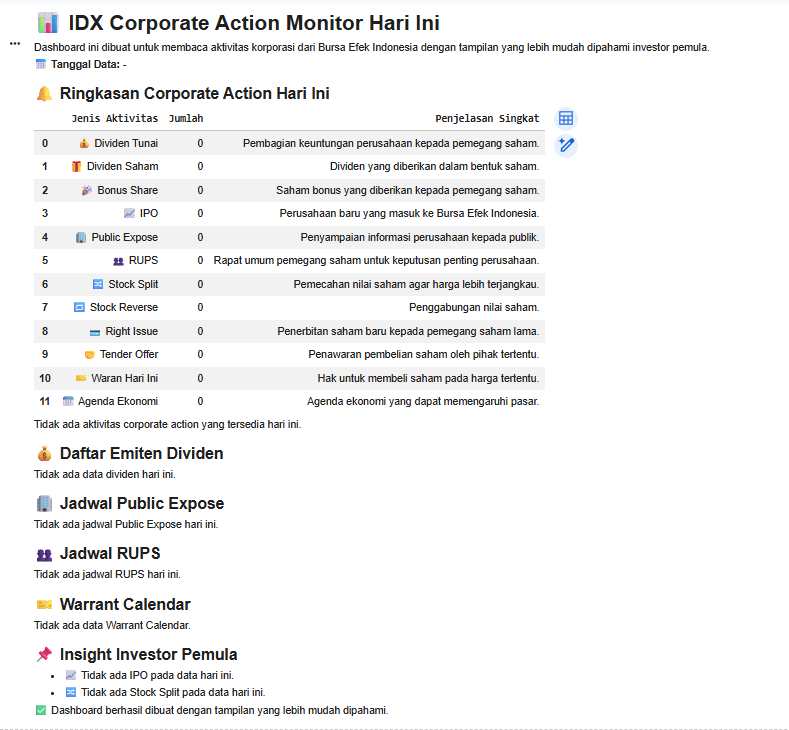
Dashboard Output
The dashboard output is divided into several sections.
The first section displays the data date, which helps users know the date of the corporate action information being reviewed.
The second section displays a corporate action summary table. This table summarizes different activities such as cash dividends, stock dividends, bonus shares, IPO, public expose, RUPS, stock split, stock reverse, right issue, tender offer, warrants, and economic agenda.
The dashboard then displays detailed sections for dividends, public expose, RUPS, and warrant calendar data. Each table is created using selected columns and renamed labels so the output becomes easier to understand.
The final output is an investor insight section designed for beginner investors. This section provides simple notes based on the available data.
Overall Workflow
Import the required libraries.
Configure API access.
Create helper functions for API retrieval and table formatting.
Retrieve Today Corporate Actions data.
Retrieve Warrant Calendar data.
Extract different corporate action categories.
Build a corporate action summary table.
Display dividend data.
Display Public Expose data.
Display RUPS data.
Display Warrant Calendar data.
Generate beginner investor insights.
Display the final dashboard confirmation.
Why This Project Matters
Corporate action data is important because it can provide useful information about company events that may affect investors.
Dividends show company profit distribution. Public Expose gives investors access to company information. RUPS may involve important shareholder decisions. Warrant Calendar data helps investors understand warrant-related schedules and risks.
By combining Today Corporate Actions data and Warrant Calendar data into one dashboard, users can monitor multiple types of market activity through a single workflow.
Conclusion
This project demonstrates how Python can be used to build an IDX Corporate Action Monitor Hari Ini dashboard.
The notebook retrieves Today Corporate Actions data and Warrant Calendar data from the Indonesia Stock Exchange API, processes the responses into structured tables, and displays investor-friendly insights in Google Colab.
The final dashboard helps beginner investors understand corporate action activity more easily.