
Corporate actions are important events that can influence investment decisions and market activity. Two of the most frequently monitored corporate actions are Initial Public Offerings (IPO) and Right Issues.
An IPO allows a company to offer its shares to the public for the first time, while a Right Issue provides existing shareholders with the opportunity to purchase additional shares issued by the company.
In this project, we build an IDX Corporate Action Calendar Dashboard using Python and the IDX API. The dashboard combines IPO Calendar data and Right Issue Calendar data into a single workflow, making it easier to monitor corporate action schedules from the Indonesia Stock Exchange.
CELL 1 — Install & Import
import requests
import pandas as pd
from IPython.display import display, Markdown
Explanation
Cell 1 imports the libraries required for the project.
The notebook uses:
requestsfor API communication.pandasfor dataframe processing.displayandMarkdownfor dashboard presentation.
These libraries are used throughout the notebook to retrieve, process, and display data from the IDX API.
CELL 2 — Konfigurasi API
BASE_URL = "https://indonesia-stock-exchange-idx.p.rapidapi.com"

HEADERS = {
    "Content-Type": "application/json",
    "x-rapidapi-host": "indonesia-stock-exchange-idx.p.rapidapi.com",
    "x-rapidapi-key": "YOUR_API_KEY"
}
Explanation
Cell 2 contains the API configuration.
BASE_URL stores the IDX API address, while HEADERS contains the request information required to access the API through RapidAPI.
These settings are reused whenever data is requested from an endpoint.
CELL 3 — Fungsi Ambil Data API
import time

def fetch_api(endpoint, delay=3):
    url = BASE_URL + endpoint

    try:
        time.sleep(delay)
        response = requests.get(url, headers=HEADERS)

        print("Endpoint:", endpoint)
        print("Status Code:", response.status_code)

        if response.status_code == 200:
            return response.json()
        elif response.status_code == 429:
            print("⏳ Rate limit. Tunggu beberapa detik lalu jalankan ulang cell ini.")
            print(response.text)
            return None
        else:
            print(response.text)
            return None

    except Exception as e:
        print("❌ Terjadi error:", e)
        return None


def extract_list(data, target_key=None):
    if data is None:
        return []

    if target_key and isinstance(data, dict):
        if target_key in data and isinstance(data[target_key], list):
            return data[target_key]

    if isinstance(data, list):
        return data

    if isinstance(data, dict):
        for value in data.values():
            result = extract_list(value, target_key)
            if result:
                return result

    return []
Explanation
Cell 3 creates helper functions used throughout the notebook.
The fetch_api() function retrieves data from the IDX API and includes a delay before each request to help reduce the risk of rate limiting.
If the API returns status code 429, the notebook displays a warning message indicating that the user should wait before running the cell again.
The extract_list() function is used to extract list-based data structures from API responses.
CELL 4 — Ambil Data IPO & Right Issue
ipo_raw = fetch_api("/api/calendar/ipo", delay=3)

# kasih jeda lebih lama agar tidak kena 429
right_issue_raw = fetch_api("/api/calendar/right-issue", delay=8)

ipo_list = extract_list(ipo_raw, target_key="ipo")
right_issue_list = extract_list(right_issue_raw, target_key="right_issue")

print("Jumlah IPO:", len(ipo_list))
print("Jumlah Right Issue:", len(right_issue_list))
Explanation
Cell 4 retrieves data from two IDX API endpoints.
The first request retrieves IPO Calendar data.
The second request retrieves Right Issue Calendar data with a longer delay to reduce the possibility of receiving a rate limit response.
After both datasets are retrieved, the notebook extracts the IPO list and Right Issue list and displays the total number of records found in each dataset.
CELL 5 — Dashboard Hasil
display(Markdown("# 📊 IDX Corporate Action Calendar Dashboard"))
display(Markdown("Dashboard sederhana untuk membaca data **IPO Calendar** dan **Right Issue Calendar** dari Bursa Efek Indonesia."))


# =========================
# IPO CALENDAR
# =========================

display(Markdown("## 🏢 IPO Calendar"))

try:
    df_ipo = pd.DataFrame(ipo_list)

    if not df_ipo.empty:
        display(Markdown(f"Jumlah data IPO yang berhasil ditampilkan: **{len(df_ipo)} data**"))
        display(df_ipo)
    else:
        display(Markdown("⚠️ Tidak ada data IPO yang tersedia."))

except Exception as e:
    display(Markdown(f"❌ Gagal mengolah data IPO: {e}"))


# =========================
# RIGHT ISSUE CALENDAR
# =========================

display(Markdown("## 📌 Right Issue Calendar"))

try:
    df_right_issue = pd.DataFrame(right_issue_list)

    if not df_right_issue.empty:
        display(Markdown(f"Jumlah data Right Issue yang berhasil ditampilkan: **{len(df_right_issue)} data**"))
        display(df_right_issue)
    else:
        display(Markdown("⚠️ Tidak ada data Right Issue yang tersedia."))

except Exception as e:
    display(Markdown(f"❌ Gagal mengolah data Right Issue: {e}"))


# =========================
# RINGKASAN
# =========================

display(Markdown("## 📝 Ringkasan Dashboard"))

display(Markdown(f"""
Dashboard ini menampilkan dua jenis aksi korporasi penting di pasar saham Indonesia:

1. **IPO Calendar**
   Menampilkan daftar perusahaan yang sedang atau akan melakukan penawaran saham perdana.

2. **Right Issue Calendar**
   Menampilkan daftar perusahaan yang melakukan penawaran saham baru kepada pemegang saham lama.

Total data yang berhasil dibaca:

- IPO Calendar: **{len(ipo_list)} data**
- Right Issue Calendar: **{len(right_issue_list)} data**
"""))
Explanation
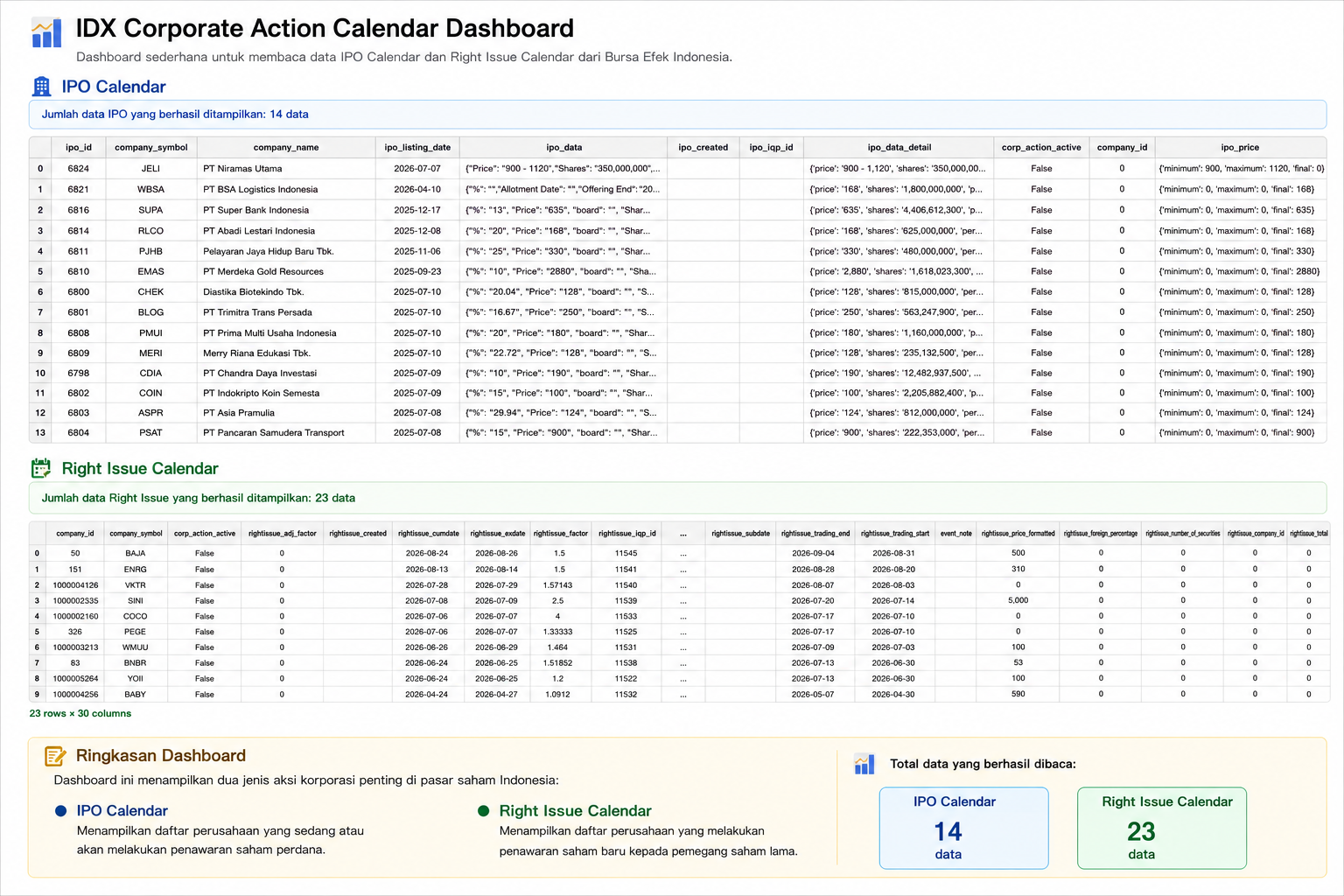
Cell 5 builds the final IDX Corporate Action Calendar Dashboard.
The dashboard begins by displaying the title and a short description explaining that the dashboard is designed to read IPO Calendar and Right Issue Calendar data from the Indonesia Stock Exchange.
IPO Calendar
The dashboard displays IPO Calendar information.
If IPO data is available:
The total number of IPO records is displayed.
The IPO dataframe is displayed.
If no IPO data is available, the dashboard displays:
⚠️ Tidak ada data IPO yang tersedia.If an error occurs:
❌ Gagal mengolah data IPORight Issue Calendar
The dashboard displays Right Issue Calendar information.
If Right Issue data is available:
The total number of Right Issue records is displayed.
The Right Issue dataframe is displayed.
If no Right Issue data is available, the dashboard displays:
⚠️ Tidak ada data Right Issue yang tersedia.If an error occurs:
❌ Gagal mengolah data Right IssueRingkasan Dashboard
The dashboard then displays a summary explaining:
IPO Calendar
Menampilkan daftar perusahaan yang sedang atau akan melakukan penawaran saham perdana.Right Issue Calendar
Menampilkan daftar perusahaan yang melakukan penawaran saham baru kepada pemegang saham lama.
The summary also displays:
Total IPO Calendar data.
Total Right Issue Calendar data.
Result:
Overall Workflow
The project begins by importing the required libraries and configuring API access.
Next, helper functions are created to retrieve API responses and extract list-based data.
The notebook then retrieves:
IPO Calendar data
Right Issue Calendar data
After the data is successfully retrieved, the dashboard displays IPO information, Right Issue information, and a dashboard summary containing the total number of records available in both datasets.
Why This Case Matters
IPO and Right Issue activities are among the most important corporate actions in the stock market.
IPO Calendar helps investors monitor companies that are conducting or planning an initial public offering.
Right Issue Calendar helps investors monitor companies that are issuing additional shares to existing shareholders.
By combining both datasets into a single dashboard, users can monitor important corporate action schedules from one place.
Conclusion
The IDX Corporate Action Calendar Dashboard combines IPO Calendar data and Right Issue Calendar data into a simple dashboard.
The project helps users monitor IPO activities, track Right Issue schedules, and view a summary of corporate action data available from the IDX API.