
Initial Public Offerings (IPOs) represent one of the most anticipated events in the stock market. Investors often monitor upcoming IPO schedules while also evaluating market momentum to understand the level of interest surrounding newly listed companies.
Instead of collecting this information manually, Python can automate the retrieval process using the Indonesia Stock Exchange API. Once the responses are received, they can be normalized into structured datasets, analyzed, and summarized inside a single dashboard.
In this tutorial, we build an IDX IPO Calendar and IPO Momentum Dashboard using Python and the Indonesia Stock Exchange API. The notebook retrieves IPO Calendar and IPO Momentum data, processes different API response structures, analyzes momentum indicators, and generates a concise dashboard summarizing both IPO schedules and IPO sentiment.
The notebook consists of five sections covering API configuration, data retrieval, response normalization, IPO analysis, and dashboard generation.
What This Project Builds
This notebook builds a lightweight dashboard for monitoring upcoming IPO schedules together with IPO Momentum indicators.
The completed workflow includes:
IPO Calendar retrieval
IPO Momentum retrieval
RapidAPI integration
API request handling
JSON normalization
pandas DataFrame conversion
IPO momentum analysis
Dashboard summary
Rather than predicting IPO performance, the notebook focuses on retrieving, organizing, and summarizing information provided by the Indonesia Stock Exchange API.
CELL 1 — Import Library & API Configuration
import requests
import pandas as pd
import json
from datetime import datetime

API_KEY = "YOUR_API_KEY"

BASE_URL = "https://indonesia-stock-exchange-idx.p.rapidapi.com"

HEADERS = {
    "Content-Type": "application/json",
    "x-rapidapi-host": "indonesia-stock-exchange-idx.p.rapidapi.com",
    "x-rapidapi-key": API_KEY
}

pd.set_option("display.max_columns", None)
pd.set_option("display.width", 1000)
Note: Replace the original API key with
YOUR_API_KEYbefore publishing the notebook.
Explanation
The notebook begins by importing the Python libraries required to build the IPO monitoring dashboard.
The requests library is responsible for communicating with the Indonesia Stock Exchange API through RapidAPI. Every API request in the notebook uses this library to retrieve IPO Calendar and IPO Momentum information.
The notebook imports pandas to transform API responses into structured DataFrames, while the json library is used to inspect JSON responses whenever debugging is required. The datetime module is available for handling timestamps throughout the dashboard.
The second part of the cell prepares the RapidAPI configuration by defining the API key, API base URL, and HTTP request headers that will be reused by every request sent to the Indonesia Stock Exchange API.
Finally, several pandas display options are configured so that wide DataFrames remain readable inside Google Colab or Jupyter Notebook environments.
CELL 2 — Request API
def get_api(endpoint):

    url = BASE_URL + endpoint

    try:

        response = requests.get(
            url,
            headers=HEADERS,
            timeout=30
        )

        print(f"\nEndpoint : {endpoint}")
        print("Status   :", response.status_code)

        if response.status_code == 200:
            return response.json()

        elif response.status_code == 403:
            print("⚠️ API belum dapat diakses.")
            return None

        elif response.status_code == 429:
            print("⚠️ Rate limit tercapai.")
            return None

        else:
            print(response.text)
            return None

    except Exception as error:
        print("❌ Error :", error)
        return None


ipo_calendar_json = get_api("/api/calendar/ipo")

ipo_momentum_json = get_api(
    "/api/analysis/sentiment/ipo/momentum"
)

print("\n==============================")
print("DEBUG")
print("==============================")

print("IPO Calendar :", type(ipo_calendar_json).__name__)
print("IPO Momentum :", type(ipo_momentum_json).__name__)
Explanation
The second section retrieves data from two Indonesia Stock Exchange API endpoints.
The notebook defines a reusable helper function named get_api(). Instead of repeating the request logic for each endpoint, the function centralizes API communication into one reusable component.
Each request combines the predefined BASE_URL with the selected endpoint before sending an authenticated HTTP GET request.
During execution, the notebook prints the endpoint together with the returned HTTP status code. These messages provide immediate feedback and simplify debugging whenever an API request fails.
The helper function handles several common API responses. When the API returns HTTP 200, the JSON response is returned immediately. If the API returns HTTP 403, the notebook reports that the endpoint cannot currently be accessed. If HTTP 429 is returned, the notebook reports that the RapidAPI request limit has been reached.
Unexpected responses and connection errors are printed before the function safely returns None.
After defining the helper function, the notebook requests IPO Calendar data followed by IPO Momentum data. Finally, the notebook prints the Python data type of both responses so users can verify that valid JSON objects were received before moving to the data-processing stage.
CELL 3 — Normalization and Fallback Data
# ============================================================
# CELL 3 — NORMALISASI DAN FALLBACK DATA
# ============================================================

def extract_records(data):
    """
    Mengambil list record dari berbagai kemungkinan struktur JSON.
    Aman untuk dictionary, list, nested data, result, items, dan records.
    """

    if data is None:
        return []

    if isinstance(data, list):
        return data

    if not isinstance(data, dict):
        return []

    possible_keys = [
        "data",
        "result",
        "results",
        "items",
        "records",
        "ipo",
        "calendar",
        "momentum"
    ]

    for key in possible_keys:
        value = data.get(key)

        if isinstance(value, list):
            return value

        if isinstance(value, dict):
            nested_records = extract_records(value)

            if nested_records:
                return nested_records

    # Jika dictionary langsung merupakan satu record
    ignored_keys = {"success", "message", "status", "timestamp"}

    meaningful_keys = [
        key for key in data.keys()
        if key not in ignored_keys
    ]

    if meaningful_keys:
        return [data]

    return []


# Sample fallback IPO Calendar
sample_ipo_calendar = [
    {
        "symbol": "DEMO",
        "company_name": "PT Contoh Emiten Indonesia Tbk",
        "sector": "Consumer",
        "offering_start": "2026-07-20",
        "offering_end": "2026-07-22",
        "listing_date": "2026-07-29",
        "offering_price": 250,
        "shares_offered": 100000000,
        "status": "UPCOMING"
    }
]

# Sample fallback IPO Momentum
sample_ipo_momentum = [
    {
        "symbol": "DEMO",
        "company_name": "PT Contoh Emiten Indonesia Tbk",
        "momentum_score": 78,
        "sentiment": "POSITIVE",
        "interest_level": "HIGH",
        "trend": "BULLISH",
        "recommendation": "WATCHLIST",
        "confidence": 75
    }
]


ipo_calendar_records = extract_records(ipo_calendar_json)
ipo_momentum_records = extract_records(ipo_momentum_json)

# Menggunakan sample data jika API kosong atau gagal
if not ipo_calendar_records:
    ipo_calendar_records = sample_ipo_calendar
    ipo_calendar_source = "SAMPLE DATA"
    print("✅ Menggunakan sample data untuk IPO Calendar.")
else:
    ipo_calendar_source = "LIVE API"
    print("✅ Menggunakan data API untuk IPO Calendar.")

if not ipo_momentum_records:
    ipo_momentum_records = sample_ipo_momentum
    ipo_momentum_source = "SAMPLE DATA"
    print("✅ Menggunakan sample data untuk IPO Momentum.")
else:
    ipo_momentum_source = "LIVE API"
    print("✅ Menggunakan data API untuk IPO Momentum.")


def records_to_dataframe(records):
    """
    Mengubah list record menjadi DataFrame dan membuka nested JSON.
    """

    if not records:
        return pd.DataFrame()

    valid_records = []

    for item in records:
        if isinstance(item, dict):
            valid_records.append(item)
        else:
            valid_records.append({"value": item})

    try:
        return pd.json_normalize(valid_records, sep=".")
    except Exception:
        return pd.DataFrame(valid_records)


df_ipo_calendar = records_to_dataframe(ipo_calendar_records)
df_ipo_momentum = records_to_dataframe(ipo_momentum_records)

print("\n" + "=" * 75)
print("HASIL NORMALISASI")
print("=" * 75)
print("IPO Calendar Records :", len(df_ipo_calendar))
print("IPO Momentum Records :", len(df_ipo_momentum))
print("Sumber IPO Calendar  :", ipo_calendar_source)
print("Sumber IPO Momentum  :", ipo_momentum_source)

print("\nKolom IPO Calendar:")
print(df_ipo_calendar.columns.tolist())

print("\nKolom IPO Momentum:")
print(df_ipo_momentum.columns.tolist())
Explanation
The third cell prepares the IPO Calendar and IPO Momentum responses so they can be processed consistently, regardless of whether the API returns a list, a dictionary, or a nested JSON structure.
The cell begins by defining extract_records(). This function searches several common response keys, including data, result, results, items, records, ipo, calendar, and momentum.
If one of these keys contains a list, that list is returned immediately. If the value is another dictionary, the function continues searching recursively until it finds usable records.
The function also supports responses where the main dictionary already represents a single record. Metadata fields such as success, message, status, and timestamp are ignored when determining whether the dictionary contains meaningful data.
Fallback Sample Data
The notebook defines two fallback datasets.
The first fallback represents an upcoming IPO Calendar record. It contains a sample stock symbol, company name, sector, offering dates, listing date, offering price, number of shares, and IPO status.
The second fallback represents IPO Momentum data. It contains a momentum score, sentiment, investor-interest level, trend, recommendation, and confidence value.
After extracting the live API records, the notebook checks whether each dataset is empty. If live data is unavailable, the corresponding sample dataset is used and the source is marked as SAMPLE DATA. If the API returns usable records, the source is marked as LIVE API.
The records_to_dataframe() function then converts the records into pandas DataFrames. Dictionary records are normalized using pd.json_normalize(), while non-dictionary values are stored inside a generic value column.
Finally, the notebook displays the number of records, the source of each dataset, and the columns detected in both DataFrames.
CELL 4 — IPO Calendar and IPO Momentum Tables
# ============================================================
# CELL 4 — TABEL IPO CALENDAR DAN IPO MOMENTUM
# ============================================================

def find_column(df, candidates):
    """
    Mencari kolom berdasarkan beberapa kemungkinan nama.
    """

    if df.empty:
        return None

    column_mapping = {
        str(column).lower(): column
        for column in df.columns
    }

    # Pencarian nama persis
    for candidate in candidates:
        if candidate.lower() in column_mapping:
            return column_mapping[candidate.lower()]

    # Pencarian nama yang mengandung keyword
    for candidate in candidates:
        for column in df.columns:
            if candidate.lower() in str(column).lower():
                return column

    return None


def build_display_table(df, column_config):
    """
    Membuat tabel dengan nama kolom yang lebih mudah dibaca.
    """

    if df.empty:
        return pd.DataFrame()

    result = pd.DataFrame(index=df.index)

    for display_name, candidates in column_config.items():
        source_column = find_column(df, candidates)

        if source_column is not None:
            result[display_name] = df[source_column]
        else:
            result[display_name] = "-"

    return result


ipo_calendar_config = {
    "Kode Saham": [
        "symbol", "ticker", "code", "stock_code",
        "data.symbol", "data.ticker"
    ],
    "Perusahaan": [
        "company_name", "company", "issuer_name",
        "name", "emiten"
    ],
    "Sektor": [
        "sector", "industry", "business_sector"
    ],
    "Awal Penawaran": [
        "offering_start", "offering_start_date",
        "start_date", "bookbuilding_start"
    ],
    "Akhir Penawaran": [
        "offering_end", "offering_end_date",
        "end_date", "bookbuilding_end"
    ],
    "Tanggal Listing": [
        "listing_date", "listingDate",
        "listed_date", "ipo_date"
    ],
    "Harga Penawaran": [
        "offering_price", "offer_price",
        "ipo_price", "price"
    ],
    "Status": [
        "status", "ipo_status", "stage"
    ]
}

ipo_momentum_config = {
    "Kode Saham": [
        "symbol", "ticker", "code",
        "stock_code", "data.symbol"
    ],
    "Perusahaan": [
        "company_name", "company",
        "issuer_name", "name"
    ],
    "Momentum Score": [
        "momentum_score", "momentumScore",
        "score", "ipo_momentum_score"
    ],
    "Sentimen": [
        "sentiment", "sentiment_label",
        "market_sentiment"
    ],
    "Level Minat": [
        "interest_level", "interestLevel",
        "demand_level", "investor_interest"
    ],
    "Tren": [
        "trend", "momentum_trend",
        "direction"
    ],
    "Rekomendasi": [
        "recommendation", "signal",
        "action", "suggestion"
    ],
    "Confidence": [
        "confidence", "confidence_score",
        "probability"
    ]
}


calendar_display = build_display_table(
    df_ipo_calendar,
    ipo_calendar_config
)

momentum_display = build_display_table(
    df_ipo_momentum,
    ipo_momentum_config
)


print("=" * 110)
print("IPO CALENDAR")
print("=" * 110)

if calendar_display.empty:
    print("Tidak ada data IPO Calendar.")
else:
    display(calendar_display.fillna("-"))


print("\n\n" + "=" * 110)
print("IPO MOMENTUM")
print("=" * 110)

if momentum_display.empty:
    print("Tidak ada data IPO Momentum.")
else:
    display(momentum_display.fillna("-"))
Explanation
The fourth cell creates cleaner tables for both datasets by detecting fields dynamically and renaming them into more readable Indonesian column labels.
The find_column() function searches the DataFrame for a suitable source column. It first attempts an exact, case-insensitive match. When an exact match is unavailable, it searches for a column containing one of the candidate terms.
This approach allows the notebook to support several possible API naming conventions.
The build_display_table() function receives a DataFrame and a column configuration. For each display column, it searches for the most appropriate source field. When a matching source column is unavailable, the output is filled with a dash rather than causing an error.
IPO Calendar Configuration
The IPO Calendar table attempts to display:
Kode Saham
Perusahaan
Sektor
Awal Penawaran
Akhir Penawaran
Tanggal Listing
Harga Penawaran
Status
Each output field supports several possible API column names. For example, the stock code may be stored as symbol, ticker, code, stock_code, or inside a nested field such as data.symbol.
IPO Momentum Configuration
The IPO Momentum table displays:
Kode Saham
Perusahaan
Momentum Score
Sentimen
Level Minat
Tren
Rekomendasi
Confidence
The same flexible matching method is used to support different response schemas.
Once both display tables are generated, the notebook prints the IPO Calendar table followed by the IPO Momentum table. Missing values are replaced with dashes using fillna("-").
This makes the raw API responses easier to review while keeping the notebook compatible with different column structures.
CELL 5 — IPO Dashboard Summary
print("=" * 100)
print("IDX IPO DASHBOARD")
print("=" * 100)

print(f"Last Update : {datetime.now().strftime('%d %B %Y %H:%M:%S')}")
print()

# ==========================================================
# IPO CALENDAR
# ==========================================================

print("IPO CALENDAR")
print("-" * 100)

print("Total IPO :", len(calendar_display))

if not calendar_display.empty:

    print()

    for index, row in calendar_display.head(10).iterrows():

        print(f"{index+1}. {row['Kode Saham']}")
        print(f"   Perusahaan : {row['Perusahaan']}")
        print(f"   Listing    : {row['Tanggal Listing']}")
        print(f"   Status     : {row['Status']}")
        print()


# ==========================================================
# IPO MOMENTUM
# ==========================================================

print("=" * 100)
print("IPO MOMENTUM")
print("-" * 100)

print("Total Data :", len(momentum_display))

if not momentum_display.empty:

    positive = 0
    negative = 0
    neutral = 0

    for _, row in momentum_display.iterrows():

        sentiment = str(row["Sentimen"]).upper()

        if "POSITIVE" in sentiment:
            positive += 1

        elif "NEGATIVE" in sentiment:
            negative += 1

        else:
            neutral += 1

    print(f"Positive : {positive}")
    print(f"Negative : {negative}")
    print(f"Neutral  : {neutral}")

    print("\nTop IPO Momentum")

    display(
        momentum_display.sort_values(
            by="Momentum Score",
            ascending=False
        ).head(10)
    )


# ==========================================================
# DASHBOARD SUMMARY
# ==========================================================

print("=" * 100)
print("SUMMARY")
print("=" * 100)

print(f"IPO Calendar Records : {len(calendar_display)}")
print(f"IPO Momentum Records : {len(momentum_display)}")

print(f"Calendar Source : {ipo_calendar_source}")
print(f"Momentum Source : {ipo_momentum_source}")

if len(calendar_display) > 0 and len(momentum_display) > 0:
    print("\n✅ Dashboard berhasil dibuat.")
else:
    print("\n⚠️ Sebagian data tidak tersedia.")
Explanation
The final cell combines both datasets into a single IDX IPO Dashboard.
The dashboard starts by displaying the current execution time together with a title indicating that the notebook has finished processing both IPO Calendar and IPO Momentum data.
IPO Calendar Summary
The first section summarizes the IPO Calendar dataset.
The notebook prints the total number of IPO records available before displaying the first ten IPO entries. For every IPO, the dashboard shows the stock symbol, company name, listing date, and current IPO status.
Because the table was prepared in the previous cell, the dashboard can display the information without depending on the original API field names.
IPO Momentum Summary
The second section summarizes IPO Momentum information.
The notebook first counts the number of records before classifying each IPO according to its sentiment.
Records containing POSITIVE sentiment are counted as positive, records containing NEGATIVE sentiment are counted as negative, while every remaining record is treated as neutral.
After calculating these totals, the notebook sorts the IPO Momentum table by Momentum Score in descending order and displays the ten highest-scoring IPO candidates.
This allows users to quickly identify IPOs with the strongest momentum according to the API response.
Dashboard Summary
The final section combines both datasets into a concise summary.
The dashboard displays:
total IPO Calendar records,
total IPO Momentum records,
the source of each dataset (Live API or Sample Data),
and a final dashboard status.
When both datasets are available, the notebook confirms that the dashboard has been created successfully. Otherwise, it reports that only part of the information could be retrieved.
This concludes the IPO monitoring workflow by combining IPO schedules with market momentum indicators into a single, readable dashboard.
Result
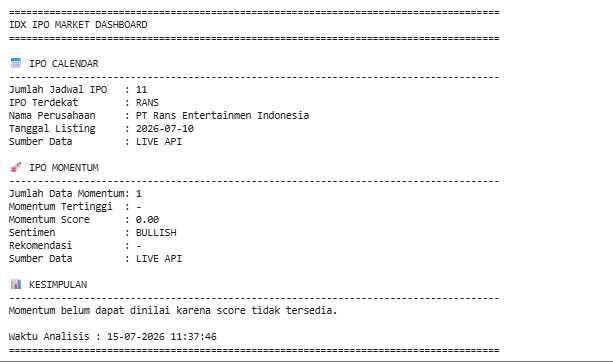
The notebook produces three primary outputs: IPO Calendar, IPO Momentum, and a final IDX IPO Dashboard.
IPO Calendar
The notebook retrieves IPO Calendar information from the Indonesia Stock Exchange API, normalizes the response, converts it into a pandas DataFrame, and displays important IPO information including:
Stock Symbol
Company Name
Sector
Offering Period
Listing Date
Offering Price
IPO Status
If the API does not return data, the notebook automatically uses the provided sample dataset so the dashboard remains functional.
IPO Momentum
The IPO Momentum endpoint is processed using the same normalization workflow.
The notebook creates a structured DataFrame containing information such as:
Stock Symbol
Company Name
Momentum Score
Market Sentiment
Investor Interest
Trend
Recommendation
Confidence Score
The dashboard also counts the number of positive, negative, and neutral IPO sentiment records before displaying the highest momentum candidates.
Dashboard Output
The final dashboard combines both datasets into a single summary containing:
IPO Calendar record count
IPO Momentum record count
Live API or Sample Data status
Top IPO Calendar entries
Top IPO Momentum ranking
Overall dashboard status
Overall Workflow
The notebook follows this five-step workflow:
Import Python libraries and configure RapidAPI authentication.
Retrieve IPO Calendar and IPO Momentum data.
Normalize different JSON response structures.
Convert API responses into pandas DataFrames.
Create user-friendly display tables.
Display IPO Calendar information.
Analyze IPO Momentum sentiment.
Rank IPOs based on Momentum Score.
Generate the final IDX IPO Dashboard.
Why This Project Matters
IPO Calendar and IPO Momentum complement each other when evaluating newly listed companies.
The IPO Calendar provides scheduling information, allowing investors to monitor upcoming offerings and listing dates. IPO Momentum adds another perspective by summarizing market sentiment, investor interest, and momentum indicators associated with those IPOs.
By combining these two datasets, the notebook demonstrates how Python can retrieve, normalize, organize, and summarize IPO-related information through a single workflow.
The notebook is also designed to be resilient against changing API response structures. Its normalization functions, dynamic column detection, fallback sample data, and flexible DataFrame generation help ensure that the dashboard remains usable even when responses vary or API requests fail.
Conclusion
The IDX IPO Calendar and IPO Momentum Dashboard demonstrates how Python can be used to retrieve, process, analyze, and summarize IPO information from the Indonesia Stock Exchange API.
Using requests, pandas, and reusable helper functions, the notebook retrieves IPO Calendar and IPO Momentum data, normalizes different JSON structures, converts responses into structured DataFrames, ranks IPO Momentum records, and generates a concise dashboard summarizing upcoming IPO activity and market sentiment.
The result is a lightweight yet practical dashboard that provides investors and developers with a structured overview of IPO schedules together with momentum indicators, making IPO monitoring more efficient inside a Python notebook.